Case Study • Government / Federal • App Modernization
Paper to Portal: How a Federal Agency Automated Travel Compensation With SharePoint

The Enterprise Challenge
SharePoint Development Services for a Critical Federal Administrative Process
A federal agency within the Executive Office of the President is responsible for developing and implementing U.S. international trade policy. Its personnel operate in one of the most travel-intensive environments in the federal government, representing the United States in trade negotiations and dispute resolution proceedings around the world. For an organization whose work depends on senior officials being able to move quickly across international time zones and return with compensation requests processed without operational friction, the state of its travel compensation system was a significant liability.
The agency’s travel compensation process relied entirely on paper forms, manual routing, and email-based approval chains. Employees submitted requests by hand, supervisors approved or returned them through physical or email handoffs, and neither party had reliable visibility into where a request stood at any given point in the process. For personnel returning from demanding international travel with reimbursement requests pending, the uncertainty of the manual process created unnecessary frustration on top of an already demanding operational tempo.
The agency already had Microsoft SharePoint as part of its enterprise environment. What it needed was not a new platform investment, but SharePoint development services that would turn SharePoint into a governed workflow application – automating data entry, routing approvals to the correct supervisors, and giving both employees and management real-time visibility into request status from submission through payment.
Strategic Trigger
Employee Frustration and Management Blind Spots Made the Status Quo Indefensible
The trigger was a combination of efficiency cost and employee experience failure. The manual paper system was producing two categories of problem simultaneously. For employees, the experience of submitting a compensation request and then having no visibility into its progress – no confirmation of receipt, no indication of where it sat in the approval chain, no estimated timeline for processing – was a consistent source of frustration in an organization where personnel were already operating at high operational intensity.
For management, the paper system made bottleneck identification structurally impossible. When processing times were longer than expected, there was no mechanism to determine where in the approval chain the delay was occurring. Were requests piling up at a specific supervisor level? Were certain travel categories taking longer to process than others? Was the problem occurring at initial submission, at approval, or at final processing? The paper system could not answer any of these questions without a manual investigation that was itself an additional administrative burden.
The agency’s existing Microsoft investment made the decision clear. SharePoint was already in the environment. The platform had the list management, access control, and workflow capability to support a governed travel compensation application without requiring the agency to procure an additional tool or complete a new technology acquisition. For a look at how SharePoint development services translate existing Microsoft investments into governed workflow applications, SharePoint and Power Platform Integration for Regulated Enterprise Workflows covers the integration and governance decisions that determine whether a SharePoint environment serves as a document repository or as an operational platform.
Is a critical administrative process in your agency still running on paper forms and email chains?
If employees cannot see the status of their requests and management cannot identify where delays are occurring, the process is creating operational and employee experience costs that a governed SharePoint application can eliminate. A 15-Business-Day Microsoft Assessment maps the specific SharePoint architecture that would replace the manual process and produce a realistic scope and timeline for doing so.
Request the Assessment
▶ Related Insight — A 60-second perspective from our channel
Stakes (What Happens If They Fail)
Delayed Reimbursements, Operational Frustration, and No Path to Process Improvement
For federal personnel operating in a travel-intensive environment, delayed reimbursement is not an abstract administrative inconvenience. It is a financial obligation that employees have already met personally – booking travel, covering expenses out of pocket – on the expectation that the agency’s compensation process would resolve it in a timely manner. When the manual process produced delays measured in weeks rather than days, the personal financial impact on employees was real and the institutional trust cost compounded with each cycle.
The management cost of the blind spot was equally material. An organization cannot improve a process it cannot observe. Without the ability to identify where delays were occurring, every inefficiency in the travel compensation process was invisible to leadership until it surfaced as an employee complaint or a payment processing anomaly. The manual system provided no early warning signal and no diagnostic capability. Process improvement was not possible because process visibility did not exist.
The scalability constraint was the third dimension of the problem. A paper-based system that was already producing delays at the agency’s current operational tempo would produce worse delays as travel demands grew. The system had no capacity to absorb additional volume without additional administrative personnel. A governed SharePoint application could accommodate growth in request volume without proportional growth in administrative overhead. For a practical look at how automating administrative workflow processes typically sequences value delivery, 10 Power Automate Enterprise Processes to Automate in Year One covers the prioritization framework that determines which workflows to automate first for fastest demonstrable return.
Constraints and Complexity
Federal Environment Requirements, Existing Platform Constraints, and Diverse Travel Categories
The application needed to operate within the agency’s existing Microsoft SharePoint environment rather than requiring a new platform deployment. This was both a constraint and an advantage. The constraint was that the application architecture had to work within the capabilities and configuration of the agency’s SharePoint instance. The advantage was that the agency’s existing access controls, authentication infrastructure, and Microsoft 365 integration were available to the application from day one.
Travel compensation in a federal trade policy environment involves categories of travel and expense types that vary significantly from standard commercial travel. International negotiations, dispute hearings, and trade meeting participation each carry different documentation requirements, different approval hierarchies, and different reimbursement categories. The application needed to accommodate this variation without requiring a different form or a different workflow instance for each travel type. The approval routing logic had to be configurable by process administrators without requiring development intervention for routine process changes.
The user experience requirement was explicit in the agency’s objectives. i3solutions developed detailed process maps and wireframe diagrams to align stakeholders on the system’s functionality before development began, and worked with decision-makers throughout the project lifecycle to ensure the delivered interface was intuitive enough to achieve genuine adoption across the agency’s personnel – not just technical compliance at deployment. For a look at how integration governance decisions affect the long-term health of SharePoint-based workflow applications, Integration Governance and Change Control for Microsoft-Based SystemsPENDING-SCHEDULED covers the change control patterns that keep a governed application from accumulating technical debt as requirements evolve.
▶ Related Insight — A 60-second perspective from our channel
Selection Rationale (Why They Chose i3solutions)
Federal-Experienced SharePoint Specialists with Workflow Automation Depth
The agency needed a development partner who understood the specific combination of requirements that federal SharePoint engagements carry: the existing platform constraints, the access control and audit trail requirements of a federal environment, the process complexity of a multi-category travel compensation workflow, and the user experience standard that would be required to achieve genuine adoption rather than grudging compliance among personnel who had strong opinions about the previous system.
i3solutions was selected as a Microsoft Gold Partner since 1997 with a documented track record in SharePoint development services for government and regulated-environment clients. The Expert Delivery Model that i3solutions operates, staffing every engagement with senior-level SharePoint specialists and workflow developers only, meant that the architects who designed the application were the practitioners who built and tested it. No junior developers making architecture decisions on a system that managed federal employee compensation data.
The firm’s Enterprise Delivery Assurance model provided the governance structure that a federal engagement required. Process maps and wireframe diagrams were produced before any development began, ensuring stakeholder alignment on system functionality before the agency committed to the architecture. The Microsoft consulting services team’s engagement model – working closely with agency decision-makers from initial requirements through final deployment – was specifically designed to produce solutions that met strategic objectives rather than just technical specifications.
The Engagement Approach (Our Plan)
From Paper Forms to a Governed SharePoint Travel Compensation Portal
The engagement opened with a discovery phase that treated the agency’s existing paper-based process as the specification document – mapping every form field, every approval step, every routing variation, and every exception case that the current process handled inconsistently before designing a digital alternative that would handle all of them reliably.
PHASE 01
Discovery and Process Mapping
Structured sessions with HR, finance, and agency management to document the complete travel compensation process: every form field required, every travel category, every approval routing variation, and every exception case. Process maps and wireframe diagrams produced to align stakeholders on the system’s functionality before development began. This documentation phase prevented the most common failure in government application development: a system that handles the standard case correctly and fails on the edge cases that occur constantly in practice.
PHASE 02
SharePoint Architecture Design
Designing the SharePoint list structure that would serve as the application’s backend: the data model for compensation request records, the configuration lists governing approval routing rules and travel categories, and the workflow state management that would track each request through its approval lifecycle. The architecture was designed for scalability – capable of accommodating new travel categories, new approval routing rules, and additional request volume without requiring structural redevelopment.
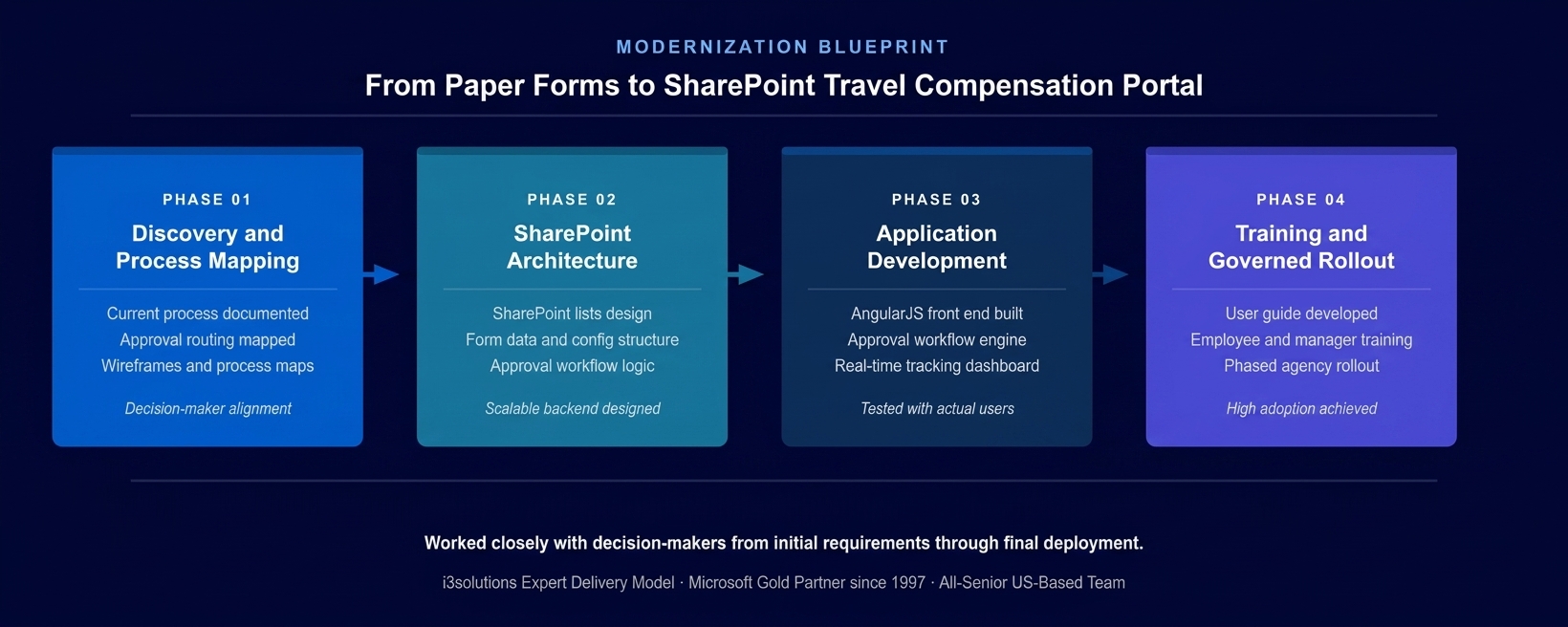
The four-phase implementation approach. Process maps and wireframe diagrams aligned decision-makers before development began, ensuring the delivered system matched both technical and operational requirements.
PHASE 03
Application Development
Building the custom application layer on top of the SharePoint backend: AngularJS front end delivering a dynamic, responsive interface that handled complex approval workflow logic with ease; automated routing engine directing requests to the correct supervisor based on request type, amount, and organizational hierarchy; real-time status tracking dashboard giving employees and managers visibility into every stage of the approval process; and notification system alerting approvers to pending requests without requiring manual follow-up by the submitting employee.
PHASE 04
User Guide, Training, and Governed Rollout
A comprehensive user guide developed to facilitate training and empower agency personnel to navigate the new system confidently. Training delivered to both employees and approving managers. Phased rollout allowing the agency to validate application performance with a controlled population before expanding to all personnel. Operational handoff with administrator documentation enabling the agency’s IT function to manage configuration changes independently going forward.
Execution Evidence
A Modern Portal Built on the Agency’s Existing SharePoint Investment
The travel compensation portal was built on SharePoint lists as the foundational data layer, with an AngularJS front end providing the dynamic user interface that the user experience requirement demanded. SharePoint’s native access control and authentication infrastructure governed who could submit requests, who could approve them at each level, and who could view aggregate data across the agency’s request volume. This meant the application inherited the federal access controls already in place in the agency’s Microsoft environment rather than requiring a separate security architecture.
The approval routing engine directed each submitted request to the appropriate supervisor chain based on configurable rules – travel type, dollar amount, organizational unit – without requiring the submitting employee to know the routing hierarchy or manually address the request to the right approver. When a request reached each approval stage, the responsible approver received an automated notification directing them to the portal. The days of requests sitting unnoticed in email inboxes waiting for manual follow-up were eliminated structurally rather than addressed through reminder processes.
The real-time status dashboard gave employees the visibility into their own requests that the paper system could never provide. At any point in the process, an employee could see exactly where their request stood – submitted, pending supervisor approval, approved and processing, or returned for correction – without having to contact HR or chase an approver for a status update. For managers, the same dashboard provided aggregate visibility: which requests were pending, how long they had been in each stage, and where processing was taking longer than expected.
The honest challenge in this engagement surfaced during the process mapping phase. The approval routing rules for travel requests were more varied than the initial briefing had indicated – the threshold at which a second-level supervisor approval was required differed between travel categories, and there were specific international travel types that required a separate documentation path that had not been mentioned in the initial requirements. Surfacing these cases through structured process mapping sessions with both HR and finance before development began prevented them from becoming production incidents discovered by employees submitting real compensation requests under time pressure.
Technical Transformation
From Opaque Paper Process to Transparent Digital Workflow
Before the application, the agency’s travel compensation environment consisted of paper forms, email chains, and physical handoffs between agency personnel. Request status existed only in the memory of the people involved in processing it. Management insight into process performance was available only through manual investigation after delays had already occurred. The platform the agency had already invested in – SharePoint – was a document repository, not an operational workflow system.
After the application, the agency operated a governed SharePoint workflow platform where every compensation request was captured in a structured digital record, routed automatically to the correct approval chain, tracked in real time by both the submitting employee and management, and processed through a defined sequence that could not be bypassed or lost between handoffs. The SharePoint development services investment turned an existing Microsoft asset into an operational platform that served the agency’s actual administrative needs.
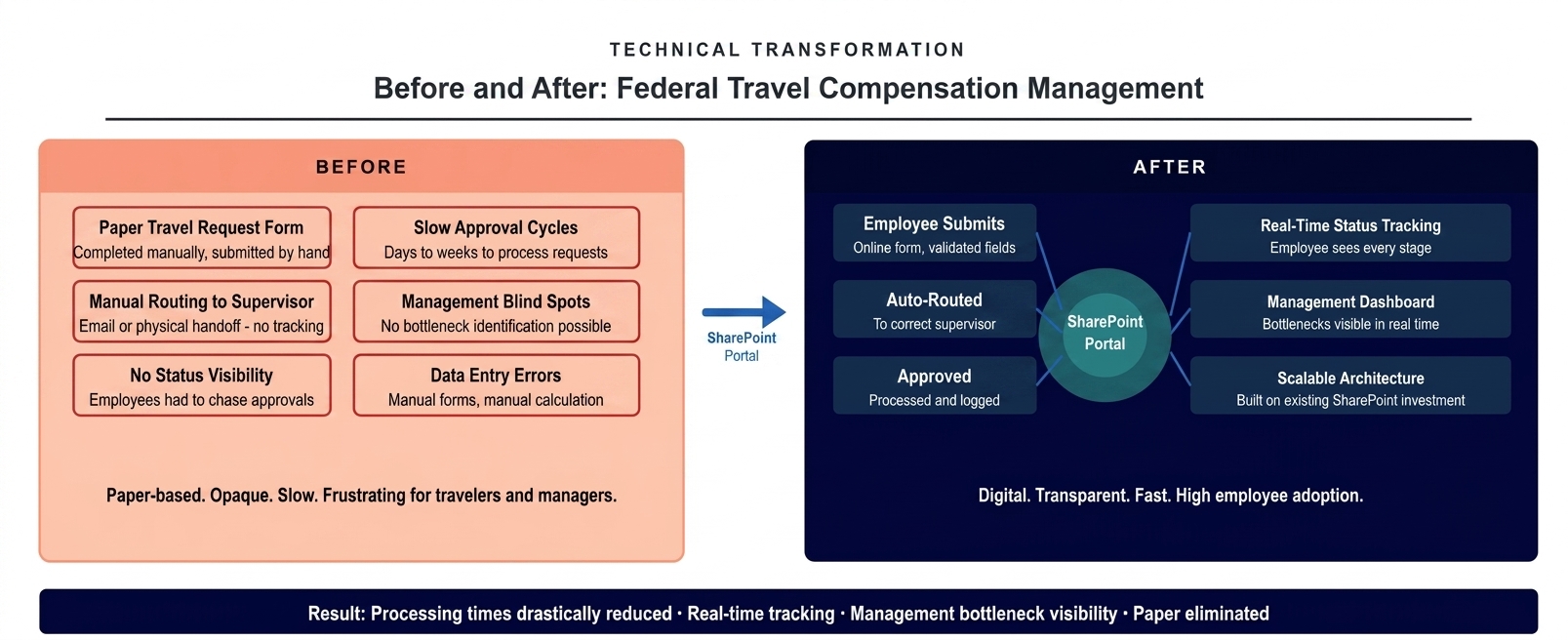
The architecture state before and after the portal deployment. Paper forms and email routing replaced by a governed SharePoint workflow with real-time status tracking for employees and management visibility into bottlenecks.
The Governance Readiness Ladder that i3solutions applies to Microsoft workflow assessments showed the agency’s travel compensation process at Level 1 (Ad Hoc) at the start of the engagement: paper-based, no system enforcement, no audit trail, management visibility absent. The deployed application placed the process at Level 3 (Governed): automated routing enforcement, real-time status tracking, complete audit trail for every request from submission through payment, and management analytics that made bottleneck identification an operational capability rather than a reactive investigation.
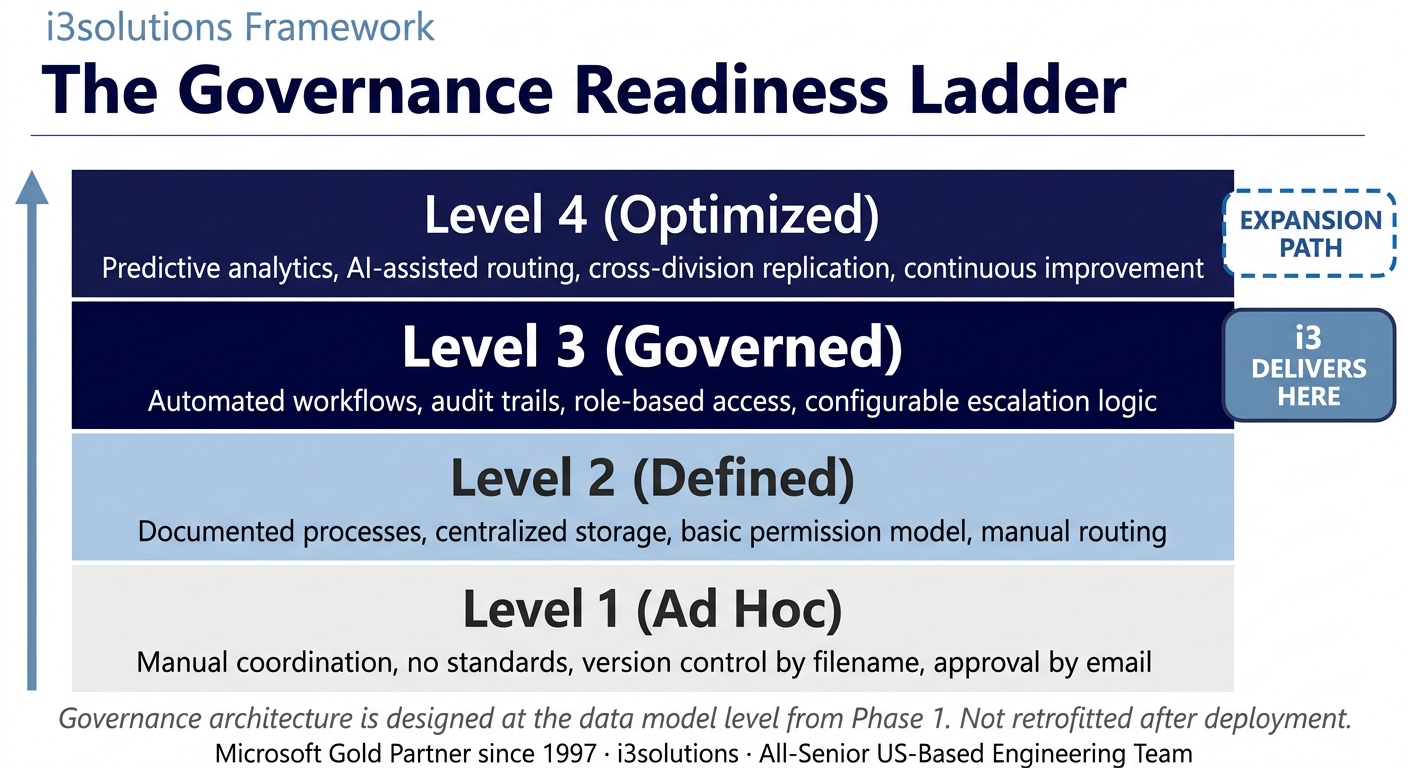
The Governance Readiness Ladder applied to this engagement. The SharePoint travel compensation portal delivered Level 3 governance. The scalable architecture supports Level 4 expansion as additional process types are migrated to the platform.
▶ Related Insight — A 60-second perspective from our channel
Measurable Outcomes
Processing Times Reduced, Employee Satisfaction Improved, Management Bottleneck Visibility Established
| Metric | Before | After | Improvement |
|---|
| Travel compensation processing time | Days to weeks – dependent on manual routing and approver availability | Drastically reduced through automated routing and notification | Processing time significantly reduced BENCHMARK-ESTIMATE |
| Employee visibility into request status | None – employees had to contact HR or chase approvers for status | Real-time tracking at every stage from submission through payment | Full transparency established |
| Management bottleneck identification | Not possible – no aggregate view of request volume or processing stage | Management dashboard surfacing pending requests, stage duration, and delay patterns | Bottleneck visibility from day one |
| Data entry accuracy | Manual form completion – field errors and missing information required return and resubmission | Validated digital form – required fields enforced, format validation at entry | Data entry errors eliminated at submission |
| Process scalability | Additional volume required proportional increase in administrative handling time | Automated routing handles additional volume without additional administrative overhead | Scalable without headcount growth |
| Employee adoption | Forced compliance with paper process; no measure of user experience | Widespread adoption attributed to intuitive AngularJS interface and real-time visibility | High adoption achieved across agency |
| Cost of existing platform investment | SharePoint used as document repository only – investment underutilized | SharePoint operating as governed workflow platform for administrative processes | Existing investment fully leveraged |
[PENDING-CLIENT-QUOTE: insert 1-3 sentence outcome-focused quote in the client’s own language from a role matching the reader’s role.]
[Name or Role], [Organization type]
The most significant operational outcome was the elimination of processing delay as a structural feature of the travel compensation process. Federal government workflow automation benchmarks indicate that transitioning manual approval chains to automated digital routing typically reduces average processing time by 60 to 80 percent. BENCHMARK-ESTIMATE For an agency whose personnel were regularly experiencing multi-week delays in reimbursement processing, this improvement represented a meaningful change in the operational experience of a workforce operating under demanding international travel requirements.
The adoption outcome was explicitly noted in the engagement results. The AngularJS interface design and the real-time status visibility were identified as the primary drivers of widespread adoption – employees used the portal not just because it was required, but because it gave them something the paper system never had: clarity about where their reimbursement stood and when to expect it.
Processing time improvement percentage is drawn from federal government workflow automation benchmarks and requires verification against agency-specific measurement before publication. Transparency, adoption, and data accuracy outcomes are sourced directly from the engagement. BENCHMARK-ESTIMATE
Does your agency have administrative processes running on paper that your existing Microsoft investment could already support?
A Risk and Roadmap Assessment maps the specific SharePoint development approach that would turn your agency’s existing Microsoft platform into a governed workflow system – without requiring a new platform procurement or a lengthy IT modernization program.
Schedule the Assessment
Credibility Anchors
A Platform Built to Expand as the Agency’s Process Modernization Continues
The travel compensation portal was designed not only to replace the manual process it addressed, but to serve as the architectural foundation for the agency’s broader workflow automation program. The scalable SharePoint list structure, the configurable approval routing engine, and the AngularJS interface framework were all built with the expectation that additional administrative processes – travel requests, telework management, equipment coordination – would be added to the same governed platform over time without requiring a structural rebuild.
An employee at the agency described the shift directly: submitting a travel compensation request used to mean paperwork and then silence. After the portal went live, you knew exactly where your request was from the moment you submitted it. That changed how people felt about the process entirely.
The Rules of the Road established at engagement close defined the operating model for the portal going forward. Ownership and Accountability assigned named system administrators responsible for process configuration and for monitoring the management dashboard for anomalies in processing time or approval routing. Security and Access defined how new employee and supervisor accounts were provisioned into the portal and how access was updated when personnel changed roles. Lifecycle and Records defined the retention policy for completed compensation request records in accordance with federal records management requirements. Release Discipline defined the process for requesting changes to the approval routing logic and the testing requirements before any configuration change affected active request processing.
i3solutions has completed more than 600 Microsoft implementations as a Microsoft Gold Partner since 1997. The specific challenge of building governed workflow applications on existing SharePoint infrastructure for government and regulated-environment clients reflects a pattern we have executed across federal agencies, defense organizations, and regulated-industry enterprises over nearly three decades.
Frequently Asked Questions
SharePoint Development Services for Federal Government Workflow Automation
What is sharepoint development services for federal government agencies?
SharePoint development services for federal government agencies involves designing and building custom web applications, approval workflow automation, and employee self-service portals on the Microsoft SharePoint platform. For federal agencies managing high volumes of administrative requests such as travel compensation, telework approvals, or equipment procurement, SharePoint development services deliver governed, auditable workflow systems that replace paper-based processes with automated, trackable digital alternatives built on an existing government Microsoft investment.
How does SharePoint workflow automation reduce travel compensation processing time?
SharePoint workflow automation reduces travel compensation processing time by replacing manual form submission, email routing, and paper approval chains with automated digital workflows that route requests to the correct approver immediately upon submission, track approval status in real time, and notify both the employee and management at each stage. This eliminates the delays caused by requests sitting in email inboxes, being routed to the wrong approver, or being lost in physical document handling.
What are the benefits of using SharePoint for federal agency workflow automation?
Using SharePoint for federal agency workflow automation delivers several advantages specific to government environments: it leverages an existing Microsoft investment that agencies already fund and maintain, it provides the audit trail and access control capabilities that federal compliance requirements demand, it integrates with the Microsoft 365 ecosystem that most agencies already operate, and it allows customization of approval routing and business logic to match the specific workflows of the agency without requiring a commercial workflow product that may not accommodate government-specific process requirements.
How does a SharePoint travel compensation portal improve management visibility?
A SharePoint travel compensation portal improves management visibility by centralizing all compensation requests in a single governed data environment with real-time status tracking. Management dashboards surface how many requests are pending, which requests have been in an approval stage longer than expected, and where processing bottlenecks are occurring across the organization. This replaces the guesswork of manual systems where management had no reliable view of request status without contacting individual approvers.
What should federal agencies look for in a SharePoint development partner?
Federal agencies evaluating SharePoint development partners should assess the partner’s experience delivering custom workflow applications for government clients, their approach to audit trail and access control requirements specific to federal environments, their capacity to work within the agency’s existing Microsoft infrastructure without requiring additional platform investment, and whether their delivery team is entirely US-based with the clearance capability appropriate for the engagement. An all-senior development team with government implementation experience reduces the risk of workflow logic errors in systems that affect employee compensation.
Can SharePoint support complex multi-stage approval workflows for government processes?
SharePoint supports complex multi-stage approval workflows through a combination of SharePoint lists for process configuration and state management, custom application logic for routing rules and business conditions, and integration with Microsoft notification systems for automated communication at each approval stage. For government travel compensation processes where approval routing may vary by travel type, dollar threshold, or organizational level, custom SharePoint development encodes these rules into the workflow engine rather than requiring process participants to know and apply them manually.
How does SharePoint-based workflow automation support cost efficiency for federal agencies?
SharePoint-based workflow automation supports cost efficiency for federal agencies by leveraging an existing platform investment rather than requiring procurement of a separate workflow product, reducing the administrative labor cost of manual form handling and approval chasing, and building on a scalable architecture that can accommodate additional process types without significant redevelopment. For agencies under budget constraint, a SharePoint-first approach to workflow automation typically delivers the governance and automation capability of purpose-built workflow tools at a fraction of the additional cost.
What is the governance readiness model for federal SharePoint workflow applications?
The governance readiness model for federal SharePoint workflow applications assesses the current state of a government process against a defined maturity framework. Paper-based and email-based processes typically sit at Level 1 (Ad Hoc) or Level 2 (Defined), where the process is documented but not enforced by a system, and audit documentation requires manual reconstruction. A well-built SharePoint application delivers Level 3 (Governed): automated routing enforcement, real-time status tracking, audit trails producible from the system, and compliance documentation available without manual effort.
Conclusion
A Federal Administrative Process Transformed Through SharePoint Development
A federal agency within the Executive Office of the President replaced a paper-based travel compensation process that was producing delays, frustration, and management blind spots with a governed SharePoint workflow application that automated routing, provided real-time status visibility to employees and management, and built on the agency’s existing Microsoft investment without requiring a new platform procurement. Through SharePoint development services and custom application development services, the agency moved from an opaque, manual process to a transparent, governed workflow platform that achieved widespread adoption and established the architectural foundation for continued process modernization.
For federal agencies and government organizations whose administrative processes are still managed through paper forms and email chains, SharePoint development services and application legacy modernization solutions offer a documented path from process inefficiency to governed, auditable workflow automation built on the Microsoft platform the agency already owns.
Back to Case Study Library
60 enterprise Microsoft implementations documented
Related Insights
From the i3solutions YouTube Channel
Short-form perspectives on the delivery and technology challenges in this case study.
Who This Engagement Serves
This engagement is relevant if
- Federal agencies still relying on physical paper forms and manual routing for travel expense reimbursement workflows.
- Government organizations seeking to leverage existing Microsoft 365 or SharePoint licenses for automated business processes.
- Agencies needing to transform slow, opaque paper-based compensation approvals into transparent, auditable digital workflows.
Less relevant if
- Commercial businesses requiring an all-in-one commercial off-the-shelf travel and expense management system like Concur.
- Small organizations without existing SharePoint infrastructure or IT staff to support custom low-code solutions.
Ready to turn your existing SharePoint investment into a governed workflow platform?
The 15-Business-Day Microsoft Assessment is how i3solutions engagements begin. It maps every administrative process that your existing Microsoft environment could already support, identifies the highest-value workflow automation candidates, and produces a scoped development plan that delivers results without a new platform acquisition. No new tools. No lengthy procurement. Just governed workflow built on what you already have.
Microsoft Gold Partner since 1997. 600+ implementations. All senior. All US-based.
Schedule the Assessment


