Case Study • Defense Nonprofit • App Modernization
IT as Bottleneck: How a Defense Research Organization Automated SharePoint Proposal Site Creation

The Enterprise Challenge
SharePoint Online Development to Eliminate IT Dependency in Proposal Collaboration
A nonprofit research organization serving government entities, public agencies, and private subcontractors in operations research, scientific testing, modeling and simulation, and program management manages a constant flow of proposal development activity across diverse teams working on sensitive government contracts. Each proposal requires a dedicated collaboration environment: a secure SharePoint site with controlled access, role-appropriate permissions, and the document structure needed for a compliant proposal development process.
The problem was in how those sites were created. Every new proposal required an IT ticket. A team member would submit the request, IT would manually configure the SharePoint site, apply permissions, set up security groups, and notify the team when the environment was ready. In a proposal environment where timelines are compressed and teams need to begin collaboration the moment a solicitation arrives, waiting days for IT to provision a site was not an operational inconvenience – it was a competitive disadvantage.
The organization needed SharePoint online development that would allow proposal teams to create their own collaboration sites instantly, with the correct security configuration applied automatically, without IT involvement in any individual provisioning request. The technical challenge was significant: SharePoint Online did not natively support automated site creation with custom permission configurations through standard workflow tools, requiring a REST API-based automation approach built with custom JavaScript, jQuery, Angular, and JSON permission definitions.
Strategic Trigger
IT Provisioning Delay Was Slowing Proposal Response Capability
The forcing function was the mismatch between proposal timelines and IT provisioning timelines. Government solicitations arrive on schedules that the responding organization does not control. When a request for proposal is released, the clock starts immediately. Teams that can begin governed collaboration on day one have a structural advantage over teams that spend the first days of the proposal period waiting for IT to configure their collaboration environment while work begins informally in email threads and personal file shares.
Beyond the timeline impact, the manual IT provisioning process introduced permission inconsistency risk. When each site was configured by hand, the quality of the security setup depended on the individual IT resource doing the configuration. Different configurers might apply slightly different permission structures, create security groups with different naming conventions, or omit access controls that were standard in some configurations but not others. For an organization handling sensitive government proposal information, permission inconsistency was a compliance risk as well as an operational one.
IT resources were also consuming capacity on routine provisioning tasks that provided no strategic value to the organization. Each individual site configuration was administrative overhead that pulled skilled IT staff away from infrastructure and security work that actually required their expertise. Automating the provisioning would free that capacity for higher-value work while simultaneously improving the proposal team’s response speed. For context on how this class of IT automation problem is approached in Microsoft environments, SharePoint and Power Platform Integration covers the integration and governance patterns that determine whether SharePoint automation is maintainable or brittle at scale.
Is IT provisioning a bottleneck in your proposal development timeline?
If your teams are waiting days for collaboration environments that should be ready in seconds, the timeline cost is measurable and the fix is architectural. A 15-Business-Day Microsoft Assessment maps the specific SharePoint Online automation approach that would eliminate the IT bottleneck and apply consistent security controls to every new proposal site automatically.
Request the Assessment
▶ Related Insight — A 60-second perspective from our channel
Stakes (What Happens If They Fail)
Proposal Delays, Permission Inconsistency, and IT Capacity Consumed by Administrative Tasks
For a research organization whose revenue depends on winning government contracts through competitive proposal processes, timeline disadvantages are not recoverable. A proposal team that begins governed collaboration two days late because IT provisioning took two days is two days behind a competitor who had an automated system. In a market where proposals are evaluated on both quality and responsiveness, administrative friction that delays the start of substantive proposal work is a structural competitive disadvantage.
The security consistency risk had a longer-term consequence. Government clients and prime contractors evaluating subcontractor proposal environments expect consistent, documented access controls as evidence of information security practice. An organization that could not demonstrate that every proposal site had been configured to the same security standard – because the configuration had been done manually with variable results – was in a weaker position when asked about its information handling practices during contract evaluation.
The IT capacity cost compounded as the organization grew. More proposals meant more IT provisioning requests. More provisioning requests meant more IT time on administrative configuration rather than strategic infrastructure work. The cost of maintaining a manual provisioning process was not fixed – it scaled with the organization’s success, which meant that growth in proposal activity created proportional growth in IT administrative burden without any corresponding increase in IT strategic output.
Constraints and Complexity
SharePoint Online Limitations, Custom Security Groups, and a Template That Had to Produce a Ready-to-Use Environment
The core technical constraint was SharePoint Online’s limited support for automated site creation through native workflow tools. Microsoft Flow and SharePoint Designer workflows – the standard SharePoint Online automation mechanisms – could not natively handle the combination of site creation from template, custom security group assignment, unique permission application, and calendar pre-population that the organization’s proposal site standard required. The solution required a REST API automation approach that called SharePoint Online’s provisioning APIs directly through custom JavaScript and jQuery code triggered by the Angular-based request form.
The security group automation was the most sensitive element of the architecture. Each proposal site needed unique security groups – not shared groups reused across sites – with specific role assignments governing who could view, edit, and manage the proposal content. The JSON permission definition that drove the security group creation and role assignment had to be precise enough to apply the correct access controls for every proposal type while being flexible enough to accommodate the variation in team size, security classification, and role structure across different proposal categories.
The template design required that the provisioned site be genuinely ready to use on creation – not a blank SharePoint site that teams would need to configure before starting work. The pre-populated milestone calendar, document libraries, and list structures had to reflect the actual proposal development workflow so that teams could begin substantive collaboration immediately after the automated provisioning completed. For a look at how template governance and change control decisions affect SharePoint automation reliability over time, Integration Governance for MicrosoftPENDING-SCHEDULED covers the patterns that keep automated provisioning systems accurate as organizational requirements evolve.
▶ Related Insight — A 60-second perspective from our channel
Selection Rationale (Why They Chose i3solutions)
SharePoint Online REST API Specialists with Defense-Adjacent Security Experience
The organization needed a development partner who had solved the specific SharePoint Online automated provisioning challenge – not a partner who had configured SharePoint sites manually and proposed to automate the manual steps, but one who had built REST API-based provisioning automation that handled custom security group creation, JSON permission application, and template-based site configuration as a governed, self-service system.
i3solutions was selected as a Microsoft Gold Partner since 1997 with a documented track record in SharePoint online development for government-adjacent organizations where security configuration consistency was a contractual requirement. The Expert Delivery Model that i3solutions operates, staffing every engagement with senior-level SharePoint developers and architects only, meant that the engineers who designed the REST API automation architecture were the same practitioners who built and tested it against the organization’s actual SharePoint Online environment.
The firm’s Enterprise Delivery Assurance model provided the governance structure that an automated security configuration system required. The permission framework, security group naming conventions, and JSON definition structure were all documented and reviewed before development began. The Microsoft consulting services engagement model ensured that the IT security team validated the automated permission application against their requirements before the self-service system went live, rather than discovering configuration gaps after proposal teams had been using it in production.
The Engagement Approach (Our Plan)
From IT Ticket to Self-Service REST API Provisioning
PHASE 01
Discovery and Requirements
Structured sessions with IT security, proposal team leads, and program managers to document the complete site configuration standard: every security group required, every permission level assignment, every document library structure, the milestone calendar population logic, and the variation requirements across different proposal types. This phase produced the precise specification that the REST API automation would implement – and identified the cases where the existing manual configuration had been applied inconsistently, providing a baseline for the consistent standard the automated system would enforce.
PHASE 02
Template and REST API Architecture
Designing the SharePoint site template that would serve as the provisioning base, the JSON permission schema that would govern security group creation and role assignment for each proposal type, and the REST API call sequence that would execute site creation, permission application, and calendar population as an atomic, self-service operation. Architecture decisions made here determined whether the permission configuration would be consistently applied or would accumulate variation over time as proposal types evolved.
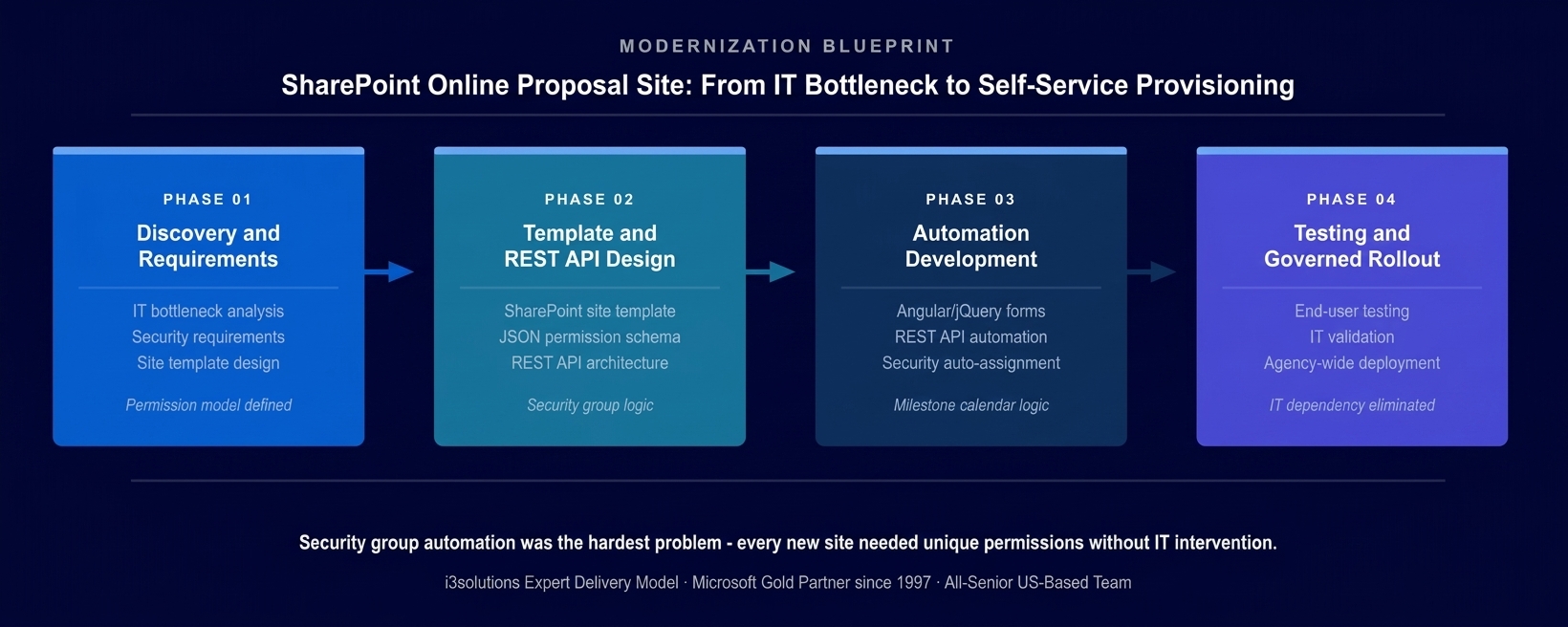
The four-phase implementation approach. The REST API architecture and JSON permission schema were fully designed before any automation code was written – the security configuration logic is an architecture decision, not a development detail.
PHASE 03
Automation Development
Building the complete automation system: the Angular-based proposal request form that captured all required information with advanced validation logic that prevented submission of incomplete or inconsistent requests; the jQuery and JavaScript automation layer that triggered the REST API calls on form submission; the SharePoint Online provisioning logic that created the site from template, applied the JSON permission definition, assigned users to the correct security groups, and populated the milestone calendar; and SharePoint Designer workflows for specific task management requirements within the provisioned environment.
PHASE 04
IT Validation and Governed Rollout
Systematic validation of automated permission application across all proposal types with the IT security team, confirming that every site provisioned by the automation matched the manually configured standard for security group structure, permission level assignment, and access control consistency. End-user training on the self-service request process. Staged rollout beginning with a controlled proposal type before expanding to the full proposal portfolio. Documentation of the JSON permission schemas and REST API architecture enabling the organization’s IT team to extend the system to new proposal types independently.
Execution Evidence
Self-Service Site Creation With Automated Security in Seconds
The proposal request form presented team members with a structured submission interface that captured all required proposal information – proposal name, type, team members, timeline, and classification – with Angular-powered validation that enforced data completeness before allowing submission. The form’s business logic dynamically retrieved relevant configuration data from SharePoint lists to ensure that the information captured was consistent with the organization’s current proposal categories and security requirements.
On form submission, the jQuery and JavaScript automation layer triggered the REST API call sequence to SharePoint Online. The site was created from the predefined template, providing the standard document library structure and list configuration that every proposal site required. The JSON permission definition was applied immediately, creating the unique security groups for that proposal, assigning the form-specified team members to the appropriate roles, and configuring access controls that restricted the proposal content to authorized personnel only.
The milestone calendar was pre-populated based on the proposal timeline information captured in the form – draft review dates, submission deadline, and internal approval gates were already on the calendar when the team arrived at the newly provisioned site. The team could begin governed collaboration with the correct document structure, the correct access controls, and the correct schedule reference in place from the first moment, without spending any of the proposal period on site configuration.
The honest challenge in this engagement was the variation in security requirements across proposal types. Initial discovery sessions had not surfaced all of the classification and access differences between different program areas – some proposals had additional oversight roles that required separate security groups not present in the standard template, and these had been handled informally in the manual process. Documenting these variations in Phase 1 before building the JSON permission schema prevented the automation from producing sites with missing access controls for the non-standard cases.
Technical Transformation
From IT Ticket and Manual Configuration to Instant Self-Service Provisioning
Before the automation, the proposal collaboration environment lifecycle began with a ticket, proceeded through IT queue processing, and resulted in a manually configured site that may or may not have matched the security standard consistently. Teams waited days for environments they needed immediately and received configurations that varied based on who had done the setup.
After the automation, the lifecycle began with a form submission and completed in seconds, with a site that was identically configured to the security standard on every provisioning regardless of proposal type, team size, or time of day. The SharePoint online development investment turned a manual IT process into a governed self-service capability that scaled with proposal volume without scaling IT burden.
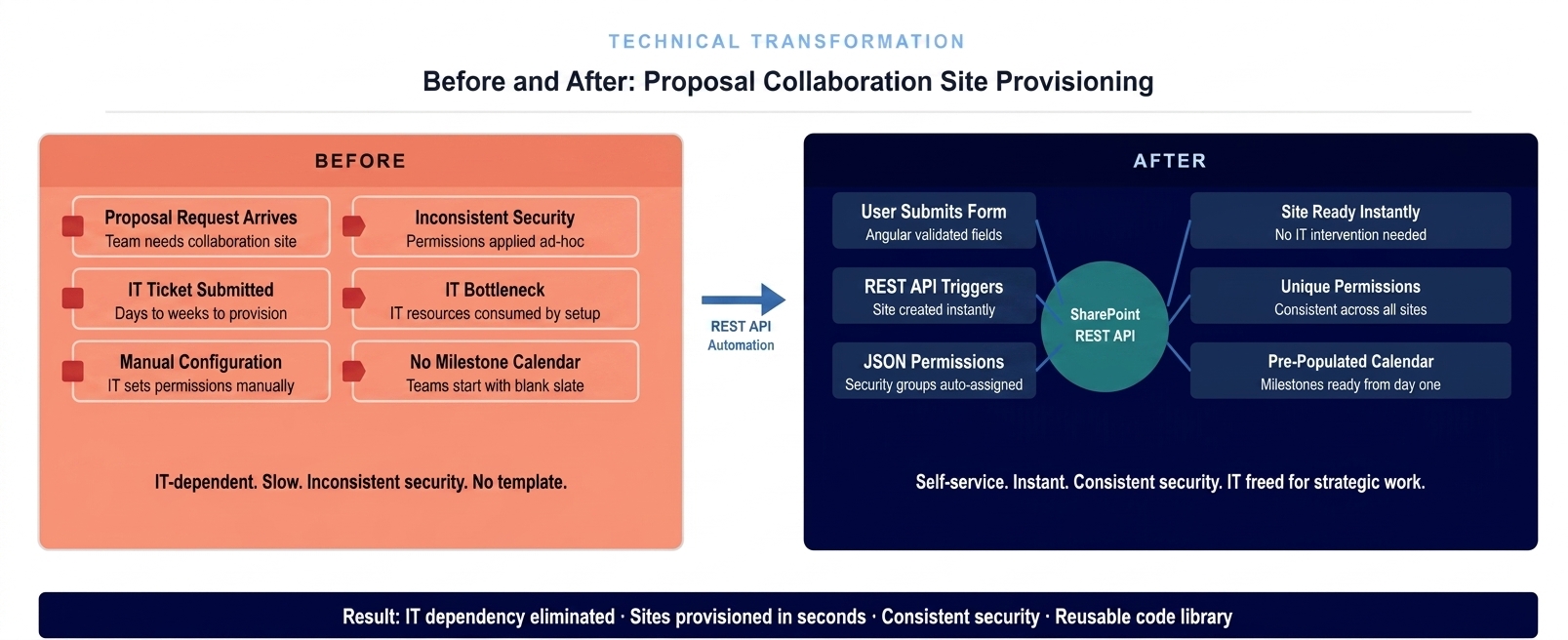
The architecture state before and after the REST API automation deployment. Manual IT configuration replaced by self-service provisioning that applies consistent security controls automatically on every site creation.
The Governance Readiness Ladder applied to this engagement showed the proposal site provisioning process at Level 1 (Ad Hoc): IT-dependent, inconsistently configured, no audit trail of permission decisions, timeline dependent on IT queue position. The automated system delivered Level 3 (Governed): standardized permission application on every provisioning, audit trail of every site creation and permission assignment embedded in the REST API execution record, self-service capability eliminating IT dependency for routine provisioning, and a reusable code library enabling extension to new proposal types without rebuilding the automation architecture.
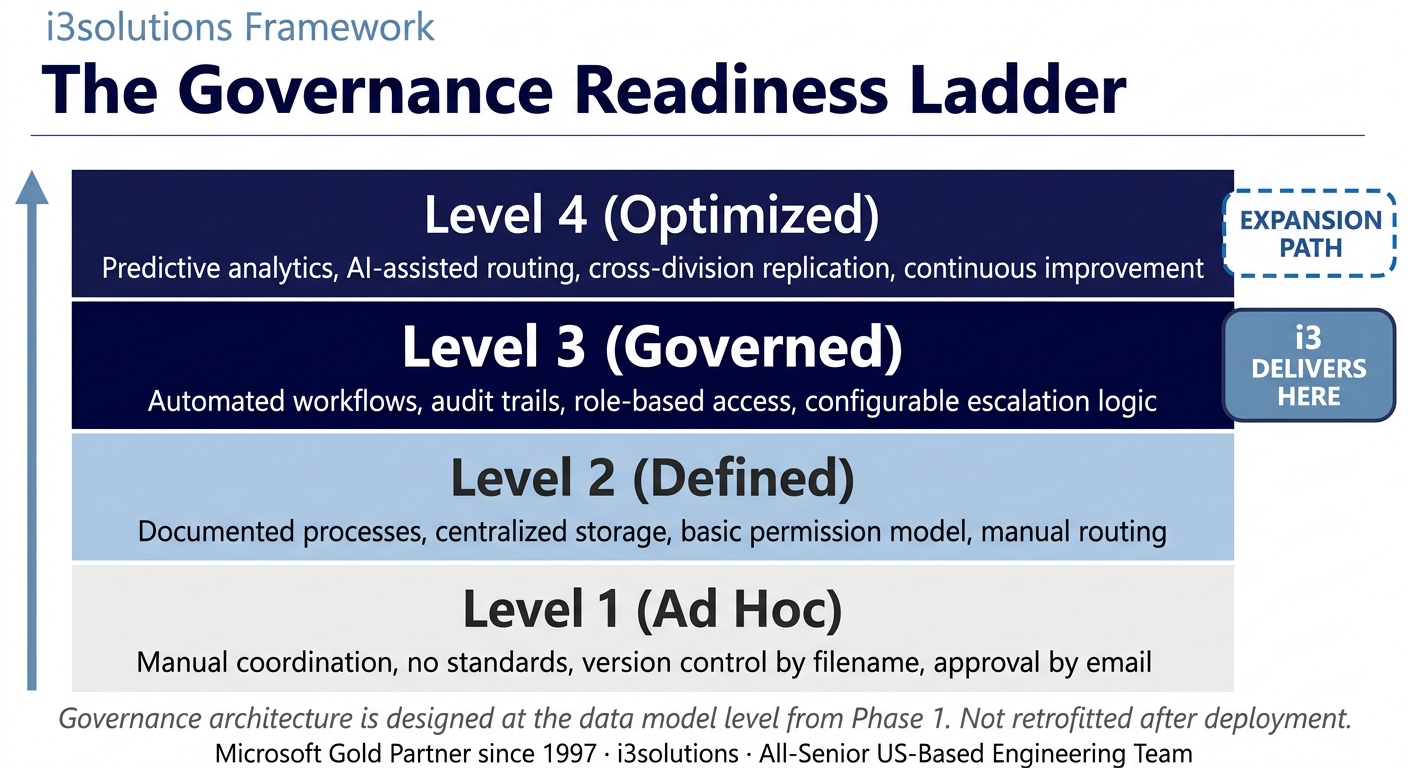
The Governance Readiness Ladder applied to this engagement. The automated provisioning system delivered Level 3. The JSON permission schema architecture supports Level 4 as analytics and compliance reporting requirements mature.
▶ Related Insight — A 60-second perspective from our channel
Measurable Outcomes
IT Dependency Eliminated, Provisioning Time from Days to Seconds, Security Consistency Achieved
| Metric | Before | After | Improvement |
|---|
| Proposal site provisioning time | Days – IT ticket, queue processing, manual configuration | Seconds – REST API automation triggered on form submission | Days to seconds |
| IT dependency for site creation | Required – every provisioning needed IT intervention | Eliminated – end users provision sites independently | IT dependency removed entirely |
| Security permission consistency | Variable – dependent on individual IT configurator | Consistent – JSON permission schema applied identically on every provisioning | 100% consistent across all sites |
| IT staff time on provisioning | Significant – each site required individual configuration effort | Zero for routine provisioning – IT attention to exceptions and schema updates only | IT provisioning overhead eliminated BENCHMARK-ESTIMATE |
| Proposal team day-one readiness | Delayed – teams started informally while waiting for IT | Immediate – governed site with calendar and permissions ready on submission | Immediate governed start |
| Milestone calendar accuracy | Manual – teams configured calendars themselves, inconsistently | Pre-populated from proposal form data on every provisioning | Calendar ready from day one on every site |
| Architecture reusability | Not applicable – manual process not reusable | REST API code library reusable across proposal types and future projects | Reusable code library established |
[PENDING-CLIENT-QUOTE: insert 1-3 sentence outcome-focused quote in the client’s own language from a role matching the reader’s role.]
[Name or Role], [Organization type]
The elimination of the IT provisioning bottleneck was the most immediate operational improvement. A delay that had been a structural feature of the proposal development process – built into how teams planned their response timelines because it was assumed to always exist – was eliminated at the moment the automated system went live. Proposal teams that had previously begun work informally while waiting for IT could now begin in a governed, correctly secured environment from the first minute of the proposal period.
The security consistency outcome addressed the organization’s compliance posture directly. When every proposal site is configured by the same JSON permission schema applied through the same REST API automation, the organization can demonstrate that its information access controls are consistent and documented – not dependent on individual IT configurator decisions that were not recorded systematically.
Is your proposal team waiting for IT every time a solicitation arrives?
A Risk and Roadmap Assessment maps the specific SharePoint Online REST API automation architecture that would eliminate your IT provisioning bottleneck, apply consistent security controls automatically, and give your proposal teams a governed, ready-to-use collaboration environment in seconds instead of days.
Schedule the Assessment
Credibility Anchors
A Reusable Architecture That Extends to New Proposal Types
The REST API automation code library developed for this engagement was explicitly designed for reusability. The core provisioning logic, the JSON permission schema framework, and the Angular form architecture were structured as modular components that the organization’s IT team could extend to new proposal types by defining a new JSON permission schema and updating the form’s proposal type list – without rebuilding the automation engine. This architectural decision was not incidental; it was a specific requirement that shaped the Phase 2 design choices.
A proposal team lead described the practical change: before, the first task on every new proposal was submitting the IT ticket and then working around the wait. After the system went live, the first task was submitting the form and the site was ready before the next task was started. The wait was just gone.
The Rules of the Road established at engagement close defined the operating model for the automated provisioning system. Ownership and Accountability assigned named IT administrators responsible for maintaining the JSON permission schemas and extending the system to new proposal types. Security and Access defined the process for requesting new proposal type configurations and the security review required before a new schema was added to the production system. Lifecycle and Records defined the retention policy for provisioning records embedded in the REST API execution logs. Release Discipline defined the testing and IT security validation requirements before any change to the permission schema or provisioning logic could be deployed to production.
i3solutions has completed more than 600 Microsoft implementations as a Microsoft Gold Partner since 1997. The specific challenge of building REST API-based SharePoint Online provisioning automation that applies consistent security controls at self-service speed for defense and government-adjacent organizations reflects a class of problem requiring both Microsoft platform depth and security configuration precision that only comes from extensive enterprise implementation experience.
Frequently Asked Questions
SharePoint Online Development for Defense and Government Proposal Management
What is sharepoint online development for proposal management?
SharePoint Online development for proposal management involves building automated workflows and self-service portals that allow teams to create governed, secure collaboration environments for each proposal without IT intervention. For defense and government-adjacent organizations managing multiple concurrent proposals with sensitive information, SharePoint Online development delivers automated site provisioning that applies consistent security controls through REST API automation rather than manual IT configuration.
How does REST API automation eliminate IT bottlenecks in SharePoint site creation?
REST API automation eliminates IT bottlenecks in SharePoint site creation by allowing an authorized application to call SharePoint’s site provisioning APIs directly when a user submits a new proposal request – creating the site, applying the permission template, assigning security groups, and configuring the collaboration environment as an automated sequence rather than an IT ticket. The result is that a site that previously required IT intervention and took days to provision is ready in seconds after form submission.
How are unique security permissions applied automatically to each proposal site?
Unique security permissions are applied automatically to each proposal site through a JSON permission definition that specifies the security groups, role assignments, and access levels for that proposal type. When the REST API creates the site from the template, it simultaneously reads the JSON permission definition and applies the access controls programmatically – assigning the correct users to the correct roles without any manual configuration by IT staff.
What is a pre-populated milestone calendar in a SharePoint proposal site?
A pre-populated milestone calendar in a SharePoint proposal site is a calendar automatically configured with key proposal development milestones when the site is created – draft review deadlines, submission dates, review periods, and internal approval gates – based on the proposal type and timeline specified in the initial request form. Teams start collaboration on a site that already reflects the proposal schedule rather than manually entering dates that should have been there from the beginning.
Can SharePoint Online support automated site provisioning without custom code?
SharePoint Online’s built-in tools have limitations in supporting automated site creation with custom permission configurations. For organizations that require unique security groups, custom permission levels, and template-based site creation without IT intervention, REST API automation using JavaScript, jQuery, and JSON permission definitions provides the capability that native SharePoint Online workflows cannot. This is specifically the technical challenge that the defense research organization faced and that i3solutions resolved through custom REST API development.
What should defense research organizations look for in a SharePoint Online development partner?
Defense research organizations evaluating SharePoint Online development partners should assess the partner’s experience with REST API automation for site provisioning, their track record building custom security permission frameworks for sensitive proposal environments, and their capacity to deliver self-service solutions that eliminate IT dependency without compromising access control consistency. An all-senior development team with experience in regulated and defense-adjacent environments reduces the risk of permission configuration errors in systems handling sensitive proposal information.
How does automated proposal site creation improve team productivity?
Automated proposal site creation improves team productivity by eliminating the delay between receiving a proposal request and having a configured collaboration environment ready to use. When site provisioning required IT intervention, teams often started proposal work in ad-hoc environments and migrated to the formal SharePoint site later. With instant automated provisioning, teams can begin governed collaboration from the moment the proposal is received, with the milestone calendar, permission structure, and document libraries already in place.
How does a reusable code library benefit future SharePoint development projects?
A reusable code library of REST API automation modules benefits future SharePoint development projects by providing tested, proven code for common site provisioning operations that can be adapted to new project types without rebuilding from scratch. The permission assignment logic, site template application, calendar population, and security group management developed for one client’s proposal management system can be extended to new proposal categories or additional document types with configuration changes rather than full redevelopment.
Conclusion
IT Dependency Eliminated Through SharePoint REST API Automation
A defense-focused nonprofit research organization eliminated the IT provisioning bottleneck from its proposal development process by replacing manual site configuration with SharePoint REST API automation that creates governed, uniquely-secured collaboration sites in seconds. Through SharePoint online development combining Angular form logic, jQuery and JavaScript REST API calls, and JSON permission schemas, every new proposal now begins with a correctly configured, access-controlled SharePoint environment that is ready from the moment the form is submitted – not from whenever IT processes the ticket.
For government-adjacent and defense research organizations whose proposal timelines cannot absorb IT provisioning delays, SharePoint online development and custom application development offer a documented path from manual, bottlenecked site configuration to instant, governed self-service provisioning that scales with proposal volume without scaling IT burden.
Back to Case Study Library
60 enterprise Microsoft implementations documented
Related Insights
From the i3solutions YouTube Channel
Short-form perspectives on the delivery and technology challenges in this case study.
Who This Engagement Serves
This engagement is relevant if
- Defense contractors managing numerous unique proposal sites with complex access controls and compliance needs.
- Organizations using manual processes to build high-volume SharePoint sites, consuming excessive IT and team hours.
- Federal systems integrators requiring streamlined and automated proposal site provisioning to meet tight request deadlines.
Less relevant if
- Commercial firms that only manage low-volume, informal proposals without needing complex SharePoint workflows.
- Small businesses looking for basic cloud-based document sharing rather than customized proposal management automation.
Ready to eliminate the IT wait from your proposal process?
The 15-Business-Day Microsoft Assessment maps the specific SharePoint Online REST API architecture that would provision secure proposal collaboration sites in seconds, apply consistent security controls automatically, and free your IT team from routine configuration tasks. Built on your existing Microsoft infrastructure. No manual IT intervention required after deployment.
Microsoft Gold Partner since 1997. 600+ implementations. All senior. All US-based.
Schedule the Assessment


