Case Study · Nonprofit / Science Advocacy
SharePoint 2010 End of Life, Customizations at Risk: How UCS Migrated to Office 365
Client: Union of Concerned Scientists (UCS)

The Enterprise Challenge
The Union of Concerned Scientists (UCS) is a leading national nonprofit dedicated to advancing sound science in public policy and addressing the most pressing environmental and security challenges facing the country. Like many research and advocacy organizations, UCS had built its operational infrastructure around Microsoft SharePoint, using it to manage scientific research materials, policy documents, and internal collaboration workflows across its national team.
The problem was the platform version. UCS was running SharePoint 2010, a highly customized on-premise deployment that had been built over years to match the organization’s specific workflows. As the platform reached its end-of-support lifecycle, the risks were mounting: diminished functionality, security vulnerabilities, and the increasing likelihood of system failure with no supported resolution path. Moving to a modern cloud platform was necessary, but the heavy customizations meant a standard migration approach risked breaking the workflows UCS depended on.
The Strategic Trigger
UCS needed a migration partner that could move their SharePoint 2010 environment to Office 365 without losing the customizations and workflows that had been built over years. The migration had to preserve data integrity, minimize disruption to active research and advocacy operations, and set UCS up on a platform that could scale as the organization’s digital needs evolved.
The Engagement Approach
Strategic Trigger
SharePoint 2010 End of Life Halts Workflows
As a prominent non-profit focused on rigorous scientific analysis and advocacy, UCS relied heavily on highly customized SharePoint 2010 environments for their core operations. These custom workflows, which had been iteratively developed over more than a decade, managed everything from critical research collaboration to external grant approvals. When Microsoft officially announced the definite end-of-life date for SharePoint 2010, leadership recognized that ignoring this event was no longer a viable operational strategy. The existing platform, while functional, was now effectively a technological dead end, unable to receive security patches and increasingly prone to stability issues.
The realization that these bespoke workflows, which were integral to daily scientific and administrative output, could abruptly cease functioning or create severe security vulnerabilities forced immediate executive action. Continuing on the legacy infrastructure represented an unacceptable operational risk that directly threatened the organization’s ability to fulfill its mission. Leadership formally acknowledged that a comprehensive modernization effort was necessary, not just for compliance but to ensure the continuity of their scientific endeavors and advocacy campaigns. They dedicated resources to a complete cloud transition, prioritizing security, long-term stability, and the modernization of vital internal business processes.
Stakes
Inaction Threatened Critical Scientific Workflow Compliance
The financial and operational consequences of doing nothing were severe. Allowing the unsupported SharePoint 2010 environment to remain active past its end-of-life date meant UCS was accepting an immediate, unmitigated security risk. A breach on this legacy server could compromise decades of sensitive scientific research data and confidential donor information, potentially violating various privacy regulations and grant requirements. Furthermore, if the custom workflows failed, which was increasingly likely without vendor support, it would paralyze core functions like research peer review and project management, halting advocacy efforts and jeopardizing the time-sensitive grant funding that sustains the entire organization.
Reputational risks were equally critical for an organization built on public trust and scientific authority. Any significant data loss, security compromise, or extended operational failure would severely damage UCS’s standing as a reliable scientific body and an effective advocate. In the competitive non-profit sector, maintaining the integrity of data and the reliability of operations is paramount for retaining the trust of major donors, academic partners, and the general public. Continual failure to update their core technology would not only hinder their efficiency but also erode the very credibility required to successfully advocate for evidence-based policy in public discourse.
Constraints and Complexity
Untangling Deep SharePoint Customizations for Cloud Migration
The most complex challenge was the sheer volume and intricate nature of the custom workflows built directly into the legacy SharePoint 2010 architecture. Over ten years, UCS had developed numerous bespoke processes that were tightly coupled to the underlying platform’s legacy features. These were not off-the-shelf components; they were highly tailored solutions for managing scientific peer reviews, tracking grant applications, and internal communication. Replicating this exact logic within the modern, cloud-native architecture of Microsoft 365 required more than a simple lift-and-shift. It demanded a fundamental re-engineering of critical business processes to ensure they remained functional without the custom code dependencies of the old system.
Data migration presented another complex layer. The legacy system held over a terabyte of unstructured content, including critical research papers, correspondence, and operational data, with complex permissions and metadata that absolutely had to be preserved. Migrating this data to the new modern SharePoint Online architecture required careful planning, as many old document library structures and permission sets were incompatible with modern security practices. Any loss or corruption of data during this migration was unacceptable, requiring meticulous testing and validation. Additionally, the transition demanded cultural change, as staff used to the old interface needed to adopt entirely new ways of working and collaborating within the modern Microsoft 365 ecosystem.
Selection Rationale
Senior Microsoft Specialists with Proven Delivery Depth
Before selecting i3solutions, UCS evaluated several other integration partners, ranging from large, global consulting firms to smaller, generalist IT providers. Many of the larger firms primarily utilized offshore resources for core development, relying on a commodity staffing model that prioritized cost savings over deep, specialized expertise. UCS quickly determined that this offshore model was inadequate for the complexity of their project. The inherent communication challenges, time zone differences, and lack of direct contact with senior, specialized developers posed too much risk when dealing with their mission-critical, highly customized legacy systems and vital scientific data.
i3solutions emerged as the clear and superior choice for several reasons. As a long-standing Microsoft Gold Partner with over 600 successful implementations since 1997, they possessed the proven track record UCS required. Crucially, i3solutions provided an all-senior, all-US-based team of consultants and developers, ensuring that every professional assigned to the project had deep, hands-on experience with both legacy SharePoint environments and modern Microsoft 365 architecture. This level of domestic expertise, combined with their extensive experience in complex workflow modernization and data migration, provided UCS with the confidence that i3solutions could navigate their unique challenges effectively, minimize operational disruption, and deliver a secure, modern platform that supports their vital scientific mission.
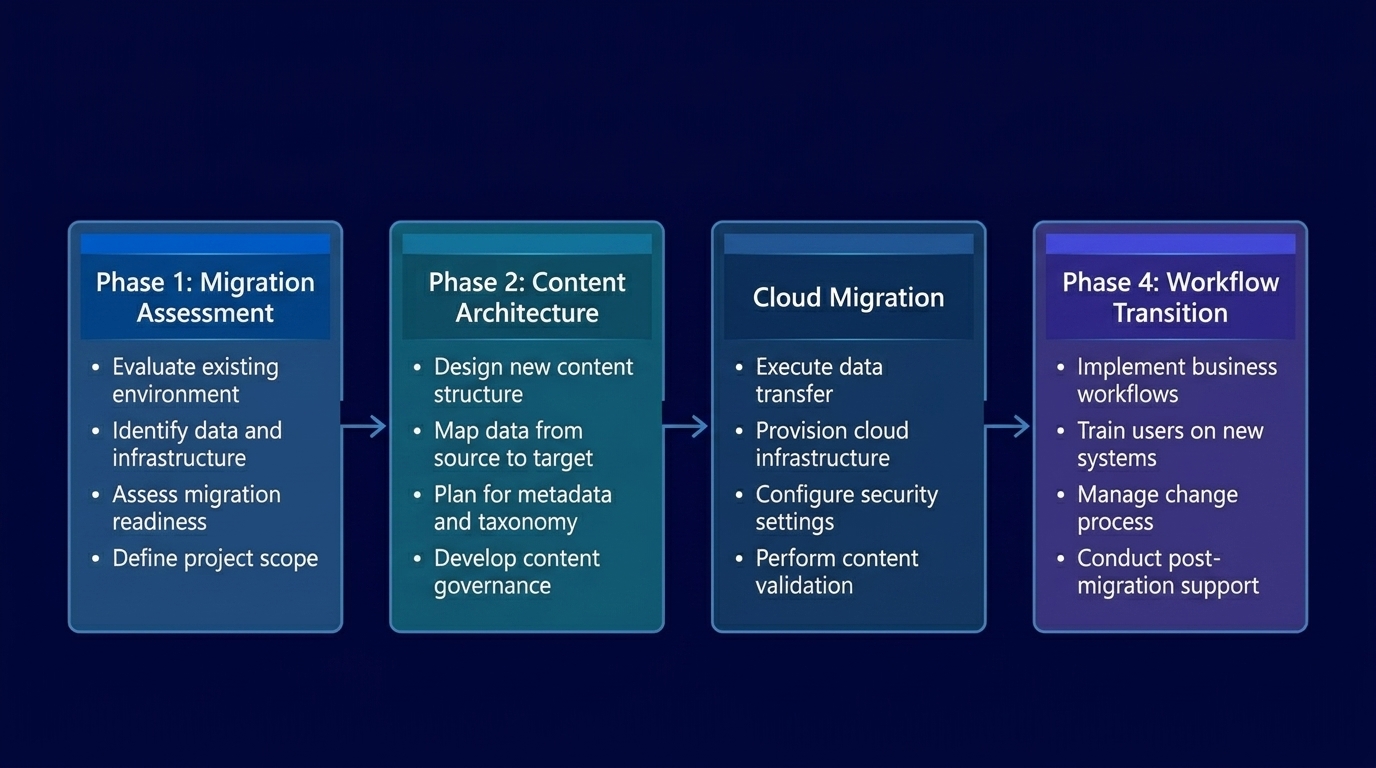
Phase 1
Migration Assessment
Audited the full SharePoint 2010 environment, content inventory, custom workflow catalog, permission structures, and integration dependencies.
Phase 2
Content Architecture
Designed the Office 365 information architecture that replicated and improved upon the existing site structure while accommodating modern collaboration features.
Phase 3
Cloud Migration
Executed a phased migration of all content, lists, libraries, and custom workflows to Office 365, validating each component before decommissioning the source environment.
Phase 4
Workflow Transition
Rebuilt legacy SharePoint 2010 workflows in modern Power Automate equivalents, preserving business logic while moving to a supported, cloud-native automation framework.
Technical Transformation
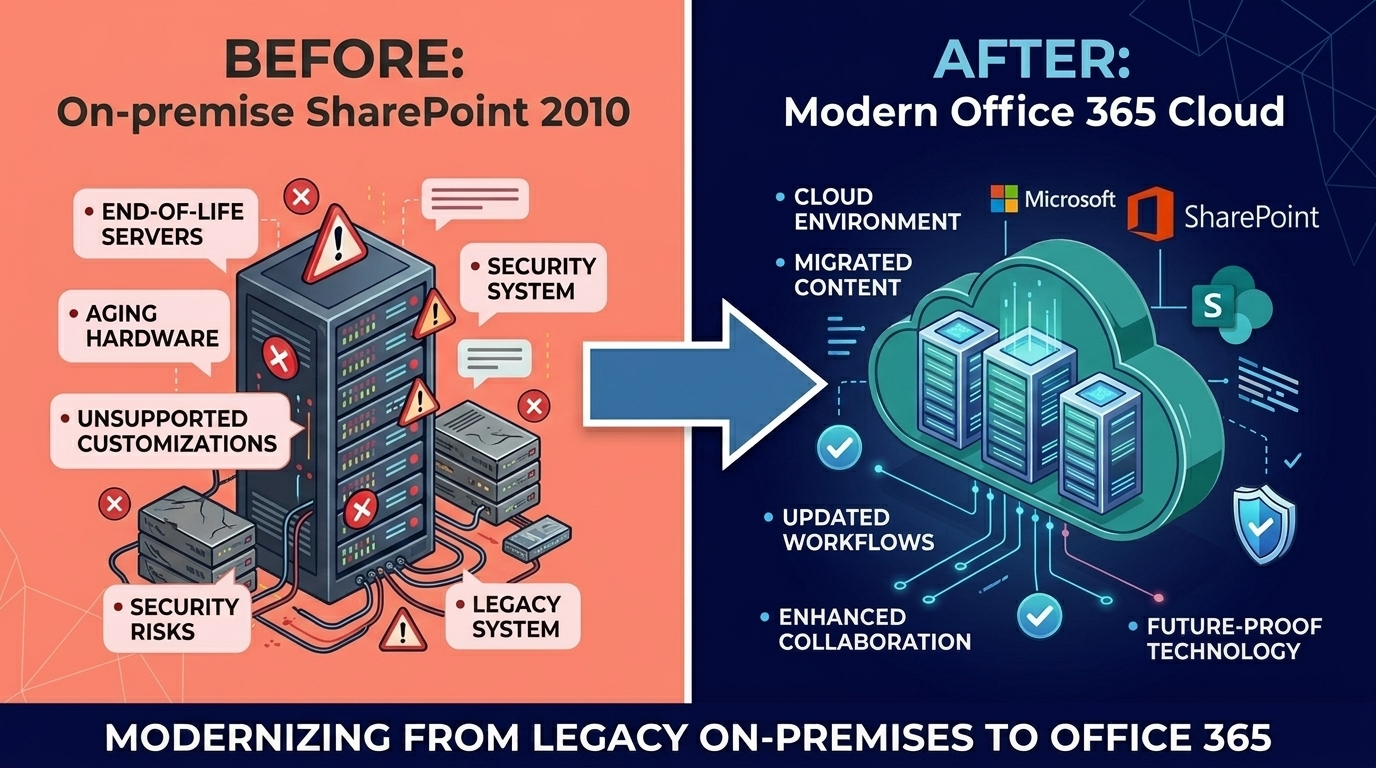
i3solutions executed a complete migration of UCS’s SharePoint 2010 environment to Office 365, preserving all content, permissions, and workflow business logic while modernizing the technical implementation. Custom workflows were rebuilt in Power Automate with equivalent functionality. The on-premise server dependency was eliminated entirely, removing the maintenance overhead and security risk of an unsupported platform. UCS gained access to the full Microsoft 365 collaboration suite, Teams, modern SharePoint, and cloud-native tools, while keeping the operational continuity their scientific and policy work required.
Measurable Outcomes
| Metric |
Result |
| Platform Risk Eliminated |
End-of-support SharePoint 2010 environment replaced with fully supported, cloud-native Office 365 platform |
| Content Preserved |
100% of research materials, policy documents, and organizational content migrated with full integrity |
| Workflows Modernized |
Legacy SharePoint 2010 workflows rebuilt as Power Automate flows with equivalent business logic on supported infrastructure |
| Infrastructure Removed |
On-premise server dependency eliminated, removing maintenance overhead and security exposure |
| Collaboration Expanded |
Access to full Microsoft 365 suite including Teams, modern SharePoint, and cloud collaboration tools |
[PENDING-CLIENT-QUOTE: insert 1-3 sentence outcome-focused quote in the client’s own language from a role matching the reader’s role.]
[Name or Role], [Organization type]
Frequently Asked Questions
What is SharePoint end-of-life migration and why is it critical?
SharePoint end-of-life migration is the process of moving an organization from an unsupported SharePoint version to a current, supported platform before the legacy version loses security patches and update support. After end-of-life, unpatched vulnerabilities accumulate and system failures have no vendor resolution path. For UCS, the risk was compounded by heavy customizations that would break under a standard migration approach.
How does i3solutions handle custom SharePoint workflow migration to Office 365?
i3solutions begins with a complete workflow inventory, documenting every automated process, its business logic, trigger conditions, and downstream dependencies. For each workflow, i3solutions determines whether a direct migration is possible or whether a rebuild in Power Automate is required. Rebuilt workflows are validated against the original business logic before the source environment is decommissioned.
What happens to SharePoint customizations during a cloud migration?
The outcome depends on the customization type. Some SharePoint 2010 customizations can be migrated directly; others require rebuilding using modern Office 365 equivalents. i3solutions conducts a customization audit upfront to classify each element, so organizations understand what will migrate directly, what will be rebuilt, and what may need to be replaced with modern alternatives before migration begins.
What ROI should nonprofits expect from a SharePoint to Office 365 migration?
Beyond eliminating the security risk of an unsupported platform, organizations that migrate to Office 365 gain access to ongoing Microsoft investment in collaboration features, Teams integration, modern SharePoint, Power Platform, that they were locked out of on SharePoint 2010. The operational ROI compounds over time as teams use modern collaboration tools rather than working around legacy platform limitations.
Why choose i3solutions for SharePoint cloud migrations?
i3solutions has executed SharePoint migrations for organizations ranging from nonprofits to federal agencies, including MCC, the federal treasury agency, and UCS. Our all-senior team brings 600+ Microsoft platform implementations and the pattern recognition to handle complex, customized environments that standard migration tools cannot address. Our 15-Business-Day Microsoft Assessment gives organizations a clear migration plan before any work begins.
Who This Engagement Serves
This engagement is relevant if
- This is an ideal solution for organizations operating large SharePoint 2010 environments that are nearing end-of-life.
- The migration approach is a perfect fit for organizations with complex, mission-critical custom workflows that require replacement.
- This engagement model will benefit companies moving to Microsoft 365 while ensuring seamless compliance and security for sensitive data.
Less relevant if
- Organizations without any custom functionality or complex workflows on SharePoint 2010 will not benefit as much from this deep architectural overhaul.
- This specialized workflow modernizing approach is not a strong fit for a small company with a simple, standard file migration.
Ready to establish a governed Microsoft environment?
i3solutions delivers enterprise digital transformation on-time, in-scope, in-production. Microsoft Gold Partner since 1997. 600+ implementations. All-senior, all US-based team.
Schedule a 15-Business-Day Microsoft Assessment


