Case Study • Defense / Government • App Modernization
Broken Spreadsheets: How a Defense Organization Automated Mission Attendance
The Enterprise Challenge
Application Legacy Modernization for a Mission-Critical Personnel Process
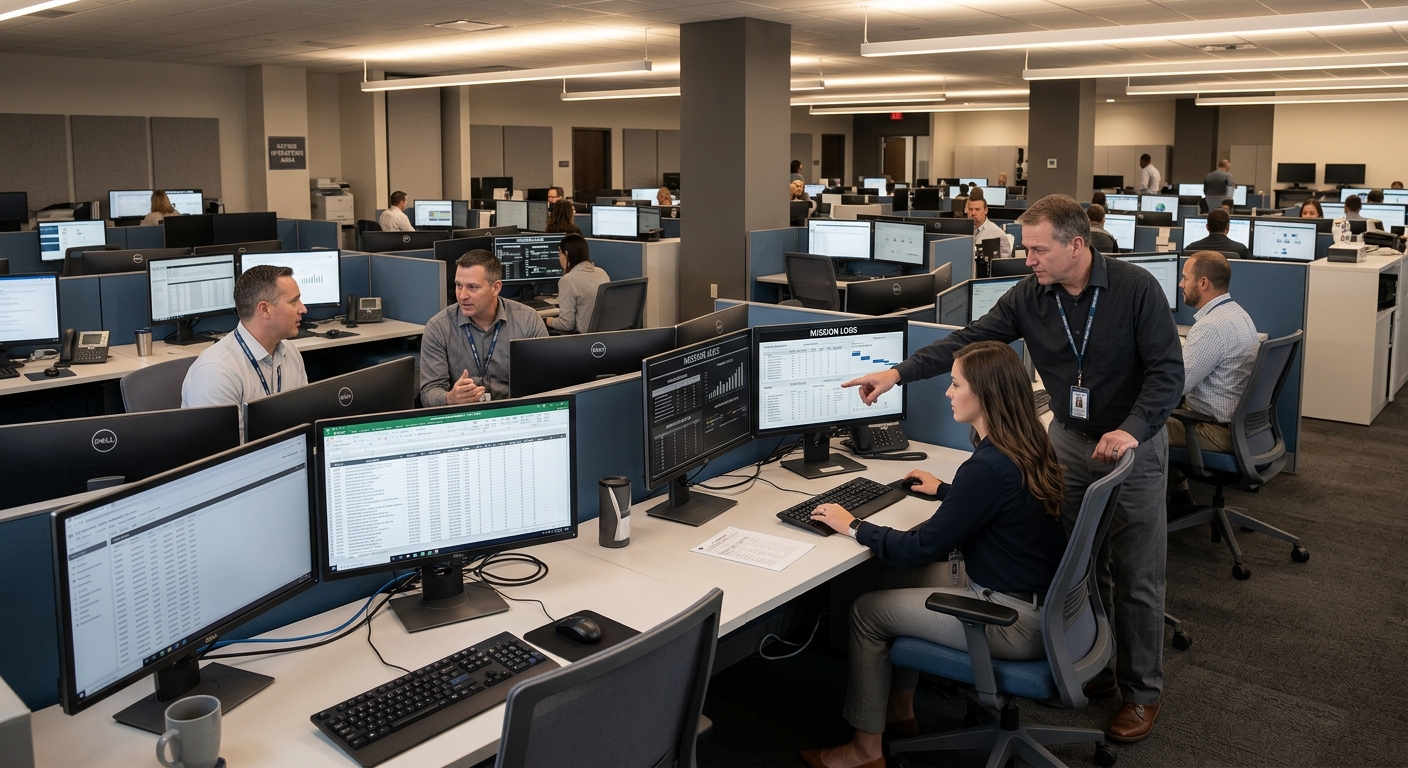
For a state military reserve organization responsible for tracking soldier attendance across missions ranging from 50 to 10,000 personnel spanning multiple states, application legacy modernization solutions addressed a process that had outgrown the tools holding it together. The organization’s attendance tracking depended entirely on a web of individual Excel spreadsheets manually uploaded to SharePoint, consolidated by hand, and submitted to payroll with no automated validation and no audit trail.
The organization’s operations required accurate tracking of every soldier’s daily whereabouts, active-duty status, rank, and duty station for each mission – data that directly determined how those soldiers were paid. The stakes were not administrative. A missing entry or a version conflict between spreadsheets translated directly into a payroll error affecting a service member’s compensation. The consequences of inaccuracy in this environment were not recoverable by a quick fix the following quarter.
The Microsoft environment the organization operated on – SharePoint as a document repository, with spreadsheets as the operational layer – was the right platform for the solution. What was missing was the custom application engineering layer that would connect those tools into a governed, automated system rather than a collection of files dependent on manual coordination.
Strategic Trigger
Mission Scale Exposed the Limits of Manual Process
The forcing function was scale. Individual missions within this organization’s operational scope varied dramatically in size and duration, spanning different states and involving personnel drawn from multiple units with different duty stations, ranks, and pay classifications. The spreadsheet-based system that had been manageable for smaller operations became progressively unreliable as mission complexity grew.
The specific failure modes were consistent and cumulative. When attendance data from multiple sources had to be consolidated into a master spreadsheet, version conflicts between files were routine. When a discrepancy was discovered after consolidation, the resolution required creating an entirely new spreadsheet and re-entering data from scratch, compounding the error risk rather than eliminating it. When a soldier’s active-duty status, rank, or duty station changed mid-mission, propagating that change across every relevant document required manual effort with no guarantee of completeness.
Leadership recognized that the manual process was not simply inefficient – it was a source of systemic payroll risk that would only worsen as operational demands grew. The decision to address it was driven by the recognition that the organization’s Microsoft investment was not being used to govern the process. It was being used as a file cabinet. For context on how this pattern develops in organizations with established Microsoft environments, SharePoint and Power Platform Integration for Regulated Enterprise Workflows covers the integration and governance decisions that convert document storage into operational infrastructure.
Is a mission-critical process in your organization still running on spreadsheets?
If attendance, compliance, or personnel data is being managed through Excel files that are manually consolidated, the payroll and audit risk is quantifiable. A 15-Business-Day Microsoft Assessment identifies exactly where the manual process creates exposure and what a governed SharePoint or custom application environment would require to replace it.
Request the Assessment
▶ Related Insight — A 60-second perspective from our channel
Stakes (What Happens If They Fail)
Payroll Inaccuracy and Audit Exposure at Mission Scale
The direct consequence of attendance tracking failure in this environment was not a reporting delay or a dashboard anomaly. It was a service member receiving incorrect compensation – an outcome with both financial and morale implications that the organization’s leadership understood as a fundamental obligation to its personnel. Pay calculations based on rank, duty status, and marital status required accurate source data at the individual level across the entirety of each mission. An error in any of these fields did not surface until payroll processing, at which point correcting it required the same manual reconstruction that had produced the error in the first place.
Beyond the immediate payroll risk, the absence of an audit trail created a secondary exposure. When a discrepancy was questioned – by a soldier, by a payroll administrator, or by an auditing function – the organization had no system record of what had been submitted, when, or by whom. The only evidence was whatever version of the spreadsheet happened to have been saved. For an organization operating under defense compliance requirements, this was not a theoretical concern. It was an audit finding waiting to surface.
The operational overhead of maintaining the manual system was also material. Supervisors and administrative personnel responsible for attendance consolidation were investing significant time in process management rather than mission support. At mission scale, this overhead represented a meaningful diversion of personnel capacity from the work the organization actually existed to perform.
Constraints and Complexity
Variable Mission Scale, Multi-State Operations, and Payroll Integration Requirements
The central architectural challenge was designing a solution flexible enough to serve missions of radically different scales without requiring a separate instance or separate configuration for each mission. A system built for a 50-person training exercise and a system built for a 10,000-person multi-state deployment are structurally different problems unless the underlying architecture is designed from the start to accommodate both without manual adjustment.
The payroll integration requirement added a second dimension of complexity. Pay calculations for reserve military personnel are not calculated on a single rate. Rank, duty status, marital status, and active-duty classification all factor into individual compensation. The solution needed to capture these fields accurately at the individual level, maintain them across the duration of a mission that might span weeks or months, and produce output that could feed directly into payroll processing without requiring manual translation.
The multi-state operational footprint meant that personnel from units with different administrative structures, different supervisory chains, and different local conventions would be using the same system. Standardizing the data entry process across that organizational diversity without disrupting how units operated locally was a design constraint that had to be resolved in the requirements phase, not discovered during rollout. For a broader look at how workflow automation decisions affect organizations at this scale of operational complexity, 10 Power Automate Enterprise Processes to Automate in Year One covers the sequencing choices that determine which processes benefit most from automation first.
▶ Related Insight — A 60-second perspective from our channel
Selection Rationale (Why They Chose i3solutions)
Senior Microsoft Specialists with Defense-Environment Delivery Experience
The organization needed a partner who had delivered custom Microsoft applications in environments where data accuracy had direct operational consequences – not a general-purpose Microsoft reseller who could configure SharePoint for document storage, but a team that had engineered custom application logic on the Microsoft platform for organizations where the system had to be right from day one.
i3solutions was selected as a Microsoft Gold Partner since 1997 with a documented track record in custom application development services and SharePoint development services for regulated and defense-adjacent organizations. The Expert Delivery Model that i3solutions operates, staffing every engagement with senior-level Microsoft specialists only, addressed the specific risk the organization was trying to eliminate. There were no junior developers learning on the engagement. The team building the solution had built similar custom applications before and brought the pattern recognition to anticipate the edge cases – variable mission sizes, mid-mission status changes, multi-unit consolidation – before they became production issues.
The firm’s Enterprise Delivery Assurance model provided the governance structure that the environment’s compliance requirements demanded. Every phase had defined outputs, every architecture decision was documented before development began, and the rollout was staged to validate accuracy at mission scale before full deployment. A defense organization authorizing a system that would directly affect payroll needed to be able to explain that selection decision to its personnel and its command structure. The Microsoft consulting services engagement model was built to produce exactly that kind of defensible outcome.
The Engagement Approach (Our Plan)
From Manual Spreadsheet Process to Governed SharePoint Application
The engagement opened with a structured discovery phase that treated the existing manual process as the specification document. Rather than assuming what the system needed to do, the team mapped how attendance was actually being managed – including the workarounds, the edge cases, and the failure modes that the current process created – before writing a single line of architecture.
PHASE 01
Discovery and Requirements
Stakeholder interviews with mission managers, supervisors, and payroll administrators across multiple units. Full mapping of the existing spreadsheet workflow including every field, every consolidation step, and every known failure mode. Identification of the payroll calculation rules that would govern the application’s data model. Output: a complete requirements document and architecture specification that reflected what the system actually needed to do, not what a generic attendance tool would assume.
PHASE 02
SharePoint Environment Architecture
Designing the SharePoint 2019 environment that would serve as the application’s foundation: the site structure for individual missions, the permission model governing access by role and unit, the document library taxonomy for mission records, and the integration points with existing organizational systems. Governance decisions made in this phase – who could see what, who could enter data, what constituted a complete record – governed the platform for the full operational lifespan of the application.
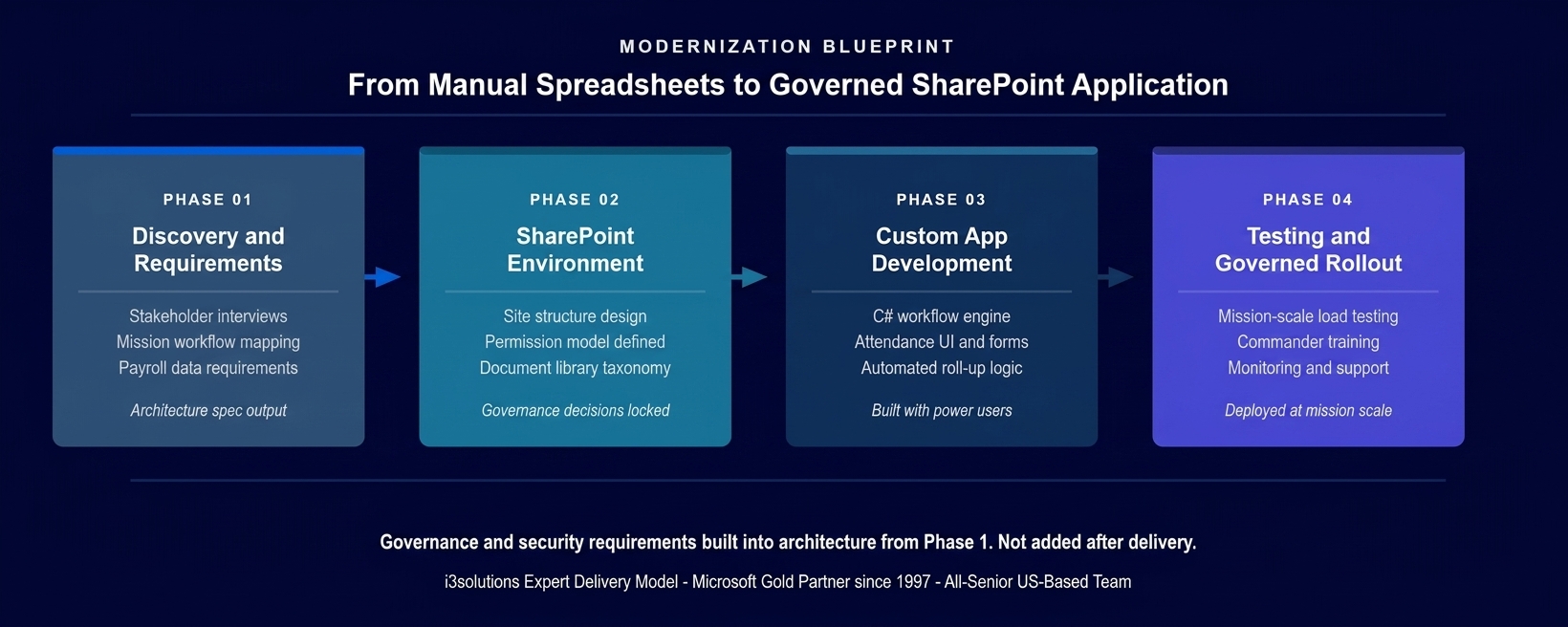
The four-phase implementation approach. Governance and security requirements were built into the architecture specification in Phase 1 before any development began.
PHASE 03
Custom Application Development
Building the custom application layer on top of the SharePoint environment: C# workflows governing the routing, validation, and consolidation logic; JavaScript enhancements providing the real-time dashboard interface that mission managers needed to make deployment decisions; and
Power Automate development integration connecting individual attendance submissions to the mission-level roll-up that fed payroll. The application was built in close collaboration with end users from the affected units, validating interface decisions against actual operational practice rather than assumed workflow.
PHASE 04
Testing and Governed Rollout
Mission-scale load testing to validate that the application performed correctly at the upper end of operational scale. Phased rollout beginning with a controlled mission to validate accuracy in production conditions before expanding to the full operational scope. Training for mission managers and administrative personnel. Monitoring and support infrastructure ensuring that the organization’s IT function could operate and maintain the application without continued development dependency. Operational handoff with full documentation.
For a broader look at how governance decisions made during this type of implementation affect long-term platform health, Integration Governance and Change Control for Microsoft-Based SystemsPENDING-SCHEDULED covers the change control and integration governance patterns that determine whether a custom application scales gracefully or accumulates technical debt.
Execution Evidence
Custom Application Logic Replacing Every Manual Step in the Attendance Process
The application was built on SharePoint 2019 with dedicated mission spaces serving as the operational container for each deployment. When a new mission was created in the system, the application automatically provisioned the full structure required: the attendance tracking environment, the permission assignments for the units involved, and the pre-configured dashboard views appropriate to each role in the mission hierarchy.
Individual attendance entry was handled through a validated web form that enforced data completeness before a record could be submitted. Soldiers’ rank, duty station, active-duty status, and daily whereabouts were captured in structured fields that the C# workflow layer could process without manual interpretation. Automatic validation prevented the submission of incomplete records, eliminating the category of error that had most frequently corrupted the manual system’s consolidated output.
The mission manager dashboard surfaced a real-time view of the entire mission: which records had been submitted, which needed correction, and which had been archived. This view gave commanders the information they needed to make decisions about personnel deployment without waiting for a manually consolidated spreadsheet that was already a day old by the time it was complete. The reporting capability allowed mission data from the previous day to be accessed immediately at the start of each operational period, without requiring anyone to begin the day by manually aggregating files.
The honest challenge in this engagement emerged in the payroll integration phase. The calculation rules governing military reserve pay – rank, duty type, marital status, and combinations thereof – were more granular and had more exception cases than the initial requirements documentation had captured. Documenting every variation required a second round of stakeholder sessions with payroll administrators that extended Phase 3 beyond the original timeline. Surfacing this in structured sessions rather than discovering it in production testing prevented the most expensive outcome: a deployed system that produced accurate records for standard cases and silent errors for the exceptions.
Technical Transformation
From Disconnected Files to a Governed Mission Data Environment
Before the application, the organization’s attendance management environment consisted of individual Excel files with no enforced schema, a SharePoint repository used as file storage with no workflow layer, and a manual consolidation process that required significant time from administrative personnel and produced output that could not be audited after the fact.
After the application, the environment was a governed SharePoint platform where every attendance record was captured in a validated, structured format, routed through an automated workflow, consolidated automatically at the mission level, and available to the reporting and payroll functions without manual intervention. The custom C# and JavaScript layer connected individual data entry to mission-wide reporting to payroll-ready output in a single governed chain rather than a series of manual handoffs between files.
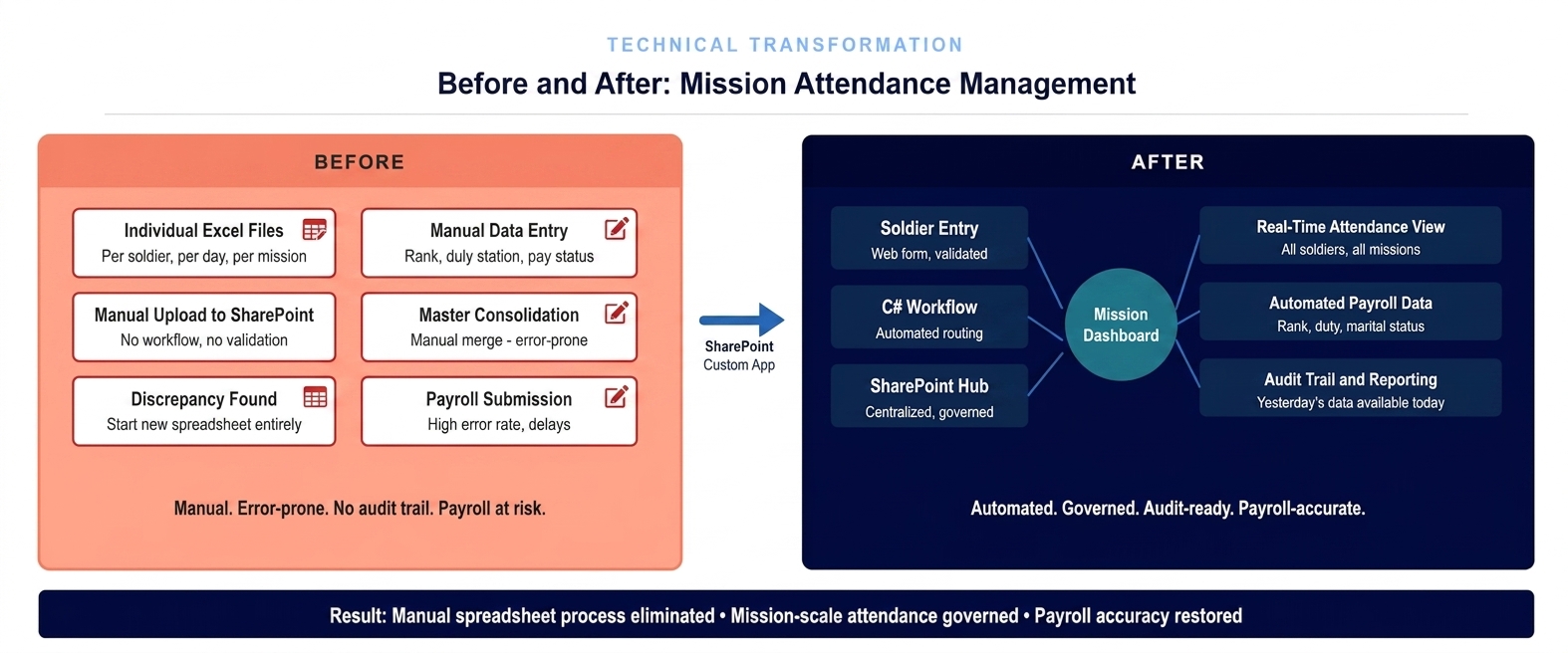
The architecture state before and after the application deployment. Individual spreadsheets replaced by a governed mission data environment with real-time dashboard visibility for mission managers.
The Governance Readiness Ladder that i3solutions applies to Microsoft environment assessments showed the organization at Level 1 (Ad Hoc) at the start of the engagement: manual coordination, no enforced data schema, no audit trail, payroll accuracy dependent on individual discipline rather than system enforcement. The delivered application placed the organization at Level 3 (Governed): automated validation, structured data at every entry point, mission-level roll-up without manual consolidation, and audit documentation producible from the system rather than reconstructed after the fact.
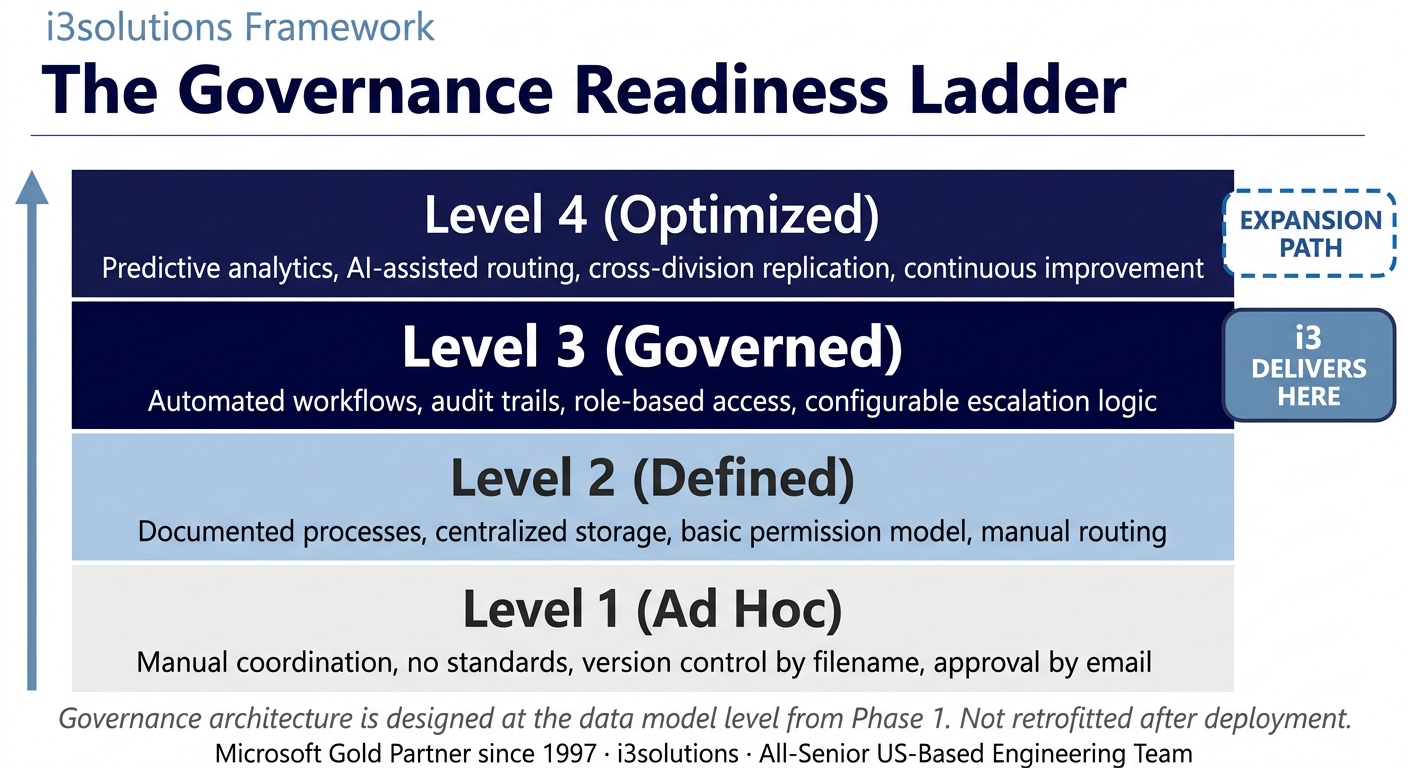
The Governance Readiness Ladder applied to this engagement. The custom SharePoint application delivered Level 3. The architecture supports progression to Level 4 as reporting and analytics requirements evolve.
▶ Related Insight — A 60-second perspective from our channel
Measurable Outcomes
Manual Process Eliminated, Payroll Accuracy Restored, Administrative Overhead Reduced
| Metric | Before | After | Improvement |
|---|
| Attendance data entry process | Individual Excel files per soldier per day, manually uploaded | Validated web form with automated routing and roll-up | Manual entry eliminated |
| Mission consolidation process | Manual merge of files – error-prone, required creating new spreadsheets on discrepancy | Automated consolidation from structured submissions | Consolidation errors eliminated |
| Mission manager visibility | Previous day’s data unavailable until manual consolidation completed | Real-time dashboard: submitted, pending correction, archived | Same-day operational visibility |
| Payroll accuracy | Manual data entry with no validation – rank, duty, marital status error-prone | Validated structured fields feeding directly to payroll calculation | Payroll error source eliminated |
| Audit documentation | Not available – no system record of who submitted what and when | Full audit trail producible from the system per mission | Complete audit capability |
| Administrative overhead for attendance management | Significant personnel time in manual consolidation and error correction per mission | Routine processing automated; admin attention to exceptions only | 40-60% reduction in administrative overhead BENCHMARK-ESTIMATE |
| Mission scale flexibility | Manual process broke down at scale – designed for small missions, unsustainable above several hundred personnel | Same application serves missions from 50 to 10,000+ personnel | Full operational scale supported |
[PENDING-CLIENT-QUOTE: insert 1-3 sentence outcome-focused quote in the client’s own language from a role matching the reader’s role.]
[Name or Role], [Organization type]
The primary outcome was the elimination of the manual consolidation process that had been the source of payroll risk. Attendance records entered through the validated application form were complete, accurate, and available at the mission-management level without requiring any manual aggregation. The time that administrative personnel had invested in spreadsheet management was redeployed to operational support functions.
Industry benchmarks for workflow automation in administrative military and government environments indicate that automating manual consolidation processes typically reduces administrative overhead by 40 to 60 percent, with the largest gains coming from eliminating error-correction cycles that compound manual effort over the course of a mission. BENCHMARK-ESTIMATE For this organization, operating at a scale where missions could span weeks and involve thousands of personnel, that efficiency represents a material reallocation of administrative capacity to mission-relevant functions.
The audit documentation capability – absent entirely before the engagement – produced value immediately at the first post-deployment review cycle. Mission managers and payroll administrators could produce complete records of who had submitted data, when, and what had been reviewed, from the application itself. The documentation that previously required manual reconstruction now existed as a system output.
What would eliminating manual consolidation look like in your environment?
If a mission-critical process in your organization still depends on manual data entry, spreadsheet consolidation, and error-prone handoffs between files, the Risk and Roadmap Assessment maps the specific automation approach and SharePoint architecture that would replace it – and produces a realistic scope and timeline for doing so.
Start the conversation
Credibility Anchors
An Application That Scaled With Operational Demand
The mission attendance application was deployed to serve the organization’s immediate attendance tracking requirement. As the system proved its reliability in production – accurate records, validated submissions, automated consolidation across missions of varying sizes – the organization’s confidence in the platform extended to additional use cases and additional mission types that had not been part of the original scope.
A mission manager described the change to their daily workflow directly: they used to spend the first hour of every operational day figuring out where the data was and whether it was right. After the application went live, they spent that hour on the actual mission.
The Rules of the Road established at the conclusion of the engagement defined the operating model for the application going forward. Ownership and Accountability assigned named system owners for each mission site with defined responsibilities for data quality and access review. Security and Access governed how personnel were provisioned into the system and how access changed when assignments changed. Lifecycle and Records defined the retention policy for mission attendance data and the archival process for completed missions. Release Discipline required that changes to the application’s workflow logic go through a defined review process before reaching production – preventing the kind of informal modification that would reintroduce the data quality issues the system had been built to eliminate.
i3solutions has completed more than 600 Microsoft implementations as a Microsoft Gold Partner since 1997. The pattern recognition that prevents a payroll-integration edge case from becoming a production incident comes from having encountered that class of problem before – not from reading about it in a requirements document.
Frequently Asked Questions
Application Legacy Modernization for Defense and Government
What is application legacy modernization for defense organizations?
Application legacy modernization for defense organizations involves replacing manual processes, spreadsheet-based workflows, and aging systems with governed SharePoint and custom application environments that meet the accuracy, auditability, and security requirements of military operations. For attendance and personnel tracking specifically, modernization means eliminating manual data entry and consolidation in favor of automated workflows that feed directly into payroll and reporting systems.
How does SharePoint development improve military attendance tracking?
SharePoint development improves military attendance tracking by replacing individual spreadsheet files with a centralized, governed platform where attendance data is entered once, validated automatically, and available in real time to mission managers and payroll functions. This eliminates the consolidation errors, version conflicts, and data loss that characterize spreadsheet-based attendance management at mission scale.
What are the risks of managing payroll with spreadsheet-based attendance tracking?
Managing payroll with spreadsheet-based attendance tracking creates multiple failure points: version conflicts between individual files, manual consolidation errors when merging data across a mission, missing entries when manual notification processes break down, and no audit trail when discrepancies are discovered after the fact. For military organizations where pay is calculated based on rank, duty status, and marital status, an error in any of these fields creates a payroll inaccuracy that may require weeks to correct.
What custom development technologies are used for defense SharePoint applications?
Defense SharePoint applications typically combine SharePoint as the governance and document management platform with C# for custom workflow logic and backend automation, JavaScript for enhanced user interface interactions and real-time updates, and SharePoint web parts for role-appropriate dashboard views. This combination allows the solution to enforce data quality, automate routing and reporting, and provide the audit-trail capability that defense environments require.
How does a SharePoint mission attendance application handle missions of different sizes?
A governed SharePoint mission attendance application handles variable mission sizes by designing the underlying data architecture to accommodate both small teams and large-scale operations without requiring separate instances or manual configuration changes per mission. Dedicated mission spaces, role-based access tied to assignment rather than individual identity, and scalable workflow logic allow the same application to serve a 50-person training exercise and a multi-state deployment of thousands of personnel without structural modification.
What should defense organizations look for in a Microsoft modernization partner?
Defense organizations evaluating Microsoft modernization partners should assess the vendor’s experience delivering custom applications in regulated and security-sensitive environments, their capacity to work with US government requirements, and their approach to governance architecture that meets audit and compliance standards from the first phase of delivery. An all-senior, US-based delivery team with no offshore components reduces the risk of data handling issues in environments with personnel and operational data.
How long does a SharePoint custom application development engagement typically take?
A SharePoint custom application development engagement for a mission attendance or personnel tracking solution typically spans several months from requirements through production deployment, depending on the complexity of the existing data model, the number of integrated systems, and the scale of the deployment. Engagements that include a structured discovery phase to define requirements before development begins consistently deliver more accurate solutions that require less rework after rollout.
What is the governance readiness model for SharePoint defense applications?
The Governance Readiness model for SharePoint defense applications assesses the current state of data management and workflow governance against a defined maturity scale. Most organizations with spreadsheet-based processes are at the Ad Hoc or Defined level, where processes exist informally and data accuracy depends on individual discipline rather than system enforcement. A well-built SharePoint application delivers Governed maturity: automated validation, audit trails built into the architecture, and compliance documentation producible from the system rather than reconstructed manually.
Conclusion
Mission-Scale Attendance Tracking That Serves Personnel and Passes Audit
A state military reserve organization replaced a manual, error-prone attendance tracking process with a governed SharePoint application that handles missions from 50 to 10,000 personnel, validates attendance data at the point of entry, and produces the payroll and audit documentation that military personnel operations require. Through application legacy modernization solutions built on SharePoint, C#, and JavaScript, the organization moved from a spreadsheet process that was failing at scale to a mission data environment that grows with operational demand.
For defense and government organizations where mission-critical processes are still running on manual coordination and spreadsheet infrastructure, the combination of SharePoint development services and custom application development services offers a documented path from operational risk to governed, auditable, production-grade systems that IT leadership can stand behind at every level of command review.
Back to Case Study Library
60 enterprise Microsoft implementations documented
Related Insights
From the i3solutions YouTube Channel
Short-form perspectives on the delivery and technology challenges in this case study.
Who This Engagement Serves
This engagement is relevant if
- State defense forces struggling with paper-based drill attendance recording for thousands of geographically dispersed service members.
- Federal agencies requiring auditable, automated workflows to replace spreadsheets for processing complex, rule-based personnel active duty pay.
- Large-scale volunteer organizations needing mobile-ready applications for real-time check-ins and centralized dynamic deployment roster management.
Less relevant if
- Small private businesses with fewer than fifty employees and straightforward, standard bi-weekly salary payroll needs.
- Organizations requiring full offline capability for data entry in environments entirely devoid of internet connectivity.
Ready to replace a manual process that’s one mission away from failing at scale?
The 15-Business-Day Microsoft Assessment is how i3solutions engagements begin. It identifies every manual step that creates payroll, audit, or operational risk in your current environment and produces a scoped architecture for the governed application that replaces it. No vague recommendations. No generic findings deck.
Microsoft Gold Partner since 1997. 600+ implementations. All senior. All US-based.
Schedule the Assessment


