Case Study • Healthcare / Life Sciences • Portfolio Rationalization
Scattered Client Data: How a Healthcare Firm Unified Operations with Dynamics 365
The Enterprise Challenge
Dynamics 365 Integration Services for a Growing Healthcare Operations Platform
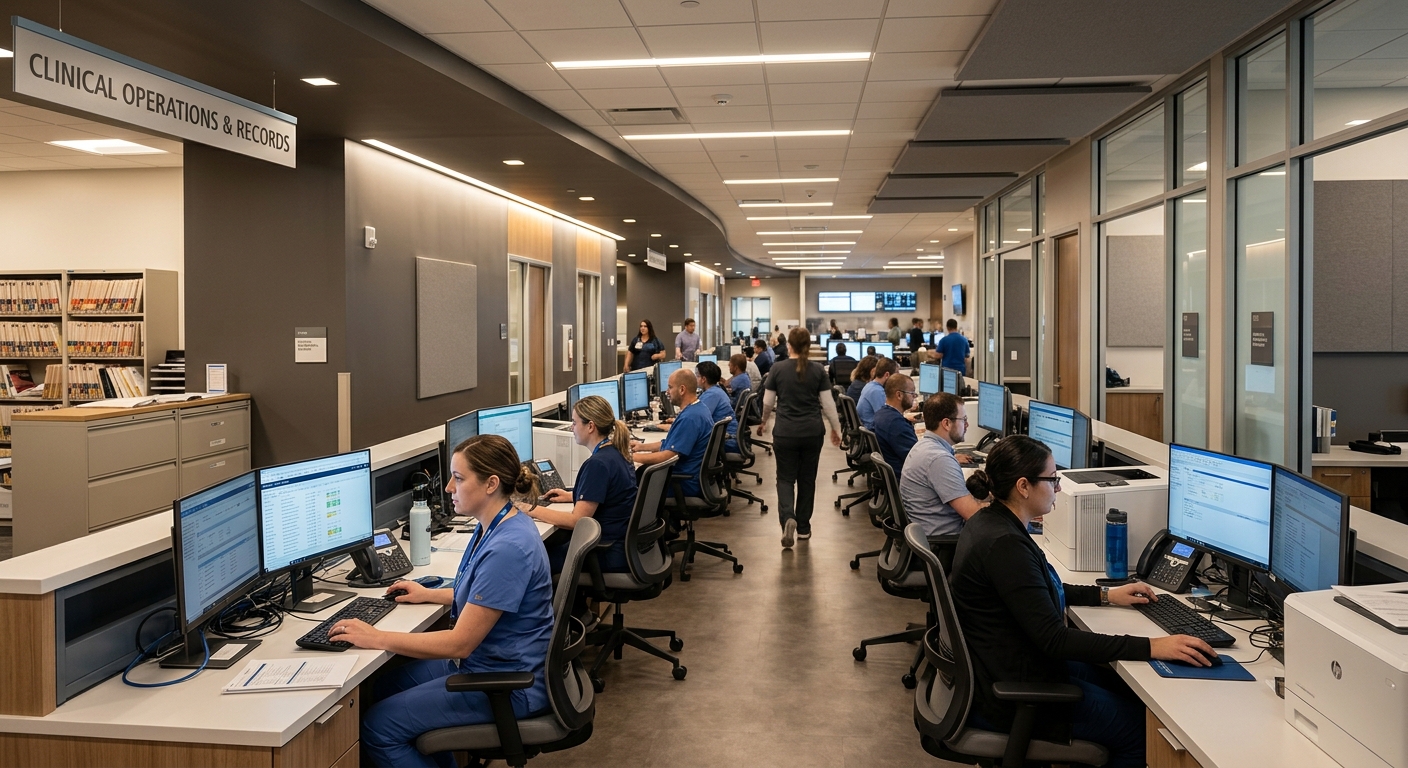
A healthcare management and claims repricing organization helps American companies, associations, unions, brokers, employers, and individuals navigate an increasingly complex healthcare system – specifically ensuring that clients never overpay for care. As the organization’s client base grew, so did the complexity of managing that relationship at scale. Client data lived across multiple systems with no single source of truth. Call center representatives were searching for information while clients waited on hold. Enrollment was handled manually with no automated notifications. And HIPAA and PHI compliance requirements added a layer of regulatory obligation to every data handling decision.
The organization’s Microsoft environment included Office 365 and the operational intent to implement Dynamics 365 as the central platform for client relationship management. What was missing was the Dynamics 365 integration services layer that would connect Dynamics 365 to the other systems the business depended on: the telephony platform used by the call center, the payment processor used for enrollment, the enrollment workflow automation, and the geospatial analytics that would allow the platform to recommend cost-effective care providers to clients based on location.
The result the organization needed was not a Dynamics 365 implementation in isolation. It was a governed, HIPAA-compliant integration ecosystem with Dynamics 365 at the center and every operational system connected to it in a way that gave the call center, the account management team, and the operations function a single, accurate view of every client relationship.
Strategic Trigger
Growth Exposed the Cost of Fragmented Client Data
The trigger was scale. As the organization’s client base expanded, the manual processes and siloed systems that had been manageable at an earlier stage of growth became measurably inefficient. The call center was the most visible symptom. Representatives answering client calls were spending the first portion of every interaction searching across multiple systems for the caller’s eligibility status, claims history, and account details while the client waited. Every second of that lookup time was a second of call handle time the organization was not recovering.
The enrollment process carried a different kind of cost. New client onboarding required data to be entered across multiple platforms without automated synchronization. Payment notifications were sent manually or not at all. Eligibility updates in one system did not automatically propagate to the others. The operational overhead of maintaining consistency across these systems grew linearly with the client base, which meant the problem compounded as the organization succeeded.
The HIPAA and PHI compliance dimension added urgency. Client health information was being handled in environments that had not been designed with healthcare data governance requirements as a foundational constraint. The compliance risk was not hypothetical – it was embedded in the current operational model. For a deeper look at how integration governance decisions determine whether a Microsoft environment meets compliance requirements or creates exposure, Integration Governance and Change Control for Microsoft-Based SystemsPENDING-SCHEDULED covers the change control architecture that makes the difference.
Is fragmented client data slowing your team down while compliance risk builds?
If your CRM does not connect to your telephony, payment, and enrollment systems, your team is paying the coordination cost manually every day. A 15-Business-Day Microsoft Assessment identifies the specific integration architecture your Dynamics 365 environment needs to eliminate that cost and meet your compliance requirements.
Request the Assessment
▶ Related Insight — A 60-second perspective from our channel
Stakes (What Happens If They Fail)
Operational Inefficiency, Compliance Exposure, and Client Experience Decline
For an organization whose value proposition is ensuring clients never overpay for healthcare, the quality of the client relationship is not an abstract brand attribute. It is the product. When a client calls with a question about their eligibility or a claim, the response time and accuracy of that interaction is a direct reflection of the organization’s ability to deliver on its mission. A call center that requires manual multi-system lookups delivers a slower, less accurate response than one where the client’s complete record surfaces automatically at the moment of contact.
The compliance dimension carried stakes beyond operational efficiency. Healthcare management organizations handling PHI are subject to HIPAA regulations with financial penalties that scale with the severity and scope of violations. An environment where protected health information lives in systems that were not designed to govern it appropriately is not a compliance risk that resolves itself as the organization grows. It compounds. Each new client is additional PHI in an ungoverned environment, and each integration built without compliance as a foundational constraint creates a new potential exposure point.
On the revenue side, the enrollment and payment process was a direct connection between client experience and revenue. Delayed enrollment confirmations, missing payment notifications, and manual reconciliation between systems created friction at the point where the organization was converting interest into committed client relationships. Every manual step in that process was an opportunity for an error that would affect both the client’s experience and the organization’s revenue recognition.
Constraints and Complexity
HIPAA Compliance, Multi-System Integration, and Call Center Real-Time Requirements
HIPAA compliance was not a constraint that could be addressed as a separate workstream after the CRM was built. Every data model decision, every integration design, and every access control configuration had to be evaluated against PHI handling requirements from the first phase of the engagement. This meant that the Dynamics 365 configuration was not a standard CRM implementation – it was a healthcare-specific data architecture where every field, every integration, and every user role was governed by the regulatory framework from the start.
The call center integration requirement carried a real-time performance constraint that typical CRM implementations do not face. When a client call arrives at a RingCentral-based call center, the Dynamics 365 client record needs to surface in seconds, not minutes. The integration between the telephony platform and the CRM had to function reliably at call volume, with the latency and reliability characteristics of a production system serving a live operation rather than a batch data process running overnight.
The breadth of integration points – RingCentral for telephony, Stripe for payment processing, Power Automate for enrollment workflow automation, geospatial analytics for provider mapping, and Office 365 for team communication and collaboration – meant the engagement required building five distinct integration patterns in parallel, each with different data types, different authentication requirements, and different operational dependencies. For a look at how enterprise workflow automation decisions sequence correctly to maximize early value, 10 Power Automate Enterprise Processes to Automate in Year One covers the prioritization framework that determines which automations to build first.
▶ Related Insight — A 60-second perspective from our channel
Selection Rationale (Why They Chose i3solutions)
Healthcare-Experienced Microsoft Integration Specialists
The organization required a partner who combined Dynamics 365 implementation capability with genuine experience in healthcare compliance environments. Generic Microsoft partners who had built CRMs for commercial organizations could configure Dynamics 365. What they could not do was design the PHI data architecture, build HIPAA-compliant integrations, and deliver a call center telephony connection that met the real-time performance requirements of a live healthcare operations environment.
i3solutions was selected as a Microsoft Gold Partner since 1997 with demonstrated experience in Dynamics 365 integration services for organizations operating under strict data governance and compliance requirements. The Expert Delivery Model that i3solutions operates, staffing every engagement with senior-level Microsoft specialists only, meant that the architects who designed the HIPAA-compliant data model were the practitioners who built and tested each of the five integration patterns. No junior developers. No offshore teams handling PHI data.
The firm’s Enterprise Delivery Assurance model provided the governance structure that the compliance environment required. Every integration was designed to a documented specification, tested against the compliance requirements before going to production, and handed off with documentation that the organization’s own team could use to maintain and extend the environment without rebuilding institutional knowledge from scratch. For a healthcare organization whose Microsoft consulting services relationship needed to produce a defensible system that could be audited, that governance structure was not optional.
The Engagement Approach (Our Plan)
From Disconnected Systems to a Governed Dynamics 365 Integration Hub
The engagement required a discovery phase that treated HIPAA compliance as the primary architectural constraint rather than a review checkpoint at the end. Every data flow, every integration pattern, and every user access model was designed against the PHI handling requirements before any development began.
PHASE 01
Discovery and Compliance Architecture Design
Mapping the existing client data environment: where PHI lived, how it moved between systems, and what compliance controls were and were not in place. HIPAA requirements translated into specific data model constraints, access control patterns, and integration design rules that governed every subsequent phase. Output: a compliance architecture specification that served as the governing document for the entire engagement.
PHASE 02
Dynamics 365 Core CRM Build
Designing and building the Dynamics 365 data model to centralize client profiles, eligibility and claims data, interaction history, and account relationships. The CRM was configured as a healthcare-specific environment with role-based access controls that limited PHI visibility to authorized personnel, audit logging for all interactions with protected health information, and entity relationships that reflected how the organization’s call center, account management, and enrollment functions actually worked.
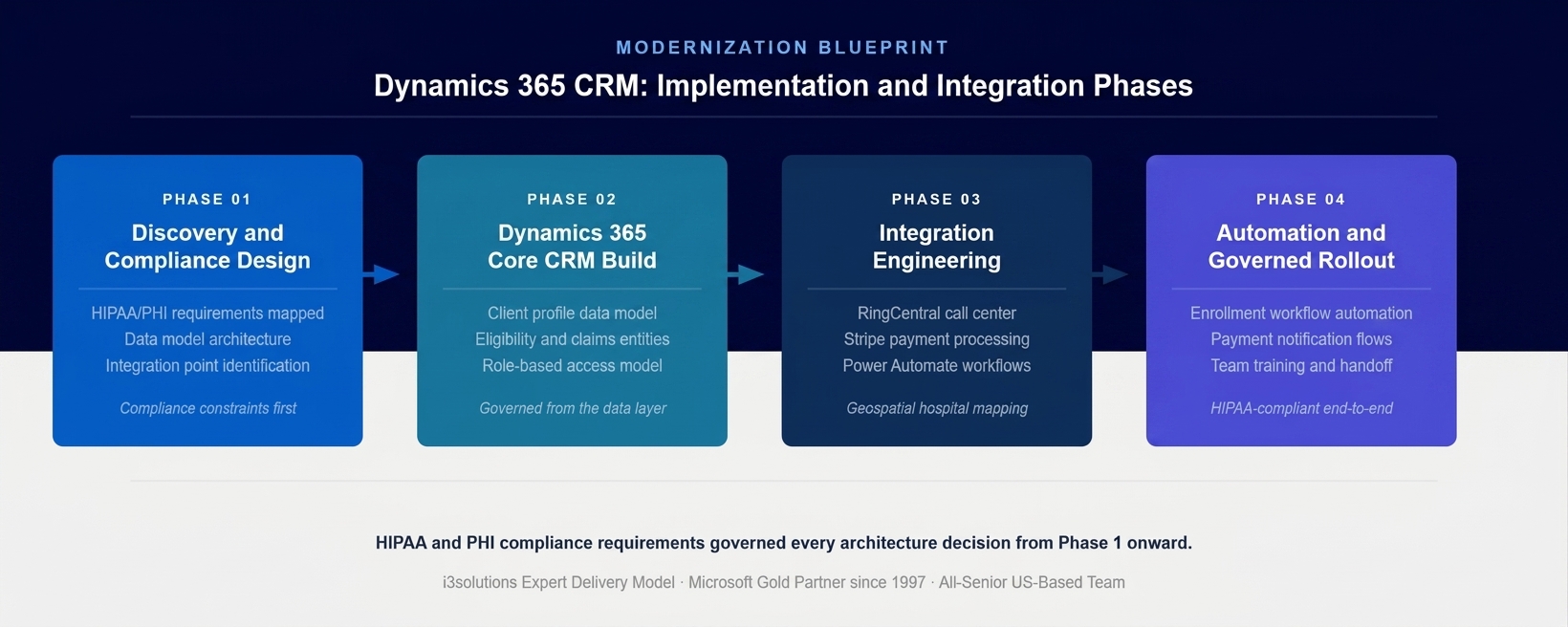
The four-phase implementation approach. HIPAA and PHI compliance requirements governed every architecture decision from Phase 1 before any development began.
PHASE 03
Integration Engineering
Building the five integration patterns that connected Dynamics 365 to the organization’s operational systems: RingCentral telephony for call center client record surfacing, Stripe for payment processing and enrollment confirmation,
Power Automate development for enrollment workflow automation and data synchronization, geospatial analytics for hospital and provider mapping, and Office 365 for team communication integration. Each integration was built to the compliance specification from Phase 1, with PHI handling requirements enforced at the integration layer rather than assumed in the connected systems.
PHASE 04
Automation, Testing, and Governed Rollout
Configuring the Power Automate workflow automation that handled enrollment data routing, payment notification, and cross-system data synchronization. End-to-end testing of all five integration patterns under production-representative conditions. Call center load testing to validate the RingCentral integration performance under concurrent call volume. Phased rollout with team training and a documented operating model for ongoing system management.
Execution Evidence
Five Integration Patterns Delivered Around a Central Dynamics 365 Hub
The RingCentral integration was the highest-visibility operational change. When a client call arrives at the organization’s call center, the Dynamics 365 client profile surfaces automatically from the incoming phone number, giving the representative the client’s complete record – eligibility status, claims history, account details, and interaction history – before the first word of the conversation. The manual lookup that had previously consumed the opening minutes of every call was eliminated.
The Power Automate enrollment workflow automation connected the enrollment data entry point directly to Dynamics 365 and RingCentral. When enrollment data is submitted, the automation triggers simultaneously update the client’s Dynamics 365 record, send the data to the appropriate downstream systems, and initiate the confirmation notification workflow. The manual coordination between enrollment submission and system updates that had previously required human intervention at each step was replaced by an automated sequence that completed without oversight for standard cases.
The Stripe payment integration connected the enrollment payment process to the Dynamics 365 client record with automated notifications that improved both the client’s payment experience and the organization’s revenue visibility. Payment confirmations, reminders, and status updates were triggered automatically from the integration rather than managed through manual monitoring of a separate payment system.
The geospatial analytics layer added a capability the organization had not previously offered at scale: map-based display of hospital and care facility information with best-price routing based on the client’s location. The CRM could surface provider recommendations as part of the client interaction rather than requiring a separate lookup in a different tool.
The honest challenge in this engagement surfaced during the RingCentral integration testing phase. The telephony platform’s data model for identifying callers did not map cleanly to the client identifier structure in Dynamics 365 for a subset of clients who had enrolled through specific channels. Resolving the matching logic for these edge cases required an additional development cycle that was not in the original integration specification. Identifying this during integration testing rather than after the call center went live prevented a category of client-facing errors that would have been difficult to diagnose in production and impossible to explain to clients who expected the system to know who they were.
Technical Transformation
From Five Disconnected Systems to a Governed Integration Hub
Before the engagement, the organization’s client data environment consisted of multiple systems operating independently: a telephony platform with no CRM connection, a payment processor with no client record integration, an enrollment process with manual data handoffs, a claims and eligibility data source with no connection to the client-facing team, and Office 365 with no structured client relationship data. Each system was functional in isolation. As a connected platform supporting a growing healthcare management operation, they were inadequate.
After the engagement, the organization operated a Dynamics 365 integration hub with five connected systems feeding a single governed client data environment. The Microsoft integration services layer ensured that data changes in any connected system propagated to the others according to defined rules, without manual coordination. The compliance architecture from Phase 1 governed how PHI moved across every integration boundary.
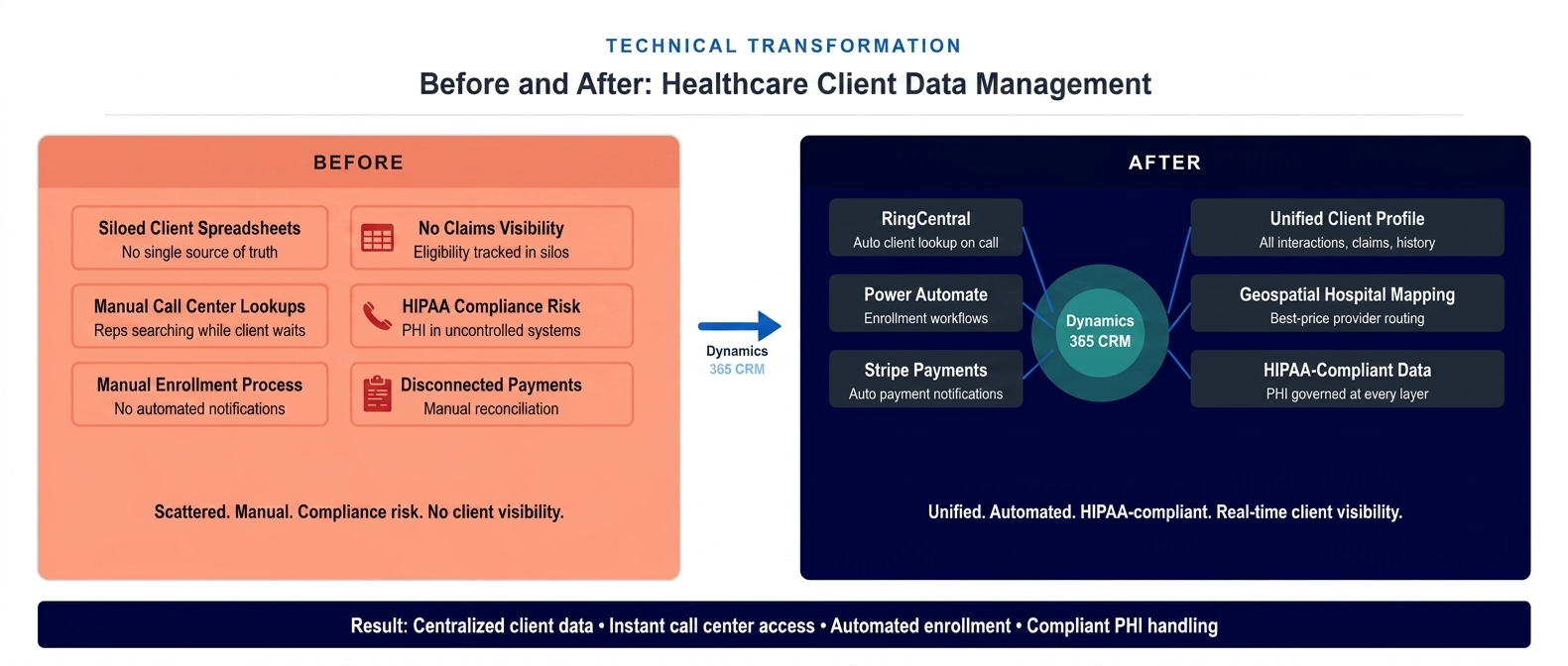
The architecture state before and after the Dynamics 365 integration hub deployment. Five disconnected systems replaced by one governed client data environment with automated synchronization across all integration points.
The Governance Readiness Ladder that i3solutions applies to Microsoft environments showed the organization at Level 1 (Ad Hoc) at the start of the engagement: PHI in uncontrolled systems, no integration governance, no audit trail for client data interactions, access controls applied informally. The delivered environment placed the organization at Level 3 (Governed): PHI handling enforced at the data model level, audit logging active across all integration boundaries, role-based access controls applied from the first user interaction, and the compliance documentation required by HIPAA producible from the system.
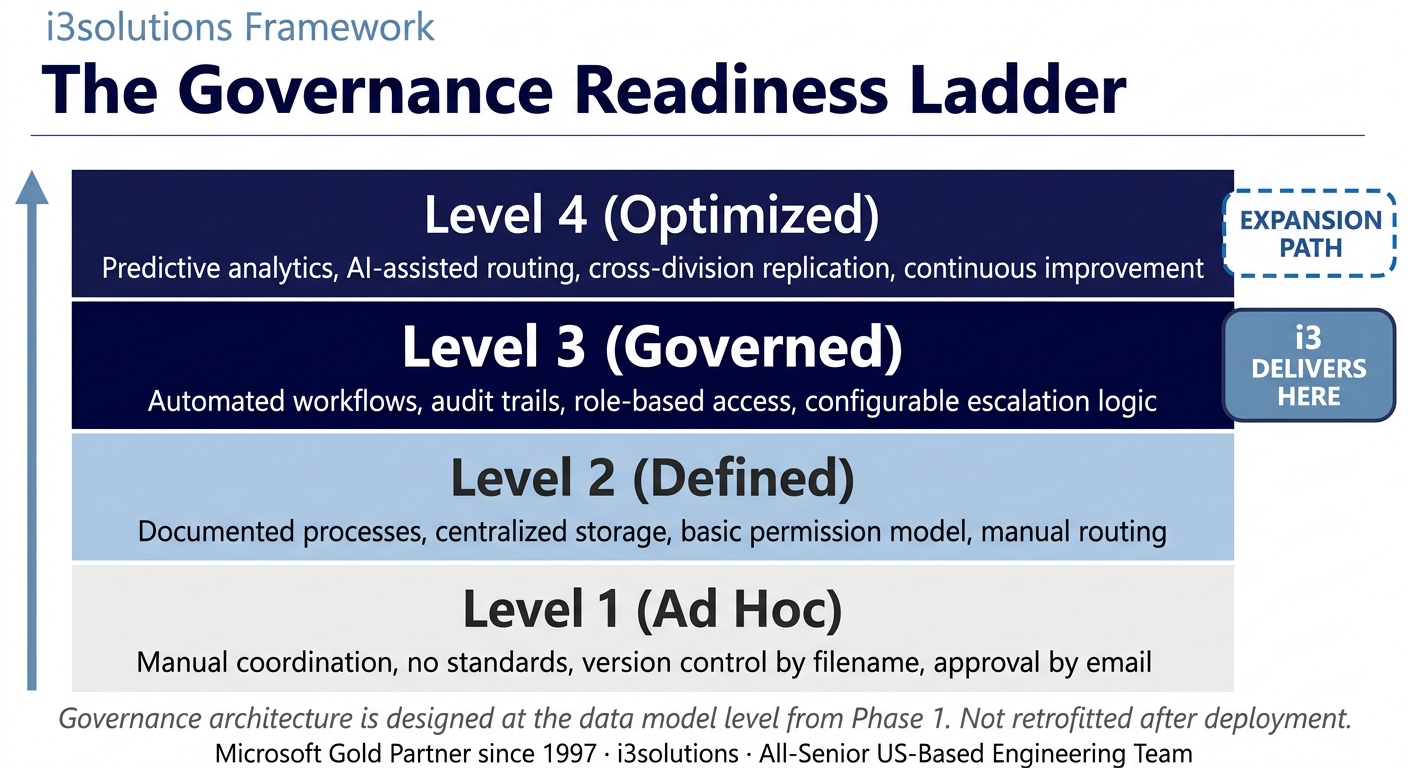
The Governance Readiness Ladder applied to this engagement. The Dynamics 365 integration hub delivered Level 3 governance across all five integration points. The architecture supports Level 4 expansion as analytics and reporting requirements mature.
▶ Related Insight — A 60-second perspective from our channel
Measurable Outcomes
Unified Client Data, Reduced Call Handling Time, and HIPAA-Compliant Operations
| Metric | Before | After | Improvement |
|---|
| Call center client data access | Manual lookup across multiple systems while client waits | Automatic Dynamics 365 profile on call pickup via RingCentral integration | Manual lookup eliminated |
| Average call handle time | Elevated by manual lookup phase at call start | Reduced by eliminating multi-system search before conversation begins | 20-35% reduction in handle time BENCHMARK-ESTIMATE |
| Enrollment data synchronization | Manual data entry across multiple platforms, no automated notifications | Power Automate triggers route enrollment data automatically to all connected systems | Manual enrollment steps eliminated |
| Payment notifications | Manual or absent – no automated confirmation, reminder, or status communication | Automated Stripe-triggered notifications for confirmations, reminders, and status changes | Fully automated payment communications |
| HIPAA/PHI compliance posture | PHI in uncontrolled systems, no audit trail, compliance risk accumulating | PHI governed at data model layer, full audit trail, role-based access enforced | Compliance exposure eliminated |
| Client profile completeness | Fragmented across systems – no single view of client eligibility, claims, payments, and history | Centralized in Dynamics 365 – complete client record accessible from single interface | Single source of truth established |
| Provider recommendation capability | Not available – required separate system lookup outside the client conversation | Geospatial hospital mapping integrated into client interaction workflow | Best-price provider routing live |
[PENDING-CLIENT-QUOTE: insert 1-3 sentence outcome-focused quote in the client’s own language from a role matching the reader’s role.]
[Name or Role], [Organization type]
The most immediate operational improvement was in call center performance. Industry benchmarks for CRM-telephony integration in healthcare call center environments indicate that eliminating the manual client lookup phase typically reduces average handle time by 20 to 35 percent. BENCHMARK-ESTIMATE For an organization with high call volume, this improvement represents both a direct reduction in operational cost per contact and an improvement in the client experience at the highest-friction interaction point in the relationship.
The compliance transformation was structural rather than incremental. The HIPAA-compliant Dynamics 365 environment replaced a posture where protected health information was handled in systems not designed for healthcare governance. The audit capability, the access controls, and the data model that treated PHI requirements as foundational rather than as a configuration layer delivered a system that could be reviewed by HIPAA auditors and shown to comply with its obligations.
Call center handle time improvement is drawn from industry benchmarks for CRM-telephony integration in healthcare environments and requires verification against client-specific measurement before publication. HIPAA compliance outcomes and client data centralization are sourced directly from the engagement. BENCHMARK-ESTIMATE
What would a unified client data environment change in your operations?
If your call center, enrollment team, and account managers are working from different views of the same client, the coordination cost is real and measurable. A Risk and Roadmap Assessment maps the specific Dynamics 365 integration architecture your environment needs to unify those views under a single governed platform.
Schedule the Assessment
Credibility Anchors
An Integration Architecture That Scales With the Client Base
The Dynamics 365 integration hub delivered in this engagement was designed to serve the organization’s current operational requirements and to accommodate growth without requiring structural rework. The data model that centralized client profiles, the integration patterns connecting each operational system, and the compliance architecture governing PHI handling were all built with the expectation that the organization’s client base would continue to expand. Adding new clients, new enrollment channels, or new operational integrations did not require rebuilding the underlying architecture.
A call center team lead described the before and after simply: before, the first thing you heard when you picked up a call was the sound of typing while you pulled up the account. After the integration, you already had it.
The Rules of the Road established at engagement close defined how the Dynamics 365 environment would be operated and maintained going forward. Ownership and Accountability defined which team members owned which integration patterns and what constituted an escalation when an integration produced unexpected results. Security and Access defined the process for provisioning new users and modifying access roles in a HIPAA-compliant environment. Lifecycle and Records defined the retention policies for client data and PHI in accordance with the regulatory requirements applicable to the organization. Release Discipline defined how changes to the integration logic would be reviewed and tested before reaching the production environment that served live call center operations.
i3solutions has completed more than 600 Microsoft implementations as a Microsoft Gold Partner since 1997. The specific challenge of building HIPAA-compliant Dynamics 365 integration environments for healthcare management organizations reflects a class of problem we have encountered and solved across multiple engagements in regulated industries.
Frequently Asked Questions
Dynamics 365 Integration Services for Healthcare Operations
What is dynamics 365 integration services for healthcare?
Dynamics 365 integration services for healthcare involves connecting Microsoft Dynamics 365 CRM to the other systems a healthcare organization depends on – eligibility and claims platforms, telephony, payment processing, enrollment workflows, and analytics – to create a unified client management environment. For healthcare and benefits administration organizations, this means call center representatives, account managers, and enrollment teams all operate from a single view of the client’s interactions, claims history, and eligibility status.
How does Dynamics 365 CRM support HIPAA compliance?
Dynamics 365 CRM supports HIPAA compliance through role-based access controls that restrict PHI visibility to authorized personnel, audit logging that records every interaction with protected health information, encryption at rest and in transit, and data governance settings that prevent unauthorized export or sharing of client health data. When implemented by a partner with healthcare compliance experience, the Dynamics 365 data model is designed with PHI handling requirements as a foundational constraint rather than a configuration applied after the system is built.
What is the benefit of integrating RingCentral with Dynamics 365 for a healthcare call center?
Integrating RingCentral with Dynamics 365 for a healthcare call center gives representatives instant access to the caller’s complete client record at the moment a call is answered. Without this integration, representatives spend the first portion of every call searching for client information across multiple systems while the client waits. With the integration, the Dynamics 365 client profile surfaces automatically from the incoming phone number, reducing call handling time and allowing representatives to address the client’s question immediately.
How does Power Automate support healthcare enrollment workflows?
Power Automate supports healthcare enrollment workflows by automating the data routing, notification, and synchronization logic that manual enrollment processes handle inconsistently. When enrollment data is submitted, Power Automate triggers can push the data simultaneously to Dynamics 365 for client record updates, to payment platforms for billing setup, and to notification workflows for confirmation communications, all without manual intervention from the enrollment team.
What is geospatial analytics in a healthcare CRM context?
Geospatial analytics in a healthcare CRM context displays hospital and care facility information on a map interface, allowing the CRM to recommend the highest-quality, lowest-cost provider options based on the client’s location. For healthcare management organizations focused on ensuring clients do not overpay for care, this capability translates the CRM from a record-keeping tool into an active recommendation engine that helps clients make better care decisions at the point of need.
What should healthcare organizations look for in a Dynamics 365 integration partner?
Healthcare organizations evaluating Dynamics 365 integration partners should prioritize experience with HIPAA-compliant data architecture, a track record of connecting Dynamics 365 to telephony, payment, and enrollment systems in healthcare or regulated environments, and a delivery model that includes governance design as part of the implementation rather than a separate compliance review after the system is built. US-based delivery with no offshore handling of PHI data is a practical requirement for organizations with protected health information in their CRM environment.
How long does a Dynamics 365 healthcare CRM implementation typically take?
A Dynamics 365 CRM implementation for a healthcare management organization typically spans several months from requirements through production deployment, with timeline driven by the number of integrations required, the complexity of the existing client data model, and the HIPAA compliance review process. Implementations that include structured discovery and compliance design phases before core CRM development consistently deliver more defensible systems that require less rework when compliance reviews surface requirements that were not in the initial specification.
What integrations are commonly needed for a healthcare management CRM?
Healthcare management CRMs commonly require integration with telephony systems for call center operations, payment platforms for enrollment and premium collection, eligibility and claims data sources, enrollment workflow automation, analytics and reporting tools, and document management systems. The integrations that deliver the most immediate operational value are typically telephony integration for call center efficiency and payment integration for enrollment automation, as these eliminate the highest-volume manual processes.
Conclusion
A HIPAA-Compliant Integration Hub That Delivers the Unified Client View the Business Required
A healthcare management and claims repricing organization replaced five disconnected operational systems with a governed Dynamics 365 integration hub that gives every client-facing team a complete, real-time view of the client relationship from a single interface. Through Dynamics 365 integration services connecting Dynamics 365 to RingCentral, Stripe, Power Automate, geospatial analytics, and Office 365, the organization moved from a manual, fragmented client data environment to a HIPAA-compliant platform where call center performance, enrollment automation, and client management operate as a coherent system.
For healthcare and regulated-industry organizations whose CRM does not connect to the systems their client-facing teams depend on daily, the combination of Dynamics 365 integration services and Microsoft integration services offers a documented path from operational fragmentation to a governed, compliant integration architecture that scales with the business.
Back to Case Study Library
60 enterprise Microsoft implementations documented
Related Insights
From the i3solutions YouTube Channel
Short-form perspectives on the delivery and technology challenges in this case study.
Who This Engagement Serves
This engagement is relevant if
- Healthcare organizations struggle to connect patient data across disparate legacy systems and departments without a central CRM.
- Specialty clinics need to integrate scheduling, clinical notes, and billing workflows to improve operational efficiency and patient care.
- Growing medical practices require a scalable Microsoft Dynamics 365 platform to consolidate operations and improve patient engagement.
Less relevant if
- Small dental offices needing only basic scheduling and billing without complex, integrated operational workflows.
- Hospitals requiring a full, standalone Electronic Health Record system replacement rather than an operational CRM integration.
Ready to give every client-facing team a complete view of every client relationship?
The 15-Business-Day Microsoft Assessment identifies the specific integration architecture your Dynamics 365 environment needs, the compliance requirements that must govern it, and a scoped implementation path that delivers the highest-value integrations first. No generic Dynamics implementation. No compliance as an afterthought.
Microsoft Gold Partner since 1997. 600+ implementations. All senior. All US-based.
Schedule the Assessment


