Case Study • Government / Federal • App Modernization
Remote Work in Chaos: How a Federal Agency Automated Telework Approvals

The Enterprise Challenge
Power Automate Development Services for Federal Telework Management
A federal agency within the Executive Office of the President operates a workforce that regularly works across both in-office and remote environments in support of its international trade policy mission. As telework became a standard operational mode rather than an exception, the agency’s approach to managing telework requests exposed a fundamental gap: there was no governed system for submitting, routing, approving, and tracking telework requests across the organization’s personnel population.
The existing approach relied on email and paper-based requests routed to supervisors through informal channels. Supervisors applied telework policy from memory, producing inconsistent decisions across the organization. Calendar updates were the employee’s responsibility after approval, which meant team calendars were frequently inaccurate – a manager checking who was available on a given day could not trust what the calendar showed. And the agency had no aggregate view of telework patterns across its workforce, making resource planning and scheduling decisions dependent on incomplete information.
The agency already operated on Microsoft 365. The solution did not require a new platform. It required Power Automate development services to build the automated workflow layer that would replace the email chain with a governed approval process, enforce telework policy through workflow logic rather than supervisor memory, and connect approval decisions directly to calendar updates without depending on employee action.
Strategic Trigger
Policy Inconsistency and Calendar Inaccuracy Became Operational Problems
The forcing function was the combination of scale and inconsistency. As the agency’s telework program grew from an occasional accommodation to a standard operational arrangement for a significant portion of its workforce, the email-based approval process that had been manageable for occasional requests began producing visible problems at volume. Supervisors were applying telework policy differently. Requests were being lost in email inboxes. Employees had no reliable way to confirm that an approved request had actually been processed, let alone that their calendar reflected it accurately.
The calendar accuracy problem had a practical operational cost. When team members needed to schedule meetings, coordinate coverage, or plan around in-office availability, the calendar was the system they relied on. An inaccurate calendar – where telework approvals were not consistently reflected because the OOO update depended on the employee remembering to set it after each approval – created scheduling conflicts, missed coverage, and coordination friction that consumed time and generated frustration across the organization.
Management recognized that the root cause was not employee carelessness or supervisor inconsistency. It was the absence of a system. A process that depends on people to manually maintain information that could be updated automatically will always produce inconsistency at scale. The solution was a Power Automate development services implementation that would automate the steps that should never have been manual in the first place. For a comprehensive look at which enterprise processes benefit most from this approach, 10 Power Automate Enterprise Processes to Automate in Year One covers the sequencing logic that identifies which automations deliver the highest operational return earliest.
Is your telework or leave request process still running through email and manual calendar updates?
If supervisors are applying policy inconsistently and team calendars do not reflect actual availability, the coordination cost is real and daily. A 15-Business-Day Microsoft Assessment identifies the specific Power Automate architecture that would replace the manual process and produce a realistic scope and timeline for doing so.
Request the Assessment
▶ Related Insight — A 60-second perspective from our channel
Stakes (What Happens If They Fail)
Policy Exposure, Scheduling Friction, and Workforce Management Without Reliable Data
Inconsistent telework policy application is not simply a fairness concern. It is a legal and HR exposure for the agency. When supervisors apply the same policy differently to different employees – approving requests for some that they decline for others under comparable circumstances – the agency faces potential grievance and discrimination claims that are difficult to defend without documentation showing that the policy was applied consistently and the decision was based on policy-defined criteria rather than supervisor discretion. An email-based process produces no such documentation reliably.
The scheduling and resource planning cost was equally material. An agency whose management team cannot reliably determine how many personnel will be physically present on a given day, in a given office, on a given week cannot make accurate decisions about space utilization, coverage requirements, or meeting coordination. These decisions are made constantly in an operational environment, and making them from inaccurate calendar data produces errors that compound over time.
The audit vulnerability was the third dimension of risk. Federal agencies are subject to oversight reviews of their telework programs by inspectors general, congressional committees, and the Office of Personnel Management. When an oversight review asks how the agency’s telework policy was applied, who requested telework and when, and whether approvals were consistent with policy, an email-based system cannot produce that documentation. The absence of an auditable record is itself a finding.
Constraints and Complexity
Federal Policy Requirements, Calendar System Integration, and a Multi-Supervisor Approval Hierarchy
The agency’s telework policy had specific rules governing how often employees could telework, which positions were eligible for which telework arrangements, and when exceptions to standard arrangements required secondary approval. Encoding these rules into Power Automate workflow logic required a detailed mapping of the policy decision tree before workflow development began – the automation had to apply the right rule to the right request based on the employee’s position, their requested frequency, and the supervisor’s role in the approval hierarchy.
The Microsoft Calendar integration requirement was the technically differentiating element of the engagement. Connecting an approved telework request to an automatic Out of Office calendar update required the Power Automate flow to interact with the employee’s Outlook calendar as a system action – not as a reminder or a suggested update, but as a definitive change that would occur on every approval without any manual step. This required careful handling of the authentication and permission model governing the flow’s access to employee calendars in the agency’s Microsoft 365 environment.
The multi-supervisor approval hierarchy added routing complexity. Different employee classifications in the agency reported through different supervisory chains, and the approval routing rules needed to reflect these variations without requiring a separate workflow instance for each organizational unit. The flow logic needed to determine the correct supervisor route at the moment of submission based on the employee’s organizational data. For a look at how integration governance decisions affect the reliability of Power Automate flows in complex organizational environments, Integration Governance and Change Control for Microsoft-Based SystemsPENDING-SCHEDULED covers the change control patterns that keep automated workflows stable as organizational structures evolve.
▶ Related Insight — A 60-second perspective from our channel
Selection Rationale (Why They Chose i3solutions)
Power Automate Specialists with Federal Workflow Experience
The agency needed a partner who had built Power Automate workflows in federal environments where the policy encoding requirements, calendar integration complexity, and organizational routing variations were not theoretical challenges but practical ones that had to be resolved correctly before the system went live. A generic Power Platform partner could build approval flows. What the agency needed was a team that had solved the specific problems of encoding federal HR policy into workflow logic and integrating approval decisions with calendar systems in a production Microsoft 365 environment.
i3solutions was selected as a Microsoft Gold Partner since 1997 with a documented track record in Power Automate development services for government and regulated-environment clients. The Expert Delivery Model that i3solutions operates, staffing every engagement with senior-level Power Platform and SharePoint specialists only, meant that the architects who designed the workflow logic were the practitioners who built and tested it in the agency’s actual Microsoft 365 environment. No junior developers making policy encoding decisions on a system that would affect every teleworking employee in the agency.
The firm’s Enterprise Delivery Assurance model provided the governance structure that a federal engagement of this sensitivity required. Wireframe diagrams and process maps were produced before development began, aligning agency decision-makers on the system’s approval logic and calendar integration behavior. The Microsoft consulting services team worked closely with agency stakeholders throughout the engagement, from initial requirements through final deployment, ensuring that the delivered system matched the agency’s operational requirements and telework policy correctly.
The Engagement Approach (Our Plan)
From Email Requests to Governed Power Automate Approval Workflow
PHASE 01
Discovery and Requirements
Structured sessions with HR, management, and IT to document the complete telework policy: eligibility rules by position type, frequency limits, approval routing by supervisor level, exception cases requiring secondary approval, and the calendar update requirements that would define the integration scope. Wireframe diagrams and process maps produced to align stakeholders before any development began. This phase identified the routing complexity that a simple email-to-approval-flow would not have handled correctly.
PHASE 02
Workflow and Data Architecture Design
Designing the SharePoint list structure that would hold telework request records, approval state, and audit history; the Power Automate flow logic governing the routing, approval, and calendar update sequence; and the Microsoft 365 permission model allowing the flow to update employee calendars as an authorized system action rather than as a user-initiated change. Architecture decisions made in this phase determined whether the calendar integration would work reliably for every employee in every approval scenario.
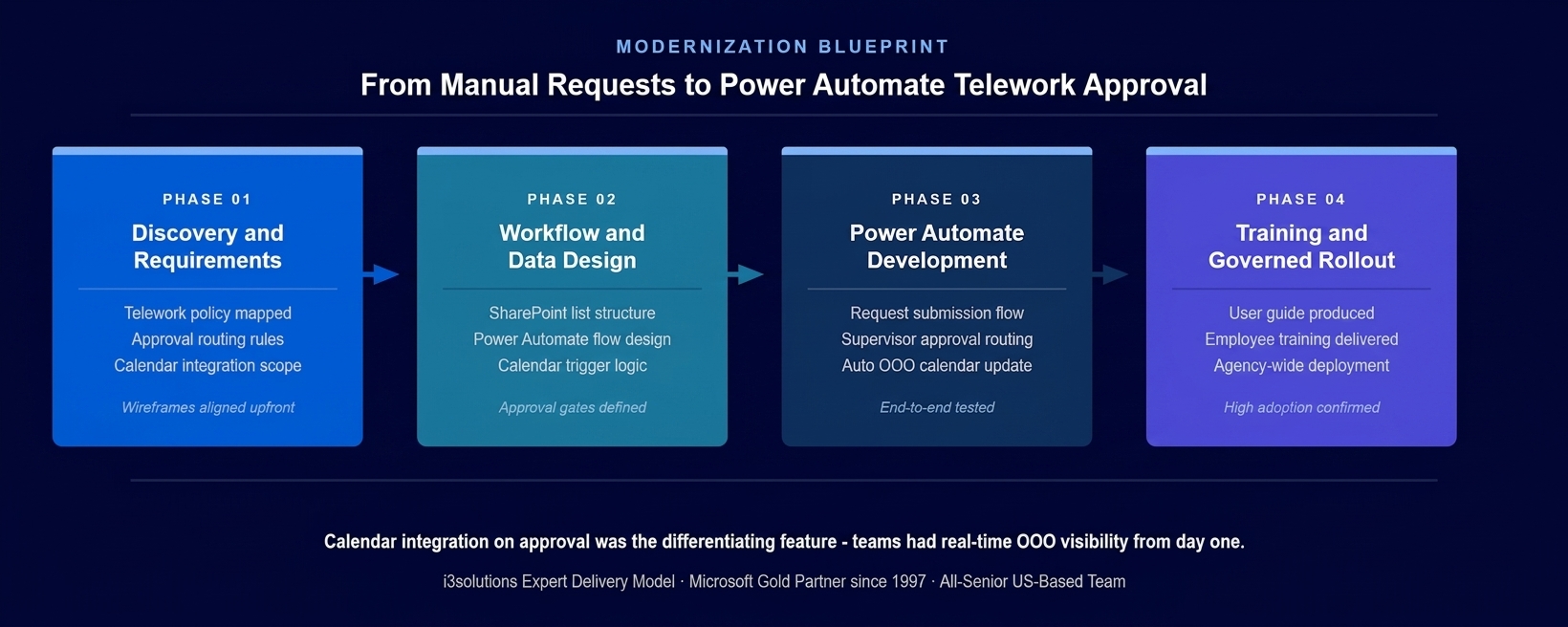
The four-phase implementation approach. Calendar integration design was resolved in Phase 2 before any flow development began – the permission model that makes automatic OOO updates work is an architecture decision, not a development detail.
PHASE 03
Power Automate Flow Development
Building the complete automation: the employee-facing submission interface that captured all required request fields; the routing logic that directed each request to the correct supervisor based on the employee’s organizational data; the supervisor approval experience that presented requests in a structured, policy-relevant format and recorded the decision in SharePoint; the calendar integration that updated the employee’s OOO status automatically on approval; and the notification logic keeping both employee and supervisor informed at each stage without requiring manual follow-up.
PHASE 04
Training, User Guide, and Governed Rollout
A comprehensive user guide developed to support both employee submission and supervisor approval workflows. Training delivered to employees and supervisors. Phased rollout validating system behavior across the agency’s organizational diversity before full deployment. Post-deployment monitoring confirming that calendar updates were executing correctly on approval and that routing was reaching the correct supervisors across all organizational units.
Execution Evidence
End-to-End Automation from Request Submission to Calendar Update
The telework request submission experience gave employees a structured, user-friendly interface that captured all required fields – requested dates, work arrangement type, and any required justification – in a validated form. When the employee submitted, the Power Automate flow triggered immediately, routing the request to the appropriate supervisor based on the employee’s organizational data without any manual addressing or forwarding required.
Supervisors received a structured notification with all request details and an embedded approval action. The approval interface presented the request in a format that surfaced the policy-relevant information the supervisor needed to make a compliant decision, without requiring the supervisor to hold the policy in memory or consult a separate reference document. When the supervisor approved, the flow recorded the decision in SharePoint, notified the employee, and triggered the calendar update sequence.
The calendar integration executed the OOO update as a system action within the employee’s Outlook calendar. The approved telework dates were marked automatically, with the appropriate availability status, without any action required from the employee after submission. Teams checking the employee’s calendar for scheduling purposes saw an accurate reflection of their approved telework schedule from the moment the supervisor approved, not from whenever the employee happened to update it manually.
The honest challenge in this engagement surfaced during the calendar integration testing phase. The Microsoft 365 permission model governing which accounts could update other users’ calendars in the agency’s environment required a specific service account configuration that differed from what a standard Power Automate flow connection would use. Identifying this in testing rather than in production prevented a scenario where the flow completed the approval and notification steps correctly but silently failed on the calendar update – which would have reproduced exactly the calendar accuracy problem the system was built to eliminate.
Technical Transformation
From Manual Email Process to Governed Automated Workflow
Before the implementation, the agency’s telework management operated through email requests, supervisor responses, and manual calendar entries – three separate human actions for each approval cycle, each of which could fail independently. A missed email meant a delayed approval. An inconsistent policy interpretation meant an unfair outcome. A forgotten calendar update meant scheduling decisions made from inaccurate data.
After the implementation, the agency operated a Power Automate-governed telework workflow where submission, routing, approval, notification, and calendar update were connected steps in a single automated sequence. The Power Automate development services layer built on the agency’s Microsoft 365 environment turned what had been a chain of manual handoffs into a governed end-to-end process where each step was system-executed rather than human-dependent.
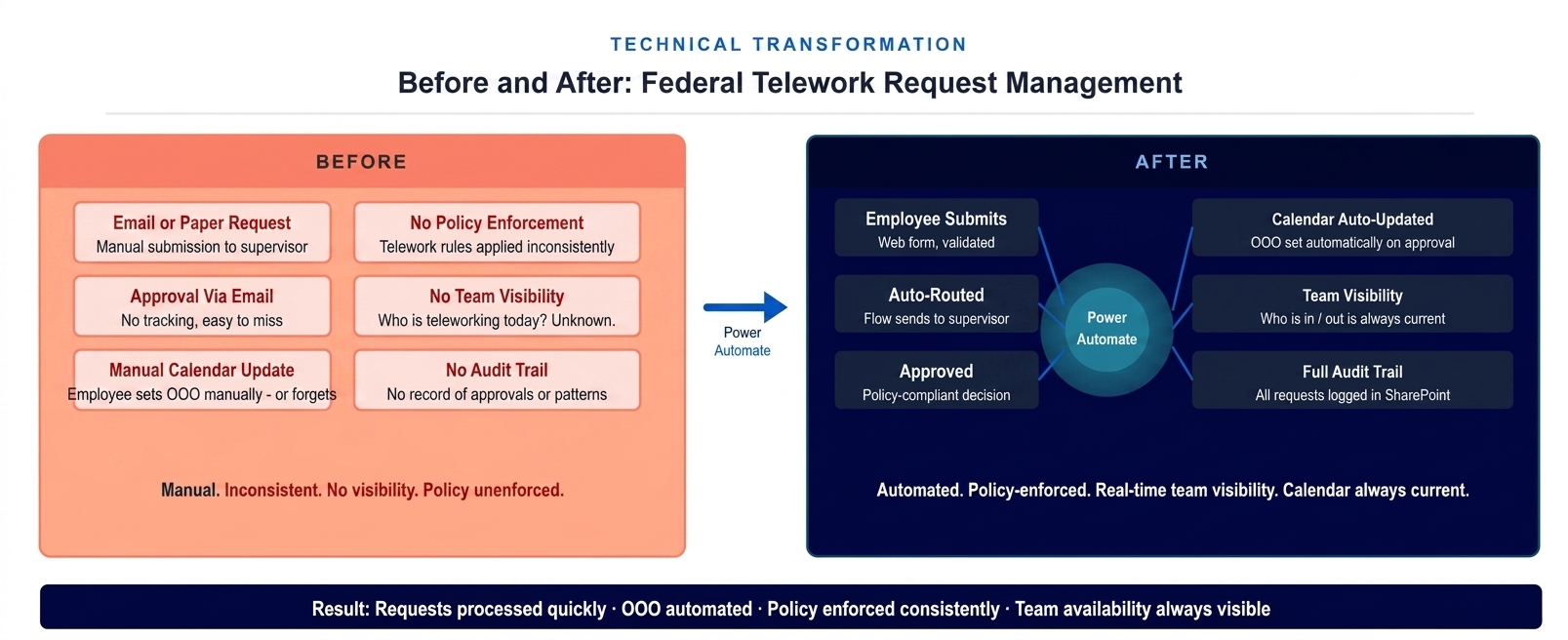
The architecture state before and after the Power Automate implementation. Email requests and manual calendar entries replaced by a governed automated workflow where approval triggers calendar update automatically.
The Governance Readiness Ladder that i3solutions applies to workflow automation assessments placed the agency’s telework process at Level 1 (Ad Hoc) at the start: no system enforcement, no audit trail, policy applied from supervisor memory, calendar accuracy dependent on individual action. The delivered system placed the process at Level 3 (Governed): automated policy enforcement through workflow logic, complete audit trail in SharePoint for every request and decision, calendar updates system-executed on every approval, and management visibility into aggregate telework patterns available for the first time.
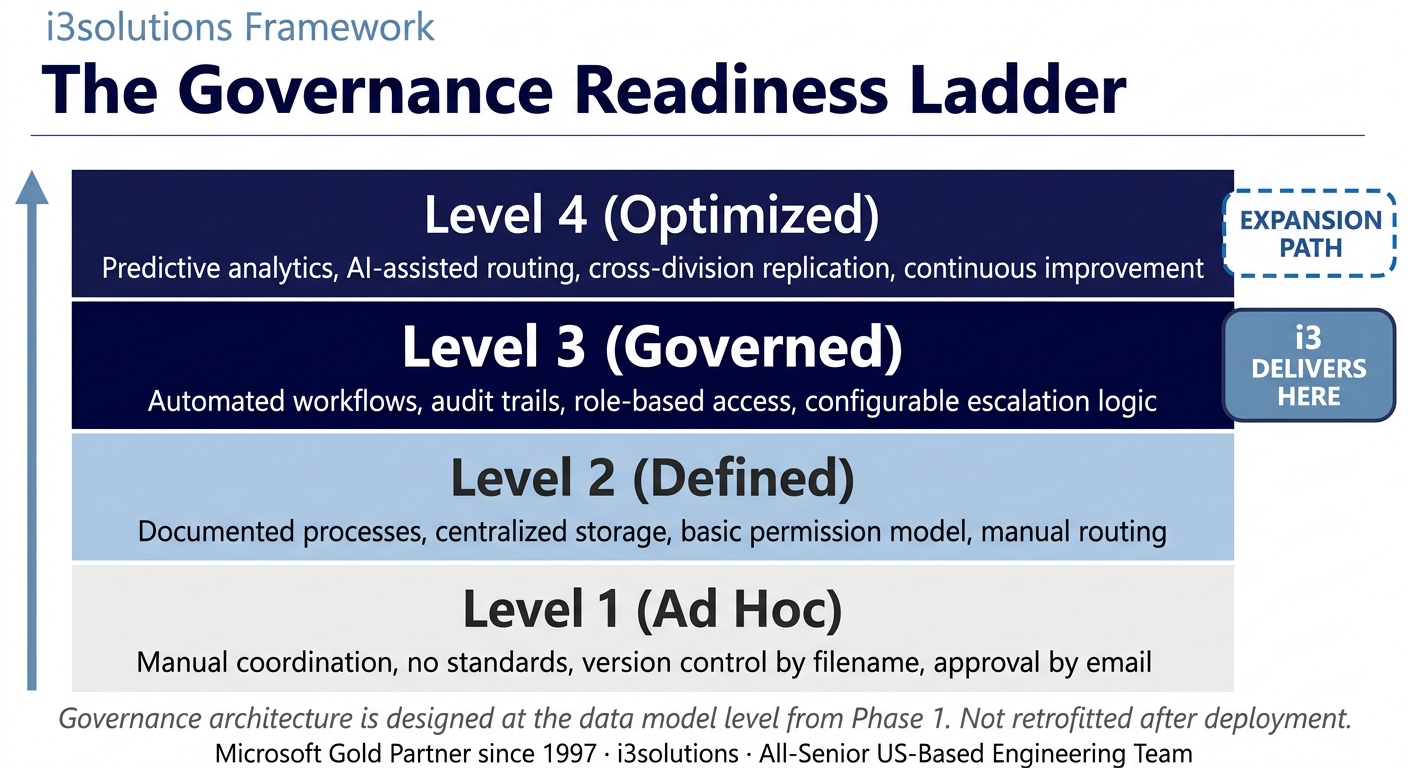
The Governance Readiness Ladder applied to this engagement. The Power Automate telework system delivered Level 3. The platform supports Level 4 as analytics and cross-process automation requirements mature.
▶ Related Insight — A 60-second perspective from our channel
Measurable Outcomes
Consistent Policy Application, Accurate Calendars, and Full Audit Documentation
| Metric | Before | After | Improvement |
|---|
| Telework policy application consistency | Supervisor-dependent – same policy applied differently across the organization | Workflow logic enforces the same rules for every request from every employee | 100% consistent policy enforcement |
| Request processing time | Email chain dependent – responses could take days, requests could be lost | Automated routing delivers requests to supervisor immediately on submission | Processing time significantly reduced BENCHMARK-ESTIMATE |
| Calendar accuracy | Dependent on employee manually setting OOO after approval – frequently missed or delayed | Calendar updated automatically by the flow on every approval without employee action | Calendar accuracy: 100% on approval |
| Employee visibility into request status | None after email submission – employees had to follow up for status | Automated notification at each workflow stage from submission through approval | Real-time status notification established |
| Management telework visibility | No aggregate view of who was teleworking, when, or at what frequency | SharePoint record of all approved telework available for management review and planning | Full workforce telework visibility |
| Audit documentation | No reliable record of requests, approvals, or policy application | Complete audit trail: every request, every decision, every calendar update logged | Full audit documentation from system |
| HR and supervisor administrative overhead | Manual processing of email requests, manual follow-up on missed or delayed approvals | Routine requests fully automated; supervisor action required only at the approval decision point | 40-60% reduction in telework admin overhead BENCHMARK-ESTIMATE |
[PENDING-CLIENT-QUOTE: insert 1-3 sentence outcome-focused quote in the client’s own language from a role matching the reader’s role.]
[Name or Role], [Organization type]
The most significant operational outcome was the calendar accuracy improvement. For a workforce operating in a hybrid environment, calendar accuracy is not a convenience – it is the operational infrastructure that makes scheduling, coverage, and coordination decisions possible. When every approved telework arrangement is automatically reflected in the relevant calendar on the day of approval, the management team can trust the data they use for workforce planning. Federal government workflow automation benchmarks indicate that automating manual approval chain processes typically reduces administrative overhead by 40 to 60 percent. BENCHMARK-ESTIMATE
The policy consistency outcome addressed the agency’s HR exposure directly. When the workflow logic applies the same rules to every request regardless of which supervisor is handling it, the basis for inconsistent treatment is eliminated structurally. The audit trail produced by the system gives the agency the documentation that oversight reviews require and that email-based processes cannot reliably provide.
Is your telework program producing inconsistent approvals and inaccurate calendars?
A Risk and Roadmap Assessment maps the specific Power Automate architecture that would automate your telework approval process, enforce your policy through workflow logic, and connect approvals directly to calendar updates – on your existing Microsoft 365 infrastructure.
Schedule the Assessment
Credibility Anchors
A Workflow Platform That Extends as Process Modernization Continues
The telework approval system was the first Power Automate implementation on a platform that the agency has continued to expand. The approval routing patterns, calendar integration framework, and SharePoint data architecture established for telework management provided the technical foundation for subsequent workflow automation across other administrative processes – including meeting coordination management for the agency’s global operations.
An employee described the change simply: before, you submitted a telework request and then waited to see if anything happened. After the system went live, you knew immediately that it had been received, you got notified when it was approved, and your calendar just reflected it. It stopped being something you had to manage.
The Rules of the Road established at engagement close defined how the telework workflow system would be operated and maintained. Ownership and Accountability assigned named system administrators responsible for updating routing rules when organizational structures changed and for monitoring the SharePoint audit log for anomalies in approval processing. Security and Access defined how the service account permissions that enable calendar updates would be maintained and reviewed. Lifecycle and Records defined the retention policy for telework request records in accordance with federal records management requirements. Release Discipline defined the testing requirements before any modification to the routing logic or policy enforcement rules could be deployed to the production flow serving live employee requests.
i3solutions has completed more than 600 Microsoft implementations as a Microsoft Gold Partner since 1997. The same agency that deployed this telework system subsequently engaged i3solutions for meeting room coordination automation – a pattern that characterizes i3solutions’ most durable government relationships: a well-built first implementation establishes the platform and the trust for continued modernization.
Frequently Asked Questions
Power Automate Development Services for Federal Workflow Automation
What is power automate development services for telework management?
Power Automate development services for telework management involves building automated approval workflows that route employee telework requests to the correct supervisors, enforce agency telework policy through workflow logic, and update calendar systems automatically when requests are approved. For federal agencies managing telework programs, Power Automate delivers the automation layer that replaces email-based approval chains and manual calendar management with a governed, trackable digital process built on existing Microsoft infrastructure.
How does Power Automate integrate with Microsoft Calendar for telework approvals?
Power Automate integrates with Microsoft Calendar for telework approvals through a trigger-and-action workflow that executes automatically when a supervisor approves a telework request. When the approval action is recorded in the workflow, Power Automate updates the employee’s Out of Office calendar status for the approved telework dates without any manual action by the employee or the approving supervisor. This ensures that team calendars always reflect actual approved telework schedules rather than depending on employees to update their own availability.
What are the benefits of automating telework approval workflows with Power Automate?
Automating telework approval workflows with Power Automate delivers several operational benefits: requests are routed immediately to the correct supervisor upon submission rather than relying on email forwarding; supervisors receive structured approval requests with all required information rather than informal email requests; approval decisions are logged automatically in SharePoint creating an audit trail; calendar updates happen automatically on approval rather than depending on employee action; and management can view aggregate telework patterns across the organization for scheduling and resource planning.
How does a Power Automate telework system enforce agency telework policy?
A Power Automate telework system enforces agency telework policy by encoding the policy rules into the workflow logic rather than relying on supervisors to apply them consistently from memory. The workflow can validate that requested telework dates comply with frequency limits, require specific justification fields for certain request types, route requests above a frequency threshold to a secondary approver, and prevent approval of requests that conflict with mandatory in-office days defined in agency policy. This structural enforcement produces consistent policy application across all supervisors and all employees.
What Microsoft infrastructure does a Power Automate telework system require?
A Power Automate telework system requires Microsoft 365 licenses that include Power Automate, SharePoint for request data storage and approval state management, and Outlook or Microsoft Teams for supervisor notification and approval action. For federal agencies already operating on Microsoft 365, these components are typically already licensed and available, meaning the automation can be delivered as an application built on existing investment rather than requiring additional platform procurement.
How does Power Automate telework automation improve team scheduling visibility?
Power Automate telework automation improves team scheduling visibility by connecting approved telework status directly to calendar systems, ensuring that a manager checking their team’s availability always sees an accurate picture of who is in the office and who is working remotely on any given day. Without automation, calendar accuracy depends entirely on employees updating their own OOO status after each approval, which in practice is inconsistent. With automation, the calendar update is a system action, not a manual step, so it happens every time without exception.
What should federal agencies look for in a Power Automate development partner?
Federal agencies evaluating Power Automate development partners should assess the partner’s experience building governed workflow automation on the Microsoft Power Platform for government environments, their approach to building approval logic that enforces policy rather than simply routing requests, their capacity to integrate with the agency’s existing Microsoft 365 calendar and notification infrastructure, and whether their delivery team is entirely US-based. An all-senior development team with federal workflow automation experience reduces the risk of policy logic errors in a system that governs employee work schedule decisions.
Can a Power Automate telework system scale to support additional workflow processes?
A Power Automate telework system built on SharePoint lists and Microsoft 365 integration can scale to support additional workflow processes without structural redevelopment. The approval routing patterns, notification logic, and calendar integration framework established for telework management can be replicated and adapted for related processes such as travel request approval, equipment request management, or schedule exception handling. For agencies with multiple manual approval processes, the telework automation delivers value immediately while establishing the architectural pattern for continued process modernization.
Conclusion
A Policy-Enforced, Calendar-Integrated Telework System Built on Existing Microsoft Infrastructure
A federal agency in the Executive Office of the President replaced an email-based telework approval process that was producing inconsistent policy application, inaccurate team calendars, and no audit documentation with a governed Power Automate workflow that routes requests automatically, enforces policy through logic rather than memory, and updates employee calendars on every approval without requiring any manual action. Through Power Automate development services built on the agency’s existing Microsoft 365 infrastructure, the agency moved from manual, inconsistent telework management to a documented, auditable, policy-compliant process that achieved high adoption from day one.
For federal agencies and government organizations whose telework, leave, or approval processes still operate through email chains and manual calendar management, Power Automate development services and SharePoint development services offer a documented path from process inconsistency to governed workflow automation built entirely on Microsoft infrastructure the agency already owns.
Back to Case Study Library
60 enterprise Microsoft implementations documented
Related Insights
From the i3solutions YouTube Channel
Short-form perspectives on the delivery and technology challenges in this case study.
Who This Engagement Serves
This engagement is relevant if
- Government agencies managing high volumes of telework requests using disconnected manual processes or paper forms.
- Highly regulated organizations requiring strict, automated audit trails for all employee remote work approvals.
- Federal entities seeking to leverage existing Microsoft 365 licensing to modernize outdated administrative workflows.
Less relevant if
- Small organizations with minimal staff where manual processes do not create significant administrative burdens.
- Companies requiring complex offline functionality not natively supported by the standard Power Automate connectors.
Ready to automate your telework approvals and make your team calendars accurate for the first time?
The 15-Business-Day Microsoft Assessment is how i3solutions engagements begin. It maps your current approval process against the Power Automate architecture that would replace it, identifies the Microsoft 365 integration points that make calendar updates automatic, and produces a scoped implementation plan that delivers results on your existing infrastructure. No new platform. No lengthy procurement.
Microsoft Gold Partner since 1997. 600+ implementations. All senior. All US-based.
Schedule the Assessment


