Case Study • Education / EdTech • SharePoint Migration
End of Life on Day One: How an Online Education Company Modernized Its SharePoint Environment

The Enterprise Challenge
SharePoint Migration Services for an Education Technology Platform
An education company known for its innovative online schooling and curricula had built its internal intranet and operational platform on SharePoint 2013. For years, the platform had served its purpose – providing a foundation for collaboration, content management, and the information environment that supported both the company’s staff and its student population. But SharePoint 2013 was approaching end of life, and with it came the compounding risk of an unsupported platform: no more security patches, no more compatibility updates, and no clear path forward without a migration.
The end of life problem was compounded by an accessibility problem. The company’s student population increasingly accessed educational content on tablets and mobile devices, particularly in the homeschooling context where students worked from home learning environments that were not desktop-centric. SharePoint 2013’s interface had not been designed for mobile devices, producing an experience that was technically accessible but practically inadequate for students using tablets as their primary interface. As the EdTech landscape moved toward mobile-first design as a baseline expectation, the company’s legacy SharePoint environment was visibly behind the standard its own curriculum set for engaging digital learning experiences.
The company engaged i3solutions for SharePoint migration services from SharePoint 2013 to SharePoint Online (Office 365), concurrent with a comprehensive intranet modernization that would deliver a mobile-first design, Entra ID integration for smooth user management, and a modern UI/UX experience appropriate for an education organization that prided itself on innovative digital learning.
Strategic Trigger
End of Life Created an Urgent Timeline With No Deferral Option
The forcing function was the non-negotiable timeline of end of life. SharePoint 2013 reaching end of life was not a preference-driven migration opportunity – it was a security and operational obligation with a defined deadline. An organization that continues operating on an unsupported platform after end of life is accepting security risk that grows with every vulnerability discovered and not patched, every compatibility issue that emerges with updated operating systems and browsers, and every month of continued dependence on a technology stack that Microsoft had declared it would no longer support.
The mobile accessibility gap was the second driver. For an education company whose value proposition was built on innovative online learning, operating an intranet that did not function well on tablets was not just a usability problem – it was a brand consistency issue. A company that delivered mobile-optimized curriculum on one side of its technology investment while maintaining a desktop-era intranet on the other was presenting an inconsistent technology experience to the students and educators it served. The migration was the opportunity to close that gap.
The Entra ID integration requirement was a third driver with operational implications. Managing users through the legacy authentication approach that SharePoint 2013 used required manual administrative effort every time a user was onboarded, offboarded, or changed roles. Entra ID integration would automate the user lifecycle management that was consuming IT administrative time at a company whose workforce and student population were both subject to regular change. For context on how user lifecycle management decisions in Microsoft environments affect operational efficiency over time, Integration Governance for MicrosoftPENDING-SCHEDULED covers the integration governance patterns that keep Microsoft environment quality sustainable as organizational change accumulates.
Is your organization running a SharePoint environment approaching end of life?
The risk of operating on an unsupported SharePoint version compounds with every month of delay. A 15-Business-Day Microsoft Assessment maps your migration path, data cleanup requirements, and the intranet modernization scope that would address both the EOL risk and the user experience gaps in your current environment simultaneously.
Request the Assessment
▶ Related Insight — A 60-second perspective from our channel
Stakes (What Happens If They Fail)
Security Vulnerability Accumulation, Tablet Inaccessibility, and User Management Overhead
The security risk of continued SharePoint 2013 operation after end of life was not theoretical. Each vulnerability discovered in the SharePoint codebase after end of life would be publicly disclosed without a corresponding patch from Microsoft. An organization still running SharePoint 2013 would know about the vulnerability – everyone would – but would have no supported remediation path. For an education company handling student data, staff information, and academic content, the security exposure of an unpatched, unsupported platform was a risk the company could not justify indefinitely.
The tablet accessibility gap had a direct student experience consequence. Homeschooling students who primarily used tablets as their learning devices encountered an intranet that was navigable on a desktop but awkward on a tablet – misaligned elements, interface patterns designed for mouse interaction rather than touch, and content layouts that required horizontal scrolling on smaller screens. For a company competing in the online education market on the strength of its user experience, this accessibility gap was a competitive liability as well as a student satisfaction problem.
The user management overhead had a sustained organizational cost. Every new student enrolled, every staff member onboarded, every role change, and every student who completed their program required manual administrative action in the identity system that SharePoint 2013 used. At the volume of a growing online education company, this overhead consumed IT administrative capacity that could be redirected to higher-value work through automated lifecycle management via Entra ID integration.
Constraints and Complexity
Legacy Data Cleanup, Entra ID Configuration, Mobile-First Design for a Diverse User Population
The data cleanup requirement was the highest-risk element of the migration. Years of accumulated content in SharePoint 2013 included active documents, archived content, outdated records, and data with varying quality of metadata and taxonomy. Migrating all of this to SharePoint Online without a cleanup process would produce a modern platform hosting legacy content problems – and potentially migrate security vulnerabilities embedded in legacy content configurations. Collaborating with K12’s internal IT team on the cleanup process required a systematic approach to content inventory, quality assessment, and remediation before any migration data moved to the target environment.
The Entra ID configuration for user transition required careful planning to ensure that the authentication model change from SharePoint 2013 to the Entra ID-integrated Office 365 environment did not disrupt access for the company’s staff and student population during the transition period. The configuration needed to handle the diversity of user types in an education environment – staff with standard organizational roles, students with educational content access, and the various administrative roles that an online education company required – within a single governed identity framework.
The mobile-first design requirement went beyond a responsive layout. The intranet needed to be genuinely designed for tablet and mobile use as a primary experience, not adapted from a desktop design to accommodate mobile access. Custom Bootstrap, jQuery, and JavaScript were deployed to create an interface that leveraged touch interaction patterns, was optimized for the screen sizes and aspect ratios of the tablet devices the student population used, and aligned with the contemporary UI/UX standards that an innovative education company needed to present to its users.
▶ Related Insight — A 60-second perspective from our channel
Selection Rationale (Why They Chose i3solutions)
SharePoint Migration Specialists With Intranet Modernization and Entra ID Depth
The company needed a partner who could handle the full scope of the engagement as a unified project rather than a collection of separate workstreams: the migration assessment and technical planning, the data cleanup collaboration with internal IT, the Entra ID configuration and user transition, and the intranet modernization with mobile-first design – all managed in a coordinated way that minimized operational disruption and delivered a coherent modern platform rather than a migrated version of the legacy environment with a new interface applied.
i3solutions was selected as a Microsoft Gold Partner since 1997 with a documented track record in SharePoint migration services and intranet modernization for organizations where the migration was an opportunity to address accumulated technical debt and deliver a materially improved user experience rather than simply moving the existing environment to a new platform. The Expert Delivery Model that i3solutions operates, staffing every engagement with senior-level SharePoint architects and developers, meant that the migration planning, data cleanup strategy, and intranet design were all handled by practitioners with deep experience in each discipline.
The firm’s Enterprise Delivery Assurance model provided the structured project management that a migration of this scope required. Detailed timelines with key milestones, clear communication with K12’s internal IT team about the data cleanup process and migration sequence, and a testing program that validated the migrated environment before go-live ensured that the migration was executed without the operational disruption that unstructured migrations commonly produce.
The Engagement Approach (Our Plan)
From SharePoint 2013 EOL to Modern, Mobile-First O365 Intranet
PHASE 01
Environment Assessment and Migration Planning
Comprehensive assessment of the SharePoint 2013 environment: content inventory across all site collections, document libraries, and lists; identification of content quality issues, metadata gaps, and legacy configurations requiring remediation before migration; Entra ID readiness assessment for the user transition; and detailed migration timeline with key milestones for the data cleanup, migration execution, and validation phases. This phase identified the scope of the data cleanup effort and produced the migration plan that guided every subsequent decision.
PHASE 02
Data Cleanup and O365 Architecture
Collaborating with K12’s internal IT team on the systematic data cleanup process: identifying content to archive, content to migrate, and content to retire; remediating metadata and taxonomy inconsistencies; and addressing security configurations in the legacy environment that would otherwise migrate alongside the content. Concurrent design of the O365 SharePoint architecture: site structure, library taxonomy, permission model, Entra ID integration configuration, and the information architecture that would make the modernized intranet genuinely navigable for both staff and students.
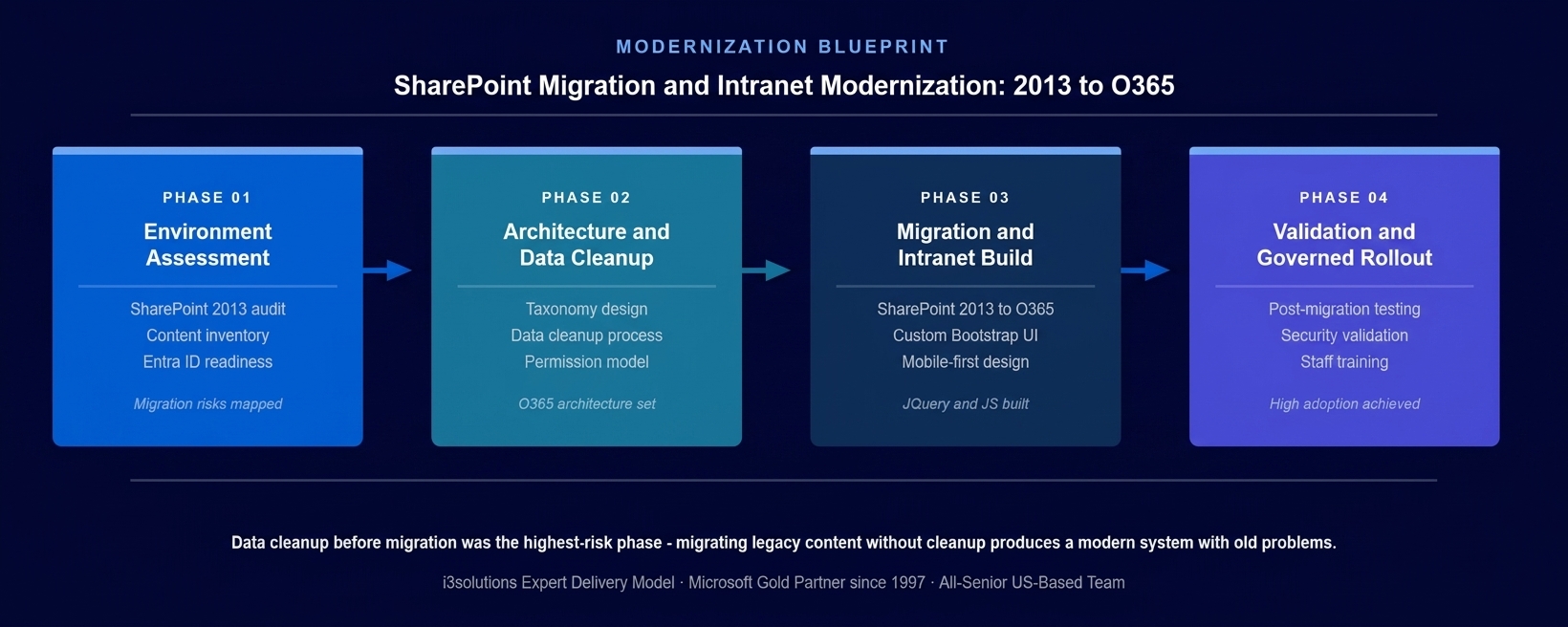
The four-phase implementation approach. Data cleanup in Phase 2, in collaboration with K12’s internal IT team, was the highest-risk phase – migrating without it would have produced a modern platform hosting legacy content problems.
PHASE 03
Migration Execution and Intranet Development
Executing the SharePoint 2013 to Office 365 migration using the validated migration plan and cleaned data set. Concurrent development of the modernized intranet portal: custom Bootstrap, jQuery, and JavaScript delivering the mobile-first interface; modern UI/UX design appropriate for an education technology organization with a diverse user population including students on tablets; Entra ID configuration for smooth user transition and ongoing lifecycle management; and content organization aligned to the architecture designed in Phase 2.
PHASE 04
Validation, Training, and Go-Live
Post-migration validation confirming content integrity, permission model accuracy, and Entra ID integration function across the full user population. Security validation against the risks that had been identified in the legacy environment and addressed during data cleanup. User training for staff administrators managing the new environment. Student-facing user testing confirming the mobile-first interface performed as designed on the tablet devices used in the homeschooling context. Coordinated go-live with legacy system decommission.
Execution Evidence
Clean Migration, Entra ID Live, Mobile Interface Validated on Student Devices
The data cleanup collaboration with K12’s internal IT team produced a migration data set that was materially cleaner than the legacy environment. Content that had accumulated without active use was archived rather than migrated, reducing the noise in the modernized intranet and ensuring that staff and students navigating the new platform encountered current, relevant content rather than years of accumulated legacy material. The metadata remediation work improved the searchability of migrated content in the Office 365 environment, where the modern search capabilities depend on consistent metadata to deliver accurate results.
The Entra ID configuration delivered the user transition the company needed. Staff and students moved to the Entra ID-authenticated Office 365 environment without the disruption that authentication model changes can produce when not properly planned. The automated provisioning rules established as part of the configuration reduced the ongoing administrative overhead for user lifecycle management – new enrollments, staff changes, and student completions were handled through automated workflows rather than manual IT action.
The mobile-first intranet design was validated on the tablet devices used by the student population before go-live. The Bootstrap-based responsive layout, touch-optimized navigation, and content layouts designed for tablet screen sizes performed as designed across the device types in the student population. The validation confirmed that the interface delivered the accessible, engaging digital experience the company needed to present to the students who had been encountering the legacy SharePoint 2013 interface on their tablets.
The honest challenge in this engagement was the breadth of the legacy content volume. The initial assessment had identified the broad categories of content to migrate, archive, and retire, but the detailed content-by-content decisions during the cleanup phase took longer than the initial estimate because the legacy environment had more content in ambiguous states – technically active but not recently accessed, metadata suggesting relevance but content suggesting obsolescence – than the high-level inventory had revealed. Addressing this methodically rather than making bulk decisions that would have migrated content that should have been archived, or archived content that should have migrated, required the additional collaboration time that produced a cleaner end state.
Technical Transformation
From EOL Legacy Platform to Modern, Mobile-First Office 365 Intranet
Before the migration, the company operated a SharePoint 2013 environment that was approaching end of life, was not mobile-optimized for the tablet-using student population, required manual user management, and had accumulated years of content without systematic cleanup. The platform was functional for desktop users with the time to navigate its legacy interface, but was failing the mobile accessibility standard the EdTech market expected and the security standard the company’s obligations required.
After the migration, the company operated a modern SharePoint Online environment integrated with Office 365 and Entra ID, with a custom-designed mobile-first intranet interface that worked as designed on the tablet devices used by the homeschooling student population, automated user lifecycle management through Entra ID, and clean migrated content organized in a taxonomy designed for the modernized platform rather than inherited from the legacy environment.
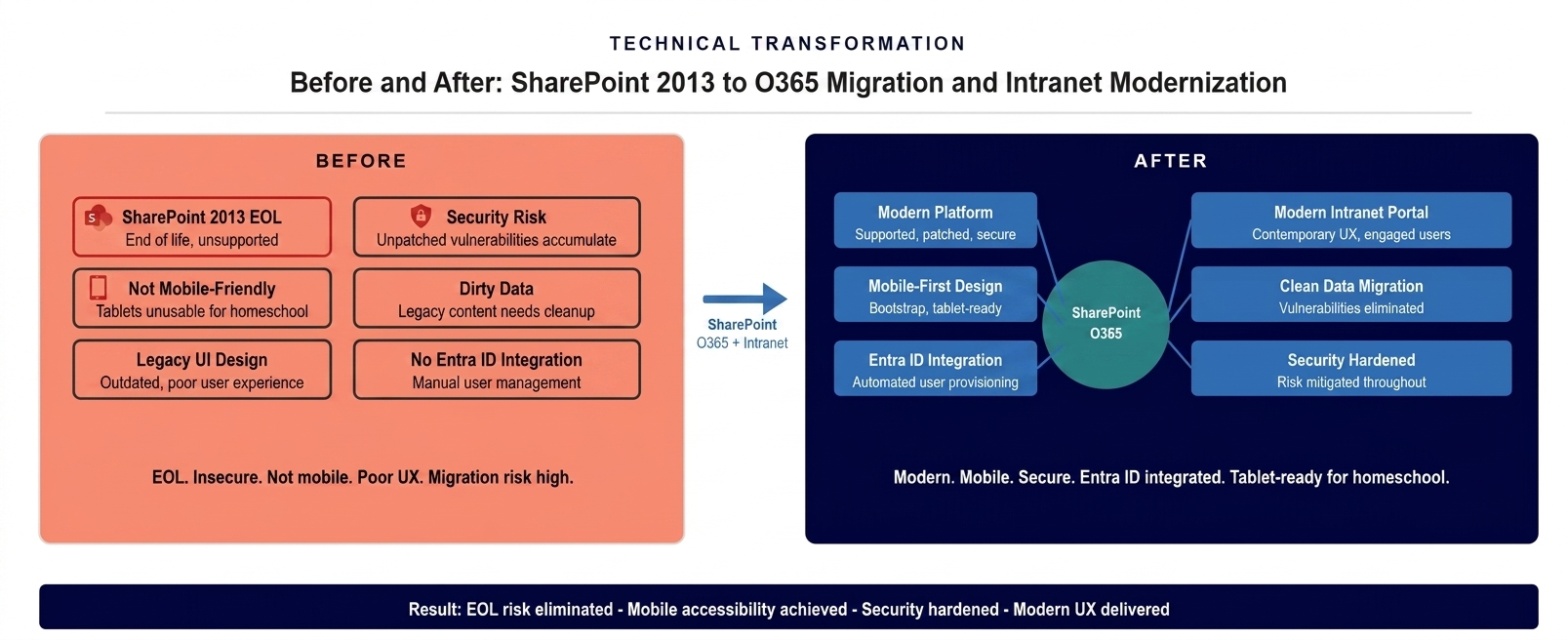
The platform state before and after the migration and modernization. An EOL SharePoint 2013 environment with desktop-era design replaced by a modern, mobile-first SharePoint Online intranet with Entra ID integration and clean migrated content.
The Governance Readiness Ladder applied to this engagement showed the SharePoint environment at Level 1 (Ad Hoc) at the end-of-life point: unsupported platform, accumulated content without governance, manual user management, and a mobile experience that did not meet the company’s own digital standards. The modernized environment delivered Level 3 (Governed): supported and maintained Office 365 platform, governed content taxonomy with systematic lifecycle management, automated user provisioning through Entra ID, and mobile-first design validated against the student user population’s actual devices.
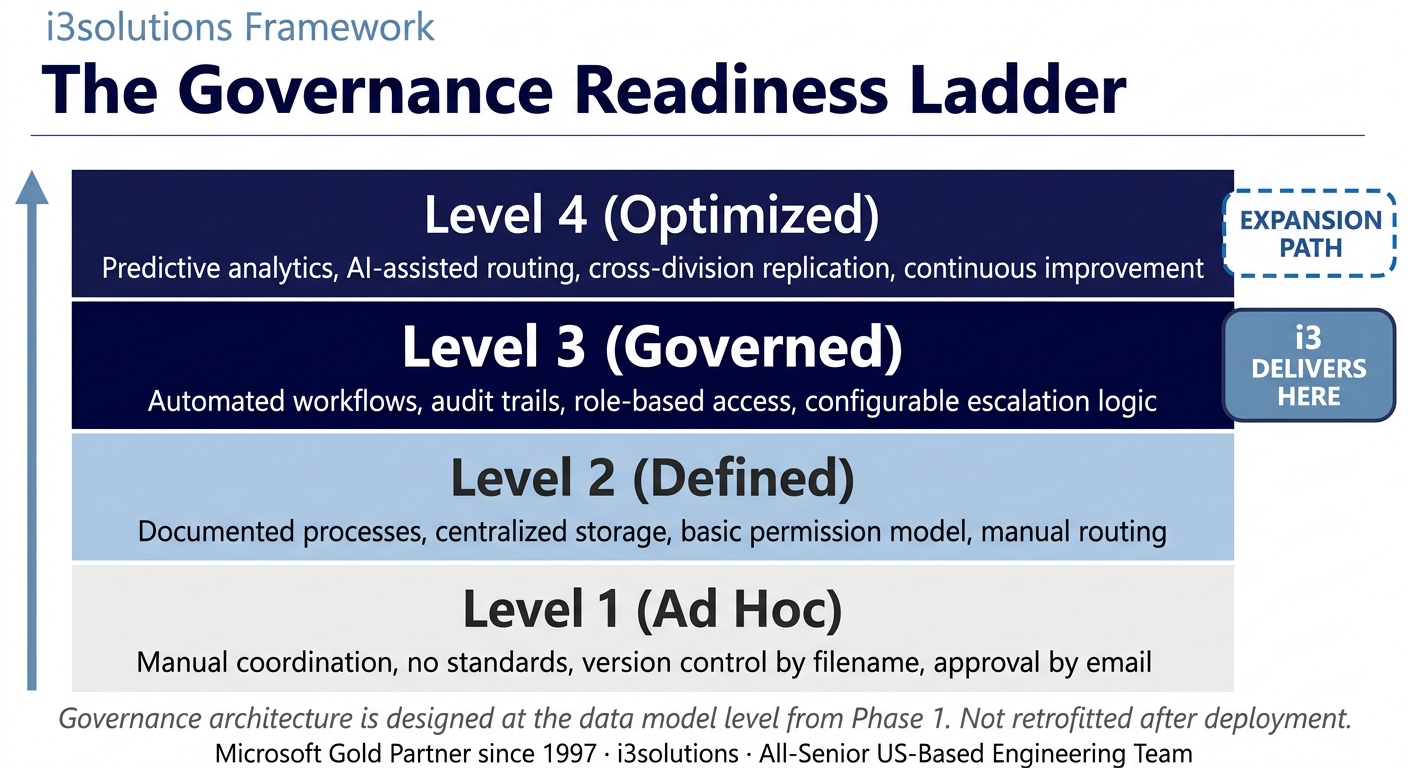
The Governance Readiness Ladder applied to this engagement. The migration and modernization delivered Level 3 SharePoint governance. The Office 365 foundation supports Level 4 as Power Platform integration and advanced collaboration capabilities mature.
▶ Related Insight — A 60-second perspective from our channel
Measurable Outcomes
EOL Risk Eliminated, Mobile Accessibility Delivered, Entra ID Automated
| Metric | Before | After | Improvement |
|---|
| Platform support status | SharePoint 2013 approaching EOL – no security patches, compliance risk accumulating | SharePoint Online on Office 365 – fully supported, continuously updated | EOL security risk eliminated |
| Mobile and tablet accessibility | Desktop-era interface – functional on desktop, inadequate on tablets and mobile | Mobile-first custom Bootstrap design – optimized for tablet use | Full tablet accessibility for homeschool students |
| User management efficiency | Manual – each enrollment, offboarding, and role change required IT administrative action | Automated Entra ID lifecycle management – provisioning rules handle routine user changes | Manual user management overhead eliminated |
| Content quality | Years of accumulated content without systematic cleanup – active and obsolete mixed | Clean migrated content with current taxonomy, archived legacy material retired | Clean, navigable content environment |
| Data security posture | EOL vulnerabilities accumulating without patches, legacy security configurations present | Security configurations remediated during cleanup, supported platform with ongoing patches | Security risk addressed at migration |
| User experience quality | Legacy SharePoint 2013 UI – dated, desktop-optimized, not aligned to EdTech UX standard | Modern Bootstrap-based intranet with contemporary UI/UX appropriate to education technology | Modern UX aligned to organizational brand |
| IT administrative capacity | Significant time consumed by manual user management and legacy system maintenance | Automated provisioning and supported platform free IT for higher-value work | IT capacity redirected from administration to strategy |
[PENDING-CLIENT-QUOTE: insert 1-3 sentence outcome-focused quote in the client’s own language from a role matching the reader’s role.]
[Name or Role], [Organization type]
The primary outcome of the migration was the elimination of the compounding risks that operating on an end-of-life platform creates. Once SharePoint 2013 reached end of life, every day of continued operation was a day of growing security exposure with no supported remediation path. The migration to SharePoint Online addressed that risk completely – and did so through an engagement that simultaneously delivered the mobile accessibility, user management automation, and intranet modernization that the company needed to bring its internal platform to the same standard as its external-facing educational technology.
The mobile accessibility outcome had a direct student experience impact. Homeschooling students accessing educational content on tablets encountered an intranet that was designed for their devices rather than adapted from a desktop interface. The improvement in the quality of that experience was not measurable in a single metric but was visible in the before-and-after comparison of an interface that required workarounds on tablets and one that was designed to be used on them.
Is your organization operating a SharePoint environment that is approaching or past end of life?
A Risk and Roadmap Assessment maps your migration path to SharePoint Online, the data cleanup scope that ensures you migrate a clean environment rather than a modern platform hosting legacy problems, and the intranet modernization approach that addresses the user experience gaps in your current environment alongside the migration.
Schedule the Assessment
Credibility Anchors
A Modern Platform Ready for Office 365 Expansion
The SharePoint Online environment delivered through the migration was not just a modern replacement for the legacy platform – it was a foundation for the Office 365 capabilities that the company had not been able to access while operating on SharePoint 2013. Power Platform integration, Microsoft Teams collaboration, advanced search and AI capabilities, and the full Microsoft 365 application suite were all now accessible on a foundation the company owned outright through its Office 365 investment.
An IT administrator described the user management change simply: before, every new student enrollment meant an IT ticket to create the account and set up access. After the Entra ID integration, the provisioning happened automatically. The enrollment process and the access process were the same process.
The data cleanup methodology developed during the migration became a governance framework for the ongoing management of the modernized intranet. Content owners understood the taxonomy structure that governed where new content should be published, the lifecycle expectations for different content categories, and the process for archiving content that was no longer actively used. The cleanup was not just a pre-migration activity – it was the establishment of the content governance discipline that would prevent the accumulation of the same legacy content problems in the new platform over time.
i3solutions has completed more than 600 Microsoft implementations as a Microsoft Gold Partner since 1997. SharePoint migration engagements that simultaneously address data cleanup, Entra ID integration, and intranet modernization are the most complex migrations we execute – and the ones that deliver the most durable value, because they address the root causes of the legacy platform’s problems rather than simply moving them to a newer platform.
Frequently Asked Questions
SharePoint Migration Services for Education and Enterprise Organizations
What is sharepoint migration services from 2013 to O365?
SharePoint migration services from 2013 to Office 365 involves assessing the legacy SharePoint environment, planning and executing the data migration to SharePoint Online, and typically includes concurrent data cleanup, Entra ID integration for user management, and intranet modernization to deliver a platform that addresses both the compliance risk of operating an end-of-life environment and the user experience gaps that have accumulated during years on the legacy platform. A well-executed migration treats the transition as an opportunity to modernize rather than simply to move.
What are the risks of continuing to operate SharePoint 2013 after end of life?
The risks of continuing to operate SharePoint 2013 after end of life include security vulnerabilities that are publicly disclosed but not patched, browser and operating system compatibility issues as the supported technology stack continues to evolve beyond SharePoint 2013’s tested configurations, compliance exposure from operating an unsupported platform in regulated or security-sensitive environments, and the compounding technical debt of maintaining a system that Microsoft no longer supports with updates, fixes, or security patches.
Why is data cleanup important before a SharePoint migration?
Data cleanup is important before a SharePoint migration because a migration without cleanup produces a modern platform hosting legacy content problems. Years of accumulated content in SharePoint 2013 typically includes active documents, archived material that should be retained but not migrated to the active environment, outdated content that should be retired, and content with inconsistent metadata that undermines searchability in the target environment. Cleaning the data before migration is always more efficient than cleaning it after, because pre-migration cleanup decisions can be made systematically with the original content structure intact.
How does Entra ID integration improve SharePoint user management?
Entra ID integration improves SharePoint user management by replacing manual account creation and access management processes with automated workflows tied to organizational lifecycle events. When a new employee is onboarded or a student enrolls, Entra ID provisioning rules automatically create the appropriate SharePoint access based on the user’s role without requiring IT staff to process individual requests. When users leave or change roles, access is updated automatically rather than through manual IT action, reducing both the administrative burden and the risk of orphaned accounts with inappropriate access.
What does mobile-first SharePoint intranet design require for education organizations?
Mobile-first SharePoint intranet design for education organizations requires designing the interface for touch interaction and the screen sizes of the devices students actually use, rather than adapting a desktop design to accommodate mobile access. This means navigation patterns that work with thumb-based interaction, content layouts that are readable without horizontal scrolling on tablet screen sizes, loading performance optimized for the connectivity conditions of home learning environments, and interaction patterns that feel contemporary rather than like a desktop application viewed on a phone.
How long does a SharePoint 2013 to O365 migration take?
A SharePoint 2013 to Office 365 migration typically spans several months from initial assessment through go-live, with timeline driven by the volume and quality of the legacy content, the scope of data cleanup required, the complexity of the Entra ID integration, and whether the engagement includes concurrent intranet modernization. Engagements that include data cleanup and intranet modernization alongside the migration take longer than pure lift-and-shift migrations, but deliver a materially better end state – a modern, clean, user-experience-improved environment rather than a migrated version of the legacy platform’s problems.
What should organizations look for in a SharePoint migration partner?
Organizations evaluating SharePoint migration partners should assess the partner’s experience with the specific version being migrated from, their approach to data cleanup as part of the migration rather than as an afterthought, their Entra ID integration capability for user management automation, and their capacity to deliver concurrent intranet modernization rather than treating the migration and the user experience improvement as separate subsequent projects. An all-senior team with migration experience across both legacy SharePoint versions and the Office 365 target environment reduces the risk of content loss, permission errors, or authentication failures during the migration transition.
What governance framework should follow a SharePoint migration?
A SharePoint migration should establish a content governance framework that assigns ownership to specific site sections and document libraries, defines the lifecycle expectations for different content categories including review intervals and archival timelines, establishes the taxonomy and metadata standards that keep content searchable as it accumulates, and defines the process for requesting new site sections or structural changes. Without this governance framework, the clean migrated environment will accumulate the same content quality problems that made the pre-migration cleanup necessary, requiring periodic remediation rather than sustained governance quality.
Conclusion
From End-of-Life to Modern, Mobile-First, and Governed
An online education technology company replaced an end-of-life SharePoint 2013 environment with a modern SharePoint Online intranet integrated with Office 365 and Entra ID, delivering a mobile-first custom interface designed for the tablet-using homeschool student population, automated user lifecycle management that eliminated manual provisioning overhead, and clean migrated content organized in a taxonomy designed for the modernized platform. Through SharePoint migration services and SharePoint development services that addressed the EOL risk, the mobile accessibility gap, and the user management overhead simultaneously, the company moved from an accumulating liability to a modern, governed, extensible platform ready for continued Office 365 expansion.
For education organizations and enterprises whose SharePoint environments are approaching or past end of life, SharePoint migration services and Microsoft integration services offer a documented path from legacy risk to modern, governed, mobile-ready Microsoft environments that serve both staff and the user populations they support.
Back to Case Study Library
60 enterprise Microsoft implementations documented
Related Insights
From the i3solutions YouTube Channel
Short-form perspectives on the delivery and technology challenges in this case study.
Who This Engagement Serves
This engagement is relevant if
- K12 districts struggling with low adoption and fragmented communication on an obsolete, legacy intranet platform.
- School systems using outdated portals that lack modern capabilities like real-time document co-authoring and social features.
- Educational institutions needing a centralized digital workplace on SharePoint to improve collaboration between administrative and teaching staff.
Less relevant if
- Higher education institutions seeking a public-facing website solution rather than an internal staff intranet.
- Small single-site private schools needing a simple file share, not a full enterprise collaboration platform.
Ready to migrate from SharePoint 2013 and modernize the experience at the same time?
The 15-Business-Day Microsoft Assessment scopes your migration: the data cleanup approach that ensures you migrate clean, the Entra ID integration that automates user management, and the intranet modernization design that addresses the user experience gaps in your current environment. Migrate once. Get it right.
Microsoft Gold Partner since 1997. 600+ implementations. All senior. All US-based.
Schedule the Assessment


