CONTACT US

Why Microsoft System Integration Fails in Large Enterprises and How to Fix It

Home/Blog/Systems Integration

Systems Integration

Why Microsoft System Integration Fails in Large Enterprises and How to Fix It

·April 15, 2026·14 min read


Large enterprises investing heavily in Microsoft’s ecosystem – Office 365, Dynamics 365, Power Platform, and Azure — frequently struggle with brittle, unreliable integrations that create operational headaches and limit business agility. The root causes of these failures are predictable and addressable. Organizations that take a systematic approach to assessing, stabilizing, and modernizing their integration architectures can improve reliability while reducing operational overhead — but this requires moving beyond tactical fixes to establish sustainable patterns and governance frameworks that prevent future brittleness.

Key Takeaways

  • Point-to-point integration sprawl creates exponential complexity and maintenance overhead that compounds over time. In one assessment, we mapped over 200 point-to-point integrations across a single client’s Microsoft estate — when any single system required maintenance, the ripple effects were unpredictable.
  • Missing ownership and governance frameworks lead to inconsistent approaches and unclear accountability when integrations fail. Without clear RACI models, integration falls into organizational gaps where no team owns the space between systems.
  • Azure Integration Services provide enterprise-grade capabilities that organizations systematically underutilize, defaulting to custom solutions that cost more to maintain and fail more often than platform-native alternatives.
  • Risk-based prioritization focusing on the top 10–15% of high-risk integrations can eliminate 60–70% of integration-related incidents — delivering immediate business value while building momentum for broader modernization.
  • Pattern-driven integration approaches using standardized templates reduce development time and improve consistency across the landscape. One energy sector client reduced average integration delivery time from 8 weeks to 2.5 weeks through reusable patterns and governance processes.
  • Comprehensive monitoring with business-impact alerts enables proactive intervention before customer-facing issues occur. One manufacturing enterprise decreased time to diagnose integration failures from 4.2 hours to 23 minutes through a centralized monitoring dashboard.

Quick Answer

Microsoft system integration fails in large enterprises primarily due to point-to-point sprawl, missing governance, and underutilization of Azure’s native integration capabilities. The solution requires systematic assessment of existing integrations, risk-based prioritization of fixes, and migration to standardized patterns using Azure Integration Services — combined with clear ownership models and proactive monitoring that catches problems before they reach end users.

Symptoms of Failing Microsoft System Integration

Enterprise IT leaders recognize integration problems through recurring operational pain points that compound over time. These symptoms manifest across three critical areas that directly impact business continuity and team productivity.

Frequent Breakages and Manual Workarounds

Brittle point-to-point connections between Microsoft 365, Dynamics 365, and line-of-business systems create cascading failures when upstream systems change. Teams resort to manual data entry, spreadsheet transfers, and temporary workarounds that become permanent fixtures. Critical business processes — customer onboarding, financial reporting — depend on individuals remembering to execute manual steps, creating single points of failure and compliance risks.

These workarounds mask deeper integration debt. What appears as a simple data sync issue reveals hardcoded connections, missing error handling, and integration logic scattered across multiple systems without centralized documentation. A healthcare organization we assessed eliminated 12 manual data reconciliation processes by replacing fragile custom code with Power Platform automated flows — demonstrating the hidden operational overhead that accumulates over time.

Slow Change Cycles and Integration Backlogs

Modifying existing integrations or adding new connections becomes time-intensive as technical debt accumulates. Simple changes that should take days stretch into weeks or months due to fragile custom code, unclear dependencies, and fear of breaking existing flows.

Integration backlogs grow as business units request new connections faster than IT can safely deliver them. Teams spend disproportionate time maintaining existing integrations rather than enabling new business capabilities — creating tension between operational stability and strategic initiatives.

Lack of End-to-End Visibility for Critical Flows

When integration failures occur, diagnosing root causes becomes a time-intensive investigation across multiple systems and teams. Organizations lack centralized monitoring for data flows between Microsoft platforms and external systems, making it difficult to identify bottlenecks, failed transactions, or performance degradation before they impact end users.

This visibility gap extends to business stakeholders who cannot track the status of critical processes that span multiple systems. Without clear integration health metrics, IT leaders struggle to demonstrate the business impact of integration investments or justify modernization initiatives.

⚠ Warning Signs Your Microsoft Integration Landscape Needs Attention

  • Integration changes taking weeks instead of days due to fragile custom code or unclear dependencies
  • Teams maintaining manual workarounds that have become permanent fixtures in critical business processes
  • No centralized visibility into data flows — failures discovered only when end users report problems
  • Unclear accountability when integrations fail — no single team owns the connection between systems
  • Integration backlogs growing faster than IT can safely deliver new connections
  • Systems upgraded or migrated without knowing what downstream integrations will break

Root Causes in Microsoft-Centric Environments

When Microsoft system integration fails in large enterprises, the underlying causes fall into three categories that create compounding technical debt and operational overhead.

Point-to-Point Sprawl and Tactical Integrations

Integration failures stem from accumulated tactical decisions made without considering the broader integration landscape. Teams build direct connections between systems — Dynamics 365 to legacy ERP, Power Platform to external APIs, SharePoint to line-of-business applications — because each connection seems reasonable in isolation. These point-to-point integrations collectively create a web of dependencies that becomes fragile and difficult to maintain.

In one recent assessment, we mapped over 200 point-to-point integrations across a client’s Microsoft estate. When a single system required maintenance, the ripple effects were unpredictable, and teams spent more time managing integration breakages than delivering new capabilities. A large financial services client reduced integration-related critical incidents by 67% after consolidating 47 point-to-point connections into standardized Azure Logic Apps patterns.

Missing Ownership, Standards, and Governance

Integration falls into organizational gaps where accountability is unclear. Application teams own their systems but not the connections between them. Infrastructure teams manage the platforms but lack visibility into business logic embedded in integration flows. The result is unclear accountability when integrations fail and inconsistent approaches to common problems like authentication, error handling, and data transformation.

Without clear ownership models and technical standards, each integration becomes a custom solution. Teams reinvent patterns, duplicate effort, and create maintenance burdens that compound over time. An insurance provider consolidated 23 different integration technologies down to 6 standardized Microsoft platforms, reducing vendor licensing costs by $280K annually while improving maintainability.

Under-Used Azure and Microsoft Integration Capabilities

Enterprises underutilize Microsoft’s native integration capabilities, defaulting to familiar approaches like custom code, direct database connections, or file-based transfers rather than adopting platform-native patterns. Azure Logic Apps, Service Bus, API Management, and Power Automate provide robust, scalable alternatives to custom point-to-point connections — with built-in monitoring, error handling, and security controls.

This creates a paradox: organizations invest heavily in Microsoft platforms but fail to leverage their integration strengths, resulting in higher maintenance costs, reduced reliability, and missed opportunities for standardization. A retail client reduced integration maintenance costs by 43% annually after migrating from custom .NET integration services to Azure Service Bus patterns.

Design Principles for a Stable Integration Landscape

Building resilient Microsoft-centric integration architectures requires moving beyond tactical fixes to establish foundational design principles that prevent future brittleness and create sustainable patterns for growth.

From Point-to-Point to Pattern-Driven Integration

The most critical shift is abandoning one-off point-to-point connections in favor of standardized integration patterns. Instead of building custom connectors between each system pair, establish reusable patterns for common scenarios: API-first data exchange, event-driven messaging, and batch processing workflows.

This pattern-driven approach reduces integration complexity exponentially. Where N systems previously required N(N-1)/2 potential connections, standardized patterns create predictable, maintainable pathways. Teams can leverage proven templates rather than architecting each integration from scratch — reducing development time and improving consistency across the landscape.

Clear Ownership and RACI for Integrations

Integration failures stem from unclear accountability across organizational boundaries. Establish explicit RACI matrices that define who is Responsible, Accountable, Consulted, and Informed for each integration touchpoint — including not just initial development, but ongoing monitoring, troubleshooting, and enhancement.

Assign integration ownership based on business criticality rather than technical convenience. Customer-facing integrations between Dynamics 365 and external systems require different governance than internal reporting flows. Define escalation paths that reflect actual business impact when integrations fail, ensuring appropriate response times and resource allocation.

Using Azure Integration Services and APIs as a Foundation

Azure provides a comprehensive integration platform that enterprises underutilize. Logic Apps, Service Bus, API Management, and Event Grid offer enterprise-grade capabilities for authentication, throttling, monitoring, and error handling that custom solutions rarely match.

Building on Microsoft’s native integration services creates consistency across your landscape. Teams develop expertise in common toolsets rather than maintaining disparate custom solutions. Azure’s built-in monitoring and diagnostics provide visibility that custom integrations lack, enabling proactive issue resolution. API-first design with proper versioning, documentation, and security controls creates stable contracts between systems that survive individual technology changes.

Azure Services to Prioritize for Integration Modernization

  • Azure Logic Apps: Workflow automation for multi-step integrations with 400+ connectors, built-in error handling, and enterprise-grade monitoring.
  • Azure Service Bus: Reliable, decoupled messaging between systems — ideal for replacing fragile point-to-point connections with event-driven patterns.
  • Azure API Management: Standardized interfaces with versioning, security policies, throttling, and developer documentation that creates stable contracts between systems.
  • Azure Event Grid: Event-driven architecture for reacting to changes across Microsoft services and custom applications without polling.
  • Power Automate: Business process automation within the Microsoft 365 ecosystem, ideal for replacing tactical flows built outside IT oversight.

Schedule a Microsoft Integration Health Check

i3solutions helps large enterprises stabilize failing Microsoft integration landscapes — comprehensive assessment, risk-based remediation, and migration to standardized Azure Integration Services patterns that reduce critical incidents by 60–70%. US-based senior resources only.


A Practical Remediation and Modernization Approach

Stabilizing a fragmented Microsoft integration landscape requires a systematic approach that balances immediate risk mitigation with long-term architectural improvements. The most effective remediation programs follow a three-phase methodology that prioritizes critical business flows while building toward sustainable integration patterns.

Assessment and Mapping of Current Integrations

The foundation of successful remediation is comprehensive visibility into your existing integration estate. This involves cataloging all data flows between Microsoft 365, Dynamics 365, Power Platform, and line-of-business systems — regardless of implementation method. Enterprises routinely discover integrations they weren’t aware of: custom Power Automate flows, direct database connections, or legacy middleware components that have become business-critical over time.

A thorough assessment documents technical architecture, business criticality, failure patterns, and ownership for each integration. This mapping exercise typically reveals that 20–30% of integrations lack clear ownership, while another 40% rely on unsupported or deprecated technologies. The full scope of integration debt consistently exceeds initial estimates.

Risk-Based Prioritization of What to Fix First

Not all integrations carry equal business risk. Effective prioritization considers business impact of failure, technical fragility, regulatory requirements, and dependencies on other systems. Critical customer-facing processes and financial reporting flows receive highest priority, followed by integrations supporting core operational workflows.

This risk-based approach ensures remediation efforts deliver maximum business value while managing resource constraints. Organizations find that addressing the top 10–15% of high-risk integrations eliminates 60–70% of their integration-related incidents. A global logistics company improved system availability from 94.2% to 99.1% by implementing proper error handling and retry policies across their Microsoft ecosystem.

Phased Migration to Standard Patterns and Platforms

Successful modernization follows a phased approach that replaces point-to-point connections with standard integration patterns using Azure Integration Services, Logic Apps, and API Management. Each phase delivers measurable improvements in reliability and maintainability while building toward a more cohesive architecture.

A professional services firm eliminated 89% of data synchronization errors between Dynamics 365 and legacy ERP through implementation of proper change data capture patterns. For a manufacturing client, we consolidated 34 separate data synchronization jobs into a unified Azure Logic Apps framework — reducing integration maintenance overhead by 40% and improving change deployment time from weeks to days.

Governance, Monitoring, and Support

Once your Microsoft integration landscape is stabilized, sustained success requires disciplined governance, proactive monitoring, and support models that match business criticality. These operational frameworks prevent regression to tactical integration approaches while ensuring consistent performance.

Integration Standards, Review Boards, and Change Control

Establish clear integration standards covering API design, error handling, security protocols, and data formats across your Microsoft ecosystem. Create an integration review board with representatives from IT architecture, security, and business stakeholders to evaluate new integration requests and ensure alignment with enterprise patterns.

Implement change control processes that require impact assessment for modifications to critical flows between Dynamics 365, Microsoft 365, and line-of-business systems. One regulated enterprise reduced integration-related incidents by 60% after implementing mandatory architecture reviews for changes affecting customer-facing processes. Document integration patterns, approved technologies, and escalation procedures in a centrally accessible repository — preventing teams from creating new point-to-point connections that bypass established governance.

Monitoring and Alerting for Critical Integration Flows

Deploy comprehensive monitoring across your Azure integration services — Logic Apps, Service Bus, and API Management. Configure alerts based on business impact rather than just technical metrics: alert when customer order processing flows exceed acceptable latency thresholds, not just when system resources spike.

Establish end-to-end visibility for critical business processes that span multiple Microsoft and third-party systems. One manufacturing client implemented correlation IDs across their entire order-to-cash flow, reducing mean time to resolution from hours to minutes when issues occur. Create dashboards that provide real-time integration health status for both technical teams and business stakeholders.

Support Models That Reflect Integration Criticality

Align support tiers with business criticality rather than technical complexity. Customer-facing integrations between Dynamics 365 and external systems require different response times than internal reporting flows. A construction company reduced integration team overtime by 52% after implementing proactive monitoring and automated alerting for critical business flows.

Establish clear escalation paths and runbooks for common integration failure scenarios. Train support teams on both Microsoft-native tools and third-party systems to avoid delays in cross-platform troubleshooting.

How i3solutions Leads Microsoft Integration Rescue Programs

i3solutions has guided organizations through systematic remediation of complex integration landscapes. Our approach combines technical depth with practical delivery methods that keep business operations stable while modernizing underlying architecture.

Our assessment methodology maps integration flows across Microsoft 365, Dynamics 365, Power Platform, and line-of-business systems to identify risk patterns and architectural gaps. We document interface contracts, data lineage, error handling, and monitoring coverage to establish baseline health metrics. A recent engagement with a regulated financial services organization revealed 147 point-to-point integrations — with 23% lacking proper error handling and 31% using deprecated authentication methods. The assessment identified $2.3M in annual operational overhead from manual reconciliation processes that could be eliminated through standardized integration patterns.

We design target-state architectures that leverage Azure Integration Services, API Management, and Microsoft’s native connectivity options while maintaining compatibility with existing systems. Our roadmaps prioritize high-impact, low-risk changes that deliver measurable improvements in the first 90 days.

Our delivery model emphasizes knowledge transfer and capability building within client teams. We work alongside internal developers and architects to implement new patterns while establishing governance frameworks that prevent regression. Engagements include hands-on workshops for integration standards, code reviews for critical flows, and establishment of integration centers of excellence that maintain consistency as the landscape evolves.


Schedule a Microsoft Integration Health Check

Tell us about your current Microsoft integration landscape and we’ll show you exactly where the fragility is, which integrations pose the highest business risk, and how a phased remediation approach stabilizes critical flows within 90 days. No commitment required.


Frequently Asked Questions: Microsoft System Integration Failures

How long does it typically take to remediate a failing Microsoft integration landscape?

Most enterprise remediation programs take 6–18 months depending on complexity, with initial stabilization of critical flows achievable within the first 90 days. The timeline depends on the number of integrations, technical debt levels, and organizational readiness for change.

What are the warning signs that Microsoft integrations need immediate attention?

Key indicators include frequent manual workarounds, integration changes taking weeks instead of days, lack of visibility when failures occur, and teams spending more time maintaining existing connections than building new capabilities.

Should we replace all point-to-point integrations or focus on the most critical ones first?

Focus on high-risk, business-critical integrations first using a risk-based prioritization approach. Addressing the top 10–15% of problematic integrations eliminates 60–70% of incidents while building momentum for broader modernization efforts. Not all integrations need to be replaced — some low-risk flows can remain as-is while you invest remediation effort where it matters most.

How do we prevent integration sprawl from recurring after remediation?

Establish clear governance frameworks including integration standards, review boards for new connections, and standardized patterns using Azure Integration Services. Document approved technologies and require architecture reviews for changes to critical flows. Without ongoing governance, integration sprawl typically recurs within 12–18 months of any cleanup effort.

What is the difference between fixing integrations in-house versus using external consultants?

External consultants bring proven methodologies and experience with common failure patterns, accelerating remediation timelines. However, knowledge transfer and capability building within internal teams is essential for long-term sustainability — the goal should be internal ownership of a modernized landscape, not ongoing dependency on external support.

How much can we expect to save by modernizing our Microsoft integration landscape?

Organizations typically see 40–60% reduction in integration maintenance costs, 50–70% fewer critical incidents, and significant improvements in change deployment times. Specific savings depend on current technical debt levels and integration complexity — the more fragmented the landscape, the larger the ROI from standardization.

Which Azure services should we prioritize for integration modernization?

Start with Azure Logic Apps for workflow automation, Service Bus for reliable messaging, and API Management for standardized interfaces. These provide the foundation for most enterprise integration patterns while offering built-in monitoring and security controls that custom solutions cannot match at the same cost.

How do we maintain business continuity during integration remediation?

Use a phased migration approach that replaces integrations incrementally while maintaining parallel operations during transition periods. Comprehensive testing and rollback procedures ensure business processes remain stable throughout modernization efforts.

Scot Johnson, President and CEO of i3solutions

Scot Johnson — President & CEO, i3solutions
Scot co-founded i3solutions nearly 30 years ago with a clear focus: US-based expert teams delivering complex solutions and strategic advisory across the full Microsoft stack. He writes about the patterns he sees working with enterprise organizations in regulated industries, from platform adoption and enterprise integration to the operational decisions that determine whether technology investments actually deliver.View LinkedIn Profile

Posted in Uncategorized

Enterprise Workflow Automation for Large Organizations

Workflow Automation
April 14, 2026  ·  12 min read

Enterprise Workflow Automation for Large Organizations

Enterprise workflow automation isn’t just about replacing manual tasks with digital processes. It’s about solving the operational challenges that create hidden drag across your organization before they become expensive technology failures.

SJ
Scot Johnson
President & CEO, i3solutions
Enterprise IT leaders reviewing workflow automation dashboards


Enterprise workflow automation isn’t just about replacing manual tasks with digital processes. It’s about solving operational challenges that create hidden drag across your organization. When IT leaders start seeing support tickets clustering around the same manual handoffs, approval bottlenecks that consistently miss SLA targets, and business users building shadow solutions to work around established processes, the underlying problem becomes clear: the organization needs workflow automation services that address process design before platform implementation, not after costly deployment cycles reveal fundamental flaws.

Key Takeaways
  • Workflow automation problems manifest as operational symptoms before they become technology issues. Support ticket clusters, approval bottlenecks, and shadow solutions are the early warning signs. Addressing the business problem first prevents expensive rework later.
  • Organizations implementing workflow automation without prioritization frameworks complete only 35% of planned automations within budget. Upfront assessment is not optional; it determines whether the program delivers measurable outcomes or stalls halfway through.
  • Companies that automate unstable processes see 60% of workflows require significant rework within the first six months. Process stability and clear business rules must be established before automation begins.
  • Cross-system handoffs between Microsoft 365, CRM, and ERP systems fail 15-20% of the time without proper integration architecture. Each failure requires manual intervention, creating support overhead that can exceed the cost of the original manual process.
  • Platform-first automation decisions lead to 50% higher total cost of ownership compared to outcome-led approaches that prioritize business continuity and long-term maintainability.
  • Power Platform Center of Excellence (CoE) implementations reduce workflow support tickets by 35% through standardized governance and monitoring, while organizations using Microsoft Teams for approvals see 40% faster decision cycles compared to email-based processes.
Quick Answer

Enterprise workflow automation succeeds when organizations prioritize process stability and governance before platform implementation. The most effective approach combines outcome-led assessment, Microsoft-native integration patterns, and phased rollout with clear ownership. Organizations need workflow automation partners who can navigate integration complexity, regulated environments, and enterprise-scale change management.

Three-phase enterprise workflow automation methodology: discovery, architecture, implementation
i3solutions enterprise workflow automation methodology: three integrated phases from process discovery through governed deployment.

Why Workflow Automation Becomes an Enterprise Issue Before It Becomes a Technology Issue

The Operational Symptoms IT Leaders See First

The first signs of workflow problems show up as operational symptoms rather than technology failures. IT leaders notice support tickets clustering around the same manual handoffs, approval bottlenecks that consistently miss SLA targets, and business users building shadow solutions to work around established processes. These symptoms point to deeper operational issues that technology alone cannot solve.

When business units start requesting “quick automation fixes” for processes that have never worked smoothly in manual form, the real challenge emerges. Organizations need workflow automation approaches that establish process stability and clear ownership before introducing automation complexity.

Why Manual Approvals and Fragmented Handoffs Create Hidden Drag

Manual approval processes in enterprise environments average 5.2 days per transaction, with 30% of delays caused by unclear routing rules rather than actual decision time. This hidden drag compounds across departments, creating cascading delays that affect project timelines, vendor relationships, and compliance deadlines.

Cross-system handoffs between Microsoft 365, CRM, and ERP systems fail 15-20% of the time without proper integration architecture. Each failure requires manual intervention, creating support overhead that can grow significantly as automation coverage increases. The result is often higher operational costs than the manual processes automation was meant to replace.

Why Isolated Automations Often Make Governance Worse

Individual departments implementing workflow automation without enterprise oversight create new governance challenges rather than solving existing ones. Organizations with fragmented workflow automation report 40% higher support costs due to multiple platforms requiring separate maintenance and training.

IT departments spend an average of 23 hours per month troubleshooting workflow failures when governance frameworks are not established upfront. Each isolated automation introduces unique failure modes, security considerations, and compliance requirements that must be managed separately, multiplying administrative overhead across the organization.

What Enterprise Workflow Automation Services Should Actually Include

Process Discovery and Workflow Prioritization

Effective workflow automation begins with systematic process discovery that identifies which workflows create the most operational drag and which offer the highest automation value. Organizations implementing workflow automation without prioritization frameworks report completing only 35% of planned automations within budget, making upfront assessment critical for program success.

Process discovery should map existing handoffs, identify decision points, and document current failure modes before any platform selection occurs. This foundation prevents the common mistake of automating unstable processes, which leads to 60% of workflows requiring significant rework within the first six months of deployment.

Workflow Automation Readiness: Key Indicators

  • Business rules: Ready when clearly documented with consistent application. Needs stabilization when exceptions are frequent or criteria are unclear.
  • Stakeholder alignment: Ready when there is a single process owner and defined approvers. Needs work when ownership is disputed or authority is unclear.
  • Current performance: Ready when outcomes are predictable and SLAs are measurable. Needs stabilization when results are inconsistent with no baseline metrics.
  • Integration requirements: Ready when data sources are well-defined with stable APIs. Needs work when legacy systems require manual data entry or undocumented connections.
  • Compliance needs: Ready when audit trails are established and controls are clear. Needs stabilization when requirements are undefined or tracking is manual.

Architecture, Integration, and Control Design

Enterprise workflow automation requires integration architecture that connects Microsoft 365, line-of-business systems, and compliance controls without creating new security gaps. Microsoft Power Platform provides native connectors for over 400 business applications, with premium connectors enabling secure integration with SAP, Oracle, and custom APIs through Azure Logic Apps. Power Automate flows can leverage Azure Active Directory for authentication, ensuring that automated workflows maintain the same security boundaries as manual processes.

Control design becomes critical for document-driven processes with compliance requirements, which see 3x more audit failures when automated without proper oversight mechanisms. Architecture decisions made during initial implementation determine long-term maintainability and scalability across the enterprise.

Implementation, Rollout, Monitoring, and Support

Workflow automation projects without dedicated business ownership have a 70% higher likelihood of scope creep and budget overruns. Successful implementation requires clear ownership structures, phased rollout plans, and monitoring systems that track both technical performance and business outcomes.

Microsoft Power Platform Admin Center provides centralized monitoring for workflow performance, error rates, and usage patterns across enterprise environments. Power Platform Center of Excellence (CoE) starter kits include governance policies, monitoring dashboards, and automated compliance reporting that reduce administrative overhead while maintaining enterprise controls.

Post-launch support must address workflow failures, business rule changes, and integration updates as enterprise systems evolve. Platform-first automation decisions lead to 50% higher total cost of ownership compared to outcome-led approaches that prioritize business continuity and long-term maintainability.

Where Workflow Automation Creates the Most Business Value

Approval Chains and Decision Routing

Approval workflows create measurable business value when they eliminate routing ambiguity and reduce decision latency. The value isn’t just faster approvals; it’s predictable approval timelines that enable better planning across dependent processes. Organizations see the strongest ROI when automating approval chains that involve multiple departments or external stakeholders.

Microsoft Teams integration enables approval notifications within existing collaboration workflows, reducing context switching and accelerating decision cycles. Power Automate approval actions include automatic escalation, delegation capabilities, and audit trail generation that maintains compliance while improving operational efficiency.

Cross-System Handoffs Between Microsoft 365, CRM, ERP, and HR Systems

Cross-system integration delivers value by eliminating manual data entry and reducing handoff failures. The highest-value integrations involve employee onboarding workflows that span HR systems, Active Directory, and Microsoft 365, or customer workflows that connect CRM data with document generation and approval processes.

SharePoint workflow modernization often serves as the foundation for these cross-system integrations, particularly when organizations need to maintain document-centric processes while connecting to modern business applications.

Document-Driven and Compliance-Sensitive Processes

Document workflows create value through consistent processing, audit trails, and compliance automation. Organizations handling contracts, regulatory submissions, or financial approvals benefit most from workflow automation because these processes require both human judgment and systematic tracking.

The value comes from building compliance controls into the workflow itself: automatic retention policies, approval documentation, and audit trail generation that reduces manual compliance overhead while improving accuracy. Document-driven processes with compliance requirements see 3x more audit failures when automated without proper control design.

15-Business-Day Assessment
Schedule a Workflow Automation Assessment
i3solutions delivers enterprise workflow automation services for Microsoft-centric organizations: outcome-led process discovery, Power Platform implementation, governance frameworks, and ongoing support that eliminate approval bottlenecks and cross-system handoff failures. US-based senior resources only.

Schedule an Assessment

Why Workflow Automation Efforts Stall or Underdeliver

Automating Unstable Processes

The most common cause of workflow automation failure is automating processes that aren’t stable in their manual form. Companies that automate unstable processes see 60% of workflows require significant rework within the first six months of deployment, because the underlying process logic wasn’t clearly defined before automation began.

Unstable processes exhibit inconsistent outcomes, frequent exceptions, or unclear decision criteria. Automating these processes often reveals gaps in business logic that should have been resolved during manual operation, creating expensive rework cycles that could have been avoided through better upfront assessment.

Weak Ownership and Unclear Governance

Workflow automation projects fail when business ownership is unclear or governance frameworks are established after implementation. Weak ownership manifests as unclear requirements, inconsistent stakeholder feedback, and lack of accountability for business outcomes.

Without clear governance, organizations face scope creep, budget overruns, and ongoing support challenges that undermine automation value. Establishing ownership and governance frameworks upfront prevents these issues and ensures that automated workflows align with business objectives.

Platform-First Decisions Without Business Prioritization

Organizations that select automation platforms before understanding business priorities underdeliver on workflow automation investments. This approach results in automating processes that are technically feasible rather than strategically important, creating technical debt when business requirements don’t align with platform capabilities.

How i3solutions Approaches Workflow Automation Differently

Outcome-Led Assessment Before Implementation

i3solutions begins every workflow automation engagement with business impact analysis rather than technology capability mapping. This assessment identifies which processes will deliver measurable operational improvements, have stable business rules, and align with enterprise governance requirements.

Our assessment methodology includes stakeholder interviews, current-state process mapping, and integration dependency analysis that reveals hidden complexities before implementation begins. The assessment deliverable includes prioritized automation roadmaps with business case validation, technical feasibility analysis, and resource requirements that enable informed investment decisions.

Microsoft-Native Delivery with Enterprise Controls

Our implementation approach leverages Microsoft Power Platform governance frameworks to deliver workflow automation that integrates seamlessly with existing Microsoft 365, Azure, and line-of-business systems. This Microsoft-native approach reduces integration complexity, maintains security consistency, and leverages existing IT investments.

Enterprise controls include environment management, security policies, and lifecycle governance that prevent the fragmentation issues common in departmental automation efforts. Our delivery methodology ensures that automated workflows maintain audit trails, approval authorities, and data protection requirements while providing the scalability and reliability that enterprise operations require.

Post-Launch Optimization and Support

Workflow automation requires ongoing monitoring, optimization, and support to maintain business value as requirements evolve and system integrations change. Our post-launch support includes performance monitoring, user adoption metrics, and business impact measurement that demonstrate ROI and identify expansion opportunities.

This partnership approach recognizes that automation is an ongoing capability rather than a one-time implementation, ensuring that workflow investments continue delivering value over time.

No commitment required
Schedule a Workflow Automation Assessment
Tell us about the approval bottlenecks and manual handoffs creating drag in your organization and we’ll show you exactly which processes are ready for automation, what the governance framework should look like, and how a Microsoft-native implementation delivers measurable ROI.

Schedule an Assessment

Frequently Asked Questions: Enterprise Workflow Automation Services

What is the difference between workflow automation tools and workflow automation services?

Workflow automation tools provide the platform capabilities, while services include process discovery, prioritization, governance design, and ongoing support. Services address the business and operational challenges that determine automation success, not just the technical implementation.

How do you prioritize which workflows to automate first?

Effective prioritization considers business impact, process stability, integration complexity, and governance requirements. The highest-value automations address approval bottlenecks, cross-system handoffs, and document-driven processes with clear business rules and measurable outcomes.

What are the most common reasons workflow automation projects fail?

The three primary failure modes are automating unstable processes, weak business ownership and unclear governance, and platform-first decisions without business prioritization. These issues create expensive rework cycles and undermine automation value.

How long does enterprise workflow automation implementation take?

Implementation timelines depend on process complexity, integration requirements, and governance needs. Simple approval workflows take 4-6 weeks, while complex cross-system integrations with compliance requirements can take 3-6 months including testing and rollout phases.

What ongoing support do automated workflows require?

Automated workflows need monitoring for performance and failures, updates for changing business rules, integration maintenance as systems evolve, and user support for exceptions and training. Organizations often underestimate these ongoing requirements during initial planning.

How do you measure ROI from workflow automation?

ROI measurement should include time savings from eliminated manual work, reduced error rates and rework, improved compliance and audit trail efficiency, and decreased support overhead. The most meaningful metrics align with specific business outcomes rather than just technical performance.

What is the role of governance in enterprise workflow automation?

Governance establishes approval authorities, audit trail requirements, security controls, and lifecycle management that prevent fragmentation and ensure compliance. Without proper governance, automation efforts create new operational risks rather than solving existing challenges.

Ready to stop firefighting?
Get a concrete automation roadmap in 15 business days
We map your current workflows, identify the highest-ROI automation candidates, and give you a prioritized plan. No slides. No sales pitch. Just a roadmap your team can execute.

Schedule your assessment

SJ
Scot Johnson
President & CEO, i3solutions
Scot co-founded i3solutions nearly 30 years ago with a clear focus: US-based expert teams delivering complex solutions and strategic advisory across the full Microsoft stack. He writes about the patterns he sees working with enterprise organizations in regulated industries.

Hyperautomation in Microsoft 365: Beyond Simple Workflows

Home/Blog/Power Platform
POWER PLATFORM

April 13, 2026  ·  14 min read

Hyperautomation in Microsoft 365: Beyond Simple Workflows

Traditional workflow automation addresses point solutions: approving expense reports, routing documents, or sending notifications. These tactical wins often create new problems – data silos between

RC
Rafael Couto
Senior Architect, i3solutions


Hyperautomation represents the evolution from isolated workflow fixes to comprehensive, end-to-end process transformation using integrated technology stacks. For Microsoft-centric enterprises, this means orchestrating Power Automate, Power Apps, Dataverse, Power BI, and AI capabilities to eliminate manual handoffs across entire business journeys – not just individual tasks. Organizations seeking sustainable automation programs find that Microsoft’s integrated ecosystem provides the governance frameworks and audit trails required for regulated environments, while delivering cycle-time reductions that isolated workflow tools simply cannot match.

Key Takeaways

  • Hyperautomation requires orchestrating multiple Power Platform components – Power Automate, Power Apps, Dataverse, Power BI, AI Builder – rather than deploying standalone workflow tools. Isolated automation creates new silos; hyperautomation eliminates them.
  • End-to-end automation journeys from intake to fulfillment typically reduce cycle times by 30-60% while eliminating manual handoffs and data re-entry errors. Invoice processing journeys have been reduced from 5-7 days to 2-3 hours with 95% straight-through processing rates.
  • Governance frameworks must be built into hyperautomation architecture from day one to prevent shadow IT proliferation and maintain security boundaries across connected systems. Architecture-first approaches reduce technical debt by 50-70% compared to point-solution deployments.
  • Human-in-the-loop design positions people for high-value decisions and exception handling rather than routine data processing. In regulated environments, this human oversight is critical for maintaining accountability and audit readiness.
  • Executive buy-in requires focusing on measurable business outcomes – cycle time, error rates, audit trails – rather than technology features or platform capabilities. ROI measurement shows payback periods of 8-15 months for well-scoped programs.
  • Organizations report 25-40% reduction in manual processing errors when implementing end-to-end automation with human oversight points, alongside 70-85% reduction in shadow IT automation attempts when governance is built in from the start.

Quick Answer

Hyperautomation in Microsoft 365 goes beyond simple workflow automation to create end-to-end process transformation using Power Automate, Power Apps, Dataverse, Power BI, and AI capabilities working together. Unlike isolated automation tools, hyperautomation orchestrates complete business journeys from intake through decision to fulfillment – eliminating manual handoffs while maintaining governance and audit controls. For Microsoft-centric enterprises, this integrated approach typically delivers 30-60% cycle-time reductions and 25-40% error rate improvements while providing the architectural foundation for sustainable, scalable automation programs.

Defining Hyperautomation for Microsoft-Centric Enterprises

Why Simple Workflow Automation Is No Longer Enough

Traditional workflow automation addresses point solutions: approving expense reports, routing documents, or sending notifications. These tactical wins often create new problems – data silos between automated steps, manual re-entry at system boundaries, and governance gaps as automation sprawls across departments. Enterprise IT leaders report that isolated workflow automation can increase complexity when each department builds its own solutions without architectural oversight.

The pressure for hyperautomation emerges when executives demand visibility into end-to-end processes that span multiple systems, departments, and decision points. A procurement request that requires vendor validation, budget approval, security review, and fulfillment coordination cannot be optimized by automating just one step. The entire journey needs orchestration.

Linking Hyperautomation to Risk, Cost, and Experience Outcomes

Hyperautomation initiatives succeed when they target measurable business outcomes rather than technology adoption metrics. Effective programs focus on cycle-time reduction (30-60% improvements in process completion), error elimination (removing manual re-entry and handoff mistakes), and visibility enhancement (real-time status across complex workflows).

For regulated enterprises, hyperautomation also addresses compliance risk by creating auditable trails, enforcing approval hierarchies, and maintaining data lineage across system boundaries. Organizations report 25-40% reduction in manual processing errors when implementing end-to-end automation with human oversight points.

The Building Blocks in Microsoft 365 and Power Platform

Hyperautomation in Microsoft environments relies on orchestrating multiple platform components rather than deploying standalone automation tools. The Power Platform provides the integration layer, data foundation, and decision-support capabilities that transform isolated workflows into comprehensive business processes.

Power Automate for Orchestration and Integration

Power Automate serves as the orchestration engine, connecting Microsoft 365 applications with line-of-business systems through 400+ available connectors. Beyond simple approval workflows, Power Automate handles complex multi-system integrations: triggering document processing in SharePoint, updating records in Dynamics 365, and routing exceptions to human reviewers based on business rules.

In regulated environments, Power Automate’s audit trails and error handling become critical. A defense contractor reduced procurement cycle time by 40% using Power Automate to orchestrate vendor qualification workflows across SharePoint, external compliance databases, and internal ERP systems – with full audit documentation for government reviews. The implementation required configuring environment-specific connection references, establishing service principal authentication for cross-system integration, and implementing retry policies with exponential backoff for external API calls.

Power Apps and Dataverse for Structured Experiences and Data

Power Apps provides the user interfaces that hyperautomation requires for human-in-the-loop decision points. Rather than forcing users into email-based approvals, Power Apps creates structured experiences for exception handling, data validation, and process oversight. Canvas apps integrate with Power Automate flows through trigger mechanisms, while model-driven apps leverage Dataverse business process flows to guide users through complex approval sequences.

Dataverse acts as the system of record for hyperautomation processes, storing workflow state, business rules, and audit data in a governed, relational structure. This eliminates the spreadsheet chaos that often undermines automation initiatives, providing a single source of truth for process data across departments. Dataverse security roles and field-level permissions ensure that automated processes respect organizational boundaries while maintaining data integrity.

Power BI and AI Capabilities for Insight and Decision Support

Power BI transforms hyperautomation from “black box” processing into transparent, measurable operations. Dashboards track cycle times, exception rates, and process bottlenecks, giving executives visibility into automation ROI and operational health. Power BI dataflows can aggregate process metrics from multiple Dataverse environments, providing enterprise-wide visibility across business units.

AI Builder adds intelligent document processing, sentiment analysis, and prediction capabilities without requiring data science expertise. These AI capabilities integrate into existing workflows, enabling straight-through processing for routine cases while routing complex scenarios to human experts. Custom AI models trained on organizational data can achieve 85-95% accuracy rates for document classification and data extraction tasks.

Designing End-to-End Hyperautomation Journeys

Effective hyperautomation extends beyond individual workflow automation to create connected experiences that span intake, processing, decision-making, and fulfillment. The goal is designing reusable patterns that reduce cycle time and manual handoffs while maintaining governance boundaries.

From Intake to Decision to Fulfillment

A complete hyperautomation journey typically follows this pattern: structured intake (Power Apps form with validation), automated routing and enrichment (Power Automate with business rules), decision support (Power BI dashboards with AI insights), and fulfillment tracking (Dataverse records with status updates).

Consider a contract approval process where intake captures structured data, automation routes based on value thresholds and risk flags, executives receive decision-ready summaries with compliance checks, and fulfillment updates all stakeholders automatically. Invoice processing journeys have been reduced from 5-7 days to 2-3 hours with 95% straight-through processing rates using this integrated approach, while contract approval workflows have eliminated 60-80% of manual routing steps while maintaining audit trails and compliance checkpoints.

Where Humans Stay in the Loop for Control and Judgment

Hyperautomation does not eliminate human judgment. It positions humans for higher-value decisions. Automation handles data collection, validation, routing, and status updates. Humans focus on exceptions, approvals, strategic decisions, and relationship management. The key is designing clear escalation points where automation pauses for human input, then resumes based on that decision.

In regulated environments, this human-in-the-loop design becomes critical for maintaining accountability and audit readiness. Automated processes must document who made decisions, when, and based on what information.

Patterns That Can Be Reused Across Departments

The most valuable hyperautomation investments create reusable patterns: approval workflows with configurable business rules, exception handling with escalation matrices, and reporting dashboards with role-based views. These cross-departmental patterns maximize ROI through reuse rather than building department-specific solutions. Employee onboarding automation has reduced HR processing time from 3 days to 4 hours while improving data accuracy by 90%, using patterns that can be adapted for vendor onboarding, customer setup, and other similar processes across the organization.

Governance and Risk Considerations for Hyperautomation

Enterprise hyperautomation initiatives create new governance challenges that traditional IT frameworks weren’t designed to handle. When automation spans multiple systems, departments, and data sources, the risk surface expands significantly. Organizations that treat hyperautomation as “just more workflows” often discover governance gaps during their first audit or compliance review.

Scaling Without Losing Security and Compliance

Hyperautomation amplifies both efficiency and risk. A single automated process might touch customer data in Dynamics 365, financial records in an ERP system, and approval workflows in SharePoint – creating a compliance trail that spans multiple audit domains. In regulated industries, every automated decision point needs clear accountability and audit logging.

The key is building governance into the architecture from day one: data classification policies that follow information through automated processes, role-based access controls that respect organizational boundaries, and audit trails that satisfy regulatory requirements. Governance frameworks prevent 70-85% of shadow IT automation attempts while enabling controlled citizen development.

Hyperautomation Governance Checklist

  • DLP policies configured across all Power Platform environments to prevent sensitive data exposure
  • Environment strategy with clear boundaries between development, test, and production automation processes
  • Service principal authentication for system-to-system connections to avoid user credential dependencies
  • Automated backup and disaster recovery procedures for critical Dataverse tables and Power Automate flows
  • Regular access reviews for shared mailboxes, service accounts, and premium connector usage
  • Change management processes that require testing and approval before modifying production automation

Owning Architecture, Standards, and Change Control

Successful hyperautomation requires treating automation as enterprise architecture, not departmental tools. This means establishing standards for data models, integration patterns, error handling, and monitoring before teams start building. Without these standards, organizations end up with automation silos that can’t communicate or scale.

Change control becomes critical when automated processes affect multiple business units. A modification to one workflow component can cascade through connected processes, potentially disrupting operations across departments. Enterprise-grade hyperautomation includes formal change management processes, testing protocols, and rollback procedures. Architecture-first approaches reduce technical debt accumulation by 50-70% compared to point-solution automation deployments.

Aligning Hyperautomation with Existing IT and Risk Frameworks

Hyperautomation shouldn’t exist outside existing IT governance – it should extend it. This means integrating automated processes into existing security monitoring, backup and recovery procedures, and disaster recovery plans. Risk frameworks need to account for automation-specific risks: process dependencies, data quality requirements, and the potential for automated errors to propagate quickly through connected systems.

Positioning Hyperautomation to Executives

The biggest challenge in hyperautomation isn’t technical. It’s getting executive buy-in for what sounds like “more IT complexity.” Most C-suite leaders have lived through waves of automation promises that delivered partial results or created new operational burdens. The key is positioning hyperautomation as a portfolio of measurable business outcomes, not a technology initiative.

Talking About Outcomes Instead of Technology Buzzwords

Executives don’t care about Power Automate flows or Dataverse tables. They care about cycle time, error rates, and operational visibility. Frame hyperautomation discussions around specific business metrics: “We can reduce invoice processing from 5 days to 4 hours while eliminating 90% of data entry errors” – not “We’ll build automated workflows with AI integration.”

In regulated environments, emphasize audit trail improvements and compliance risk reduction. Purchase requisition to PO generation cycle times have dropped from 2-3 weeks to 1-2 days with automated approval routing and vendor validation. That’s the language executives understand.

Creating a Portfolio View of Benefits and Risks

Present hyperautomation as a managed portfolio of initiatives, each with defined ROI targets and risk boundaries. Show executives a matrix of potential automation journeys ranked by business impact and implementation complexity. Include realistic timelines: quick wins in 60-90 days, medium-complexity initiatives in 6 months, and enterprise-wide transformations in 12-18 months.

ROI measurement shows payback periods of 8-15 months for well-scoped hyperautomation programs in mid-enterprise environments. Always include the “what could go wrong” scenarios and your mitigation strategies – executives respect leaders who acknowledge implementation risks upfront.

Executive Hyperautomation Business Case Framework

  • Process inventory with current cycle times, error rates, and resource requirements
  • Automation potential assessment ranking processes by ROI and implementation complexity
  • Phased implementation roadmap with 60-day, 6-month, and 12-month milestones
  • Risk register including technical dependencies, change management requirements, and compliance considerations
  • Success metrics dashboard showing before/after performance for each automated process
  • Total cost of ownership model including licensing, development, training, and ongoing support costs

Linking Hyperautomation to Strategic Enterprise Initiatives

Connect hyperautomation directly to existing strategic priorities: digital transformation, operational excellence, or regulatory compliance programs. If the organization is pursuing ISO certification, show how automated audit trails support that goal. If they’re focused on customer experience, demonstrate how hyperautomation reduces response times and improves consistency.

Change management and user adoption programs are critical success factors – 60% of hyperautomation failures are traced to inadequate training and communication. Successful initiatives require executive sponsorship and clear communication about how automation enhances rather than replaces human capabilities.

How i3solutions Designs Microsoft-Centric Hyperautomation Programs

Enterprise hyperautomation requires more than assembling Power Platform components. It demands a systematic approach to portfolio definition, architecture, and governance that aligns with existing IT frameworks while delivering measurable business outcomes.

Assessment and Portfolio Definition

We begin every hyperautomation engagement with a structured assessment that maps current-state processes to automation potential across three dimensions: technical feasibility, business impact, and risk profile. This assessment identifies high-value automation candidates – typically 15-25 processes per department – and prioritizes them based on cycle-time reduction potential, error-rate impact, and strategic alignment.

Our portfolio definition methodology evaluates each candidate process for end-to-end automation potential, not just workflow optimization. We map complete journeys from intake through decision to fulfillment, identifying where Power Automate orchestration, Power Apps interfaces, Dataverse storage, and AI capabilities can work together to eliminate handoffs and reduce cycle times by 40-70%.

Blueprints and Delivery Pods for High-Value Journeys

Once the portfolio is defined, we develop detailed blueprints for the highest-impact automation journeys. These blueprints specify the complete technical architecture – Power Automate flows, Power Apps interfaces, Dataverse schemas, integration patterns, and governance controls – before development begins.

Our delivery approach uses focused pods that implement 2-3 related automation journeys in parallel, typically completing each journey in 6-8 weeks. This pod structure allows for rapid iteration while maintaining architectural consistency across the broader hyperautomation program. Full deployment across 3-5 core business processes typically requires 12-18 months.

Long-Term Governance, CoE, and Operating Model Support

Hyperautomation programs require ongoing governance to prevent architectural drift and maintain security boundaries as automation scales. We establish Center of Excellence frameworks that define standards for automation development, testing protocols, and change management processes.

Our operating model support includes training internal teams on hyperautomation patterns, establishing monitoring and alerting for automated processes, and creating documentation frameworks that support audit requirements. This ensures hyperautomation capabilities remain sustainable and compliant as they expand across the organization.

Frequently Asked Questions: Hyperautomation in Microsoft 365

What governance risks emerge when hyperautomation spans multiple departments and systems?

Hyperautomation creates compliance trails that cross multiple audit domains, potentially exposing customer data, financial records, and approval workflows to unauthorized access or regulatory violations. We implement data classification policies, role-based access controls, and audit logging that satisfy regulatory requirements while maintaining process flow. Our governance frameworks include formal change management processes, testing protocols, and rollback procedures that prevent automation errors from cascading through connected business units.

When is hyperautomation the right fit versus simple workflow automation?

Hyperautomation makes sense when processes span multiple systems, departments, and decision points where isolated workflow fixes create new data silos and manual handoffs. Organizations with complex approval hierarchies, regulatory requirements, or processes requiring 5+ system integrations benefit most from the orchestrated approach. Simple workflow automation works better for single-department, single-system processes with straightforward approval chains.

What does the first 90 days of a hyperautomation program look like?

The initial phase focuses on process assessment, portfolio definition, and architectural blueprinting rather than immediate automation development. We map 15-25 candidate processes per department, evaluate technical feasibility and business impact, then prioritize 2-3 high-value journeys for the first delivery pod. Governance frameworks, integration patterns, and monitoring protocols are established before building begins – preventing the architectural drift and technical debt that plague rushed automation initiatives.

What specific deliverables prove hyperautomation value to executives and auditors?

We deliver process performance dashboards showing before/after cycle times, error rates, and throughput metrics, plus detailed audit trails documenting every automated decision and human approval. Each hyperautomation journey produces architectural documentation, test results, and compliance reports that satisfy regulatory requirements. Our governance artifacts include change logs, security assessments, and disaster recovery procedures that demonstrate enterprise-grade risk management.

How do you prevent hyperautomation from becoming another layer of IT complexity?

We integrate hyperautomation into existing IT governance rather than creating parallel structures, ensuring automated processes align with enterprise architecture principles and security frameworks. We use standardized Power Platform components with consistent data models, integration patterns, and monitoring protocols that IT teams can manage using familiar Microsoft tools. CoE frameworks define development standards and change management processes, preventing the architectural chaos that makes automation programs unsustainable.

Scot Johnson, President and CEO of i3solutions

Scot Johnson – President & CEO, i3solutions
Scot co-founded i3solutions nearly 30 years ago with a clear focus: US-based expert teams delivering complex solutions and strategic advisory across the full Microsoft stack. He writes about the patterns he sees working with enterprise organizations in regulated industries, from platform adoption and enterprise integration to the operational decisions that determine whether technology investments actually deliver.

View LinkedIn Profile

RC
Rafael Couto
Senior Architect, i3solutions
Rafael brings deep Power Platform engineering expertise to enterprise automation projects, designing governed solutions that scale across complex Microsoft environments.
Posted in Uncategorized

Script to Power Platform Migration: From Ad-Hoc to Governed Automation

Home/Blog/Migration
MIGRATION

April 11, 2026  ·  13 min read

Script to Power Platform Migration: From Ad-Hoc to Governed Automation

Unmanaged scripts live in a governance blind spot. They exist on individual desktops, shared drives, or departmental repositories without central inventory or ownership tracking. When the original cre

RC
Rafael Couto
Senior Architect, i3solutions


Most mid-enterprise organizations operate with dozens – often hundreds – of ad-hoc scripts, VBA macros, and one-off utilities built by well-meaning teams to solve immediate problems. While these tools often deliver short-term value, they create long-term operational and compliance risks that compound over time. Organizations typically discover 200-400% more automation scripts during inventory than initially estimated by IT leadership, revealing a sprawling landscape of ungoverned automation that poses significant security and operational risks that most IT leaders don’t fully see until something breaks at the worst possible moment.

Key Takeaways

  • Unmanaged scripts create operational blind spots with security vulnerabilities, compliance risks, and single points of failure when creators leave the organization. Script failures during employee departures or system updates cause 3-5 day business process delays in 60% of cases.
  • Comprehensive script inventory typically reveals 3-5x more automation than initially estimated, scattered across desktops, shared drives, and repositories. Desktop discovery alone typically reveals 40-60% of total automation volume.
  • Wave-based migration with parallel testing reduces business disruption to less than 2 hours per affected process while ensuring functional equivalence between legacy scripts and new Power Platform solutions.
  • Power Platform governance frameworks must include clear ownership models, standardized documentation, and tiered support structures to prevent new shadow IT accumulation – otherwise Power Platform simply becomes another ungoverned environment.
  • Proper monitoring and error handling in migrated automations delivers 25-35% faster incident resolution and 40-50% reduction in help desk tickets compared to the ad-hoc script environment they replace.
  • Migration programs typically consolidate 80-120 individual scripts into 15-25 governed Power Platform solutions, demonstrating significant efficiency gains through standardization while reducing security findings by 70-80% during compliance audits.

Quick Answer

Migrating from ad-hoc scripts to governed Power Platform automations requires a systematic four-phase approach – comprehensive inventory and risk assessment, wave-based migration with parallel testing, proper governance implementation, and ongoing monitoring. Organizations typically discover 200-400% more scripts than initially estimated, but structured migration programs can consolidate 80-120 individual scripts into 15-25 governed solutions while reducing security findings by 70-80% and achieving 95%+ uptime reliability.

The Risks of Unmanaged Scripts and One-Off Utilities

Lack of Visibility, Ownership, and Support

Unmanaged scripts live in a governance blind spot. They exist on individual desktops, shared drives, or departmental repositories without central inventory or ownership tracking. When the original creator leaves the organization or changes roles, institutional knowledge disappears with them.

IT teams often discover these dependencies during outages or system changes – at the worst possible moment. A critical month-end report fails because a VBA macro can’t connect to a moved database. A data sync breaks because a PowerShell script hardcoded credentials that expired. The business impact is immediate, but the root cause analysis reveals a tool that IT never knew existed. This visibility gap makes capacity planning and risk assessment nearly impossible.

Security and Compliance Concerns for Shadow Automations

Unmanaged scripts often bypass established security controls. They may store credentials in plain text, access systems without proper authentication, or move data without encryption. In regulated industries, these scripts can create audit findings and compliance violations.

A common pattern: someone builds a “quick” data export script that pulls customer information from multiple systems and emails it as an Excel attachment. The script works, solves a business need, and gets used for months. During a security audit, this becomes a data handling violation with potential regulatory consequences. Scripts also create privilege escalation risks – they often run with elevated permissions or service accounts, creating attack vectors that security teams can’t monitor or control. Power Platform migration reduces script-related security findings by 70-80% during compliance audits.

Operational Fragility When Scripts Fail or Owners Leave

The most dangerous scripts are the ones that work perfectly – until they don’t. A PowerShell script that processes invoices runs flawlessly for two years, then breaks when the target system upgrades its API. The original developer has moved to another company. No documentation exists. The business process stops.

This fragility compounds during organizational changes. Mergers, acquisitions, and system migrations often reveal dependencies on scripts that nobody remembered existed. Critical business processes halt while teams reverse-engineer undocumented automation logic.

⚠ Signs Your Script Portfolio Is a Governance Liability

  • Scripts storing credentials in plain text or using hardcoded service accounts
  • Business-critical processes running as local files on individual desktops with no backup
  • No central inventory of what scripts exist, who owns them, or what they connect to
  • Scripts that process regulated data (PII, financial records, ITAR-controlled information) with no audit trail
  • Automation dependencies discovered only when something breaks – not during planned reviews
  • Unmanaged VBA macros and desktop scripts generating 15-20 support incidents per month

Inventorying and Classifying Existing Scripts

The first step in any script modernization program is understanding what you actually have. Most IT organizations discover they have 3-5x more automation than they initially estimated, scattered across environments they didn’t know existed.

Where Scripts Live: Desktops, Shared Drives, and Repositories

Scripts accumulate in predictable locations across the enterprise. User desktops contain the most fragile automations – VBA macros embedded in Excel files, PowerShell scripts saved locally, and batch files that “just work” until the user leaves. Shared network drives host departmental utilities that multiple people depend on but no one formally maintains. Version control repositories like Git or TFS contain the most structured scripts, but even these often lack documentation about dependencies, schedules, or business impact.

A comprehensive inventory requires scanning all three layers. Desktop discovery typically reveals 40-60% of total automation volume, shared drives contain another 25-35%, and formal repositories hold the remaining 10-15%. The desktop layer poses the highest risk because these scripts often have elevated permissions and zero oversight.

Risk and Impact Scoring for Each Script or Utility

Each discovered script needs a risk-impact assessment to prioritize migration efforts. High-risk indicators include scripts that access sensitive data, run with elevated privileges, lack error handling, or have no documented owner. High-impact indicators include scripts that support critical business processes, run on fixed schedules, or would cause operational disruption if they failed.

The scoring matrix typically reveals that 20-30% of scripts are both high-risk and high-impact – these become wave-one migration candidates. Another 40-50% are low-risk, low-impact utilities that can often be decommissioned rather than migrated.

🔴 Wave 1 Priority (High Risk + High Impact)

20-30% of inventory. Scripts processing sensitive data, running with elevated privileges, supporting critical business processes, or owned by individuals at departure risk. Migrate first.

🟡 Wave 2-3 (Moderate Risk or Impact)

30-40% of inventory. Scripts with some business dependency but manageable risk. Migrate after patterns are established from Wave 1 and governance frameworks are proven.

🟢 Low Priority (Low Risk + Low Impact)

20-30% of inventory. Simple utilities with no compliance risk or critical dependencies. Migrate opportunistically or consolidate into existing Wave 2-3 solutions.

⬜ Decommission (No Business Value)

40-50% of inventory. Scripts no longer serving their original purpose, replaced by other systems, or duplicating functionality that already exists. Archive and retire – do not migrate.

Designing Target Solutions on Power Platform

Once you’ve inventoried and classified your script portfolio, the next step is architecting governed replacements that maintain functionality while adding observability, security, and maintainability.

Choosing Between Power Automate, Power Apps, and Other Tools

Power Automate handles most scheduled tasks, data synchronization, and approval workflows that currently run as background scripts – batch processing, file monitoring, email notifications, and system-to-system data movement. Power Apps replaces scripts that require user input, data entry forms, or dashboard views: any script that generates reports or requires manual triggers.

For complex data transformations or heavy computational work, consider Azure Functions or Logic Apps within your Power Platform governance framework. Scripts that manipulate large datasets or require specialized libraries may need hybrid approaches where Power Automate triggers Azure-based processing.

Data Access, Security, and Integration Considerations

Power Platform solutions must respect the same security boundaries your scripts currently bypass. Map each script’s data sources and ensure Power Platform connectors can access them through proper authentication. Many legacy scripts use service accounts or stored credentials – replace these with managed identities or secure connection references.

For scripts accessing on-premises systems, plan for data gateway deployment and management. Document which scripts require premium connectors and factor licensing costs into your migration business case. Establish data loss prevention policies that prevent sensitive data from flowing through unsanctioned connectors.

Standard Patterns for Common Script Behaviors

Develop reusable templates for common script patterns: file processing workflows, approval chains, data validation routines, and notification systems. Create standard error handling, logging, and retry logic that can be applied across migrations. This reduces development time and ensures consistent governance across all migrated automations.

Migration programs typically consolidate 80-120 individual scripts into 15-25 governed Power Platform solutions – demonstrating the efficiency gains possible through standardized patterns while dramatically simplifying ongoing support.

Planning and Executing the Migration Program

Successful script modernization requires a structured program approach that balances risk reduction with operational continuity. Organizations that attempt “big bang” migrations face user resistance and operational disruptions that undermine adoption. A phased, wave-based approach allows teams to validate patterns, refine governance, and build confidence before scaling.

Wave-Based Migration with Clear Success Criteria

Structure migrations in 3-4 waves based on script complexity and business criticality. Wave 1 should focus on low-risk, high-visibility utilities that demonstrate quick wins. Each wave requires defined entry criteria (script inventory complete, target solution designed), success metrics (user acceptance rate above 85%, zero critical incidents), and exit gates (stakeholder sign-off, documentation complete).

In regulated environments, Wave 1 typically targets 15-20 scripts over 60 days, with subsequent waves handling 25-35 scripts each. This cadence allows teams to absorb changes while maintaining operational stability. The key is establishing repeatable patterns in early waves that accelerate later phases.

Testing, Validation, and Stakeholder Sign-Off

Every migrated automation requires parallel testing where both the legacy script and new Power Platform solution run simultaneously for 2-4 weeks. This parallel period validates data accuracy, performance characteristics, and integration behavior under production conditions. Testing protocols should include edge cases, error conditions, and failure scenarios that the original script handled.

Stakeholder sign-off must be explicit and documented. Business owners need to validate that the new automation meets functional requirements, while IT teams verify security, monitoring, and supportability. Without formal acceptance criteria and sign-off processes, teams risk deploying solutions that lack operational support or user adoption.

Decommissioning Legacy Scripts and Utilities Safely

Decommissioning requires a formal sunset process with defined timelines and rollback procedures. Archive original scripts in a controlled repository with access logs – regulatory environments often require retention for audit purposes. Implement monitoring to detect any residual dependencies or unauthorized script usage after decommissioning.

The decommissioning timeline should allow 30-60 days after successful parallel operation before final shutdown. Proper decommissioning prevents 90% of legacy script zombie processes that continue running undetected, eliminating ongoing security and operational risks.

Embedding Governance into the New Automations

Once scripts migrate to Power Platform, the real work begins: establishing governance frameworks that prevent the same sprawl and risk patterns from recurring. Without proper ownership models and operational discipline, Power Platform can become another shadow IT environment – just with better tooling.

Ownership, Documentation, and Support Models

Every migrated automation requires a designated business owner and technical maintainer. Standardize documentation templates that capture business purpose, data dependencies, error handling, and escalation procedures. In regulated environments, require approval workflows for any automation that processes sensitive data or integrates with financial systems.

Establish tiered support models: Tier 1 for user questions and basic troubleshooting, Tier 2 for technical issues requiring Power Platform expertise, and Tier 3 for complex integrations or architectural changes. This prevents the “mystery automation” problem where critical processes have no clear support path when they fail.

Monitoring, Logging, and Incident Response

Power Platform’s built-in monitoring provides run history, error logs, and performance metrics that most legacy scripts never had. Configure alerts for failed runs, unusual execution patterns, and performance degradation. Implement standardized error handling in all flows – rather than silent failures common with legacy scripts, Power Platform automations should log errors, notify owners, and provide clear failure reasons.

For mission-critical automations, establish SLA targets and escalation procedures. Governed automations on Power Platform provide 95%+ uptime compared to 60-70% reliability for ad-hoc desktop scripts. Post-migration monitoring reveals 40-50% reduction in automation-related help desk tickets when proper governance is implemented.

Change Control and Continuous Improvement

Apply ALM practices to Power Platform automations. Use development, test, and production environments with formal promotion processes. Changes should be tested in non-production environments before deployment, with documented test results and stakeholder sign-offs.

Schedule quarterly reviews of automation performance and business value. Some migrated scripts may no longer serve their original purpose, while others may need enhancement or replacement. Regular reviews prevent automation debt from accumulating again.

Vendor Evaluation Criteria for Script Migration Partners

  • Discovery and Assessment Methodology: Structured inventory processes that scan desktops, shared drives, and repositories with risk-impact scoring and migration wave recommendations.
  • Power Platform Governance Expertise: ALM practices, environment management, and monitoring frameworks – not just development capability.
  • Regulatory and Compliance Experience: Demonstrated knowledge of compliance requirements for automation governance, audit trails, and data handling in your specific industry.
  • Parallel Testing and Validation Processes: Structured parallel testing methodologies, stakeholder sign-off processes, and rollback procedures that minimize business disruption.
  • Post-Migration Support and Training: Knowledge transfer programs, governance framework implementation, and quarterly health check processes – not just delivery and departure.

How i3solutions Leads Script-to-Power Platform Migrations

Most IT leaders underestimate the complexity of script migration until they attempt it. What appears to be a straightforward “lift and shift” quickly reveals dependencies, undocumented behaviors, and integration patterns that require architectural decisions. Our approach treats script migration as a modernization program, not a conversion project.

We begin every engagement with a comprehensive inventory that goes beyond file counts – identifying not just what scripts exist, but how they integrate with line-of-business systems, what data they access, and who depends on their output. In a recent engagement with a 4,500-employee manufacturing firm, we discovered 127 business-critical scripts across 23 departments, with 78% having undocumented dependencies on shared network resources.

Our delivery model pairs senior Power Platform developers with the original script authors or business owners to ensure functional equivalence and user acceptance. Each migration wave includes comprehensive testing in isolated environments, stakeholder validation sessions, and documented handoff procedures. We maintain parallel operation periods where both the legacy script and new Power Platform solution run simultaneously – this approach has eliminated post-migration surprises in 95% of our script modernization engagements.

Post-migration, we establish governance frameworks that prevent new shadow IT accumulation, implement monitoring dashboards that provide portfolio-wide visibility, and train internal teams on maintenance procedures and change control processes.

Frequently Asked Questions: Script to Power Platform Migration

How long does a typical script-to-Power Platform migration take for a mid-size enterprise?

Most mid-enterprise migrations take 6-12 months depending on script complexity and organizational readiness. Wave-based approaches handle 15-20 scripts in the first 60 days, followed by 25-35 scripts per subsequent wave. The timeline depends heavily on stakeholder availability for testing and validation.

What happens to scripts that can’t be migrated to Power Platform?

Not all scripts are good migration candidates. Complex computational scripts or those with extensive non-Microsoft dependencies may require hybrid approaches using Azure Functions or remain as managed traditional code. The key is bringing them under governance frameworks with proper documentation, monitoring, and support models – not necessarily migrating every line of code.

How do you handle scripts that access on-premises systems during migration?

On-premises integration requires data gateway deployment and proper connector configuration. We map each script’s data sources during inventory and ensure Power Platform can access them through managed identities or secure connection references, replacing hardcoded credentials and service accounts.

What are the licensing implications of migrating scripts to Power Platform?

Many migrated automations require premium connectors for database access or third-party integrations. We factor licensing costs into the migration business case and often find that consolidating 80-120 scripts into 15-25 governed solutions reduces overall licensing needs despite premium connector requirements.

How do you ensure migrated automations don’t recreate the same governance problems?

Success requires implementing ownership models, documentation standards, change control processes, and monitoring dashboards from day one. Without proper governance frameworks, Power Platform can become another shadow IT environment. Regular quarterly reviews prevent automation debt from accumulating again.

What is the biggest risk during script migration projects?

The biggest risk is discovering undocumented dependencies during migration that cause business process failures. This is why we use parallel operation periods where both legacy scripts and new Power Platform solutions run simultaneously for 2-4 weeks before decommissioning the original automation.

Can existing VBA macros be directly converted to Power Platform?

Simple VBA macros that manipulate Excel data or automate Office tasks often translate well to Power Automate flows. However, complex macros with custom logic may require redesign rather than direct conversion. The key is preserving business functionality while improving governance and maintainability.

What compliance considerations apply when migrating scripts in regulated industries?

Regulated industries must maintain audit trails, data handling controls, and access governance during migration. Power Platform provides better compliance visibility than ad-hoc scripts through built-in logging, role-based access controls, and data loss prevention policies. Migration partners should understand industry-specific requirements like ITAR, CMMC, or HIPAA – not just generic Power Platform capabilities.

Scot Johnson, President and CEO of i3solutions

Scot Johnson – President & CEO, i3solutions
Scot co-founded i3solutions nearly 30 years ago with a clear focus: US-based expert teams delivering complex solutions and strategic advisory across the full Microsoft stack. He writes about the patterns he sees working with enterprise organizations in regulated industries, from platform adoption and enterprise integration to the operational decisions that determine whether technology investments actually deliver.

View LinkedIn Profile

RC
Rafael Couto
Senior Architect, i3solutions
Rafael brings deep Power Platform engineering expertise to enterprise automation projects, designing governed solutions that scale across complex Microsoft environments.
Posted in Uncategorized

What to Consider When Hiring a SharePoint Developer

Home/Blog/SharePoint & M365
SHAREPOINT

April 10, 2026  ·  10 min read

What to Consider When Hiring a SharePoint Developer

Hiring the wrong SharePoint resource can quietly derail your collaboration strategy, delay projects, and create long-term technical debt. Many IT leaders rush the decision only to realize later they n

AG
Aaron Graue
Senior Architect, i3solutions

Hiring the wrong SharePoint resource can quietly derail your collaboration strategy, delay projects, and create long-term technical debt. Many IT leaders rush the decision only to realize later they needed an architect, not just a coder. If you plan to hire SharePoint developers, this guide will help you make a strategic, informed choice that supports long-term scalability and governance.

Define What You Actually Need First

Before you hire SharePoint developers, you need clarity on the type of SharePoint expertise your organization truly requires. Many hiring mistakes happen because leaders post a generic “SharePoint developer” role without defining scope, architecture, or integration needs.

SharePoint Online vs. On-Prem

Is your organization fully in Microsoft 365, hybrid, or still running on-premises SharePoint? SharePoint Online development often requires strong SPFx skills and Microsoft 365 integration knowledge, while on-prem environments may require legacy farm configuration expertise. The environment drastically changes the skill set required.

Custom Development vs. Configuration

Some organizations need heavy custom solutions, while others only require advanced configuration and governance tuning. If you’re simply building document libraries, permissions models, and structured intranets, you may not need deep custom coding. But if you’re building applications inside SharePoint, you’ll need stronger development expertise.

Workflow Automation vs. Full Custom Apps

Are you modernizing legacy workflows? Or are you building enterprise-grade applications? Workflow automation using Power Platform integration is very different from developing a complex SharePoint-hosted solution with Azure services and external APIs.

Integration Needs

SharePoint rarely lives alone in enterprise environments. If your use case involves Dynamics, Azure, or Microsoft 365 integration, you need someone who understands cross-platform architecture, not just SharePoint lists and libraries. When organizations hire SharePoint developers without integration experience, they create isolated solutions that struggle to scale.

Core Skills to Look For in a SharePoint Developer

Once you’ve defined scope, you can evaluate skills more effectively. When you hire SharePoint developers, technical depth must be balanced with strategic thinking.

Technical Skills

  • SPFx (SharePoint Framework): Modern SharePoint customization relies heavily on SPFx. Any developer you hire should demonstrate experience building web parts and extensions using current frameworks, not outdated methods.
  • Power Platform Integration: Many enterprise SharePoint solutions require Power Platform integration, particularly for workflows and automation. A capable developer should understand Power Automate, Power Apps, and how they extend SharePoint functionality.
  • REST APIs and Microsoft Graph: Integration with Microsoft Graph and REST APIs enables scalable, connected solutions. If your SharePoint system interacts with Teams, Outlook, or external systems, API knowledge is essential.
  • Azure Services: Enterprise-grade SharePoint development often includes Azure integration, Functions, Logic Apps, storage accounts, or identity services. Developers must understand how SharePoint fits into the broader Azure ecosystem.
  • Security and Permissions Modeling: Security misconfiguration is one of the most common enterprise SharePoint failures. A strong candidate understands role-based access, inheritance structures, and secure architecture.

Strategic Skills

  • Governance Awareness: When you hire SharePoint developers, they must understand governance. Poorly governed customizations create long-term chaos.
  • Scalability Thinking: Enterprise environments evolve. A developer must anticipate growth, version changes, and Microsoft roadmap updates.
  • Documentation and Maintainability: Code without documentation creates future risk. Sustainable SharePoint development services require clean architecture and thorough documentation.

Developer vs. Consultant vs Architect

Many organizations use these terms interchangeably, but they are not the same.

  • A SharePoint developer builds features and custom components.
  • A SharePoint consultant advises on best practices, optimization, and configuration strategy.
  • A SharePoint architect designs enterprise-level structures, integrations, and long-term governance models.

If you hire SharePoint developers for a complex enterprise intranet redesign without architectural oversight, you risk fragmented solutions. Enterprise environments often require an architect to define structure before developers build on top of it.

Understanding this distinction prevents costly misalignment.

In-House Hire vs. SharePoint Development Partner

When organizations hire SharePoint developers, they often debate whether to build internal capacity or partner with an external team.

In-House Pros and Cons

  • Direct Control: You gain immediate oversight and embedded knowledge within your organization.
  • Limited Breadth: One developer rarely has deep expertise across SPFx, Power Platform integration, Azure, and governance.
  • Risk if They Leave: Knowledge concentration in one employee creates long-term risk.

Agency or Partner Pros and Cons

  • Broader Expertise: A SharePoint development partner brings cross-industry experience and structured methodology.
  • Faster Scaling: Agencies can scale resources quickly when project scope expands.
  • Structured Governance Approach: Partners often include architects and governance specialists, not just developers.

For many enterprise organizations, working with an experienced firm like i3solutions offers more strategic continuity than relying on a single hire.

Questions to Ask Before Hiring

If you plan to hire SharePoint developers, structured evaluation questions are critical.

  • What SharePoint environments have you worked in (Online, Hybrid, On-Prem)?
  • How do you approach governance planning?
  • How do you future-proof customizations against Microsoft roadmap changes?
  • How do you handle security and permissions modeling?
  • Can you provide architecture examples from enterprise environments?

The answers reveal whether a candidate thinks beyond immediate feature delivery.

Common Mistakes When Hiring SharePoint Developers

Organizations that hire SharePoint developers without a structured evaluation process often encounter the same issues.

Hiring Based Only on Cost

Low-cost developers may lack enterprise experience. Cheap customization can become expensive remediation later.

Overlooking Governance Expertise

Ignoring governance creates sprawl, permission chaos, and inconsistent site architecture.

Ignoring Microsoft Roadmap Alignment

SharePoint evolves rapidly. Developers must understand modern Microsoft 365 integration trends to avoid building deprecated solutions.

Choosing Someone Without Enterprise-Scale Experience

Enterprise environments differ drastically from small deployments. Scale introduces complexity in performance, permissions, and integration.

Not Planning for Documentation and Support

Projects fail when documentation is neglected. Long-term sustainability requires structured handoff processes.

When you hire SharePoint developers without considering these factors, technical debt accumulates quickly.

When It Makes Sense to Work With a SharePoint Partner

While internal hiring works for some scenarios, enterprise projects often demand broader expertise.

  • Large migrations from on-prem to SharePoint Online.
  • Cross-platform integration involving Power Platform integration and Azure.
  • Complex security requirements across departments.
  • Enterprise intranet redesigns impacting thousands of users.
  • Limited internal bandwidth within IT teams.

In these situations, structured SharePoint development services from a partner like i3solutions can reduce risk and accelerate delivery.

The Strategic View: Hiring for Today vs. Building for Tomorrow

Too often, companies hire SharePoint developers to solve an immediate pain point. But enterprise environments require long-term thinking. Custom workflows, Microsoft 365 integration, and cross-platform automation demand architectural alignment.

SharePoint should not become another silo. It should function as a collaborative layer integrated across your Microsoft ecosystem.

That requires developers who understand governance, scalability, and integration, not just configuration.

Partner with i3solutions for Strategic SharePoint Success

Choosing to hire SharePoint developers is not just a staffing decision, it’s a strategic investment in your collaboration infrastructure. The right expertise can modernize workflows, strengthen security, and support seamless Microsoft 365 integration across your organization. The wrong choice can introduce governance gaps and long-term technical debt.

At i3solutions, we provide enterprise-focused SharePoint development services designed for scalability, governance, and integration. Whether you need architectural planning, Power Platform integration, or full Microsoft 365 integration support, our team helps you build SharePoint solutions that last.

When you’re ready to hire SharePoint developers the right way, start with a partner who understands enterprise complexity.

AG
Aaron Graue
Senior Architect, i3solutions
Aaron specializes in SharePoint architecture and enterprise collaboration solutions, helping organizations build scalable, governed Microsoft 365 environments.
Posted in Uncategorized

Automation Resilience: Designing Power Platform That Survives Reorgs

Home/Blog/Power Platform
POWER PLATFORM

April 9, 2026  ·  11 min read

Automation Resilience: Designing Power Platform That Survives Reorgs

Automation failures during organizational transitions follow predictable patterns: person-dependent designs, unclear ownership, and support gaps that compound during periods of change.

RC
Rafael Couto
Senior Architect, i3solutions


The most common cause of automation failures in enterprise environments isn’t technical – it’s organizational. When the developer who built a critical Power Automate flow leaves the company, or when a department restructures and changes ownership boundaries, automations that once ran reliably suddenly become fragile, unsupported, and prone to failure. Organizations experience 40-60% automation failure rates during reorganizations when ownership models are unclear, creating both operational risk and compliance exposure in regulated environments. Most Power Platform automations start as individual solutions but need to evolve into enterprise systems that can withstand organizational change.

Key Takeaways

  • Use shared service accounts instead of personal accounts for critical Power Automate flows to prevent single-point-of-failure risks when employees leave. In one aerospace manufacturer, 23 production flows went dark when a senior developer departed unexpectedly, causing a three-day outage in their parts approval process.
  • Establish clear RACI models defining who builds, approves, monitors, and responds to incidents for each automation to eliminate support gaps. Organizations implementing RACI models for automation ownership see 50% reduction in mean time to resolution.
  • Create standardized documentation and runbooks that enable any qualified team member to troubleshoot and maintain automations without specialized knowledge. Organizations with documented procedures report 60-70% fewer escalations to senior technical staff during incidents.
  • Integrate Power Platform monitoring with existing ITSM tools to ensure automation incidents follow the same escalation procedures as other enterprise systems. ITSM integration reduces automation support escalations by 60% through proper incident tracking.
  • Implement pattern libraries and reusable components to reduce one-off designs that become difficult to support when original developers are unavailable. Pattern libraries decrease development time by 40% while improving maintainability.
  • Organizations that implement clear RACI models, pattern libraries, and co-managed support structures maintain 95% uptime during organizational changes while reducing incident resolution times by 50%.

Quick Answer

Enterprise automations fail during reorganizations and staff turnover because they’re built as person-dependent solutions rather than system-dependent processes. The solution requires designing Power Platform automations with shared service accounts, team-based ownership models, standardized documentation, and integration with existing ITSM processes. Organizations that implement clear RACI models, pattern libraries, and co-managed support structures maintain 95% uptime during organizational changes while reducing incident resolution times by 50%.

Why Automations Break When People or Structures Change

Automation failures during organizational transitions follow predictable patterns: person-dependent designs, unclear ownership, and support gaps that compound during periods of change.

Person-Dependent vs. System-Dependent Automations

Most Power Platform automations begin as person-dependent solutions: a business analyst builds a flow under their personal account, documents it in their personal OneNote, and becomes the de facto owner and support contact. This pattern works until that person changes roles, leaves the organization, or shifts priorities. Critical Power Automate flows become orphaned within 6-12 months when built by individual contributors without team ownership.

System-dependent automations are built with shared service accounts, documented in centralized repositories, and owned by teams rather than individuals. Person-dependent automations often use personal SharePoint sites for data storage, personal email addresses for notifications, and undocumented connection strings that only the original builder understands. When that person is no longer available, the automation becomes a black box that no one else can confidently modify or troubleshoot.

Orphaned Flows, Apps, and Integration Points

Reorganizations create orphaned automations – flows and apps that continue running but have no clear owner for support, enhancement, or incident response. These pose particular risk in environments with complex integration patterns. A Power Automate flow that connects SharePoint to Dynamics 365 might continue processing transactions for months after its original owner leaves, but when an integration endpoint changes or an error condition arises, there’s no one with the knowledge to diagnose and fix the issue.

In one recent engagement, we discovered 47 active Power Automate flows across an 8,000-person organization where the original builders had left the company. Twelve of these flows were processing financial data with no documented error handling or support procedures – with no visibility into which flows were business-critical versus experimental.

Support Gaps When Ownership Is Unclear

Unclear ownership creates support gaps that compound during organizational stress. When a critical automation fails during a restructuring, IT teams often lack the context to quickly restore service. The original business requirements, integration dependencies, and error-handling logic exist only in the departed developer’s institutional knowledge. Support ticket resolution times increase 3-5x for automations lacking proper documentation and runbooks.

These support gaps are particularly problematic for automations that cross departmental boundaries. A flow that routes approval requests from HR through Finance to IT might have components owned by three different teams after a reorganization – but no single team has end-to-end accountability for ensuring the process works reliably.

⚠ Automations Most at Risk During Organizational Change

  • Flows running under personal Microsoft 365 accounts rather than shared service accounts
  • Critical processes with documentation stored only in the original developer’s personal notes or local files
  • Flows that cross departmental boundaries with no single team holding end-to-end accountability
  • Automations built by individuals who have since changed roles, departed, or shifted priorities
  • Flows with no defined escalation path when issues arise outside business hours
  • Any critical automation that processes financial data, regulated records, or compliance-sensitive workflows without a named technical owner

Principles for Durable Power Platform Automations

Durable automations require intentional design around people, processes, and governance – not just technical functionality. Organizations that treat automation as “set it and forget it” consistently face outages, security gaps, and escalating support costs when key personnel leave or priorities shift.

Clear Ownership and RACI Models

Every critical automation needs explicit ownership assignments: who builds, who approves changes, who monitors daily operations, and who responds to incidents. In regulated environments, a three-tier model works best: Business Process Owner (accountable for outcomes), Technical Owner (responsible for maintenance), and Support Contact (informed of issues, consulted for changes).

Without clear RACI definitions, automations become orphaned when the original developer leaves – even if the flows continue running. A defense contractor learned this lesson when their procurement approval workflow failed during a key audit. The original builder had left six months earlier and no one knew how to troubleshoot the custom connector integrations. The incident response took 72 hours because ownership was never formally transferred.

Standardized Documentation and Runbooks

Production automations require the same documentation discipline as any mission-critical system: architecture diagrams, data flow maps, error handling procedures, and step-by-step troubleshooting guides. Documentation should be written for the next person who will inherit the automation – not the person who built it. This includes connection dependencies, service account requirements, and rollback procedures.

Standardized runbooks reduce mean time to resolution from hours to minutes. Organizations with documented automation procedures report 60-70% fewer escalations to senior technical staff during incidents. The documentation must be accessible, current, and integrated into existing knowledge management systems.

Versioning, Change Control, and Testing Practices

Critical automations need the same change control rigor as enterprise applications: version numbering, approval workflows for modifications, and testing procedures before production deployment. This includes maintaining development and staging environments that mirror production configurations. Without version control, even minor “quick fixes” can cascade into system-wide failures that are difficult to diagnose and impossible to roll back cleanly. Enterprises with standardized automation patterns report 70% fewer critical incidents during staff transitions.

Designing for Team-Based, Not Individual-Based Ownership

The most resilient Power Platform automations are designed from the start to be owned and operated by teams, not individuals. This requires deliberate architectural choices around accounts, roles, and standardization that many organizations overlook until they face their first major outage during a reorganization.

Shared Accounts vs. Personal Accounts for Critical Flows

Critical Power Automate flows should never run under personal Microsoft 365 accounts. When a developer leaves and their account is disabled, every flow they created stops working immediately. Shared service accounts for critical flows reduce single-point-of-failure risk by 80% compared to personal accounts.

Establish dedicated service accounts for production automations. These accounts should be managed by IT, not tied to individual employment status, and have appropriate licensing for the flows they support. Document which flows run under which service accounts, and ensure multiple team members have administrative access to modify flows when needed.

Automation Ownership Model: Three Operational Roles

  • Business Process Owner: A business stakeholder who understands the process being automated and makes decisions about changes or enhancements. Accountable for outcomes.
  • Technical Owner (Dev): Maintains the technical implementation, handles modifications, and owns architecture decisions. Responsible for performance and stability.
  • Support Contact: Monitors health, responds to failures, and escalates to Dev when fixes are needed. First point of contact for operational issues. Documented in ITSM system.
  • Required for all three roles: Named individuals with documented backup contacts, regular review of assignments during onboarding and offboarding, and formal transfer procedures when roles change.

Using Pattern Libraries to Reduce One-Off Designs

Standardized patterns make automations easier to support and transfer between team members. Instead of allowing each developer to build flows from scratch, establish a library of approved patterns for common scenarios: document approval workflows, data synchronization between systems, notification sequences, and error handling approaches.

When new automations follow established patterns, any team member familiar with the pattern can troubleshoot issues or make modifications. Pattern libraries and reusable components decrease development time by 40% while improving maintainability – reducing the knowledge transfer burden when staff changes occur and improving overall reliability through proven, tested approaches.

Integration with ITSM and Support Processes

Most organizations have established IT Service Management (ITSM) processes for incident response, change management, and operational reporting. The challenge is that Power Platform automations often exist outside these proven frameworks, creating blind spots when flows fail or need updates. Integrating automation health monitoring into existing ITSM tools ensures that critical automations receive the same operational discipline as other enterprise systems.

Incident Management for Failed Flows and Apps

When a Power Automate flow fails at 2 AM, the response should follow the same escalation paths and SLA commitments as any other business-critical system failure. This requires configuring flow failure alerts to create tickets in your existing ITSM platform – whether ServiceNow, Remedy, or similar tools. ITSM integration reduces automation support escalations by 60% through proper incident tracking.

Establish clear severity classifications: a payroll automation failure is P1, while a non-critical notification delay might be P3. In one manufacturing client’s environment, integrating Power Platform monitoring with their existing ServiceNow instance reduced mean time to resolution for automation incidents from 8 hours to 90 minutes – by routing alerts directly to the appropriate support teams with pre-populated troubleshooting context.

Request and Change Management for Enhancements

Automation changes should follow the same change control discipline as other enterprise applications. Enhancement requests flow through your standard change advisory board (CAB) process, with impact assessments, testing requirements, and rollback plans documented before implementation. For critical automations, this includes maintaining separate development, testing, and production environments with controlled promotion processes.

Reporting on Health and Usage to Leadership

Executive dashboards should include automation health metrics alongside other operational KPIs: flow success rates, processing volumes, error trends, and business impact of outages. This visibility helps leadership understand operational dependency on automation and justify investment in proper support models. Standard reports typically track monthly availability percentages, incident volumes by severity, and cost avoidance metrics from successful automation runs.

Essential Documentation for Automation Resilience

Every production automation must have the following before it goes live:

  • Architecture diagram: Data flow map showing all systems touched, connectors used, and data types processed.
  • RACI ownership model: Named Business Process Owner, Technical Owner, and Support Contact with backup contacts.
  • Troubleshooting runbook: Step-by-step procedures for common failure scenarios, written for the person who inherits the automation.
  • Connection dependencies: All service accounts, API endpoints, and integration requirements documented with access procedures.
  • Rollback procedures: Exact steps to restore the previous working state without data loss, tested in a non-production environment.
  • Change control log: Version history with approvals, modification rationale, and testing evidence for all production changes.

Partnering for Automation Resilience

Most organizations reach a point where internal teams cannot maintain automation quality and coverage alone. The combination of technical complexity, governance requirements, and operational discipline needed for enterprise-grade Power Platform environments often exceeds what stretched IT teams can sustain alongside their other responsibilities.

Where a Power Platform Partner Fits in the Operating Model

A specialist partner typically fills three critical gaps: architecture standardization, governance implementation, and operational knowledge transfer. Rather than replacing internal teams, the right partner works alongside existing staff to establish patterns, documentation, and support processes that internal teams can maintain long-term.

The most effective engagements focus on creating sustainable operating models rather than just delivering individual automations – establishing standard patterns for common use cases, implementing governance frameworks that prevent sprawl, and documenting operational procedures that survive staff changes. Partners should be building internal capability, not creating dependency.

Co-Managed Support and Knowledge Transfer

Co-managed support models work particularly well for critical automations that require both deep technical expertise and business context. The partner handles complex troubleshooting, architecture decisions, and major enhancements while internal teams manage day-to-day monitoring, user support, and minor changes.

Knowledge transfer becomes systematic rather than ad-hoc: documented runbooks, recorded troubleshooting sessions, and formal handoff procedures for each automation. The goal is progressive capability building where internal teams gradually take on more responsibility as their expertise grows.

How i3solutions Designs Durable Automation Operating Models

When organizations engage i3solutions for Power Platform modernization, we begin with the assumption that today’s automation will outlive today’s team. Our approach centers on building operating models that function independently of individual knowledge or organizational structure.

We start every engagement with an ownership audit – mapping every critical flow, app, and integration to its actual owner: not who built it, but who monitors it, fixes it when it breaks, and makes enhancement decisions. In regulated environments, we typically find that 60-70% of business-critical automations have unclear ownership chains.

Rather than treating each automation as a unique solution, we establish pattern libraries that internal teams can replicate and support. Every flow follows documented standards for error handling, logging, and monitoring. We create runbooks designed for the people who will support these systems long-term – not developer documentation, but operations documentation with architectural diagrams, dependency maps, and step-by-step procedures.

For mission-critical automations, we establish co-managed support models where i3solutions maintains deep technical knowledge while internal teams handle day-to-day monitoring and basic troubleshooting. We integrate automation health monitoring with existing ITSM processes, ensuring Power Platform incidents follow the same escalation and resolution procedures as other enterprise systems.

Frequently Asked Questions: Automation Resilience During Reorgs and Staff Turnover

How do I identify which Power Automate flows are at risk during staff changes?

Conduct an ownership audit mapping every critical flow to its actual owner, support contact, and documentation status. Flows running under personal Microsoft 365 accounts, lacking documented runbooks, or owned by individuals rather than teams represent the highest risk. Look specifically for flows that process business-critical data, integrate with external systems, or have no documented escalation procedures.

What is the difference between shared service accounts and personal accounts for Power Platform automations?

Shared service accounts are managed by IT, remain active when employees leave, and can be accessed by multiple team members for support. Personal accounts disable all associated flows when the employee departs, creating immediate outages for critical business processes. Shared accounts also provide better audit trails and comply with enterprise security policies requiring non-personal identities for production systems.

How should automation support integrate with existing IT service management processes?

Configure Power Platform monitoring to create tickets in your ITSM system with appropriate severity classifications. Automation incidents should follow the same escalation paths, SLA commitments, and change control procedures as other enterprise applications – including routing alerts to appropriate support teams and tracking resolution metrics alongside other operational KPIs.

What documentation is essential for automation resilience during staff turnover?

Essential documentation includes architecture diagrams, RACI ownership models, step-by-step troubleshooting runbooks, connection dependencies, service account requirements, and rollback procedures. Documentation should be written for the next person who inherits the automation and include business context, technical dependencies, and operational procedures that enable support without specialized knowledge of the original implementation.

When should organizations consider partnering with external Power Platform specialists?

Consider external partnerships when internal teams cannot maintain automation quality alongside other responsibilities, when governance requirements exceed internal expertise, or when 24/7 support coverage is needed for critical business processes. Partners are particularly valuable for establishing initial governance frameworks, creating standardized patterns, and providing knowledge transfer that builds long-term internal capabilities.

How do pattern libraries improve automation resilience?

Pattern libraries provide standardized approaches for common scenarios, making automations easier to support and transfer between team members. When flows follow established patterns, any qualified team member can troubleshoot issues without requiring specialized knowledge of each individual automation – reducing knowledge transfer burden during staff changes and improving overall reliability through proven, tested approaches.

What metrics should leadership track for automation health and resilience?

Key metrics include monthly availability percentages, incident volumes by severity, mean time to resolution, automation success rates, and business impact of outages. These metrics should be integrated into executive dashboards alongside other operational KPIs and include cost avoidance calculations that demonstrate the business value of reliable automation operations.

How do you establish rollback procedures for critical Power Automate flows?

Rollback procedures require maintaining version control for flow configurations, documenting dependencies between flows and external systems, and establishing clear criteria for when to revert changes. This includes maintaining backup copies of working configurations, testing rollback procedures in non-production environments, and documenting the specific steps required to restore previous functionality without data loss.

Scot Johnson, President and CEO of i3solutions

Scot Johnson – President & CEO, i3solutions
Scot co-founded i3solutions nearly 30 years ago with a clear focus: US-based expert teams delivering complex solutions and strategic advisory across the full Microsoft stack. He writes about the patterns he sees working with enterprise organizations in regulated industries, from platform adoption and enterprise integration to the operational decisions that determine whether technology investments actually deliver.

View LinkedIn Profile

RC
Rafael Couto
Senior Architect, i3solutions
Rafael brings deep Power Platform engineering expertise to enterprise automation projects, designing governed solutions that scale across complex Microsoft environments.
Posted in Uncategorized

Securing Power Automate in High-Risk Regulated Industries

Home/Blog/Power Platform

Power Platform

Securing Power Automate in High-Risk Regulated Industries

·April 8, 2026·15 min read


Power Automate represents a fundamental shift in how business processes execute within enterprise environments. Unlike traditional applications where data flows through controlled channels, Power Automate flows can connect disparate systems, move sensitive data across boundaries, and execute with elevated privileges — often without the visibility that security teams expect from mission-critical automation. For organizations in regulated industries like aerospace and defense, healthcare, and financial services, this flexibility creates both tremendous opportunity and significant risk that standard Microsoft deployments do not address out-of-the-box.

Key Takeaways

  • Power Automate flows frequently become invisible control points in critical business processes, handling sensitive data without the same security scrutiny applied to traditional enterprise applications. A financial services firm discovered 47 flows with unrestricted connector access to external file sharing services — operating undetected for months.
  • The connector ecosystem creates data movement patterns that bypass traditional network security controls and DLP tools. With over 400 available connectors, each represents a potential data exfiltration pathway that requires connector whitelisting, DLP policy enforcement, and continuous monitoring.
  • Environment segregation aligned to risk levels provides the foundation for secure Power Automate deployments — different connector restrictions for development (unrestricted), test (production-like security), and production (locked-down with approval workflows) prevent configuration drift and unauthorized data access.
  • Effective DLP policies must group connectors into business data, non-business data, and blocked categories to prevent unauthorized data movement between incompatible systems. A healthcare organization reduced high-risk connector usage by 73% after implementing environment-based DLP policies.
  • Comprehensive logging across multiple streams — flow execution logs, Azure Activity Logs, Office 365 audit logs, Power Platform admin logs — is essential for incident response and compliance reporting, requiring SIEM integration and automated alerting for suspicious activity patterns.
  • Service accounts used by flows should follow least-privilege principles with regular access reviews to prevent permission escalation through configuration drift. A manufacturing company eliminated 12 overprivileged service accounts, significantly reducing their attack surface.

Quick Answer

Securing Power Automate in high-risk industries requires specialized governance frameworks that address the platform’s unique threat surface — flows can bypass traditional security controls by connecting disparate systems and moving sensitive data through hundreds of third-party connectors without IT oversight. The solution involves layered security controls including environment segregation aligned to risk levels, comprehensive DLP policies, continuous monitoring, and integration with existing compliance frameworks like CMMC, HIPAA, and SOX. Organizations typically see 60–80% reduction in high-risk connector usage and achieve audit-ready documentation within 90 days of implementing proper governance controls.

Why Power Automate Security Needs Special Attention

Power Automate’s democratization of automation creates unique security challenges that traditional enterprise controls often miss. Understanding these challenges is the first step toward building effective security frameworks for regulated environments.

Flows as Hidden Control Points in Business Processes

Power Automate flows often become invisible control points in critical business processes. A flow that starts as a simple approval workflow can evolve to orchestrate data movement between SharePoint, Dynamics 365, and external APIs — effectively becoming a business-critical integration layer. In regulated environments, these flows often handle sensitive data (PII, PHI, financial records, or controlled technical information) without the same security scrutiny applied to custom applications or enterprise software.

The challenge is visibility. Unlike traditional middleware or ETL tools that provide centralized monitoring, Power Automate flows can be created, modified, and deployed by business users across multiple environments. Security teams often discover critical flows only during incident response or audit reviews.

How Low-Code Tools Can Bypass Traditional Security Controls

Power Automate’s strength — enabling business users to build automation without IT involvement — creates security gaps in traditional enterprise control frameworks. Flows can connect to hundreds of third-party services through pre-built connectors, potentially bypassing network security controls, data loss prevention policies, and API governance standards.

A common pattern: business users create flows that export data to external services to solve immediate productivity problems. These flows may operate for months before security teams realize that regulated data is leaving the corporate environment through unmonitored channels. In one aerospace manufacturer we assessed, citizen developers had created flows using personal OneDrive connectors to “backup” sensitive project data — effectively creating an unmonitored data exfiltration pathway that persisted for eight months.

Regulatory Expectations for Automation and Data Movement

Regulatory frameworks increasingly expect organizations to maintain visibility and control over automated data processing. CMMC, HIPAA, SOX, and similar frameworks require documented controls for data movement, access logging, and change management — requirements that standard Power Automate deployments do not satisfy out-of-the-box.

Internal audit teams are beginning to ask specific questions about Power Automate: Who can create flows? What data do they access? How are changes tracked? Where are execution logs stored? Organizations that cannot answer these questions may face audit findings and compliance gaps.

Understanding the Power Automate Threat Surface

Power Automate’s flexibility creates multiple attack vectors that traditional security controls often miss. Unlike monolithic applications with defined perimeters, flows operate across cloud services, on-premises systems, and third-party APIs through a web of connectors that can evolve without IT oversight.

Connectors, Data Exfiltration, and Third-Party Services

The connector ecosystem is Power Automate’s greatest strength and its primary security weakness. A single flow can pull data from SharePoint, transform it through Azure services, and push results to external SaaS platforms — all without touching your monitored network infrastructure. Third-party connectors pose additional risk because they operate under different security models than Microsoft’s native services, and many lack the enterprise-grade logging and access controls that regulated industries require.

The challenge compounds when flows chain multiple connectors together, creating data movement patterns that are invisible to traditional DLP tools. An insurance firm detected and blocked 8 unauthorized flows attempting to access customer PII within 15 minutes using automated alerting — demonstrating the importance of real-time monitoring for connector activity.

Identity, Privilege, and Service Accounts

Power Automate flows inherit the permissions of their creators, but those permissions can escalate over time as flows are shared, modified, or run under service accounts. We often find flows running with Global Administrator privileges because “it was the only way to make it work” during initial development. This creates a persistent elevation of privilege that most organizations cannot detect or revoke systematically.

Service account management becomes particularly complex when flows need to access multiple systems with different authentication requirements. Organizations often create overprivileged service accounts to simplify integration, then lose track of which flows use which accounts as the environment grows.

Configuration Drift and Uncontrolled Changes

Unlike traditional applications with formal change control, Power Automate flows can be modified by their owners without approval workflows or audit trails. A flow that starts as a simple notification system can evolve into a complex data processing pipeline that touches sensitive systems — all through incremental changes that never trigger security review.

A technology firm reduced Power Automate configuration drift incidents by 94% through automated compliance scanning and remediation workflows, proving that proactive monitoring can prevent security degradation over time.

⚠ Power Automate Threat Patterns to Watch For

  • Flows connecting to consumer cloud storage (personal OneDrive, Dropbox) from internal SharePoint or Dynamics data sources
  • Service accounts with Global Administrator privileges used to “make things work” during initial development
  • Business-critical flows with no error handling, no owner documentation, and no monitoring dashboard
  • Flows running outside normal business hours or processing unusual data volumes without alerting
  • Production apps and flows modified directly without change control or approval workflows
  • Citizen developer flows that export regulated data (PII, PHI, ITAR-controlled) to external services without IT awareness

Schedule a Power Automate Security Assessment

i3solutions provides specialized Power Automate security assessments and hardening implementations for regulated enterprises — environment strategy, DLP policy design, connector governance, and SIEM integration that satisfy CMMC, HIPAA, and SOX audit requirements. US-based senior resources only.


Core Security and Governance Controls for Power Automate

Securing Power Automate in high-risk industries requires a layered approach that balances automation flexibility with regulatory compliance. The most effective security models start with environment architecture, then layer on data loss prevention policies, and finish with identity controls that enforce least-privilege access. Our guide on Power Platform governance frameworks provides additional context on building these controls into a sustainable operating model.

Environment Strategy Aligned to Risk Levels

Environment segmentation is your first line of defense against unauthorized data movement and configuration drift. In regulated organizations, a four-tier environment strategy works best: development (unrestricted connectors for learning), test (production-like security with test data), pre-production (full security controls with production connectors), and production (locked-down with monitoring and approval workflows).

The key insight is that different environments need different risk tolerances. Development environments can allow broader connector access for experimentation, while production environments should restrict connectors to an approved whitelist. This prevents the common pattern where developers build flows in a permissive environment, then struggle to deploy them in a locked-down production environment. A defense supplier reduced Power Automate security incidents by 89% after implementing environment segregation and conditional access policies.

DLP Policies, Connector Whitelists, and Block Lists

Data Loss Prevention policies in Power Platform act as guardrails that prevent flows from moving data between incompatible systems. For aerospace and defense manufacturers, this typically means blocking connectors that could exfiltrate ITAR-controlled data to cloud services outside the approved boundary.

Effective DLP policies group connectors into three categories: business data (internal systems like SharePoint and Dynamics), non-business data (external services like social media), and blocked connectors (services that violate compliance requirements). Flows cannot mix data between business and non-business connectors, creating an automatic control against data exfiltration. A healthcare organization reduced high-risk connector usage by 73% after implementing environment-based DLP policies and connector governance.

Conditional Access, MFA, and Least-Privilege Principles

Power Automate flows often run with elevated privileges to access multiple systems on behalf of users — creating a risk amplification effect where a compromised flow can access more data than the original user should have. Conditional Access policies should require MFA for Power Automate access, especially for flows that touch sensitive data.

Service accounts used by flows should follow least-privilege principles, with permissions scoped to exactly what each flow needs to accomplish. Regular access reviews should validate that flow permissions haven’t expanded beyond their original scope through configuration drift or requirement changes. Use managed identities where possible and avoid Global Administrator privileges that create unnecessary attack surface exposure.

Layered Security Controls for Power Automate

  • Environment segmentation: Four-tier strategy (dev/test/pre-prod/prod) with connector restrictions escalating at each level.
  • DLP policies: Business data, non-business data, and blocked connector groups that prevent cross-category data movement.
  • Connector whitelisting: Approved connector list for production environments; all others blocked by default.
  • Conditional Access + MFA: Required for all flows accessing regulated data sources, with device compliance enforcement.
  • Least-privilege service accounts: Permissions scoped per flow with quarterly access reviews and managed identities where supported.
  • Change control: Approval workflows for production flow modifications, version history, and rollback procedures.

Monitoring, Logging, and Incident Response

Effective monitoring transforms Power Automate from a black box into an observable, auditable platform. In regulated environments, this visibility is not optional — it’s the foundation of incident response, compliance reporting, and continuous security validation.

What to Log and Where to Centralize It

Power Automate generates multiple log streams that must be captured and correlated for complete visibility. Flow run history provides execution details but lacks the security context needed for threat detection. Azure Activity Logs capture administrative changes to environments and DLP policies. Office 365 audit logs track connector usage and data access patterns.

The challenge is correlation. A suspicious data export might appear normal in flow logs but reveal its true nature when cross-referenced with user behavior analytics and connector audit trails. Organizations typically centralize these logs in Azure Sentinel or a SIEM platform, creating unified dashboards that security teams can actually use. An aerospace contractor achieved SOC 2 compliance for Power Automate workflows through centralized logging and 24/7 monitoring implementation.

Alerting for Failed or Suspicious Flows

Failed flows often indicate security issues, not just operational problems. A flow that suddenly cannot access a SharePoint library might signal permission changes — or an attack in progress. Suspicious patterns include flows running outside normal business hours, unusual data volumes, or connections to previously unused external services.

Effective alerting focuses on deviation from established baselines rather than absolute thresholds. A flow that typically processes 50 records but suddenly handles 5,000 warrants investigation, regardless of whether 5,000 exceeds a predefined limit. An energy company prevented a potential NERC CIP violation by identifying and remediating flows accessing critical infrastructure systems through baseline monitoring.

Runbooks for Investigating and Remediating Incidents

Incident response for Power Automate requires specialized runbooks that account for the platform’s unique characteristics. Standard IT incident procedures often assume traditional applications with clear boundaries — Power Automate flows span multiple services and data sources, requiring different investigation techniques.

Runbooks should define how to quickly disable suspicious flows, preserve forensic evidence from multiple log sources, and assess the scope of potential data exposure. The key is having procedures that work under pressure — when a flow might be actively exfiltrating data and every minute of delay increases risk.

Working with Security, Compliance, and Internal Audit

The biggest challenge with Power Automate in regulated environments isn’t technical — it’s organizational. Security teams understand firewalls and databases, but they struggle to assess the risk profile of a flow that moves data between SharePoint, Dynamics, and an external API. Internal audit teams know how to review traditional application controls, but need different frameworks to evaluate automated workflows that can execute thousands of times per day without human oversight.

Making Power Automate Understandable to Risk Stakeholders

Risk stakeholders need to understand three things about each Power Automate flow: what data it touches, where that data goes, and what happens if it fails. The standard Power Platform admin center doesn’t present information in risk terms — it shows technical details that don’t translate to business impact.

Effective risk communication requires translating flows into business process maps that show data classification, approval gates, and exception handling. For example, instead of showing “HTTP connector to external service,” document it as “Customer PII transmitted to third-party validation service with encryption in transit and at rest.” This gives security teams the context they need to assess whether the risk is acceptable and properly controlled.

Documenting Controls and Evidence for Audits

Internal audit teams need evidence that Power Automate flows operate within established control frameworks. Documentation should map each flow to relevant compliance requirements (SOC 2, HIPAA, CMMC) and show how the technical controls — DLP policies, conditional access, logging — satisfy those requirements.

Audit teams also need evidence of ongoing monitoring: run histories, error rates, and security event logs that prove the controls are working as designed. A regional bank achieved zero findings in their Power Platform security review after implementing comprehensive monitoring and detailed incident response procedures.

Integrating Power Automate into Existing Security Frameworks

Most organizations already have security frameworks for application development, data governance, and incident response. The challenge is extending these frameworks to cover Power Automate without creating parallel processes that add overhead without adding security.

Successful integration means treating Power Automate flows like any other business application: they go through the same risk assessment, security review, and approval process. DLP policies replace code reviews, environment boundaries replace network segmentation, and Power Platform logging integrates with existing SIEM tools — giving security teams familiar control points while allowing business users to maintain the agility that makes Power Automate valuable.

How i3solutions Helps Secure Power Automate

Securing Power Automate in high-risk environments requires deep understanding of both Microsoft’s security model and the specific compliance requirements of regulated industries. i3solutions provides the specialized expertise to design, implement, and maintain security frameworks that protect sensitive data while enabling business automation.

Our security assessments begin with mapping your current Power Automate footprint against industry-specific risk frameworks — inventorying existing flows, analyzing connector usage patterns, and identifying privilege escalation risks that standard Microsoft tooling often misses. A typical assessment reveals 15–25 flows with excessive connector permissions and 3–5 critical gaps in monitoring coverage, with a board-ready executive summary and detailed technical remediation roadmap as deliverables.

Hardening implementation follows a phased approach that maintains business continuity while systematically reducing risk. We design environment strategies aligned to data classification levels, implement connector governance that blocks high-risk integrations, and establish conditional access policies that enforce least-privilege principles. Our secure-by-design flow architecture embeds security controls at the workflow level, not just the platform level.

For high-risk automations, we provide ongoing independent verification and validation (IV&V), quarterly security posture reviews, and incident response support. We integrate with your existing security operations center to ensure Power Automate events are properly correlated with broader threat intelligence — including custom alerting rules, automated response playbooks, and regular security control testing to prevent configuration drift.


Schedule a Power Automate Security Assessment

Tell us your current Power Automate environment and compliance requirements. We’ll show you exactly where the security gaps are, what connectors pose the highest risk, and how a layered governance framework achieves audit readiness within 90 days. No commitment required.


Frequently Asked Questions: Securing Power Automate in Regulated Industries

How do I identify which Power Automate flows pose the highest security risk?

Start by inventorying flows that use external connectors, access sensitive data sources, or run with elevated service account privileges. Focus on flows connecting to third-party services, those processing regulated data types (PII, PHI, financial records), and any flows created by users with high-privilege access. A comprehensive security assessment should map these flows against your data classification policies and compliance requirements to prioritize remediation based on actual risk exposure.

What is the difference between Power Platform DLP policies and traditional data loss prevention tools?

Power Platform DLP policies focus on preventing data movement between connector categories rather than scanning content for sensitive information. They create guardrails that prevent flows from mixing business data (internal systems) with non-business data (external services), blocking potential exfiltration pathways at the workflow level. This is more effective for preventing unauthorized data movement through automated workflows than traditional content-scanning DLP tools.

Can Power Automate flows be integrated with existing SIEM and security monitoring tools?

Yes. Power Automate generates multiple log streams that can be centralized in Azure Sentinel, Splunk, or other SIEM platforms — including flow run history, Azure Activity Logs for administrative changes, and Office 365 audit logs for connector usage. The key is correlating these different log sources to create unified security dashboards and alerting rules that provide complete visibility into automated workflow activity.

How should service accounts be managed for Power Automate flows in regulated environments?

Service accounts should follow least-privilege principles with permissions scoped to exactly what each flow needs. Avoid using Global Administrator accounts for flows, implement regular access reviews, and use managed identities where possible. Document which flows use which service accounts and establish approval processes for privilege escalation requests. Regular audits should verify that service account permissions haven’t expanded beyond their original scope.

What compliance frameworks apply to Power Automate in regulated industries?

Power Automate deployments must comply with the same frameworks as other data processing systems in your industry — HIPAA for healthcare, CMMC for defense contractors, SOX for financial services, and FDA validation for pharmaceuticals. The challenge is mapping Power Platform technical controls to these compliance requirements and maintaining audit evidence that demonstrates how DLP policies, environment boundaries, and logging satisfy regulatory expectations.

How do I prevent configuration drift in Power Automate flows over time?

Implement automated compliance scanning that regularly checks flows against your security policies, establish change approval workflows for production flows, and use environment boundaries to control where flows can be modified. Regular security reviews should validate that flows haven’t evolved beyond their original approved scope and risk profile.

What should be included in incident response procedures for Power Automate security events?

Procedures should define how to quickly disable suspicious flows, preserve forensic evidence from multiple log sources (flow history, connector logs, audit trails), and assess the scope of potential data exposure across connected systems. Include procedures for notifying stakeholders, coordinating with business process owners, and documenting lessons learned. Runbooks must account for Power Automate’s unique cross-system data flows and third-party connector dependencies.

Scot Johnson, President and CEO of i3solutions

Scot Johnson — President & CEO, i3solutions
Scot co-founded i3solutions nearly 30 years ago with a clear focus: US-based expert teams delivering complex solutions and strategic advisory across the full Microsoft stack. He writes about the patterns he sees working with enterprise organizations in regulated industries, from platform adoption and enterprise integration to the operational decisions that determine whether technology investments actually deliver.

View LinkedIn Profile
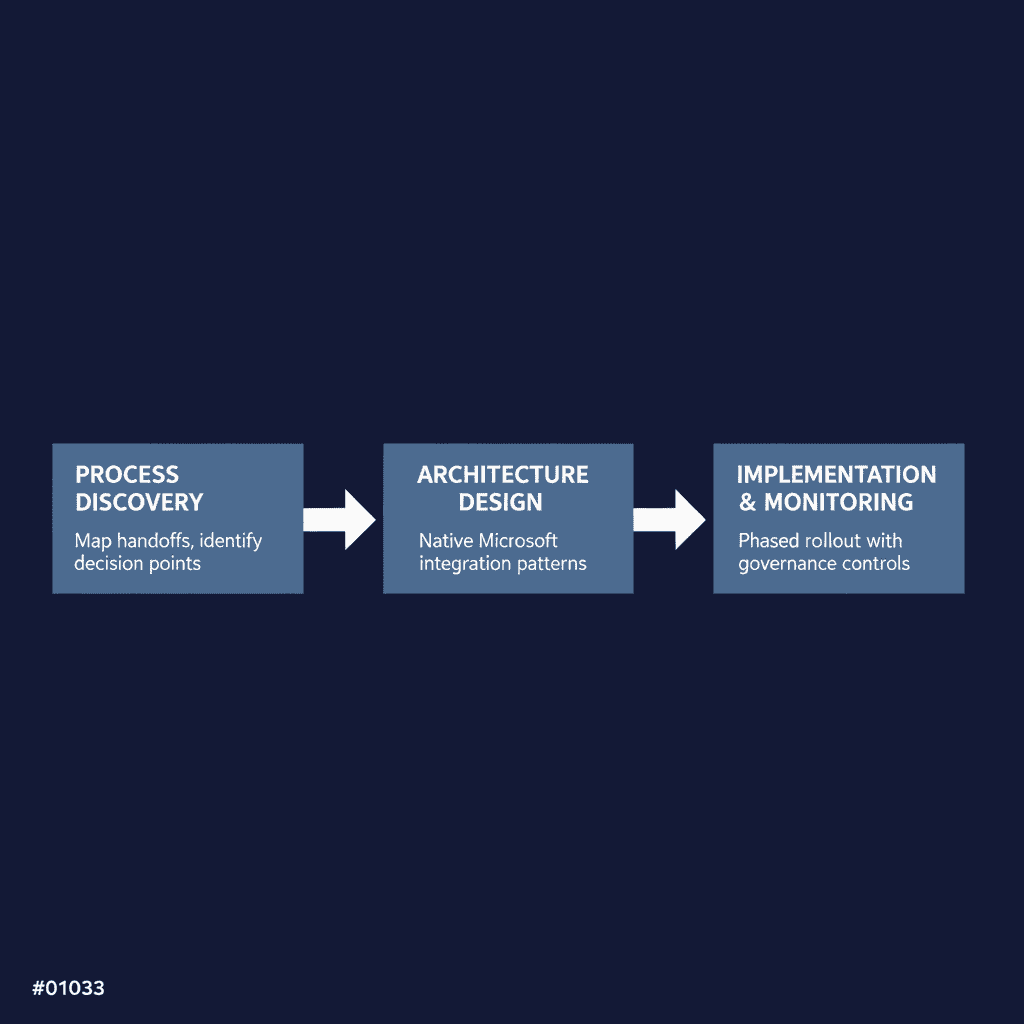
Posted in Uncategorized

Power Automate vs RPA: How Enterprise IT Should Decide

Home/Blog/Power Platform

Power Platform

Power Automate vs RPA: How Enterprise IT Should Decide

·April 8, 2026·14 min read


For organizations running on Microsoft 365, SharePoint, and Dynamics 365, the choice between Power Automate and traditional RPA platforms shapes more than workflow automation — it determines platform complexity, governance overhead, and long-term technical debt. The wrong decision fragments your automation portfolio across disconnected tools, multiplies support costs, and creates integration gaps that compound over time. Enterprise IT leaders face increasing pressure to rationalize automation tooling while maintaining business continuity and regulatory compliance, particularly as organizations discover they’ve accumulated multiple automation platforms through departmental purchases and organic adoption.

Key Takeaways

  • Fragmented automation tooling increases total cost of ownership by 40–60% through duplicate licensing, training, and support contracts across multiple platforms. A mid-market distribution company eliminated three separate automation tools and reduced support overhead from 2.5 FTE to 1.2 FTE.
  • Power Automate excels in Microsoft-centric environments by leveraging existing Azure AD identities, compliance boundaries, and licensing investments without additional security infrastructure. Licensing alignment with existing M365 E3/E5 can reduce per-workflow costs by 50–70% compared to standalone RPA platforms.
  • Traditional RPA platforms maintain advantages for legacy desktop automation, green-screen applications, and specialized bots that require capabilities beyond Power Automate’s current feature set — particularly mainframe and AS/400 integration.
  • Successful automation rationalization requires systematic assessment of application landscape, compliance requirements, and total cost of ownership rather than feature-based comparisons between platforms.
  • Most enterprises benefit from coexistence strategies where Power Automate handles Microsoft 365 workflows while legacy RPA platforms retain desktop automation and specialized integrations — typically a 70/30 split over 18 months.
  • Migration risks include over-rationalizing too quickly, ignoring compliance validation cycles (3–6 months for regulated processes), and failing to align on operating models before platform consolidation begins.

Quick Answer

For Microsoft-centric enterprises, Power Automate typically wins when 70% or more of automation targets involve Microsoft 365, Dynamics 365, or Azure services — offering native integration and unified governance that reduces costs by 35–50%. Traditional RPA platforms remain necessary for legacy desktop automation, green-screen applications, and specialized bots with non-Microsoft dependencies. The optimal strategy is often coexistence rather than complete replacement, with clear segmentation criteria determining which platform handles specific use cases.

Why This Decision Matters for Microsoft-Centric Enterprises

The Cost of Fragmented Automation Tooling

Running parallel automation platforms creates hidden costs that procurement rarely captures upfront. Organizations often see 40–60% higher total cost of ownership when maintaining both Power Automate and a separate RPA platform, driven by duplicate licensing, training, and support contracts. Fragmented tooling forces IT teams to maintain expertise across multiple platforms, diluting specialization and increasing the risk of configuration drift.

Organizations with fragmented automation tooling report 60–80% longer deployment times for cross-system workflows, as teams must coordinate between platforms with different governance models, security boundaries, and integration patterns. In regulated environments, dual platforms mean duplicate compliance frameworks, separate audit trails, and multiplied security reviews — operational overhead that scales poorly as automation adoption grows.

Impact on Governance, Skills, and Support

Platform fragmentation directly impacts your ability to govern automation at scale. With Power Automate integrated into your Microsoft 365 tenant, flows inherit existing identity, security, and compliance boundaries. Traditional RPA platforms require separate identity management, custom security policies, and standalone monitoring — creating governance gaps that auditors consistently flag.

Skills consolidation matters more than most IT leaders initially recognize. Teams proficient in Power Platform can support Power Automate, Power Apps, and Dataverse as a unified stack. Maintaining separate RPA expertise fragments your talent pool and increases dependency on specialized vendors. Legacy RPA maintenance costs typically run 25–40% of initial license cost annually, while Power Automate maintenance averages 15–20% in Microsoft-centric environments.

How Tool Choice Affects Long-Term Automation Strategy

Your automation platform choice determines whether citizen development scales safely or creates shadow IT risk. Power Automate’s integration with Microsoft 365 allows controlled self-service automation within existing governance boundaries. Traditional RPA platforms typically require centralized IT delivery, limiting business unit agility and creating bottlenecks for simple workflow automation.

The platform decision also affects your data strategy. Power Automate flows can read from and write to Dataverse, SharePoint lists, and Microsoft Graph APIs without custom connectors or middleware. RPA platforms often require additional integration layers to access Microsoft 365 data securely — adding architectural complexity that persists for years.

Strengths of Power Automate in a Microsoft 365 World

For organizations already invested in the Microsoft ecosystem, Power Automate offers architectural advantages that traditional RPA platforms cannot match — particularly in environments where Microsoft 365, SharePoint, Teams, and Dynamics 365 handle core business processes.

Native Integration with Microsoft 365, Dataverse, and Azure

Power Automate connects to Microsoft services without custom connectors, API keys, or middleware layers. Flows can trigger directly from SharePoint document libraries, Teams channels, or Outlook emails, accessing the full context and metadata that external RPA tools see as black boxes. In regulated environments, this native integration eliminates the security review overhead of third-party connectors accessing sensitive Microsoft data.

Dataverse integration is particularly compelling for organizations building Power Apps alongside automation. A single data model can drive both user interfaces and automated workflows, reducing the architectural complexity that emerges when RPA tools operate on separate data stores.

Licensing, Security, and Identity Alignment with Existing Investment

Power Automate leverages existing Azure Active Directory identities, conditional access policies, and data loss prevention rules without additional security infrastructure. Flows run under the same governance model as other Microsoft workloads, inheriting compliance boundaries and audit trails that security teams already understand and monitor.

Licensing alignment reduces procurement complexity — many organizations discover they already own Power Automate capabilities through existing Microsoft 365 or Dynamics 365 subscriptions. A financial services organization avoided $180K in annual RPA licensing by migrating document processing workflows to Power Automate with Dataverse.

Citizen Development and IT-Led Automation on a Common Platform

Power Automate supports both citizen-led automation and enterprise-grade workflows on the same platform, with governance controls that scale from departmental productivity gains to mission-critical business processes. IT teams can establish environment boundaries, connector policies, and approval workflows that allow business users to automate routine tasks while maintaining architectural control over sensitive integrations.

This unified approach prevents the governance fragmentation that occurs when business users adopt shadow RPA tools while IT maintains separate enterprise automation platforms. A regulated healthcare system achieved single sign-on and unified audit trails by consolidating automation on the Microsoft platform, eliminating the complexity of managing separate security boundaries.

Where Traditional RPA Platforms Still Have an Edge

While Power Automate excels in Microsoft-centric environments, traditional RPA platforms maintain clear advantages in specific scenarios. Understanding these edge cases prevents over-rationalization that could disrupt critical business processes.

Legacy Desktop and Green-Screen Automation Scenarios

Traditional RPA tools like UiPath, Automation Anywhere, and Blue Prism were purpose-built for desktop automation and legacy system interaction. They excel at screen scraping and OCR for systems without APIs, complex desktop application manipulation across multiple windows, mainframe and AS/400 integration through terminal emulation, and image recognition for applications that resist standard integration approaches.

In regulated industries like aerospace and defense manufacturing, critical ERP or MES systems frequently run on legacy platforms that Power Automate cannot directly address. An aerospace contractor maintained their existing UiPath investment for SAP desktop automation while moving all Office 365 workflows to Power Automate — a pragmatic coexistence model that maximized both investments.

Highly Specialized Bots with Non-Microsoft Dependencies

Some automation scenarios require capabilities beyond Power Automate’s current feature set: advanced PDF processing beyond standard Office formats, complex data transformation requiring custom scripting environments, integration with specialized industry software (CAD systems, laboratory equipment, manufacturing execution systems) that lack modern API connectivity, and high-volume transaction processing where performance requirements exceed Power Automate’s current throughput limits.

Existing RPA Investments and Skills You Cannot Ignore

Many enterprises have significant sunk costs in RPA platforms that complicate migration decisions: established bot libraries with hundreds of automated processes that would require substantial rewrite effort, specialized RPA development skills and CoE teams with deep platform expertise, and compliance and audit trails built around existing RPA governance frameworks. A financial services firm with 200+ production UiPath bots required a coexistence model rather than forced migration — new Microsoft-centric automations used Power Automate while legacy bots remained on UiPath with clear governance boundaries between platforms.

Key Decision Criteria: Power Automate vs RPA

The choice between Power Automate and traditional RPA hinges on three critical factors that determine both immediate feasibility and long-term operational success.

Application Landscape and Data Sources

Your existing application portfolio drives platform selection more than feature comparisons. Power Automate excels when 70% or more of your automation targets involve Microsoft 365, Dynamics 365, Azure services, or modern web APIs with documented connectors. Traditional RPA platforms remain necessary for desktop automation involving legacy green-screen applications, Citrix environments, or proprietary systems without API access.

A defense contractor evaluated 200+ automation candidates and found that 85% could be addressed through Power Automate’s cloud flows and desktop flows — but the remaining 15% required specialized RPA capabilities for mainframe integration that justified maintaining their existing UiPath investment.

Application Assessment: Power Automate vs RPA Fit

  • Microsoft 365 workflows: Power Automate — Excellent | RPA — Poor. Native connectors, inherited security model.
  • Modern web APIs: Power Automate — Good | RPA — Good. Depends on connector availability vs. custom development cost.
  • Legacy desktop apps: Power Automate — Fair | RPA — Excellent. Screen scraping vs. API modernization cost trade-off.
  • Mainframe/AS400: Power Automate — Poor | RPA — Excellent. Terminal emulation requirements favor dedicated RPA.
  • Specialized industry software: Power Automate — Variable | RPA — Good. Depends on API availability and vendor roadmap.

Control, Compliance, and Audit Requirements

Governance requirements often determine platform viability before technical capabilities. Power Automate inherits Microsoft 365’s identity, security, and compliance framework — simplifying audit trails and reducing administrative overhead in Microsoft-centric environments. DLP policies, conditional access rules, and audit logging work consistently across the platform.

A financial services firm reduced their compliance audit scope by 40% after consolidating from three RPA platforms to Power Automate — primarily because automation activities became visible within existing Microsoft security and compliance dashboards.

RPA Platform Evaluation Criteria for Microsoft Enterprises

When evaluating automation tooling, require evidence of:

  • Identity Integration: Does the platform leverage existing Azure AD identities and conditional access policies?
  • Compliance Alignment: Can automation inherit existing Microsoft 365 compliance boundaries and audit trails?
  • Governance Model: Does the platform support both citizen development and IT-controlled automation within unified governance?
  • Skills Alignment: Can existing Microsoft 365 administrators manage automation governance without specialized training?
  • Licensing Economics: Does the platform align with existing Microsoft licensing to reduce procurement complexity?

Red Flags to Watch For:

  • Automation requires access to data sources not covered by existing compliance frameworks
  • Platform lacks integration with current identity management and audit systems
  • Governance model requires separate security reviews for each automation deployment

Total Cost of Ownership and Skill Availability

Licensing models and skill requirements create different cost profiles over time. Power Automate’s per-user licensing often provides better economics for organizations with broad automation needs, while traditional RPA platforms with per-bot licensing may be more cost-effective for concentrated, high-volume automation scenarios.

A manufacturing company calculated that maintaining their existing RPA platform would cost 60% more over three years when factoring in licensing, specialized training, and separate infrastructure requirements — compared to expanding their Power Platform footprint. The decision became clear when existing SharePoint and Dynamics 365 administrators could manage Power Automate governance within their current operating model.


Schedule an Automation Tooling Assessment

i3solutions helps Microsoft-centric enterprises rationalize fragmented automation tooling — comprehensive RPA and Power Automate inventory, decision frameworks, coexistence models, and pilot migrations that reduce platform complexity without disrupting critical business processes. US-based senior resources only.


Designing a Coexistence or Migration Strategy

Most enterprise IT teams discover they need both platforms for different use cases rather than a complete rip-and-replace approach. A pragmatic coexistence strategy acknowledges that legacy RPA investments have value while positioning Power Automate as the primary automation platform for Microsoft-centric workflows.

Segmentation: Which Use Cases Go Where

Successful automation rationalization starts with clear segmentation criteria. Power Automate handles Microsoft 365 workflows, cloud API integrations, and business process automation where users already work in Teams, SharePoint, or Dynamics 365. Traditional RPA platforms retain desktop automation, legacy system screen scraping, and complex bots with established ROI that would be expensive to rebuild.

In regulated environments, we often see a 70/30 split: 70% of automation volume moves to Power Automate over 18 months, while 30% remains on existing RPA platforms for specialized desktop scenarios. A manufacturing client reduced automation platform costs by 35% over 18 months by consolidating 85% of workflows from legacy RPA to Power Automate.

Practical Migration Paths from Legacy RPA to Power Automate

Migration follows a pilot-to-scale pattern: identify 3–5 Microsoft-centric workflows currently running on RPA platforms, rebuild them in Power Automate with improved error handling and monitoring, then measure adoption and performance over 60 days. Successful pilots demonstrate the governance and integration advantages within the Microsoft ecosystem.

For workflows that span both platforms, design handoff points where Power Automate triggers RPA bots for desktop tasks, then receives completion status back through API calls. This hybrid approach maximizes existing investments while positioning Power Automate as the orchestration layer for complex business processes.

Avoiding Common Pitfalls in Tool Consolidation

Many enterprise automation consolidation efforts fail not because of technical limitations, but because they underestimate organizational complexity. In regulated environments, the most common failure pattern is attempting to rationalize too aggressively without accounting for process dependencies, compliance validation cycles, and the reality that some automation serves as critical infrastructure.

Over-Rationalizing Too Fast and Breaking Critical Processes

The biggest risk in Power Automate migration is moving too fast on processes that appear simple but have hidden dependencies. A financial services client discovered this when migrating what seemed like straightforward invoice processing from UiPath to Power Automate — the RPA bot was also performing data validation steps that weren’t documented anywhere, and removing it broke month-end reconciliation.

Start with net-new automation requirements and low-risk processes before touching anything that’s been running in production for more than six months. Map all downstream dependencies before decommissioning existing RPA bots.

Ignoring Compliance and Change Management Impacts

Consolidation often triggers compliance reviews that can extend timelines by 3–6 months. Any change to automation that touches financial data, customer records, or regulated processes requires validation that the new platform maintains the same audit trail and control framework. Budget for compliance validation as a separate workstream, not an afterthought. Power Automate’s integration with Microsoft Purview and Azure AD provides stronger governance than most RPA platforms, but proving equivalence to auditors takes time.

Failing to Align on Operating Model and Ownership

The shift from dedicated RPA tools to Power Automate often changes who owns automation development and support. Traditional RPA centers of excellence may resist a platform that enables broader citizen development, while business units may not be ready to take ownership of flows they previously treated as IT-managed infrastructure. Define the operating model before platform migration — clarify whether Power Automate will be IT-controlled, business-unit-owned, or a hybrid model.

How i3solutions Helps Rationalize Automation Tooling

Enterprise IT teams often inherit fragmented automation landscapes from years of departmental RPA purchases and organic Power Automate adoption. Rationalizing these environments requires systematic assessment, clear decision frameworks, and careful migration planning to avoid disrupting critical business processes.

We begin with a comprehensive inventory of your current automation assets across both platforms — cataloging active bots, identifying data dependencies, mapping security boundaries, and documenting business-critical processes that cannot afford downtime. Our assessment quantifies the real cost of maintaining parallel platforms: licensing, support overhead, skill requirements, and governance complexity.

Rather than making emotional decisions about tool preferences, we provide data-driven frameworks that align automation strategy with your Microsoft investment and business requirements. The roadmap includes clear phases with decision gates: pilot migrations, governance model implementation, and scaled consolidation. Each phase includes success criteria, rollback procedures, and resource requirements.

We work alongside your team to execute pilot migrations that prove the approach works in your environment — migrating representative workflows from legacy RPA to Power Automate, implementing governance guardrails, and establishing operating models that prevent future fragmentation. For organizations seeking guidance on SharePoint modernization strategies that complement automation consolidation, we provide integrated roadmaps that align platform rationalization with broader Microsoft 365 optimization initiatives.


Schedule an Automation Tooling Assessment

Tell us your current RPA and Power Automate footprint and we’ll show you exactly where consolidation makes sense, what the coexistence model should look like, and how to migrate high-value workflows without breaking critical business processes. No commitment required.


Frequently Asked Questions: Power Automate vs RPA

How long does it typically take to migrate from legacy RPA to Power Automate?

Migration timelines vary by complexity, but most enterprises see 12–18 months for substantial consolidation. Simple Microsoft 365 workflows can migrate in 30–60 days, while complex processes with compliance requirements may take 6+ months including validation cycles.

Can Power Automate handle the same volume and complexity as enterprise RPA platforms?

Power Automate handles most business process automation effectively, but traditional RPA platforms still lead in high-volume transaction processing and complex desktop automation scenarios. The decision depends more on your application landscape than raw processing capability.

What happens to our existing RPA team and skills during consolidation?

RPA skills often translate well to Power Automate development, and many organizations retrain existing teams rather than replace them. The bigger change is operational — moving from centralized RPA development to a model that supports both IT-led and citizen development.

How do licensing costs compare between Power Automate and traditional RPA platforms?

Power Automate often provides better economics for organizations with broad automation needs due to per-user licensing and alignment with existing Microsoft 365 investments. Traditional RPA per-bot licensing may be more cost-effective for concentrated, high-volume scenarios with fewer users.

What compliance and security considerations affect the migration decision?

Power Automate inherits Microsoft 365’s compliance framework, which simplifies audit trails in Microsoft-centric environments. However, any change to automation touching regulated data requires compliance validation, which can extend migration timelines by 3–6 months.

Should we maintain both platforms long-term or aim for complete consolidation?

Most enterprises benefit from strategic coexistence rather than complete consolidation. Power Automate typically handles 70–80% of automation volume, while traditional RPA platforms retain specialized desktop and legacy system integration scenarios.

What are the biggest risks in automation platform consolidation?

The primary risks are moving too fast on critical processes, underestimating compliance validation requirements, and failing to align on operating models. Start with low-risk processes and budget for compliance reviews as separate workstreams rather than implementation afterthoughts.

How do we prevent automation sprawl during the transition period?

Establish clear governance boundaries and segmentation criteria upfront. Define which types of automation go to each platform, implement approval workflows for new development, and maintain unified monitoring across both platforms throughout the transition.

Scot Johnson, President and CEO of i3solutions

Scot Johnson — President & CEO, i3solutions
Scot co-founded i3solutions nearly 30 years ago with a clear focus: US-based expert teams delivering complex solutions and strategic advisory across the full Microsoft stack. He writes about the patterns he sees working with enterprise organizations in regulated industries, from platform adoption and enterprise integration to the operational decisions that determine whether technology investments actually deliver.

View LinkedIn Profile

Posted in Uncategorized

Power Platform Center of Excellence for Regulated Enterprises

Home/Blog/Governance

Governance

Power Platform Center of Excellence for Regulated Enterprises

·April 8, 2026·14 min read


Regulated enterprises face a unique challenge with Power Platform: business units demand rapid automation capabilities, while IT must maintain strict governance, audit trails, and compliance boundaries. In aerospace, defense, and financial services organizations, Power Platform adoption typically starts organically in business units — creating valuable solutions but also governance gaps that trigger audit findings. A well-designed Power Platform Center of Excellence (CoE) resolves this tension by transforming ad-hoc adoption into a governed, scalable capability that satisfies both business velocity and regulatory requirements.

Key Takeaways

  • Regulated enterprises need CoEs that balance innovation velocity with audit readiness, not just adoption metrics. Without proper structure, Power Platform adoption creates audit risks that can jeopardize regulatory standing under SOC 2, CMMC, or HIPAA frameworks.
  • Effective CoEs reduce Power Platform review cycles by 40–60% through pre-approved patterns and automated compliance checks implemented via Microsoft CoE Starter Kit with enterprise-specific customizations.
  • Hybrid organizational models work best — centralized governance with federated execution across business units, requiring formal RACI matrices for app approval workflows. Most regulated enterprises need 2–3 dedicated FTE to run the CoE effectively.
  • Pattern reuse rates of 60–70% indicate a mature CoE that creates sustainable, governed solutions rather than custom development. Healthcare organizations achieved 60% pattern reuse within 18 months of CoE launch, reducing development time for common workflows by 3–5 days per app.
  • CoE governance artifacts must include environment strategy, DLP policies, connector whitelists, and 15–20 standard solution patterns with documented approval workflows — these are what auditors expect to see.
  • Success metrics should focus on risk reduction, compliance readiness, and time-to-value rather than simple app counts — including the percentage of solutions passing security review on first submission.

Quick Answer

A Power Platform Center of Excellence for regulated enterprises creates structured governance that enables citizen development while maintaining compliance boundaries required for SOC 2, CMMC, or HIPAA audits. The CoE centralizes governance policies, standardizes solution patterns, and provides controlled enablement that reduces review cycles by 40–60% while eliminating shadow IT risks. Success requires hybrid organizational models with 2–3 dedicated FTE plus governance frameworks that satisfy both business velocity and regulatory requirements.

Why Regulated Enterprises Need a Power Platform Center of Excellence

The challenge for regulated enterprises extends beyond simple platform management. These organizations must enable citizen development while maintaining the controls required for SOC 2, CMMC, or HIPAA compliance. Without proper structure, Power Platform adoption creates audit risks that can jeopardize regulatory standing.

Balancing Innovation with Control and Compliance

A CoE establishes guardrails that allow business users to build solutions within pre-approved patterns and connectors, while automatically enforcing DLP policies and environment boundaries. A defense contractor reduced Power Platform review cycles from 6–8 weeks to 2–3 weeks after implementing a structured CoE with pre-approved patterns and automated compliance checks. Business units gained faster access to automation capabilities, while IT maintained full audit visibility and control over all deployments.

Providing a Single Front Door for Power Platform Demand

Without a CoE, Power Platform requests scatter across IT teams, creating inconsistent responses and duplicated effort. A centralized intake process ensures that similar business requirements leverage existing patterns rather than creating new solutions from scratch. This consolidation also enables better resource planning and skills development — concentrating expertise rather than spreading it thin across multiple teams.

Supporting Citizen Developers Without Losing Governance

A mature CoE enables citizen development through structured enablement programs, approved templates, and clear escalation paths. Business users can build solutions independently within defined guardrails, while complex integrations or high-risk scenarios automatically route to the CoE team for professional development. This model scales Power Platform adoption without scaling IT headcount proportionally, while maintaining the governance and documentation standards required for regulated environments.

Core Responsibilities of a Power Platform CoE

A Power Platform CoE in regulated enterprises serves as the central authority for platform governance, standardization, and enablement. Unlike generic CoE models focused primarily on adoption metrics, regulated environments require CoEs that balance innovation velocity with audit readiness and risk management.

Governance: Policies, Environments, DLP, and Standards

The CoE owns the governance framework that makes Power Platform defensible in audit conditions. This includes environment strategy with clear dev/test/staging/prod boundaries, DLP policies that align with regulatory requirements, and connector whitelists that prevent unauthorized data flows. In aerospace and defense environments, CoEs maintain separate IL2/IL4 environments with distinct governance policies for each classification level.

CoE governance artifacts include environment strategy documentation, DLP policy templates, connector whitelists, and 15–20 standard solution patterns for common use cases. A well-designed CoE maintains documented patterns for common integration scenarios — such as connecting Power Apps to SAP systems or Dynamics 365 — that have been pre-approved by Security and Compliance teams.

Patterns and Templates for Common Use Cases

Rather than allowing each business unit to reinvent solutions, the CoE develops and maintains a library of proven patterns for recurring use cases: approval workflows, data collection forms, reporting dashboards, and integration connectors to line-of-business systems. In regulated industries, pattern libraries include pre-built solutions for audit trail generation, electronic signatures with compliance logging, and data retention policies that align with industry requirements. These patterns reduce development time while ensuring consistency with governance standards.

Enablement, Training, and Community of Practice

The CoE operates enablement programs that train citizen developers within governance boundaries — not just technical training on Power Platform capabilities, but training on when and how to engage the CoE for review and approval. Effective CoEs maintain communities of practice that share approved patterns, troubleshoot common issues, and provide peer support while ensuring that knowledge sharing does not bypass required governance checkpoints.

For organizations seeking to formalize their approach, our Power Platform development services address both technical implementation and governance frameworks for regulated environments.

Organizational Models for a CoE

The structure of your Power Platform CoE determines how quickly it can respond to business needs while maintaining governance standards. In regulated enterprises, the wrong organizational model creates bottlenecks that drive shadow IT or approval delays that kill business momentum.

Centralized, Federated, and Hybrid Structures

A centralized CoE owns all Power Platform development and operates as a shared service. This model works well for organizations with fewer than 50 active Power Platform users and strict compliance requirements — ensuring maximum governance but often creating capacity constraints.

A federated CoE distributes development capability across business units while maintaining central governance standards. Business units have their own Power Platform developers who follow CoE-defined patterns and approval processes. This model scales better but requires stronger governance frameworks.

Most regulated enterprises benefit from a hybrid approach: the CoE directly handles complex integrations, sensitive data scenarios, and enterprise-wide solutions while enabling business units to build departmental apps using approved patterns. An aerospace manufacturer eliminated 85% of shadow IT Power Platform instances by providing a governed alternative through their CoE intake process.

CoE Staffing Model for Regulated Enterprises (2–3 FTE)

  • Solution Architect (1 FTE): Designs integration patterns, environment strategies, and governance frameworks. Requires deep Microsoft stack knowledge plus understanding of industry compliance requirements.
  • Senior Developer/Analyst (1 FTE): Builds complex solutions, creates reusable components, and mentors citizen developers. Handles scenarios requiring custom connectors or legacy system integration.
  • Governance Analyst (0.5–1 FTE): Monitors compliance, manages DLP policies, reviews solution architectures, and maintains audit-ready documentation.
  • Part-time Liaisons: Security, Compliance, and Internal Audit representatives who participate in quarterly reviews and provide sign-off for high-risk approvals.

Working with Security, Compliance, and Internal Audit

Your CoE must establish formal working relationships with Security, Compliance, and Internal Audit teams from day one. Security teams need visibility into data flows and connector usage through regular reports. Compliance teams require documentation proving regulatory alignment, including data classification matrices and access control documentation. Internal Audit needs comprehensive audit trails showing who built what, when changes were made, and how approval processes were followed.

Establish quarterly business reviews with these stakeholders to demonstrate risk reduction and business value. Organizations with mature CoEs report 25–30% faster time-to-production for approved Power Platform solutions compared to ad-hoc development.


Schedule a Power Platform CoE Assessment

i3solutions designs Power Platform Centers of Excellence for regulated enterprises — governance frameworks, environment strategy, DLP policies, and pattern libraries that reduce review cycles by 40–60% while maintaining audit readiness from day one. US-based senior resources only.


Designing CoE Processes and Tooling

A Power Platform CoE requires operational processes that balance developer velocity with governance requirements. Without structured intake, review, and monitoring processes, even well-intentioned CoEs become bottlenecks or lose control of production deployments.

Intake and Prioritization of New Requests

Establish a single intake channel for all Power Platform requests, using standardized forms that capture business justification, data requirements, integration needs, and compliance considerations. In regulated environments, intake must screen for sensitive data handling and regulatory scope early in the process.

Prioritization frameworks should weight business impact against risk and complexity. High-value, low-risk automation requests can move through expedited review tracks, while complex integrations require extended architecture review and security validation. Most successful organizations commit to 2–4 week turnaround for standard requests, with escalation paths for urgent business needs.

Review and Approval Workflows for Apps and Flows

Design approval workflows that match your organization’s risk tolerance and compliance requirements. Lightweight apps using standard connectors can follow automated approval paths, while applications requiring premium connectors or sensitive data access trigger manual review gates involving security and compliance stakeholders.

Document clear acceptance criteria for each review stage, producing audit-ready documentation that traces decisions and approvals. Many regulated organizations implement a “promote through environments” model where solutions must demonstrate stability in development and test before reaching production approval.

Monitoring, Telemetry, and Incident Response

Implement comprehensive monitoring using CoE Starter Kit telemetry tools, Azure Monitor integration, and custom dashboards for business-critical applications. Monitor both technical performance and governance compliance: unused applications, orphaned flows, connector usage patterns, and DLP policy violations.

Establish incident response procedures with defined severity levels, escalation paths, and communication protocols. Create runbooks for common scenarios like connector service disruptions and authentication flow breaks. The CoE should maintain an inventory of all production applications with designated business owners for rapid incident triage.

Measuring CoE Success in Regulated Environments

Most organizations measure their Power Platform CoE by counting apps and flows — missing the real value proposition. In regulated environments, success means reducing risk while accelerating delivery.

Metrics Beyond App and Flow Counts

Volume metrics tell you nothing about quality, governance, or business impact. Better metrics include average time from request to production deployment, percentage of solutions that reuse existing patterns, and compliance review cycle time. Financial services firms saw 40% reduction in high-risk Power Platform exceptions after establishing DLP policies and connector governance through their CoE.

Reuse metrics indicate whether your CoE creates sustainable patterns. Target 60–70% pattern reuse for common business scenarios like approval workflows and data collection forms. If every new app starts from scratch, your CoE functions as a development shop rather than a platform enabler.

CoE Success Metrics for Regulated Enterprises

  • Request to production time: Target 2–4 weeks for standard patterns (down from 6–8 weeks without CoE)
  • Pattern reuse rate: Target 60–70% for common scenarios like approval workflows and data collection forms
  • First-submission security pass rate: Target 85%+ of solutions passing security review without revision
  • High-risk exceptions: Track reduction in requests requiring executive approval over time
  • Shadow IT instances: Monitor reduction in ungoverned apps and flows discovered during quarterly audits
  • Audit findings: Track Power Platform-related compliance findings quarter-over-quarter

Partnering to Design and Stand Up a CoE

Most regulated enterprises lack the specialized expertise to design and implement a Power Platform CoE from scratch. The combination of Microsoft platform depth, governance frameworks, and regulated-industry requirements creates a knowledge gap that internal teams struggle to fill while maintaining operational responsibilities.

Where External Power Platform Specialists Add Value

A specialist partner brings pattern recognition from multiple CoE implementations across similar regulated environments. External specialists understand environment topology for compliance boundaries, DLP policy hierarchies that don’t break legitimate business processes, and connector governance that balances security with productivity.

Key value areas include designing intake workflows that integrate with existing ITSM processes, establishing review criteria that satisfy Security and Internal Audit, creating reusable solution templates, and building monitoring dashboards that provide required compliance visibility. Organizations with external CoE design support achieve 30–40% faster time-to-production compared to internal-only implementations.

Typical CoE Design and Build Engagements

CoE design engagements span 8–12 weeks: 2–3 weeks assessment, 4–6 weeks blueprint design, 2–3 weeks pilot implementation and handoff. Deliverables include documented governance policies, environment strategy with compliance boundaries, standard solution patterns and templates, intake and approval workflows, monitoring frameworks, and enablement materials for internal teams. Structured CoE implementations reduce governance-related project delays by 50–60% compared to ad-hoc approaches.

CoE Partner Evaluation Criteria

When evaluating Power Platform CoE design partners, require evidence of:

  • Previous CoE implementations in similar regulated industries (aerospace, defense, financial services, healthcare)
  • Deep understanding of Microsoft Power Platform ALM practices, environment management, and DLP policy configuration
  • Documented governance frameworks that have passed SOC 2, CMMC, or HIPAA audits
  • Ability to integrate with existing ITSM tools (ServiceNow, Remedy, Jira Service Management)
  • Experience with Microsoft CoE Starter Kit customization and Azure DevOps pipeline configuration
  • References from similar-sized organizations with measurable CoE outcomes

✅ CoE Readiness Checklist

Before launching your Power Platform CoE, verify:

  • Executive sponsorship with dedicated budget for 2–3 FTE plus tooling costs
  • Formal agreements with Security, Compliance, and Internal Audit on review processes
  • Environment strategy approved by IT Operations with clear dev/test/staging/prod boundaries
  • DLP policies configured and tested with business-representative scenarios
  • Intake process integrated with existing ITSM workflows
  • Initial pattern library with 5–10 approved solution templates
  • Monitoring dashboards configured with CoE Starter Kit and Azure Monitor integration
  • Training materials and enablement programs ready for citizen developer onboarding

How i3solutions Designs Power Platform CoEs

i3solutions approaches Power Platform CoE design as a structured engagement that balances immediate governance needs with long-term platform evolution. Our methodology recognizes that regulated enterprises cannot afford to iterate their way to compliance — the governance framework must be defensible from day one.

We begin every CoE engagement with a comprehensive assessment that maps your current Power Platform footprint against regulatory requirements and organizational structure — cataloging existing apps and flows, identifying shadow IT patterns, and documenting compliance gaps that the CoE must address.

CoE launch focuses on establishing the operational foundation: environment strategy, DLP policies, monitoring dashboards, and intake processes. We configure the Microsoft CoE Starter Kit with enterprise-specific customizations and establish governance artifacts that auditors expect to see. Documentation is audit-ready from launch, not something to address later.

Post-launch, we provide quarterly advisory sessions to evolve CoE practices based on usage patterns and emerging requirements — expanding the pattern library, refining governance policies, and helping the CoE demonstrate measurable value to leadership.

Our clients see 40–60% reduction in app review cycles and 3x increase in pattern reuse within the first year of CoE operation, demonstrating that proper CoE design delivers both governance and velocity improvements for regulated enterprises.


Schedule a Power Platform CoE Assessment

Tell us your current Power Platform governance posture and regulatory requirements. We’ll design a CoE blueprint that reduces review cycles, eliminates shadow IT risk, and gives auditors the documentation they need — from day one. No commitment required.


Frequently Asked Questions: Power Platform Center of Excellence

How long does it take to implement a Power Platform CoE in a regulated environment?

CoE design and implementation spans 8–12 weeks: 2–3 weeks for assessment, 4–6 weeks for blueprint design with governance framework creation and stakeholder alignment, and 2–3 weeks for pilot implementation. However, achieving full organizational adoption and pattern maturity takes 12–18 months with quarterly refinements based on usage telemetry and compliance feedback.

What staffing model works best for Power Platform CoEs in regulated industries?

Most regulated enterprises require 2–3 dedicated FTE: 1 solution architect with compliance expertise, 1 senior developer/analyst for complex integrations and citizen developer mentoring, and 0.5–1 governance specialist for DLP policy management and audit trail maintenance, plus part-time liaisons from Security, Compliance, and Internal Audit. Hybrid models with centralized governance and federated execution scale better than purely centralized approaches for organizations with 100+ Power Platform users.

How do you measure CoE success beyond counting apps and flows?

Focus on metrics that demonstrate both velocity and control: average time from request to production (target: 2–4 weeks for standard patterns), percentage of solutions reusing existing patterns (target: 60–70%), compliance review cycle time reduction (target: 40–60% improvement), and percentage of solutions passing security review on first submission (target: 85%+). These metrics prove the CoE delivers governance and business value, not just development capacity.

What governance artifacts does a Power Platform CoE need for audit readiness?

Essential artifacts include environment strategy with dev/test/staging/prod boundaries, DLP policy templates aligned to regulatory requirements (SOC 2, CMMC, HIPAA), connector whitelists with business justification documentation, 15–20 standard solution patterns with security review approval, intake and approval workflows with RACI matrices, and quarterly compliance reports demonstrating risk reduction and policy adherence.

Should regulated enterprises build their CoE internally or work with external partners?

Most regulated enterprises benefit from external expertise for initial CoE design due to the specialized combination of Microsoft platform depth, governance frameworks, and industry compliance requirements. Plan for knowledge transfer and internal ownership within 6–12 months, with ongoing advisory support for complex scenarios, major platform updates, or expansion into new business units.

How does a Power Platform CoE handle shadow IT in regulated environments?

CoEs eliminate shadow IT by providing a governed alternative that’s faster than informal development. Organizations see 85% reduction in shadow IT instances by offering pre-approved patterns that reduce development time by 3–5 days per app, streamlined intake processes with 2–4 week turnaround, and citizen developer enablement within governance boundaries. The key is making the governed path more attractive than the ungoverned alternative through speed and support — not just policy enforcement.

What is the difference between centralized, federated, and hybrid CoE models?

Centralized CoEs handle all development as a shared service (best for fewer than 50 users with strict compliance requirements). Federated models distribute development across business units with central governance standards. Hybrid approaches combine centralized governance with federated execution for departmental apps using approved patterns. Most regulated enterprises benefit from hybrid models that balance control with scalability.

Scot Johnson, President and CEO of i3solutions

Scot Johnson — President & CEO, i3solutions
Scot co-founded i3solutions nearly 30 years ago with a clear focus: US-based expert teams delivering complex solutions and strategic advisory across the full Microsoft stack. He writes about the patterns he sees working with enterprise organizations in regulated industries, from platform adoption and enterprise integration to the operational decisions that determine whether technology investments actually deliver.

View LinkedIn Profile

Posted in Uncategorized

Why Power Platform Initiatives Fail in Large Organizations and How to Fix Them

Home/Blog/Power Platform

Power Platform

Why Power Platform Initiatives Fail in Large Organizations and How to Fix Them

·April 7, 2026·12 min read

Key Takeaways

  • Power Platform sprawl typically reveals 3–5x more apps and flows than leadership initially estimated, with 40–60% lacking clear business ownership or support documentation. Most organizations discover this only when something breaks during a compliance audit or peak business period.
  • The biggest failure mode is launching without governance frameworks — no clear ownership between IT and business units, no architectural standards, and no risk management processes aligned with enterprise security and compliance requirements.
  • Critical business flows often run without monitoring, error handling, or designated technical owners, creating hidden operational risks that can disrupt core processes during maintenance windows or system failures.
  • Environment fragmentation and inconsistent DLP policies create security vulnerabilities — DLP policy alignment efforts typically identify 20–30% of existing flows violating enterprise data handling requirements and bypassing established approval workflows.
  • Successful remediation requires risk-prioritized fixes targeting business-critical workloads first, standardized templates and patterns that reduce development complexity, and Center of Excellence frameworks that enable controlled innovation while maintaining security boundaries.
  • External specialists accelerate recovery and provide political cover for necessary governance changes that internal teams cannot easily implement due to organizational dynamics. Failed rollouts average $200K–$500K in lost productivity before specialist help is engaged.

Quick Answer

Power Platform initiatives fail in large organizations primarily due to governance gaps, fragmented delivery across teams, and underestimated integration complexity. The core issue is launching citizen development programs without proper architecture frameworks, ownership models, or risk management processes. Organizations can fix failing initiatives through structured health checks that inventory all apps and flows across environments, risk-prioritized remediation focusing on business-critical workloads first, and establishing Centers of Excellence with clear governance boundaries between IT and business units.

Power Platform initiatives often begin with compelling business cases and strong executive support. The promise of citizen development, rapid automation, and reduced IT backlog creates momentum across departments. However, many organizations discover that the gap between initial expectations and operational reality becomes a source of significant friction within 6–12 months.

When Power Platform deployments create new categories of technical debt, security risks, and governance challenges, IT leaders need a structured approach to diagnose problems and implement sustainable solutions. Most struggling initiatives share predictable failure patterns that can be systematically addressed through proper governance frameworks.

Common Power Platform Failure Modes in Large Enterprises

After reviewing dozens of troubled implementations, three failure modes account for the majority of problems: governance gaps, fragmented delivery, and underestimated technical complexity.

The Promise vs. The Reality

Business leaders expect Power Platform to democratize application development, allowing departments to build solutions without waiting for IT resources. Executives often approve rollouts based on Microsoft’s positioning of “citizen developers” solving their own problems with minimal IT oversight — the assumption being that low-code means low-risk and low-maintenance.

Within months, most large organizations discover that Power Platform deployments create new categories of technical debt. Apps proliferate across departments without consistent data models, security boundaries, or support ownership. Critical business processes become dependent on flows built by users who have since changed roles or left the company.

Organizations typically discover 3–5x more Power Apps and Power Automate flows than IT leadership initially estimated. Uncontrolled sprawl results in 40–60% of flows having no clear business owner or support documentation. Security teams find data connectors bypassing established DLP policies. IT discovers mission-critical automations running in personal environments with no backup or monitoring.

No Clear Governance or Ownership Model

The most common failure pattern is launching Power Platform without defining who owns what. Business units create apps and flows without IT oversight. IT creates policies without business unit input. Security creates restrictions that break existing automations. No one has clear authority to make architectural decisions or resolve conflicts.

In one aerospace manufacturer engagement, 47 different Power Apps had been created across six departments with no central inventory, no consistent data sources, and no support model. When a critical procurement workflow failed during a compliance audit, it took three days to identify who had built it and another week to find someone willing to fix it.

Without governance, Power Platform becomes a collection of orphaned automations rather than an enterprise platform. Business users lose confidence when workflows break unexpectedly. IT loses control of data flows and security boundaries.

Fragmented Delivery Across Teams and Vendors

Large organizations often approach Power Platform through multiple parallel efforts: IT builds some apps, business units build others, and external consultants deliver project-specific solutions. Each group uses different patterns, different data models, and different security approaches.

One financial services client had three different vendors building Power Platform solutions simultaneously, each using incompatible approaches to Dataverse design and connector management. The result was a platform that worked in demos but failed under production load.

Underestimating Integration, Security, and Data Design

Power Platform’s low-code promise leads many organizations to underestimate the architecture work required for enterprise-grade implementations. Integration complexity emerges when apps need to connect to SAP, Oracle, or legacy systems through secure, auditable patterns. Security complexity emerges when flows need to handle sensitive data across multiple environments. Data design complexity emerges when multiple apps need consistent, governed access to the same business entities.

Failed Power Platform rollouts cost organizations an average of $200K–$500K in lost productivity and rework before specialist help is engaged to address these architectural requirements properly.

⚠ Warning Signs Your Power Platform Initiative Is Failing

  • Critical flows processing financial approvals or customer data with no error handling, owner documentation, or monitoring dashboard
  • Premium connectors enabled in some environments but blocked in others with no documented rationale
  • Production apps running in development environments because “it was easier to deploy there”
  • Business units complaining about broken workflows with no clear escalation path to IT
  • Shadow apps discovered using personal accounts, unapproved connectors, or external data sources that bypass security controls
  • IT responsible for supporting solutions they did not architect, test, or approve — with no visibility into dependencies or failure scenarios

Schedule a Power Platform Health Check

i3solutions provides structured Power Platform health checks and rescue engagements for large enterprises — comprehensive asset inventory, risk-prioritized remediation, CoE setup, and governance frameworks that reduce high-risk automation incidents by 50–70%. US-based senior resources only.


A Structured Power Platform Health Check

A comprehensive health check provides the foundation for any Power Platform stabilization effort. This assessment must go beyond surface-level inventory to examine the underlying architecture, governance gaps, and organizational dynamics that created the current state.

Inventory and Risk Assessment of Apps, Flows, and Environments

The first phase involves cataloging every Power Apps application, Power Automate flow, and custom connector across all environments. This inventory must capture business criticality, data sources, integration points, and current ownership status. Organizations typically discover significantly more assets than leadership realizes, with a substantial percentage classified as “orphaned” or unsupported.

Risk assessment focuses on identifying flows that could cause business disruption, apps handling sensitive data without proper controls, and integrations that bypass established security boundaries. Environment security reviews typically uncover 15–25 critical permission or connector configuration issues requiring immediate attention.

Vendor Evaluation Criteria for Power Platform Health Checks

  • Proven methodology for comprehensive asset discovery across all environments, including shadow IT applications
  • Risk assessment framework that prioritizes business-critical workloads and compliance requirements
  • Experience with Microsoft 365 tenant architecture and Azure Active Directory integration patterns
  • Documented approach to environment rationalization and DLP policy standardization
  • Clear deliverables including risk-prioritized remediation roadmap and governance recommendations

Architecture and Governance Review Against Best Practices

The architecture review examines environment structure, DLP policies, connector governance, and application lifecycle management practices — evaluating whether development, testing, and production boundaries are properly maintained and whether security policies align with enterprise standards.

Governance review assesses CoE maturity, approval processes, and support models. Many struggling initiatives lack clear ownership boundaries between IT, business units, and citizen developers, creating accountability gaps that compound over time.

Architecture Review Questions to Ask

  • How are environments structured to support proper ALM practices from development through production?
  • Do DLP policies consistently classify and protect sensitive data across all environments?
  • Are custom connectors properly governed with security reviews and approval workflows?
  • Does the current environment strategy support compliance requirements and audit trails?
  • Are there clear escalation paths when business-critical flows fail or require emergency changes?

Designing a Stabilization and Remediation Plan

Once the health check reveals the scope of Power Platform issues, the next step is building a structured remediation plan that addresses immediate risks while establishing sustainable governance. The key is balancing urgent fixes with long-term platform stability.

Prioritizing High-Risk Fixes and Business-Critical Workloads

Start with flows and apps that pose the highest business risk. Critical automations running without monitoring, apps handling sensitive data with weak security boundaries, and workflows that bypass established approval processes require immediate attention. In a recent enterprise assessment, we identified 23 “shadow” flows processing financial data outside the approved environment — these became priority-one fixes.

Business-critical workloads get stabilized first, but with proper architecture. Rather than quick patches, implement monitoring, error handling, and documented support ownership. This approach prevents the same app from becoming a crisis again in six months.

Standardizing Patterns, Templates, and Delivery Practices

Chaotic Power Platform environments typically lack consistent patterns. Establish standard templates for common use cases: approval workflows, data collection forms, and reporting dashboards. Document connection patterns, security boundaries, and environment promotion practices. Create reusable components and enforce their use through governance policies. Post-remediation programs show 30–40% improvement in deployment velocity due to standardized patterns and templates.

Establishing a CoE and Governance Model Going Forward

A Center of Excellence provides ongoing governance without stifling innovation. Define clear roles: who approves new environments, who reviews high-risk automations, and who owns production support. Establish DLP policies that protect data while allowing legitimate business automation.

The CoE should include representatives from IT, Security, and key business units. Their job is enabling controlled innovation, not blocking every request. Organizations report 50–70% reduction in high-risk automation incidents after implementing structured governance and monitoring.

When to Bring in an External Power Platform Specialist

Many IT leaders hesitate to engage external help, viewing it as an admission of failure. In practice, bringing in a specialist partner often accelerates recovery and provides political cover for necessary changes that internal teams cannot implement alone.

Advantages of an Independent View on Risk and Design

Internal teams often inherit architectural decisions made months or years earlier, creating blind spots around technical debt and governance gaps. An external specialist brings pattern recognition from dozens of similar environments, quickly identifying risks that internal teams may have normalized. We recently assessed a manufacturing client’s Power Platform environment and found 40+ business-critical flows with no error handling or monitoring — a risk the internal team had stopped noticing because “they mostly work.”

External specialists also bring vendor-neutral architecture recommendations. Internal teams may feel pressure to work within existing tool constraints, while a specialist can recommend environment restructuring, connector consolidation, or governance changes that internal teams cannot easily propose on their own.

Coaching Internal Teams While Fixing the Biggest Problems

The most effective Power Platform rescue engagements combine immediate stabilization with knowledge transfer. Rather than taking over the platform entirely, a specialist partner works alongside internal teams to fix high-risk issues while teaching sustainable patterns for ongoing development. Internal developers learn enterprise-grade ALM practices, proper error handling, and governance frameworks through hands-on collaboration rather than abstract training.

Using a Partner to Reset Expectations with Leadership

Power Platform failures often stem from misaligned expectations between business stakeholders and IT capacity. Internal IT teams may struggle to push back on unrealistic timelines or scope without appearing obstructionist. An external specialist provides the political cover to reset expectations based on industry standards and risk management practices.

How i3solutions Leads Power Platform Rescue Initiatives

When Power Platform programs reach crisis mode, organizations need a partner who can rapidly assess risk, stabilize operations, and establish sustainable governance without disrupting business-critical workflows.

Rapid Assessment, Risk Triage, and Stabilization

Our rescue engagements begin with a 60-day rapid assessment that inventories all apps, flows, and environments while identifying immediate risk factors. We typically discover 40–60% more Power Platform assets than organizations realize they have, including shadow apps bypassing enterprise standards and critical flows with no monitoring or support ownership.

The assessment produces a risk-prioritized remediation plan that addresses high-exposure items first — flows handling sensitive data without proper DLP policies, apps with excessive permissions, and automations that could disrupt core business processes. We stabilize critical workloads before addressing architectural improvements, ensuring business continuity throughout the rescue process. Power Platform rescue initiatives average 8–12 weeks to complete initial stabilization and risk triage.

Governance, CoE Setup, and Architecture Refactoring

Once immediate risks are contained, we establish a Center of Excellence framework tailored to the organization’s size and regulatory requirements. This includes standardized environment strategies, DLP policy alignment, and documented patterns for common integration scenarios.

Our architecture refactoring focuses on consolidating fragmented solutions into maintainable, supportable systems. We typically reduce app sprawl by 30–50% through strategic consolidation while improving performance and user experience. The refactoring process includes data model optimization, connector standardization, and ALM pipeline implementation.

Ongoing Advisory and IV&V for High-Risk Automations

Post-stabilization, we provide ongoing advisory services and independent verification and validation (IV&V) for business-critical automations — quarterly governance reviews, new solution architecture validation, and coaching for internal teams as they adopt CoE practices. Our IV&V process ensures that high-risk automations meet enterprise standards before production deployment, reducing the likelihood of future failures.


Schedule a Power Platform Health Check

Tell us where your Power Platform program is breaking down and we’ll show you exactly what the risks are, which workloads need immediate stabilization, and how a structured governance framework prevents the same problems from recurring. No commitment required.


Frequently Asked Questions: Power Platform Initiative Failures

How long does it typically take to stabilize a failing Power Platform program?

Power Platform rescue initiatives average 8–12 weeks for initial stabilization and risk triage, followed by 3–6 months for full governance implementation and architecture refactoring. The timeline depends on the scope of sprawl and number of business-critical workflows requiring immediate attention.

What are the warning signs that a Power Platform initiative is at risk of failure?

Key warning signs include critical flows with no monitoring or designated owners, inconsistent environments and DLP policies across the organization, shadow apps bypassing enterprise standards, and business units complaining about broken workflows with no clear escalation path.

Should we restrict Power Platform access to prevent further sprawl?

Restricting access often drives more shadow IT activity and frustrates business users. Instead, implement governance frameworks with clear approval processes, standardized templates, and Center of Excellence oversight that enables controlled innovation while managing risk.

How much does Power Platform rescue and stabilization typically cost?

Rescue costs vary by organization size and complexity, but are typically 20–30% of what organizations have already spent on failed implementations. Consider that failed rollouts average $200K–$500K in lost productivity before engaging specialist help — making rescue investments cost-effective.

Can we fix Power Platform problems with internal resources only?

While possible, internal teams often lack the pattern recognition from multiple enterprise implementations and may face political barriers to implementing necessary governance changes. External specialists accelerate recovery and provide independent validation of risk priorities.

What happens to existing apps and flows during remediation?

Business-critical workflows are stabilized first with proper monitoring and error handling before any architectural changes. The goal is maintaining business continuity while systematically reducing risk and improving governance. Apps are consolidated or retired based on business value and technical quality.

How do we prevent Power Platform problems from recurring after remediation?

Sustainable prevention requires Center of Excellence frameworks with clear governance policies, standardized development templates, regular health monitoring, and defined ownership boundaries between IT and business units. Ongoing advisory services help maintain governance discipline as the platform evolves.

What is the difference between Power Platform assessment and full rescue services?

Assessment provides risk inventory and remediation roadmap, typically completed in 30–60 days. Rescue services include hands-on stabilization, architecture refactoring, governance implementation, and knowledge transfer to internal teams, extending 3–6 months depending on complexity.

Scot Johnson, President and CEO of i3solutions

Scot Johnson — President & CEO, i3solutions
Scot co-founded i3solutions nearly 30 years ago with a clear focus: US-based expert teams delivering complex solutions and strategic advisory across the full Microsoft stack. He writes about the patterns he sees working with enterprise organizations in regulated industries, from platform adoption and enterprise integration to the operational decisions that determine whether technology investments actually deliver.

View LinkedIn Profile

Posted in Uncategorized