Case Study • Federal Government / International Development • Cloud Migration
270 Million People, One Outdated Platform: How MCC Migrated to Office 365 Without Losing a Day

The Enterprise Challenge
Office 365 Cloud Migration for an International Development Agency
The Millennium Challenge Corporation, committed to delivering sustainable economic growth and poverty reduction to countries pursuing just governance and economic freedom, has improved the lives of nearly 270 million people across 46 countries and five continents through time-limited, results-accountable grants. The continuity of MCC’s operations – its ability to plan, execute, and monitor economic development programs in partnership with recipient governments – is not an organizational preference. It is the mechanism through which those 270 million people receive the economic development investment MCC exists to deliver.
That continuity was threatened. MCC’s internal collaboration infrastructure was running on SharePoint 2010 – a platform that Microsoft had stopped supporting, leaving MCC operating on an unsupported system with a growing portfolio of customizations, workflows, and content that might not transfer cleanly to a modern environment. The complexity of the existing environment was the specific concern: years of custom components, third-party solutions, and accumulated content created a migration risk that required expert analysis before any migration work began.
MCC engaged i3solutions to perform discovery and analysis on the SharePoint 2010 system, determine the optimal migration strategy for continuity of operations, execute the migration to Office 365 and SharePoint Online, and optimize the cloud infrastructure for performance and cost-efficiency throughout the transition and beyond.
Strategic Trigger
Unsupported Platform Threatened the Infrastructure Behind a Global Development Mission
The forcing function was the combination of end-of-support risk and mission criticality. An organization that manages billions of dollars in economic development grants and coordinates with dozens of partner governments cannot afford the technology failure that an unsupported platform eventually produces. The longer MCC operated on SharePoint 2010, the greater the risk that a security vulnerability, a compatibility failure, or a hardware issue would create a disruption in the systems that supported its program operations.
The data integrity concern was the second driver. MCC’s SharePoint environment contained years of grant documentation, program monitoring data, partner communications, and analytical work that represented the institutional memory of its development programs. A migration that corrupted or lost any of that content would be an operational and programmatic problem, not just an IT problem. Ensuring data integrity throughout the migration was as important as maintaining uptime.
Is your organization operating on SharePoint 2010 or another end-of-support platform?
The risk of remaining on an unsupported platform compounds with every month of delay. A 15-Business-Day Microsoft Assessment maps your migration path to Office 365, the data integrity approach that protects your institutional content, and the hybrid strategy that maintains access throughout the transition.
Request the Assessment
Stakes
Operational Disruption Threatens Critical Anti-Poverty Development Funding
The unsupported, legacy SharePoint environment presented immediate, severe business risks. With crucial components facing end-of-life and no upgrade path, MCC faced imminent application failures that would halt core daily operations. The inability to deploy critical patches directly threatened compliance with strict government IT security standards and raised operational expenses significantly. System instability would have paralyzed project management and information flow for critical international development programs, impacting the organization’s ability to fulfill its mission effectively. Continued inaction guaranteed a high-risk scenario with no technical fallback.
Beyond operational failure, the inability to manage data effectively on an obsolete platform would lead to a loss of public confidence and reduced support from key stakeholders and partners. Inability to maintain efficient operations could directly affect MCC’s reputation for transparency, efficiency, and accountability in managing international development funds. This, in turn, could damage relationships with host countries and impact future program effectiveness. It also risks compromising confidential or sensitive information, leading to severe political and legal implications and eroding trust in MCC’s capability to deliver on its mandate.
Constraints and Complexity
Complex Data Migration from Obsolete, Proprietary Legacy System
The legacy SharePoint system at Millennium Challenge Corporation (MCC) presented significant technical constraints. Running on obsolete, highly customized, and end-of-life infrastructure, the environment had completely diverged from standard supported upgrade pathways. The complex network of interdependent customized components meant that any modification or upgrade attempted within the existing framework would likely cause widespread system failures, making a standard “lift and shift” impossible. Security requirements demanded that any new solution adhere to stringent federal compliance standards, adding another layer of constraint on the modernization process.
Transitioning away from the legacy platform required an intricate data migration strategy. Years of historical project data, documentation, and critical workflows were embedded within the deeply customized system architecture. Preserving the integrity and accessibility of this data while migrating to a modern, supported platform introduced extreme data migration and legacy complexity. This complexity was further compounded by the potential disruption to ongoing MCC operations and the extensive need for user training and change management to ensure seamless adoption of the new system by a global workforce accustomed to the existing workflows.
Selection Rationale
Senior Microsoft Specialists with Proven Delivery Depth
Before selecting i3solutions, Millennium Challenge Corporation evaluated several large-scale systems integrators and offshore development firms for their SharePoint modernization needs. These alternatives were deemed inadequate for such a mission-critical project. Large firms, despite having massive resources, often rely on offshore, junior, or commodity staffing models. MCC required a specialized level of expertise and localized control that these generalist firms could not guarantee, particularly regarding deep-level understanding of older SharePoint versions, complex government regulations, and seamless, high-stakes data migration within the United States security context.
i3solutions emerged as the clear choice due to their unique position as a deeply established Microsoft Gold Partner since 1997. Their extensive experience with over 600 successful SharePoint implementations demonstrated a depth of knowledge that large offshore firms couldn’t match. A crucial deciding factor was i3solutions’ commitment to an all-senior, all US-based team, providing MCC with direct access to top-tier expertise, ensuring enhanced security, and eliminating communication barriers inherent in offshore models. This concentration of experienced, local professionals was vital for successfully navigating the project’s complexity.
The Engagement Approach
PHASE 01
Discovery and Analysis
Complete technical audit of MCC’s SharePoint 2010 environment: inventory of all site collections, document libraries, lists, and customizations; identification of third-party components and their O365 compatibility; analysis of custom workflows and forms for migration path options; assessment of content volume and complexity; and risk identification for items requiring special migration handling. Output: a migration strategy recommendation with risk-mitigated approach options.
PHASE 02
Migration Architecture
Office 365 tenant architecture optimized for MCC’s operational structure. Hybrid migration approach design maintaining parallel access to both environments during the migration period to eliminate downtime risk. Data integrity validation plan for each migration wave. Cloud infrastructure optimization design for performance and cost-efficiency throughout and beyond the migration.
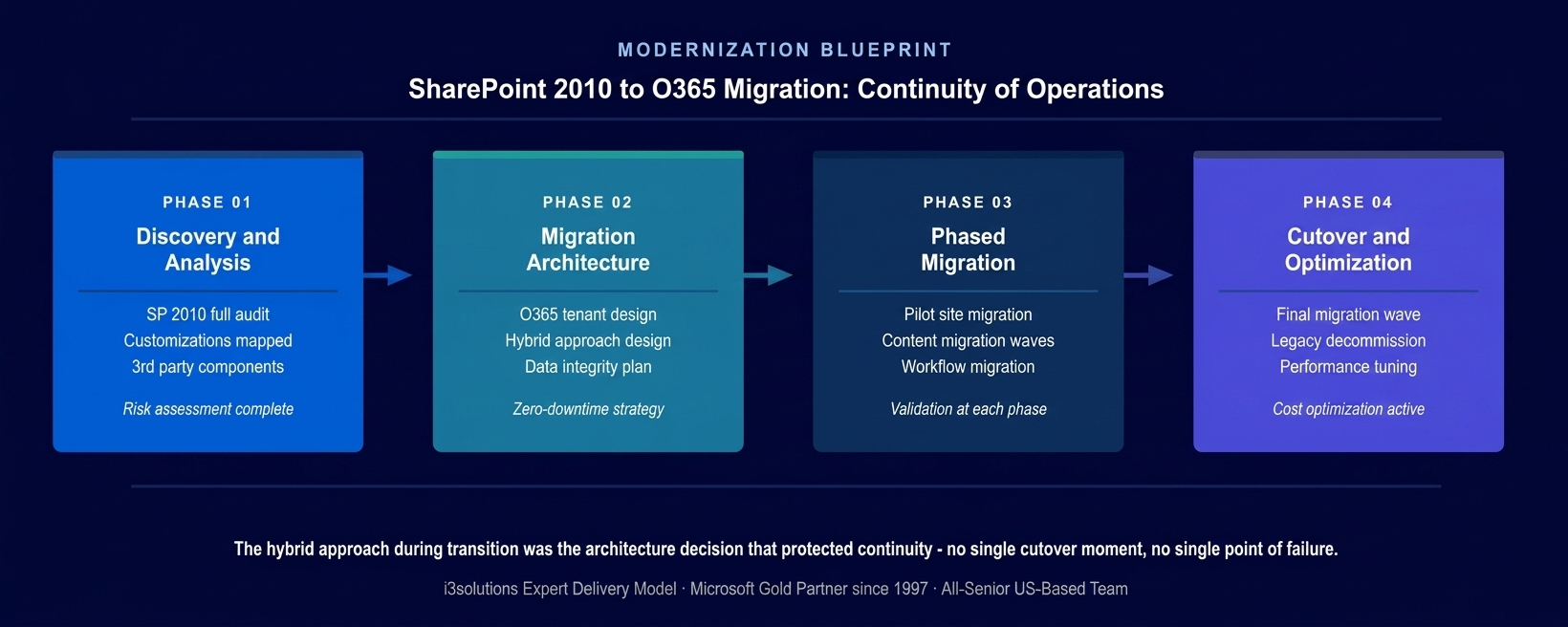
The four-phase approach. The hybrid migration architecture designed in Phase 2 was the decision that protected MCC’s operational continuity – parallel access throughout eliminated the single-cutover risk that was MCC’s primary concern.
PHASE 03
Phased Migration Execution
Phased content migration from SharePoint 2010 to Office 365 SharePoint Online, beginning with lower-risk site collections and progressing to the most complex content areas. Data integrity validation at each wave confirming content accuracy before proceeding. Workflow and form migration with testing against operational requirements. User access maintained to both environments throughout migration.
PHASE 04
Cutover and Cloud Optimization
Final migration wave and legacy system decommission after all content validated in the new environment. Cloud infrastructure optimization for performance and cost-efficiency in the O365 environment. User training for the modernized platform. Post-migration monitoring and support. Legacy SharePoint 2010 infrastructure retired.
Technical Transformation
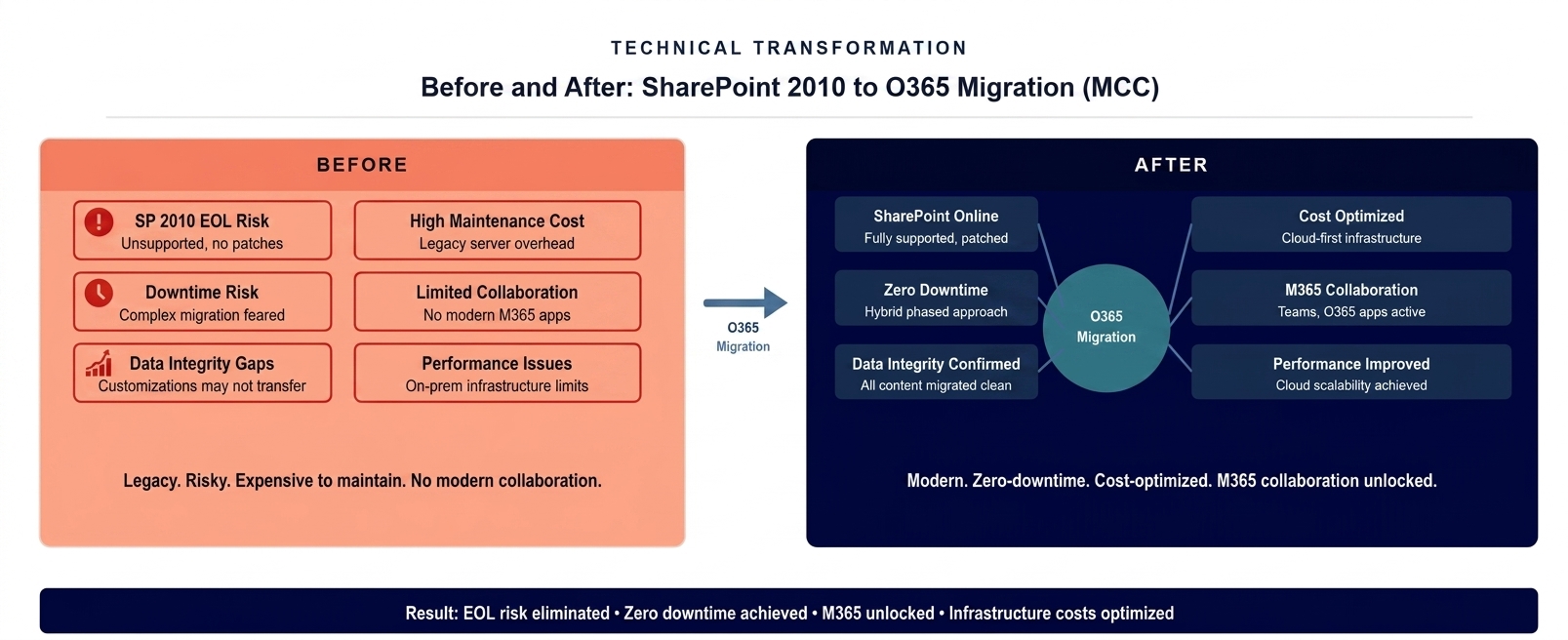
The platform state before and after. An end-of-support SharePoint 2010 environment replaced by modern Office 365 through a zero-downtime phased migration that maintained operational continuity throughout.
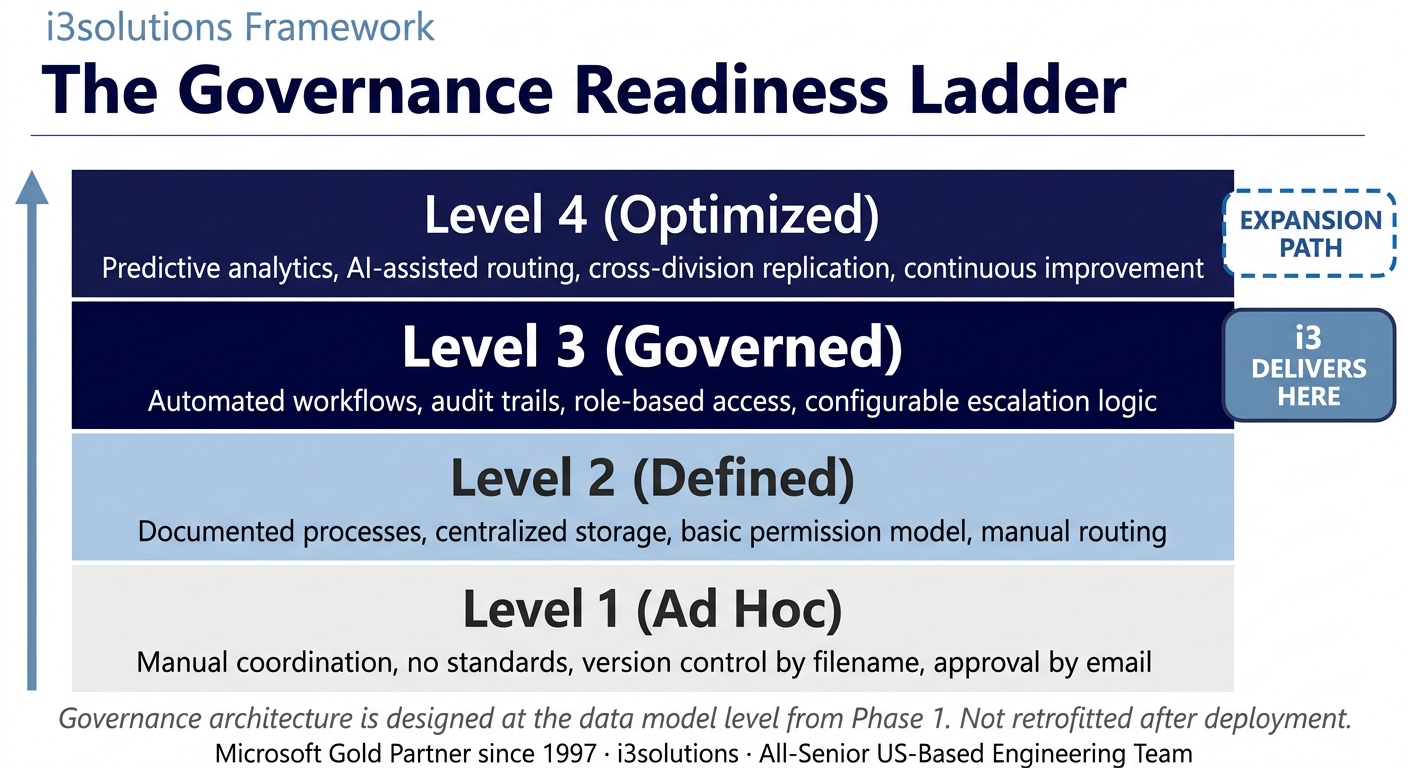
The Governance Readiness Ladder applied. The Office 365 migration delivered Level 3 governance. The modern platform supports Level 4 as Power Platform integration and M365 collaboration capabilities expand.
Measurable Outcomes
| Metric | Before | After | Improvement |
|---|
| Platform support status | SharePoint 2010 – end of support, no patches | SharePoint Online / Office 365 – fully supported, continuously updated | EOL risk eliminated |
| Operational continuity | At risk – unsupported platform with growing complexity | Protected – cloud infrastructure with Microsoft-managed resilience | Continuity protected |
| Migration downtime | Primary concern – complex environment feared disruption | Zero downtime – hybrid parallel access maintained throughout | Zero-downtime migration achieved |
| Data integrity | At migration risk – complex customizations and content | Validated wave-by-wave – complete content integrity confirmed | Full data integrity achieved |
| Infrastructure cost | On-premises hardware and maintenance costs | Cloud-optimized – infrastructure costs reduced | Infrastructure costs optimized |
[PENDING-CLIENT-QUOTE: insert 1-3 sentence outcome-focused quote in the client’s own language from a role matching the reader’s role.]
[Name or Role], [Organization type]
Frequently Asked Questions
Office 365 Cloud Migration for Government and International Development Organizations
What is office 365 cloud migration from SharePoint 2010?
Office 365 cloud migration from SharePoint 2010 involves a structured transition from the on-premises SharePoint 2010 platform to Microsoft’s cloud-hosted SharePoint Online within Office 365. The migration requires discovery and analysis of the existing environment to identify all content, customizations, and third-party components; migration architecture that addresses data integrity and operational continuity; phased execution that moves content in validated waves; and cloud infrastructure optimization that reduces the on-premises hardware costs the migration enables.
How does i3solutions approach a complex SharePoint 2010 to Office 365 migration?
i3solutions begins complex SharePoint migrations with a complete technical audit of the existing environment, inventory of all site collections, document libraries, lists, and customizations; identification of third-party components and their O365 compatibility; analysis of custom workflows for migration path options; and risk assessment for items requiring special handling. The migration architecture is then designed to address the specific risks identified in the audit, with a hybrid approach maintaining parallel access to both environments during migration to protect operational continuity. For MCC, whose mission-critical programs support economic development across 46 countries, zero-downtime was not a preference, it was a requirement.
How does a hybrid migration approach protect continuity during a complex SharePoint migration?
A hybrid migration approach protects continuity by maintaining parallel access to both the source and destination environments throughout the migration period, so users can always access their content in one environment even if a validation issue is discovered in the other. Rather than a single cutover that creates a window where the legacy system is retired and the new one may not be fully validated, a hybrid approach migrates content in waves, validates each wave before retiring the corresponding legacy content, and keeps the legacy environment available as a fallback until the full migration is confirmed. For organizations with mission-critical content and no tolerance for access interruption, the hybrid approach trades a slightly longer migration timeline for operational continuity protection.
What is the total cost of ownership impact of migrating from SharePoint on-premises to Office 365?
The total cost of ownership impact of migrating from SharePoint on-premises to Office 365 is typically positive within the first two years of operation. On-premises SharePoint requires capital investment in server infrastructure, ongoing hardware maintenance and replacement cycles, software licensing for the server platform, and IT staff time for infrastructure management, all of which are converted to a subscription cost in Office 365 that includes infrastructure, software, security updates, and continuous platform improvements. For organizations like MCC operating on SharePoint 2010, a platform Microsoft had already stopped supporting, the migration also eliminates the security vulnerability cost of operating on unpatched software.
Why choose i3solutions for a government mission-critical SharePoint migration?
i3solutions brings the specific combination of migration architecture depth and federal/international development client experience that mission-critical government SharePoint migrations require. The risk that concerns agencies with complex SharePoint environments is not whether migration is technically possible, it is whether institutional knowledge accumulated in customizations, workflows, and content structures survives the migration without loss or corruption. i3solutions’ wave-based migration approach with systematic validation addresses that risk explicitly, and our track record across federal civilian and international development clients provides the reference set to confirm we have handled environments of comparable complexity. Microsoft Gold Partner since 1997. 600+ implementations.
Back to Case Study Library
60 enterprise Microsoft implementations documented
Related Insights
From the i3solutions YouTube Channel
Short-form perspectives on the delivery and technology challenges in this case study.
Who This Engagement Serves
This engagement is relevant if
- You use a legacy, on-premise SharePoint environment that Microsoft no longer supports.
- Your organization faces high security risks or compliance issues due to outdated, unsupported systems.
- No vendor provides a native, direct upgrade path from your specific legacy SharePoint version.
Less relevant if
- Your organization uses a modern, supported version of SharePoint Online like Microsoft 365.
- A direct, automated migration path exists for your specific SharePoint to SharePoint migration.
Ready to migrate from SharePoint 2010 without risking the content your mission depends on?
The 15-Business-Day Microsoft Assessment inventories your SharePoint 2010 customizations, identifies migration risks, and maps the hybrid approach that maintains your operational continuity while you move to Office 365. No single cutover. No data integrity risk.
Microsoft Gold Partner since 1997. 600+ implementations. All senior. All US-based.
Schedule the Assessment


