Case Study · Research / Analytics
Outdated File Server, 900 Clients at Risk: How a Global Research Provider Built Its Knowledge Hub on SharePoint
Client: Global Analytical Research Provider

The Enterprise Challenge
A global analytical research provider serving over 900 clients across multiple industries had built its reputation on the quality and rigor of its research output. With 150 employees across multiple locations and a client base spanning many sectors, the organization’s ability to produce consistent, high-quality research depended on its people being able to find and use the right information at the right time. But the infrastructure that was supposed to support that capability, a centralized file server, had become an obstacle.
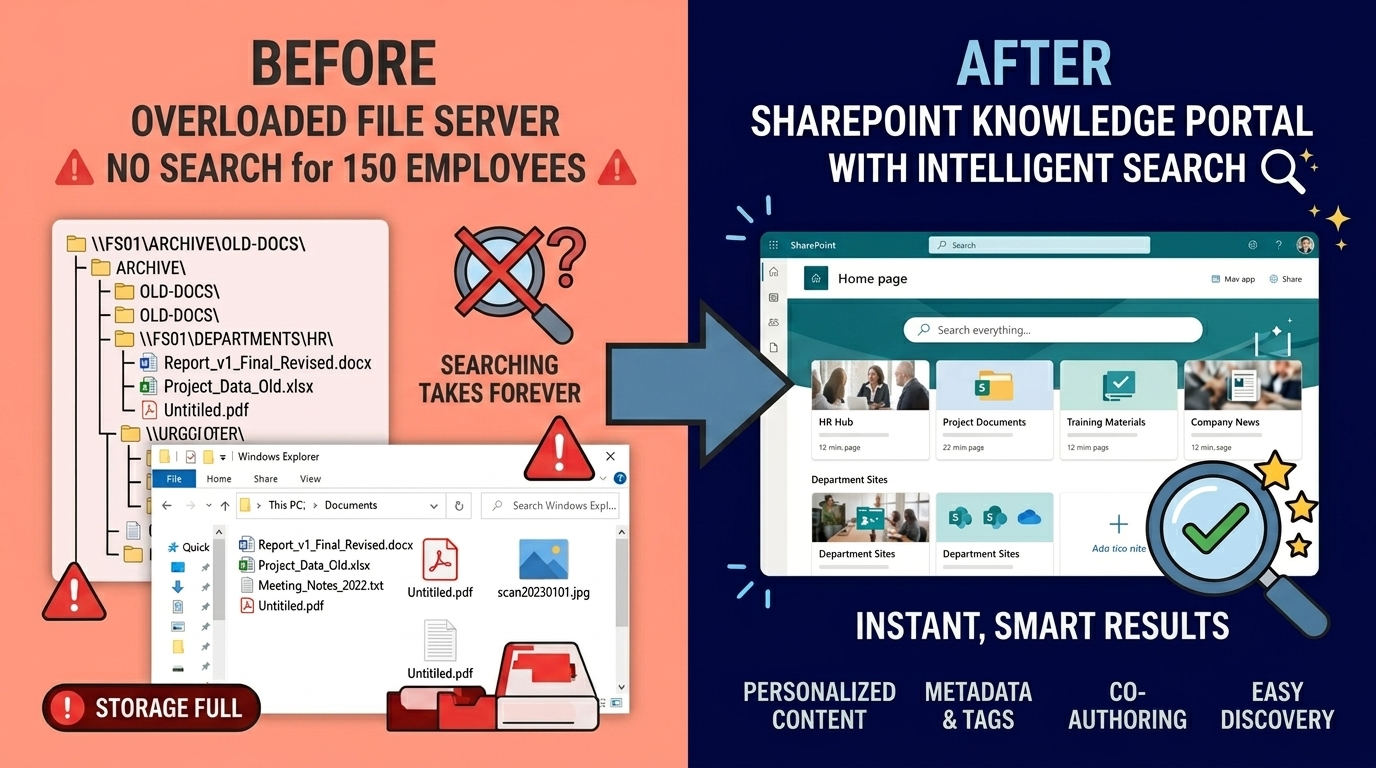
The file server had grown without governance for years, accumulating research reports, client materials, methodology documents, and project files in a structure that had become genuinely difficult to navigate. Employees regularly spent significant time searching for documents they knew existed but could not locate efficiently. With the company expanding internationally, the problem was compounding, new employees in new offices had no reliable way to access institutional knowledge. There was no search capability beyond file name browsing, no version control, and no way to understand which document was current.
The Strategic Trigger
The organization needed a knowledge management platform with genuine search capability, organized information architecture, version control, and collaboration features that could serve a growing distributed team, replacing the ungoverned file server without disrupting the active research workflows that depended on the existing content.
The Engagement Approach
Strategic Trigger
Global research data isolated on overloaded legacy server
For years, the research provider relied on a centralized file server to store critical analytical reports, client data, and proprietary methodologies. As the firm grew to 150 employees, the sheer volume of data overwhelmed the aging infrastructure. Near-misses became commonplace; analysts frequently spent hours searching for mislabeled documents, and several high-stakes projects were nearly compromised when researchers couldn’t locate key regulatory data before major deadlines. The chaotic “wild west” file structure led to version control nightmares, with outdated information occasionally being used in final client deliverables, severely threatening the integrity of their core business offerings.
Leadership formally recognized that the existing infrastructure was not just an operational bottleneck but a critical liability. The tipping point arrived when a primary client’s project was delayed because the necessary historical data was lost within the fractured file system. Executives realized that continued reliance on the overloaded server would stifle growth, erode client trust, and prevent them from leveraging their own intellectual property. They committed to a total digital transformation, recognizing that a modern, scalable, and searchable content management system was essential to maintain their competitive edge in the fast-paced analytical research market.
Stakes
Escalating compliance penalties and critical data loss
Inaction was rapidly becoming a financial and operational impossibility. The inability to manage data according to strict client protocols was exposing the firm to massive compliance penalties. A single failed audit due to misplaced data or insufficient access controls could have resulted in crippling fines, potentially totaling hundreds of thousands of dollars. Operationally, the firm was wasting countless billable hours as highly skilled analysts and researchers were forced to become data archivists. Continued inaction promised a steady decline in profitability as overhead costs spiraled, threatening the firm’s long-term viability in a margin-sensitive analytical research industry.
The strategic and reputational risks were equally severe. As a premier provider of analytical research, the firm’s entire value proposition rested on accuracy, confidentiality, and data integrity. If they could not reliably manage their own data, clients would quickly lose confidence in their ability to handle sensitive information, causing irreparable damage to their brand reputation. This lack of data governance would also severely impede their ability to recruit and retain top-tier talent, who require efficient tools to succeed, effectively stalling the firm’s strategic growth initiatives and potentially leading to a permanent market contraction.
Constraints and Complexity
Global teams require instant document access and security
The implementation faced unique constraints, primarily balancing the need for intense security with easy data access. Analytical reports often contained sensitive, trade-secret-level information that required extremely precise access controls based on client contracts, project teams, and regulatory frameworks (like GDPR). However, the system had to remain efficient for 150 employees working across different time zones. Implementing a complex security matrix while maintaining an intuitive user experience for document retrieval was a significant technical and organizational challenge that demanded a sophisticated architecture and careful planning of SharePoint’s metadata structure.
Data migration was a Herculean task due to the volume and complexity of the existing data, much of it unstructured or containing nested folders. The firm had millions of documents spanning decades, and the “lift and shift” approach was not viable. Adopting a new platform required not just technical migration but also a total cultural shift in how employees managed documentation. Overcoming the deep-seated habits of using a direct file path and fostering adoption of metadata-driven search was crucial. This legacy complexity, combined with the pressure for zero downtime, made this a particularly intricate and high-stakes transformation.
Selection Rationale
Senior Microsoft Specialists with Proven Delivery Depth
The research provider thoroughly evaluated several implementation partners, including several larger global consulting firms and offshoring options. While these alternatives promised lower initial costs, their reliance on offshore resources and commodity staffing raised significant concerns regarding data security, communication delays, and the depth of expertise available for a complex, migration-heavy project. The firm recognized that successful delivery required a deeply experienced partner, not just a implementation factory, as any significant delays or data loss during migration would be catastrophic. Offshoring was deemed too risky for handling their sensitive proprietary data.
i3solutions was ultimately selected as the clear choice due to their unique composition: an all-senior, 100% US-based team. Their status as a Microsoft Gold Partner since 1997 and a proven track record of over 600 successful SharePoint implementations provided unparalleled confidence. The client valued the ability to work directly with seasoned architects and developers who understood not just the technology but the strategic business implications. i3solutions’ proven methodology, deep architectural knowledge, and senior-level accountability were the critical factors that aligned with the firm’s need for a secure, sophisticated, and rapidly adopted solution.
Phase 1
Data Audit
Conducted a full inventory of the file server, content types, document volumes, current folder structures, and access patterns, to inform the new information architecture.
Phase 2
Information Architecture
Designed a SharePoint site structure organized around research divisions, client categories, and document types, with metadata tagging to support search.
Phase 3
SharePoint Build
Configured SharePoint document libraries, search indexes, version control settings, and collaboration workspaces aligned to the organization’s research and client management workflows.
Phase 4
Search and Adoption
Deployed SharePoint search with metadata-driven refiners, trained employees across all locations on the new system, and managed migration of active content from the legacy file server.

Technical Transformation
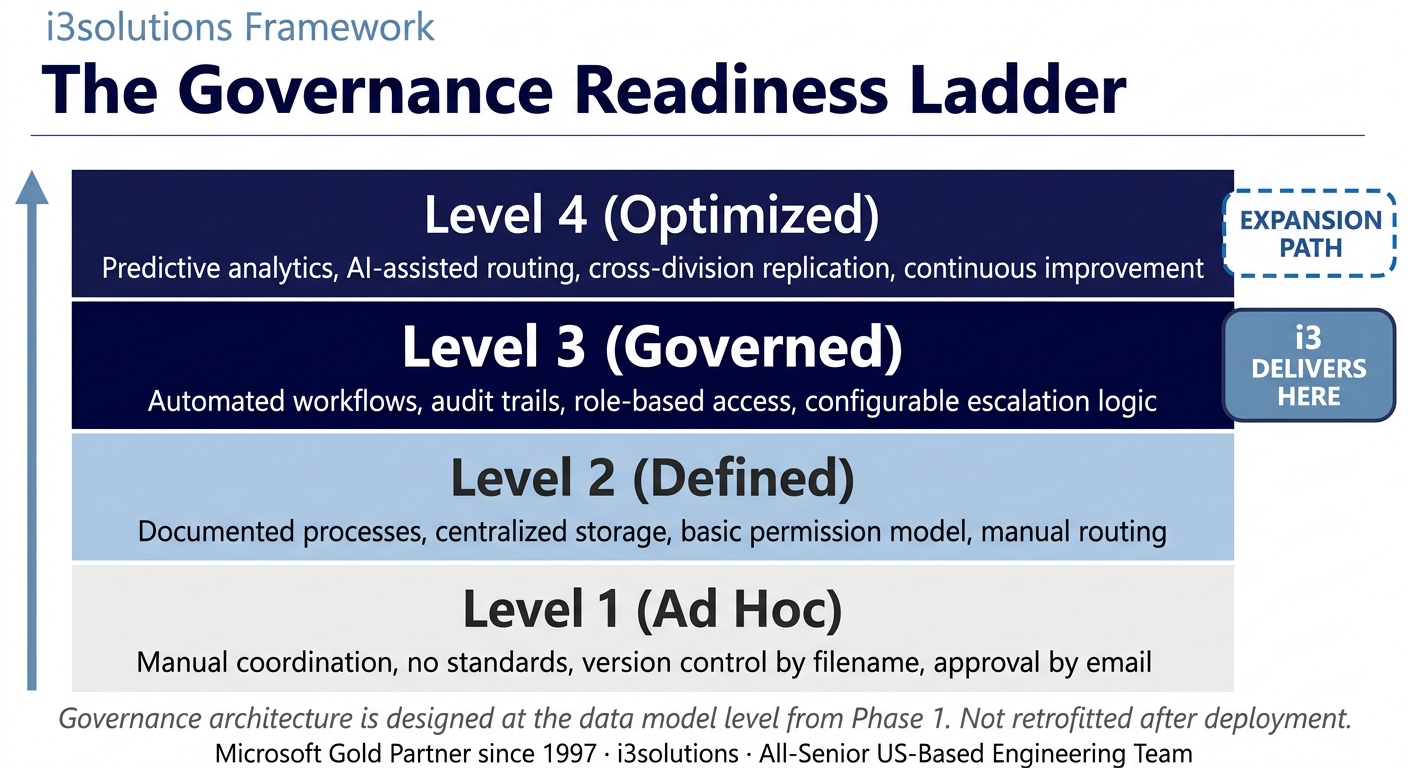
i3solutions replaced the research firm’s overloaded file server with a governed SharePoint knowledge management portal. Research reports, methodology documents, client materials, and project files are now organized in structured libraries with consistent metadata. Full-text search returns relevant results in seconds rather than requiring manual folder browsing. Version control ensures employees work from current documents. Distributed teams across locations access the same organized knowledge base. The ungoverned file server that had grown beyond usability was replaced with a system designed to scale with the organization’s growth.
Measurable Outcomes
| Metric |
Result |
| Search Time Eliminated |
Full-text SharePoint search replaced manual folder browsing for 150 employees across multiple locations |
| Knowledge Governance |
Structured metadata and library organization replaced an ungoverned file server that had grown beyond navigability |
| Version Control |
Document versioning ensures all employees work from current research materials without ambiguity |
| Distributed Access |
International team members access the same organized knowledge base regardless of location |
| Scale Foundation |
SharePoint architecture designed to accommodate continued organizational growth without degradation |
[PENDING-CLIENT-QUOTE: insert 1-3 sentence outcome-focused quote in the client’s own language from a role matching the reader’s role.]
[Name or Role], [Organization type]
Frequently Asked Questions
What is knowledge management and when does an organization need it?
Knowledge management is the practice of organizing, structuring, and making accessible the information an organization needs to do its work. An organization typically needs formal knowledge management when informal systems, shared drives, email attachments, file servers, have grown to a size where employees can no longer reliably find what they need. For this research firm, 150 employees across multiple locations and years of unstructured file server growth made that threshold clear.
How does i3solutions approach SharePoint knowledge management for research organizations?
i3solutions begins with a content audit, understanding what information exists, how it is currently organized, and how employees actually search for and use it. For research organizations, the key design challenge is balancing the diversity of content types (methodology documents, client reports, project files, reference materials) with the need for a consistent navigation and search experience. i3solutions designs the information architecture before any SharePoint configuration begins.
How does SharePoint search work for a large document repository?
SharePoint’s search engine indexes document content, metadata, and properties, making all of it searchable from a single search box. i3solutions enhances this with custom metadata fields, research discipline, client industry, document type, date range, that become refiners in the search interface. Employees can search broadly and then filter results to exactly what they need, rather than manually navigating folder trees.
What ROI should research organizations expect from knowledge management implementation?
Research organizations that implement governed knowledge management typically recover significant time from document search, time that can be redirected to research production. The secondary ROI is institutional memory: when knowledge lives in an organized, searchable system rather than individual hard drives and email inboxes, the organization retains it through employee transitions and distributes it to new hires immediately.
Why choose i3solutions for SharePoint knowledge management?
i3solutions has built knowledge management and document portal systems for clients across research, defense, financial services, and nonprofit sectors. Our all-senior team brings 600+ Microsoft platform implementations and the experience to design SharePoint architectures that remain organized as organizations grow. Our 15-Business-Day Microsoft Assessment gives research organizations a clear implementation plan.
Who This Engagement Serves
This engagement is relevant if
- A knowledge-based firm with numerous consultants struggling to retrieve critical information from a sprawling file server.
- Companies whose remote workers experience severe delays accessing and collaborating on files over a traditional VPN.
- Organizations requiring structured data governance, version control, and compliance that an ungoverned file server cannot provide.
Less relevant if
- A small business with under twenty employees who rarely collaborate on complex documents or share files.
- A company requiring low-latency processing of massive raw media files which is not suitable for SharePoint.
Ready to establish a governed Microsoft environment?
i3solutions delivers enterprise digital transformation on-time, in-scope, in-production. Microsoft Gold Partner since 1997. 600+ implementations. All-senior, all US-based team.
Schedule a 15-Business-Day Microsoft Assessment


