Case Study • Civil Engineering / Manufacturing • Employee Portal
Low Adoption, Irrelevant Content: How a Civil Engineering Firm Rebuilt Its SharePoint Employee Portal

The Enterprise Challenge
SharePoint Employee Portal for a Leading Civil Engineering Product Manufacturer
The Reinforced Earth Company, a leading provider of retaining walls and geotechnical structures for heavy civil engineering projects, had completed more than 45,000 Mechanically Stabilized Earth walls using its proprietary Reinforced Earth and T-WALL systems since 1971. RECo’s workforce relied on product knowledge, assembly processes, and cross-team coordination to deliver complex civil engineering projects on schedule. Its existing intranet portal was designed to support that coordination – but it wasn’t doing it.
The portal suffered from two compounding problems. First, low usage: employees had collectively decided the portal wasn’t worth the effort to navigate, and had found workarounds for the tasks it was supposed to support. Second, irrelevance: the content that existed in the portal was outdated, the design was dated, and the functionality didn’t reflect how RECo’s teams actually worked. A portal that employees don’t use is not a collaboration platform – it’s an administrative liability.
The core gap was the absence of a feature that genuinely mattered to how RECo operated: an integrated product catalog that connected the product development team to the assembly team. Without a digital, searchable product catalog in the intranet, product and assembly teams communicated through email, spreadsheets, and informal channels – creating the kind of coordination friction that compounds on complex multi-site civil engineering projects. RECo engaged i3solutions to rebuild the portal from discovery through deployment, delivering a SharePoint employee portal that employees would actually use.
Strategic Trigger
The Portal Existed But Employees Had Voted With Their Behavior
The forcing function was measurable non-adoption. When usage data showed that employees were consistently finding workarounds rather than using the portal, the organization faced a clear choice: continue investing in a platform that wasn’t working, or rebuild it around what employees actually needed. The workarounds themselves were informative – the most common ones revealed the specific gaps that a rebuilt portal needed to fill.
The product catalog gap was identified as the highest-value opportunity. RECo’s business model depends on accurate, current product information flowing between product designers, assembly teams, and project managers. When that information lives in email threads and informal channels rather than a governed, searchable system, the coordination overhead compounds with every project. A product catalog embedded in the employee portal would replace the informal information flow with a governed, consistent source of truth for RECo’s proprietary product systems.
The employee directory gap was the second identified opportunity. RECo’s existing directory was a PDF – static, manually updated, and consistently out of date. A dynamic, searchable employee directory that reflected current org structure and contact information would replace a workaround-generating resource with a functional one. For context on how SharePoint portal governance decisions determine whether a rebuilt intranet maintains its adoption over time, Integration Governance for MicrosoftPENDING-SCHEDULED covers the change control architecture that prevents portal quality from degrading after launch.
Is your organization’s intranet portal underused because it doesn’t reflect how teams actually work?
If employees have built workarounds around a portal that was designed to support them, the adoption gap is diagnostic. A 15-Business-Day Microsoft Assessment maps the specific SharePoint portal architecture – product catalogs, directories, workflows – that would replace the workarounds with features employees choose to use.
Request the Assessment
▶ Related Insight — A 60-second perspective from our channel
Stakes
Operational inefficiencies drive overhead costs and slow project delivery
A lack of automated self-service means every internal query, form submission, and policy request funnels directly to the administrative and HR teams via email, phone, or in-person visits. This model introduces critical financial and operational strain. It requires over-resourcing administrative departments just to manage routine, low-value inquiries, inflating general overhead costs. Furthermore, the reliance on manual processing creates significant delays in fulfilling simple employee needs. This slows responsiveness to critical project requests, directly impacting the velocity of Reinforced Earth’s core engineering and construction operations and reducing overall billing efficiency.
Beyond immediate financial overhead, the reliance on ad-hoc, manual requests fosters a fragmented, opaque operating environment that presents severe strategic risk. When administrative workflows are managed through spreadsheets and individual email threads, the data is siloed and invisible to organizational leadership. This fragmentation prevents the collection of clean, structured usage data required for accurate operational analysis and resource planning. Without clear visibility into internal demand, leadership cannot effectively optimize departmental structures or anticipate future resource requirements, undermining long-term strategic growth and organizational agility in a competitive infrastructure market.
Constraints and Complexity
Product Catalog Integration, Custom Development, and Adoption as the Primary Success Metric
The product catalog requirement was the most technically specific element of the engagement. RECo’s product catalog needed to reflect the structure of its proprietary systems – Reinforced Earth and T-WALL – in a way that made sense to product designers and assembly teams simultaneously. Building a generic document library with product PDFs would have produced a marginally better version of the existing problem. Building an interactive catalog with the navigation logic that RECo’s teams actually used required close collaboration with the product and assembly teams to understand how they thought about the product portfolio.
Adoption was treated as a design constraint from the beginning rather than a post-launch concern. A portal that is technically functional but organizationally foreign – with navigation structures, content organization, and workflow patterns that don’t match how RECo’s teams actually work – will not achieve adoption regardless of how well it is built. Requirements gathering therefore included employee journey mapping that identified specific daily tasks and how the portal should support each one.
Selection Rationale
Microsoft Gold Partner with SharePoint Portal and Custom Development Depth
RECo selected i3solutions as a Microsoft Gold Partner since 1997 with a track record in SharePoint employee portal and Microsoft consulting services for organizations where adoption, not just functionality, was the primary success criterion. The Expert Delivery Model that i3solutions operates, with senior-level SharePoint developers handling every engagement, meant that the practitioners who designed the portal architecture were the same practitioners who built it – ensuring that the requirements-gathering insights translated directly into development decisions.
The Engagement Approach
From Ignored Portal to Operational Backbone
PHASE 01
Discovery and Requirements
Portal usage audit identifying the specific pages and features with near-zero engagement. Employee journey mapping documenting the daily tasks that portal was supposed to support and the workarounds employees had built. Requirements documentation covering the product catalog structure, employee directory fields, and workflow automation needs. Stakeholder alignment on adoption metrics that would define success.
PHASE 02
Architecture and Design
SharePoint information architecture optimized for RECo’s operational structure rather than a generic intranet template. Navigation taxonomy derived from how teams actually navigated product and project information. UI/UX wireframes reviewed and validated with employee representatives before development began. Custom web part specifications for the product catalog and employee directory.
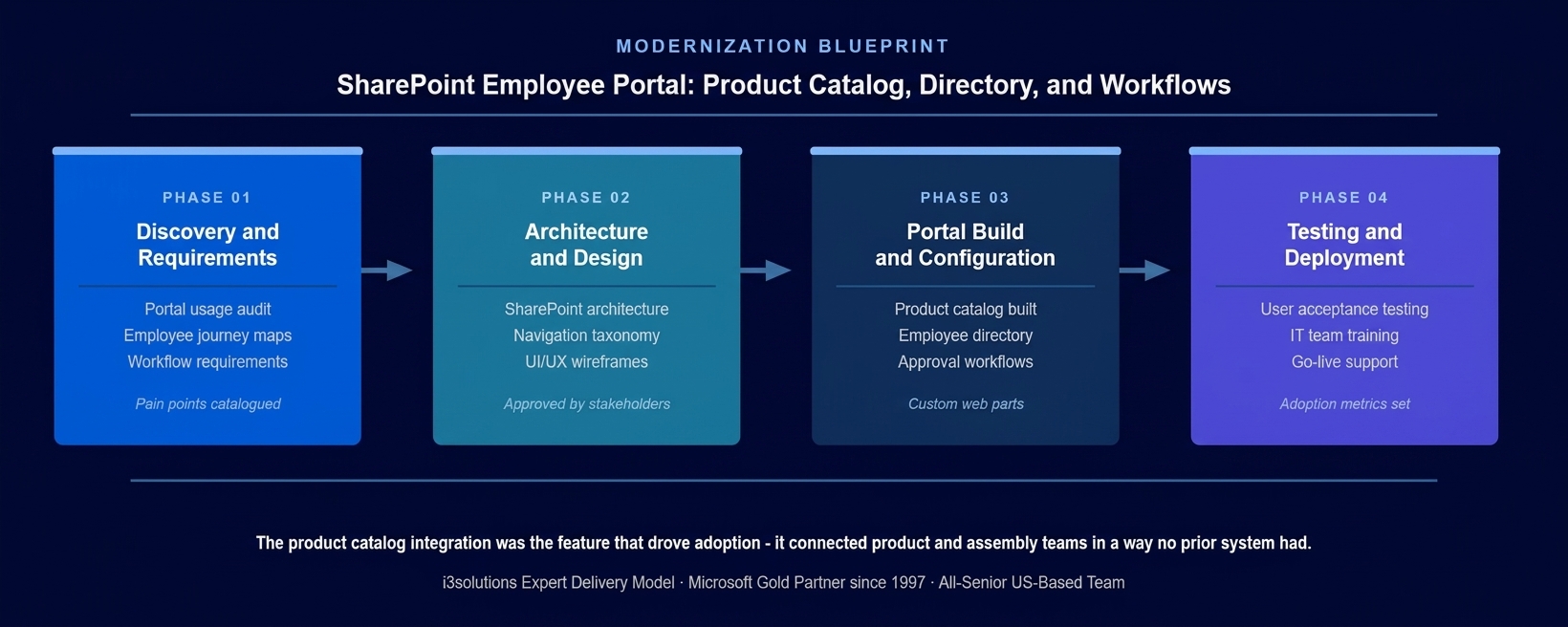
The four-phase approach. Employee journey mapping in Phase 1 was the investment that determined whether Phase 3 would build features employees used or features that looked good in a demo.
PHASE 03
Portal Build and Configuration
Interactive product catalog built as a custom SharePoint web part with the navigation structure, filtering capability, and product metadata that RECo’s product and assembly teams needed. Dynamic employee directory replacing the PDF with a searchable, automatically maintained record of current staff. Approval workflows for the processes that RECo’s teams had previously managed through email chains. Modern UI/UX design that presented the portal as a contemporary, purposeful tool rather than an administrative legacy system.
PHASE 04
Testing and Deployment
User acceptance testing with employee representatives from the product, assembly, and administrative teams that the portal was designed to serve. IT team training on portal administration and content governance. Go-live with adoption monitoring to confirm that the features built in Phase 3 were being used as designed and to identify any post-launch adjustments needed.
Technical Transformation
From Ignored to Indispensable
Before the rebuild, the RECo portal was a platform that existed in the IT architecture but not in the employees’ workflow. The product catalog was an email thread. The employee directory was a PDF. The approval workflows were informal. The portal was contributing nothing to how RECo’s teams actually worked.
After the rebuild, the portal hosted an interactive product catalog that connected RECo’s product and assembly teams through a governed, searchable system; a dynamic employee directory that replaced manual PDF maintenance; and approval workflows that converted email-based processes into governed, trackable digital flows. The SharePoint employee portal became the operational backbone it was designed to be.
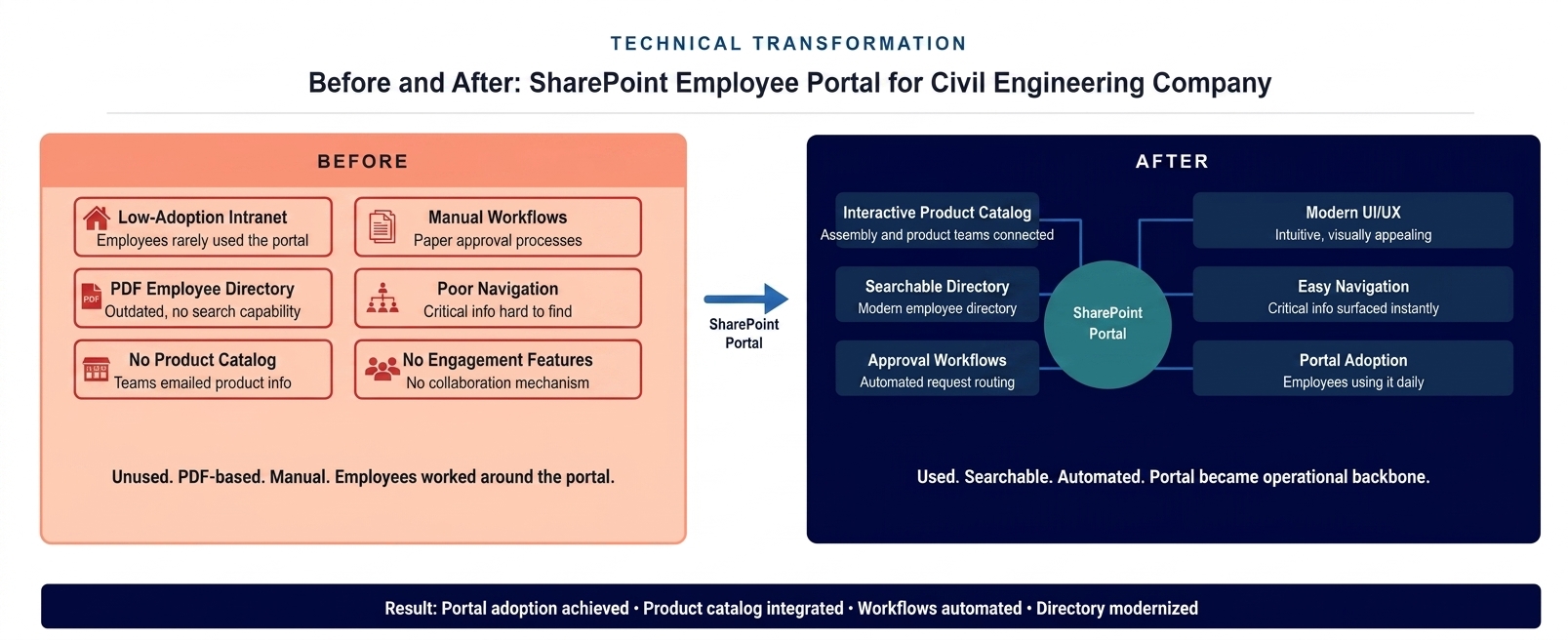
The portal state before and after. A low-adoption, PDF-directory intranet replaced by a modern SharePoint employee portal with interactive product catalog, searchable directory, and automated workflows.
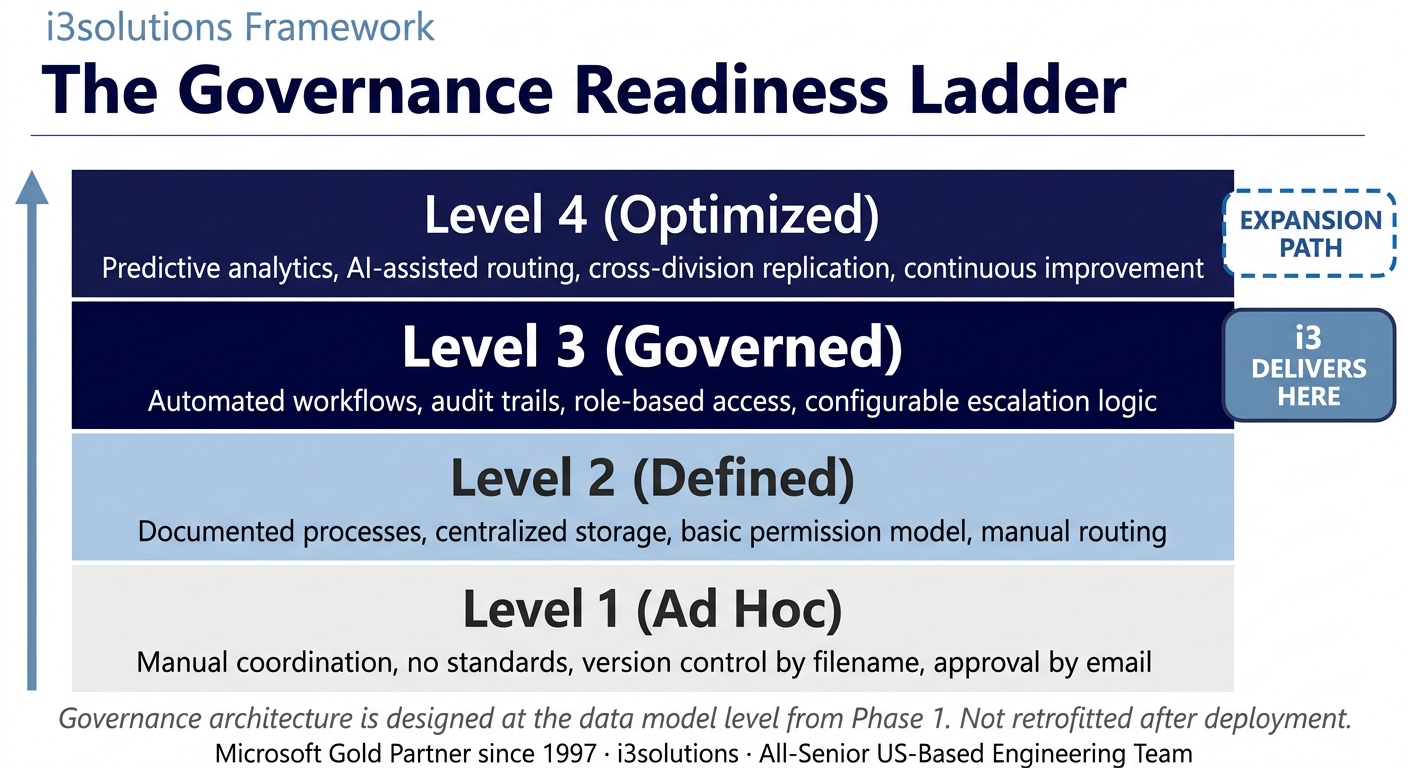
The Governance Readiness Ladder applied. The rebuilt portal delivered Level 3 governance. The SharePoint architecture supports Level 4 as Power Platform integration and analytics mature.
▶ Related Insight — A 60-second perspective from our channel
Measurable Outcomes
Portal Adoption Achieved, Product Catalog Live, Workflows Automated
| Metric | Before | After | Improvement |
|---|
| Portal adoption | Low – employees used workarounds rather than the portal | Active use – portal became the operational hub for daily tasks | Adoption achieved |
| Product catalog access | Email threads and informal communication between teams | Interactive SharePoint catalog – searchable, filterable, current | Governed product information hub |
| Employee directory | Static PDF – manually updated, consistently out of date | Dynamic, searchable directory – automatically maintained | PDF directory replaced |
| Approval workflows | Email-based – no tracking, no audit trail | SharePoint workflows – governed, trackable, documented | Email workflows eliminated |
| Cross-team coordination | Friction between product and assembly teams on product information | Product catalog connects teams through shared governed source | Coordination friction reduced |
[PENDING-CLIENT-QUOTE: insert 1-3 sentence outcome-focused quote in the client’s own language from a role matching the reader’s role.]
[Name or Role], [Organization type]
Ready to rebuild a portal that employees actually choose to use?
A Risk and Roadmap Assessment maps the specific SharePoint portal architecture – product catalogs, directories, workflows – that would replace your employees’ workarounds with features that match how they actually work.
Schedule the Assessment
Frequently Asked Questions
SharePoint Employee Portal for Manufacturing and Engineering Organizations
What is a SharePoint employee portal for manufacturing organizations?
A SharePoint employee portal for manufacturing organizations is a custom-built intranet that integrates the specific information and workflow needs of the organization’s operations, product catalogs, assembly documentation, approval workflows, and employee directories, into a single governed platform that employees choose to use because it reflects how they actually work. Unlike generic intranet templates, a manufacturing-specific portal is built around the operational structure of the organization, making critical information accessible in the formats and navigation patterns that match daily workflows.
Why do employee portals fail to achieve adoption, and how does i3solutions prevent that?
Employee portals fail to achieve adoption when they are built around what IT or management thinks employees need rather than how employees actually work, navigation structures that don’t match how teams think about their work, content that requires employees to learn a new mental model, and features that address administrative requirements rather than daily tasks. i3solutions prevents this by beginning every portal engagement with employee journey mapping that documents specific daily tasks and builds the portal to support each one. The product catalog integration RECo needed was identified through this process, it was the feature that employees were working around, and building it drove adoption because it replaced a workaround with something better.
How does an interactive product catalog work in SharePoint?
An interactive product catalog in SharePoint is a custom web part that presents product information in a navigable, searchable format organized around the structure that matters to the organization’s teams. For a manufacturer with multiple product systems, the catalog can be organized by product line, application type, or project specification, with filtering that allows product and assembly teams to find specific technical information without knowing exactly where it lives. The catalog is governed through SharePoint’s content management infrastructure, ensuring that updates are reflected immediately across all teams without requiring email distribution or PDF republication.
What should manufacturing firms look for in a SharePoint portal implementation partner?
Manufacturing firms should look for an implementation partner with experience building portals that achieve measurable adoption, not just technical completion. A portal that works correctly but employees don’t use is a failed engagement regardless of whether it was delivered on time. i3solutions uses journey mapping and employee feedback to design portals around real operational workflows before writing a line of code, and confirms adoption metrics post-deployment rather than just signing off on go-live. With 600+ Microsoft platform implementations and a Microsoft Gold Partner relationship since 1997, i3solutions brings the pattern recognition to identify adoption risk in the requirements phase rather than discovering it after launch.
How long does a SharePoint employee portal rebuild typically take?
A SharePoint employee portal rebuild spans several months from requirements through go-live, with timeline driven by the scope of custom development, the complexity of integrations, and the number of stakeholder groups whose input is needed during requirements. Engagements that include custom web parts like interactive product catalogs take longer than rebuilds using standard SharePoint components, but deliver more durable adoption because the features are built for the organization’s actual operational needs. i3solutions provides a timeline estimate with milestones after completing the requirements phase, when the scope is understood with enough precision to commit to a schedule.
Conclusion
A Portal Employees Actually Use
The Reinforced Earth Company replaced a low-adoption intranet that employees were working around with a SharePoint employee portal built around how RECo’s teams actually worked – featuring an interactive product catalog connecting product and assembly teams, a dynamic employee directory replacing the static PDF, and approval workflows converting email-based processes into governed digital flows. Through SharePoint employee portal and Microsoft consulting services that prioritized adoption as the primary success metric from the first requirements session, RECo moved from a portal nobody used to a platform that became part of daily operations.
Back to Case Study Library
60 enterprise Microsoft implementations documented
Related Insights
From the i3solutions YouTube Channel
Short-form perspectives on the delivery and technology challenges in this case study.
Who This Engagement Serves
This engagement is relevant if
- Companies seeking to eliminate manual processes by providing employees with a self-service internal request system.
- Organizations relying on email or paper forms that need centralized request management on their SharePoint platform.
- Businesses looking to streamline internal resource allocation and approvals using their existing SharePoint software.
Less relevant if
- Small businesses with very few employees who manage internal requests efficiently without any digital system.
- Organizations that have already deployed a comprehensive, automated employee self-service portal for internal needs.
Ready to build a portal your teams will actually use?
The 15-Business-Day Microsoft Assessment maps the portal architecture that reflects how your teams work – product catalogs, directories, approval workflows – built on your existing Microsoft investment. Adoption by design, not by mandate.
Microsoft Gold Partner since 1997. 600+ implementations. All senior. All US-based.
Schedule the Assessment


