Case Study • Government / Federal • App Modernization
Global Meetings in Chaos: How a Federal Agency Automated Meeting Room Coordination
The Enterprise Challenge
Workflow Automation Solutions for Federal Meeting and VTC Coordination
A federal agency within the Executive Office of the President coordinates trade negotiations, dispute resolution proceedings, and diplomatic engagements across both domestic offices and international locations. For an organization whose core function depends on convening the right people in the right rooms with the right equipment at the right time, the state of its meeting room and video teleconference coordination was a persistent operational liability.
Room booking requests were handled through manual processes – phone calls and emails to administrative staff who maintained room availability records informally. Double-bookings were a consistent problem. Equipment requests for video teleconference setups, presentation technology, and overseas coordination were managed separately from room bookings, creating situations where a room was confirmed but the equipment needed to conduct the meeting had not been requested, or had been requested but not connected to the room reservation. For an agency coordinating meetings that included overseas participants, the absence of a unified booking system meant that international coordination operated entirely outside the domestic process.
The agency already operated on Microsoft SharePoint. The workflow automation solutions it needed did not require a new platform. It required a governed booking portal built on the existing SharePoint infrastructure that would give staff self-service access to room availability, equipment requests, and booking confirmation – and give administrative staff a single view of all coordination activity across domestic and international facilities.
Strategic Trigger
Double-Bookings and Overseas Coordination Gaps Made the Manual System Indefensible
The forcing function was a pattern of operational failures that accumulated across a meeting schedule too complex for a manual process to manage reliably. Double-bookings – two meetings confirmed for the same room at the same time – were not exceptional. They were a recurring feature of an informal booking system where availability was tracked in a way that did not prevent a second booking from being confirmed before the first was visible to the person handling the second request.
The equipment gap was a compounding factor. Video teleconference meetings required specific equipment configurations – display screens, cameras, microphones, connectivity to overseas participants – that needed to be set up and tested before the meeting. When equipment requests were managed separately from room bookings, the administrative chain between a confirmed room and a configured meeting depended on multiple manual handoffs between staff members handling different parts of the coordination. A breakdown at any handoff produced a meeting that started late or could not proceed.
The overseas coordination dimension was the most significant structural gap. International meeting participants, conference room reservations at overseas facilities, and equipment needs for cross-continental video calls were being coordinated through informal channels that had no connection to the domestic booking system. The agency was effectively managing two separate, incompatible coordination processes for what was functionally one meeting environment. For a look at how workflow automation decisions can unify fragmented coordination processes on a shared Microsoft platform, 10 Power Automate Enterprise Processes to Automate in Year One covers the sequencing logic that identifies which automation investments deliver the highest operational value earliest.
Are double-bookings and coordination gaps slowing down meetings your mission depends on?
If your meeting room booking process relies on administrative staff fielding individual requests without real-time availability data, the double-booking risk is structural. A 15-Business-Day Microsoft Assessment maps the specific SharePoint and workflow automation architecture that would replace the manual process on your existing Microsoft infrastructure.
Request the Assessment
▶ Related Insight — A 60-second perspective from our channel
Stakes (What Happens If They Fail)
Diplomatic and Operational Meetings Disrupted by Coordination Failures
For a federal agency engaged in international trade negotiations, meeting coordination failures are not minor inconveniences. When a senior official arrives for a meeting and the room is occupied by a conflicting booking, or the video teleconference equipment has not been configured for the overseas participants who are already waiting, the operational and reputational consequences are immediate and visible to the international counterparts involved. These are not meetings where a casual delay or equipment failure is absorbed without consequence.
The administrative cost of the manual process was also material. Staff who spent their time fielding booking requests, resolving double-bookings, and coordinating equipment setup through separate channels were investing significant effort in coordination that could be automated. The manual process consumed administrative capacity that the agency needed for higher-value coordination work – and it still produced failures that a governed automated system would have prevented.
The absence of a unified record of meeting activity across domestic and overseas facilities had a secondary cost: the agency could not easily analyze patterns in its meeting demand, facility utilization, or equipment usage to inform resource planning. Decisions about room configuration, equipment investment, and overseas coordination infrastructure were made from incomplete information because the data that would support those decisions was scattered across informal records, email threads, and individual administrator knowledge.
Constraints and Complexity
Global Coordination, Equipment Integration, and Self-Service Without Sacrificing Administrative Control
The booking system needed to serve a global coordination requirement from a single unified platform. This meant the room inventory had to include both domestic conference rooms and overseas facilities, the booking interface had to accommodate the time zone and format differences relevant to international meetings, and the equipment request process had to be applicable to both domestic AV setup and video teleconference equipment for international participants. Designing a system that was coherent for a domestic meeting request and equally coherent for a multi-location international video conference required architectural decisions in Phase 1 rather than accommodations retrofitted after deployment.
The equipment request integration was technically and operationally nuanced. Different rooms had different standard equipment, and different meeting types required different configurations. The booking portal needed to present the relevant equipment options for the room being requested – not a generic list that required the requestor to know which options were available for which room – and the equipment request had to be linked to the booking record in a way that administrative staff could act on without reconstructing the connection from separate records.
The self-service requirement had to coexist with the administrative control requirement. Staff needed the ability to check availability and submit bookings without going through an administrator for routine requests. Administrators needed visibility into all bookings, the ability to manage the room inventory and equipment catalog, and the ability to handle exceptions that required judgment. The system had to serve both user populations without compromising either. For a look at how this class of SharePoint governance architecture is designed in practice, SharePoint and Power Platform Integration for Regulated Enterprise Workflows covers the integration and access control decisions that make a self-service portal governable rather than ungoverned.
▶ Related Insight — A 60-second perspective from our channel
Selection Rationale (Why They Chose i3solutions)
Federal-Experienced SharePoint Specialists Who Had Built Governed Self-Service Systems Before
The agency had already engaged i3solutions for the travel compensation portal and the telework approval system. The decision to engage the same team for meeting coordination was driven by the track record of those prior implementations – systems that had achieved the self-service adoption and administrative visibility that the agency needed without producing the governance gaps that self-service systems without proper architecture can create.
i3solutions was selected as a Microsoft Gold Partner since 1997 with demonstrated experience in workflow automation solutions built on Microsoft SharePoint for federal environments. The Expert Delivery Model that i3solutions operates, staffing every engagement with senior-level SharePoint and workflow specialists only, meant that the architects who had designed the travel compensation and telework systems were the same practitioners who designed the meeting coordination portal. Institutional knowledge about the agency’s Microsoft environment, access control model, and operational requirements carried directly into the engagement without a re-learning phase.
The firm’s Enterprise Delivery Assurance model provided the governance structure that the overseas coordination complexity required. Detailed process maps and wireframe diagrams were produced before development began, aligning agency stakeholders on the booking logic for both domestic and international facilities before the architecture was committed. The Microsoft consulting services engagement model that had served the prior implementations served this one as well – close collaboration with agency decision-makers from initial requirements through final deployment.
The Engagement Approach (Our Plan)
From Manual Booking to a Governed Global Coordination Portal
PHASE 01
Discovery and Requirements
Structured sessions with administrative staff, facility management, and IT to document the full meeting coordination requirement: every room type across domestic and overseas facilities, every equipment category and room-equipment relationship, every booking rule governing advance notice, capacity limits, and priority access, and the overseas coordination workflow that had previously operated outside the domestic system. Process maps and wireframe diagrams produced to align stakeholders before development began.
PHASE 02
Data Architecture and Availability Logic
Designing the SharePoint list structure that would hold the room inventory, equipment catalog, booking records, and availability state; the conflict detection logic preventing double-bookings at the data layer rather than through UI validation alone; and the access model governing which staff could book which room types, which administrators could manage the inventory, and how overseas bookings would be submitted and confirmed. These architecture decisions determined whether the system would be reliably conflict-free or merely less conflict-prone than the manual process.
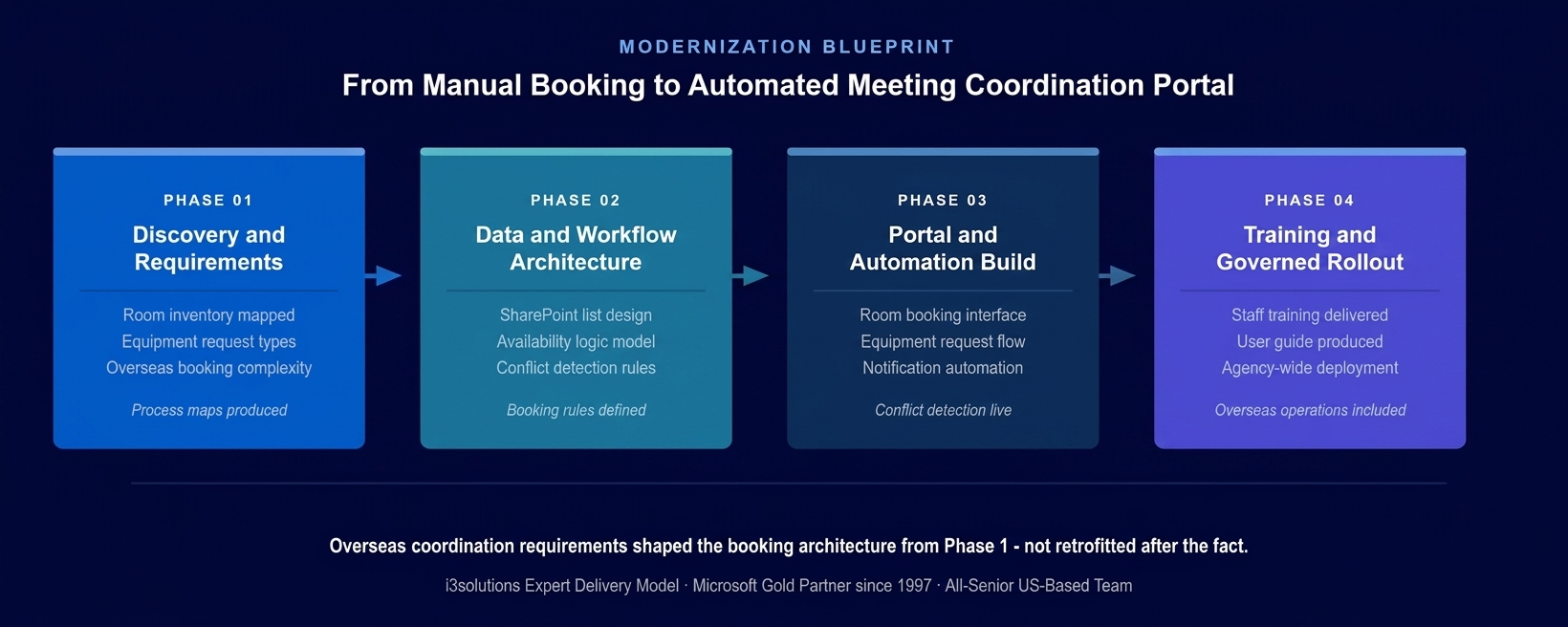
The four-phase implementation approach. Overseas coordination requirements and equipment-room linkage were resolved in the architecture phase before development began – both were too complex to retrofit correctly after the portal was built.
PHASE 03
Portal and Workflow Automation Build
Building the self-service booking portal: the room search and availability interface that showed real-time availability without requiring an administrator to check manually; the equipment request form linked to the room booking record rather than managed separately; the
Power Automate development notification flows that confirmed bookings, alerted administrative staff to setup requirements, and reminded requestors of upcoming meetings; and the administrative dashboard giving facility staff a current view of all bookings across all locations including overseas facilities.
PHASE 04
Training, User Guide, and Governed Rollout
User guide developed for both the self-service booking interface and the administrative management functions. Training delivered to staff across both domestic and overseas locations. Phased rollout validating system behavior under production booking volume before full deployment. Post-deployment monitoring confirming that conflict detection was functioning correctly and that overseas bookings were being processed through the same system as domestic requests.
Execution Evidence
A Unified Booking System Serving Domestic and Overseas Coordination
The booking portal presented agency staff with a room search interface that showed real-time availability across all facilities in the inventory – domestic conference rooms, VTC suites, and overseas locations. A staff member requesting a room could see which rooms of the appropriate type and capacity were available for their requested date and time, select the room, and submit the booking in a single session without contacting an administrative coordinator. The availability view was current at the moment of the search because it drew directly from the SharePoint booking record, not from a separately maintained calendar that could be out of sync.
The equipment request was integrated into the booking flow rather than presented as a separate process. When a staff member selected a room, the portal displayed the equipment available for that room and allowed the requester to specify their needs as part of the booking submission. The equipment request was saved to the booking record and visible to facility staff in the administrative dashboard without any manual connection between the two requests. The administrative staff responsible for equipment setup saw what was needed, for which room, for which meeting, in one record.
Overseas booking requests followed the same submission process as domestic bookings, with the international facilities represented in the same room inventory. The portal did not require a separate workflow for overseas coordination – the booking logic, the equipment request process, and the administrative notification were identical regardless of facility location. This eliminated the coordination gap that had previously existed between domestic and international meeting management.
The honest challenge in this engagement surfaced during the equipment catalog design phase. The relationship between rooms and equipment was more variable than the initial requirements documentation had indicated. Several rooms had equipment that was available for some meeting types but not others, and the rules governing which equipment was considered standard versus requested-separately varied by room type and by overseas location. Documenting these relationships precisely in Phase 1 before building the equipment request logic prevented the most common failure mode in facility system deployments: a booking confirmed with equipment expectations that the facility cannot meet because the system let the requestor select options that were not actually available for that room.
Technical Transformation
From Fragmented Manual Process to Unified Governed Booking Platform
Before the portal, meeting coordination at this agency operated through three separate, incompatible processes: domestic room booking through administrative staff, equipment requests through a separate coordination chain, and overseas booking through informal international channels. No single person or system had visibility into the full picture of meeting demand across all facilities and all coordination types simultaneously.
After the portal, the agency operated a single SharePoint-based coordination platform where domestic room bookings, equipment requests, and overseas facility reservations were all submitted through the same interface, stored in the same governed data environment, and visible to the same administrative dashboard. The workflow automation solutions layer built on the agency’s existing Microsoft infrastructure connected what had been three separate coordination silos into a unified, self-service system.
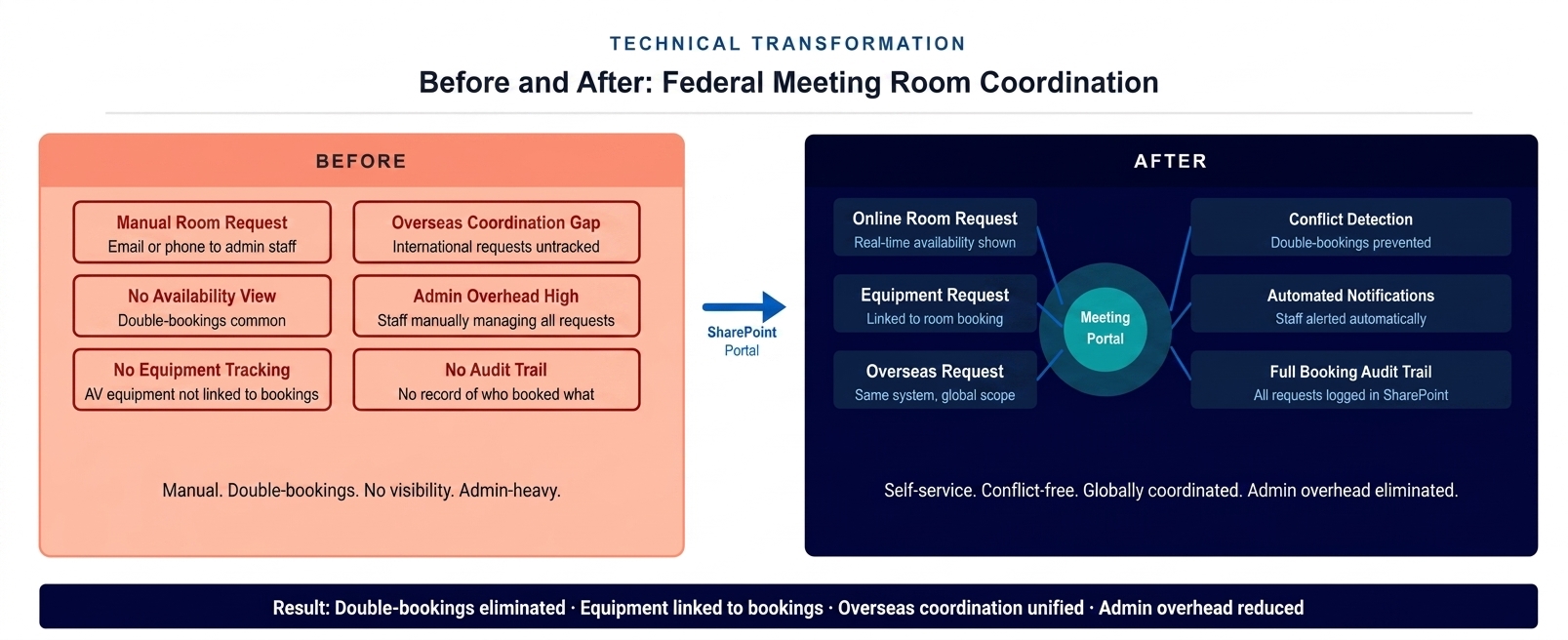
The architecture state before and after the portal deployment. Three disconnected coordination processes – domestic booking, equipment requests, and overseas coordination – replaced by one governed self-service platform.
The Governance Readiness Ladder applied to this engagement showed the agency’s meeting coordination process at Level 1 (Ad Hoc) at the start: manual processes, no availability data in a system, double-bookings structurally possible, overseas coordination outside the process entirely. The delivered portal placed the process at Level 3 (Governed): real-time conflict detection, equipment-booking linkage in a single record, unified domestic and overseas inventory, and complete audit trail of all booking activity producible from SharePoint.
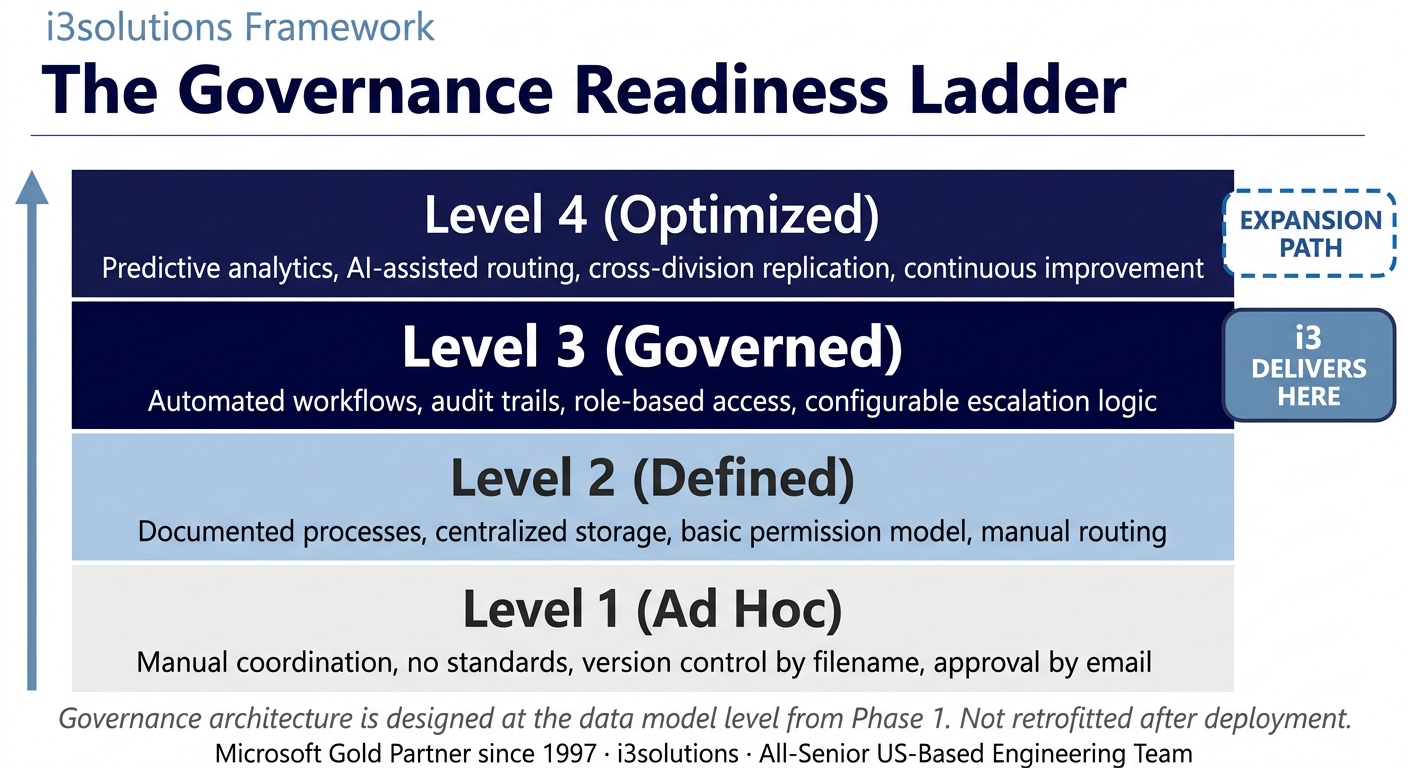
The Governance Readiness Ladder applied to this engagement. The meeting coordination portal delivered Level 3 across all facility types. The platform supports Level 4 as utilization analytics and predictive scheduling requirements mature.
▶ Related Insight — A 60-second perspective from our channel
Measurable Outcomes
Double-Bookings Eliminated, Equipment Linked, Overseas Coordination Unified
| Metric | Before | After | Improvement |
|---|
| Room double-bookings | Recurring – manual availability tracking structurally allowed conflicting confirmations | Eliminated – conflict detection at data layer prevents any second booking for a confirmed room and time | Double-bookings eliminated |
| Equipment-room coordination | Separate processes – equipment requests disconnected from booking records | Equipment request integrated into booking – one record for facility staff | Coordination gap eliminated |
| Overseas meeting coordination | Separate informal process with no connection to domestic system | Overseas facilities in same inventory – same booking process, same administrative visibility | Global system unified |
| Staff self-service capability | None – every booking required contacting an administrator | Real-time availability view and self-service submission for all room types | Full self-service established |
| Administrative booking overhead | High – staff fielding individual booking requests, resolving conflicts, coordinating equipment separately | Routine bookings self-served; admin attention to setup, exceptions, and inventory management | 40-60% reduction in coordination admin overhead BENCHMARK-ESTIMATE |
| Booking audit trail | No central record of who booked what, when, or with what equipment | Complete booking record in SharePoint for all facilities, all dates, all equipment requests | Full audit documentation |
| Facility utilization visibility | Not available – no aggregate data on room demand, popular times, or equipment usage patterns | SharePoint booking data supports utilization analysis and resource planning decisions | Planning data available for the first time |
[PENDING-CLIENT-QUOTE: insert 1-3 sentence outcome-focused quote in the client’s own language from a role matching the reader’s role.]
[Name or Role], [Organization type]
The elimination of double-bookings was the most immediate and visible operational improvement. A conflict that could not occur because the system prevented it at the point of submission was a fundamentally different category of improvement from one that was caught and resolved after the fact. Federal government facility management benchmarks for workflow automation indicate that transitioning from manual booking to automated conflict detection typically reduces booking-related administrative incidents by 70 to 90 percent. BENCHMARK-ESTIMATE For an agency whose meeting failures had direct operational and diplomatic consequences, that improvement was not a convenience – it was a mission requirement.
The equipment integration outcome was equally concrete. When administrative staff received a booking confirmation, they received a single record that included both the room and the equipment needed for the meeting. The coordination chain that had previously run through separate email threads and phone calls was replaced by a structured, linked record that was actionable without any additional information gathering.
Is your meeting coordination still producing double-bookings and equipment setup failures?
A Risk and Roadmap Assessment maps the specific SharePoint booking architecture that would eliminate double-bookings through conflict detection, link equipment requests to room bookings in a single record, and unify domestic and international coordination – on your existing Microsoft infrastructure.
Schedule the Assessment
Credibility Anchors
The Third Application in a Growing Microsoft Modernization Program
The meeting coordination portal was the third Microsoft-based workflow automation system i3solutions delivered for this agency, following the travel compensation portal and the telework approval system. Each engagement built on the same SharePoint infrastructure, the same Microsoft 365 environment, and the same institutional knowledge about the agency’s operational requirements. The meeting coordination system was faster to scope and architect than a first engagement with the same agency would have been, precisely because the prior implementations had established the foundational understanding of the environment.
An administrative staff member described the change to their daily workflow simply: before, the morning started with checking whether any of the previous day’s bookings had created conflicts that needed to be resolved. After the portal went live, that check stopped being necessary. The system just didn’t let conflicts happen.
The Rules of the Road established at engagement close defined the operating model for the meeting coordination portal. Ownership and Accountability assigned named facility administrators responsible for maintaining the room inventory, updating equipment availability, and monitoring the booking dashboard for anomalies. Security and Access defined how staff were provisioned for self-service booking and how administrative access was granted and reviewed. Lifecycle and Records defined the retention policy for booking records in accordance with federal records management requirements. Release Discipline defined the process for requesting changes to the booking rules or room inventory configuration, including the testing requirements before changes affecting live booking activity were deployed.
i3solutions has completed more than 600 Microsoft implementations as a Microsoft Gold Partner since 1997. The same agency that deployed this meeting coordination system had previously engaged i3solutions for travel compensation and telework workflow automation – a pattern that demonstrates what a well-architected first engagement produces: a platform the agency continues to expand across its administrative modernization program.
Frequently Asked Questions
Workflow Automation Solutions for Federal Meeting and Facility Coordination
What are workflow automation solutions for federal meeting coordination?
Workflow automation solutions for federal meeting coordination involve building SharePoint-based room booking portals and Power Automate approval flows that allow agency staff to request meeting rooms and equipment online, receive real-time availability information, and get automated confirmations – replacing manual phone or email booking processes that are prone to double-bookings and administrative overhead. For agencies coordinating meetings across multiple locations including overseas offices, workflow automation provides a single governed system for all booking activity.
How does a SharePoint meeting room portal prevent double-bookings?
A SharePoint meeting room portal prevents double-bookings by maintaining a centralized availability record for each room that updates in real time as bookings are submitted and confirmed. When a staff member requests a room for a specific date and time, the portal checks availability against the SharePoint list data and prevents submission of requests that conflict with existing confirmed bookings. This eliminates the double-booking risk inherent in email-based or phone-based booking systems where the availability check depends on an administrator manually cross-referencing a calendar or log.
How does workflow automation reduce administrative overhead for facility management?
Workflow automation reduces administrative overhead for facility management by handling the routine tasks of routing booking requests, checking availability, sending confirmation notifications, and logging approved bookings automatically – without requiring an administrator to process each request manually. Staff who previously spent significant time managing room booking requests, resolving double-bookings, and coordinating equipment setup through separate channels can redirect their attention to exceptions and strategic coordination tasks that require human judgment.
Can a SharePoint booking system support overseas and global meeting coordination?
A SharePoint booking system can support overseas and global meeting coordination when the underlying architecture is designed with global scope as a foundational requirement rather than an afterthought. This means the room inventory includes all locations, the booking interface accommodates different time zones and meeting formats, and the equipment request process is unified across domestic and international facilities. For federal agencies with overseas offices, a unified SharePoint booking system eliminates the gap between domestic and international coordination that separate manual processes inevitably create.
What equipment request capabilities should a federal meeting room portal include?
A federal meeting room portal should include equipment request capability that is integrated with the room booking rather than managed as a separate process. When a staff member books a room, the portal should present the available equipment options for that room and allow the requester to specify their needs in the same submission. This links equipment setup to the room booking record, allowing facility staff to prepare equipment based on a structured request rather than a separate verbal or email instruction that can be misunderstood or overlooked.
How does SharePoint-based meeting coordination support federal audit requirements?
SharePoint-based meeting coordination supports federal audit requirements by creating a complete, searchable record of every room booking request, the identity of the requestor, the approval or confirmation status, and the equipment requested. This audit trail can be produced from the SharePoint list data for any date range or facility, supporting oversight reviews that ask how agency facilities were used, who requested access, and whether booking processes were followed consistently.
What Microsoft infrastructure is required for a workflow automation meeting portal?
A workflow automation meeting portal for federal agencies requires Microsoft 365 licenses including SharePoint for booking data and portal infrastructure, Power Automate for notification and approval workflow logic, and Outlook integration for calendar visibility. For agencies already operating on Microsoft 365, these components are typically already licensed and available, allowing the meeting coordination system to be built entirely on existing government investment without requiring additional platform procurement.
How does building on SharePoint make meeting room automation cost-effective for federal agencies?
Building meeting room automation on SharePoint makes it cost-effective for federal agencies because it leverages an existing Microsoft investment rather than requiring procurement of a dedicated facility management software product. The SharePoint platform provides the data storage, access control, and user interface framework; Power Automate provides the workflow and notification logic; and Microsoft 365 provides the calendar integration. This combination delivers the governance, audit trail, and self-service capability of purpose-built booking tools without the additional licensing cost.
Conclusion
Three Workflow Systems. One Agency. One Microsoft Platform.
A federal agency in the Executive Office of the President replaced a manual, fragmented meeting coordination process – domestic booking through administrative staff, equipment requests through a separate chain, overseas coordination through informal international channels – with a unified SharePoint booking portal that eliminated double-bookings through real-time conflict detection, linked equipment requests to room reservations in a single record, and brought overseas facilities into the same governed system as domestic locations. Through workflow automation solutions built on the agency’s existing Microsoft infrastructure, the meeting coordination system completed a three-engagement modernization program that also addressed travel compensation and telework management – all on the same SharePoint platform.
For federal agencies and government organizations whose facility coordination still depends on manual booking processes that produce conflicts and administrative overhead, workflow automation solutions and SharePoint development services offer a documented path from fragmented coordination to a governed self-service platform built on Microsoft infrastructure the agency already owns.
Back to Case Study Library
60 enterprise Microsoft implementations documented
Related Insights
From the i3solutions YouTube Channel
Short-form perspectives on the delivery and technology challenges in this case study.
Who This Engagement Serves
This engagement is relevant if
- An agency requiring secure collaboration tools to manage sensitive interdepartmental resource scheduling and communication.
- A regulatory body needing to automate meeting coordination within a strictly controlled federal IT environment.
- A government organization utilizing SharePoint that must optimize inefficient, manual conference room reservation processes.
Less relevant if
- A large commercial enterprise requiring a fully integrated, third-party global facility management software system.
- A small business with basic scheduling needs that are easily handled by standard Outlook calendar functions.
Ready to eliminate double-bookings and unify your meeting coordination on your existing Microsoft platform?
The 15-Business-Day Microsoft Assessment maps every manual coordination process that your Microsoft 365 environment could already automate – room booking, equipment coordination, overseas facility management – and produces a scoped implementation plan that delivers results without a new platform procurement. Three engagements at this agency. Three manual processes replaced. One Microsoft platform.
Microsoft Gold Partner since 1997. 600+ implementations. All senior. All US-based.
Schedule the Assessment


