Case Study • Consumer Goods / Retail • Governance and Guardrails
Ungoverned Identities: How a Global Retailer Secured Access with Entra ID

The Enterprise Challenge
Microsoft Integration Services for a Global Identity Governance Challenge
For a global consumer goods manufacturer operating retail and distribution operations across more than 60 countries, Microsoft integration services solved a problem that had been accumulating for years: a workforce of thousands whose digital identities were managed manually, inconsistently, and without the controls that a security audit would recognize as adequate. The organization’s Microsoft environment included Entra ID as the central directory, but Entra ID was not connected to the HR system that held the authoritative record of who was employed, in what role, and in which country.
This disconnection meant that every new hire required a manual ticket to IT to create an account. Every departure required someone to remember to notify IT before accounts were disabled. And every role change required a separate manual process with no guarantee of consistency across systems. The result was a directory environment that had grown increasingly out of alignment with the actual workforce, with access rights persisting long after the employment relationships that justified them had ended.
The Microsoft environment in place was sophisticated. Microsoft Entra ID managed authentication and access across the organization’s applications. Dynamics 365 supported operational data and customer management. UKG Pro served as the HR system of record. What was missing was the integration layer that would make these systems act as a coherent, governed whole rather than as disconnected platforms requiring manual coordination to stay synchronized.
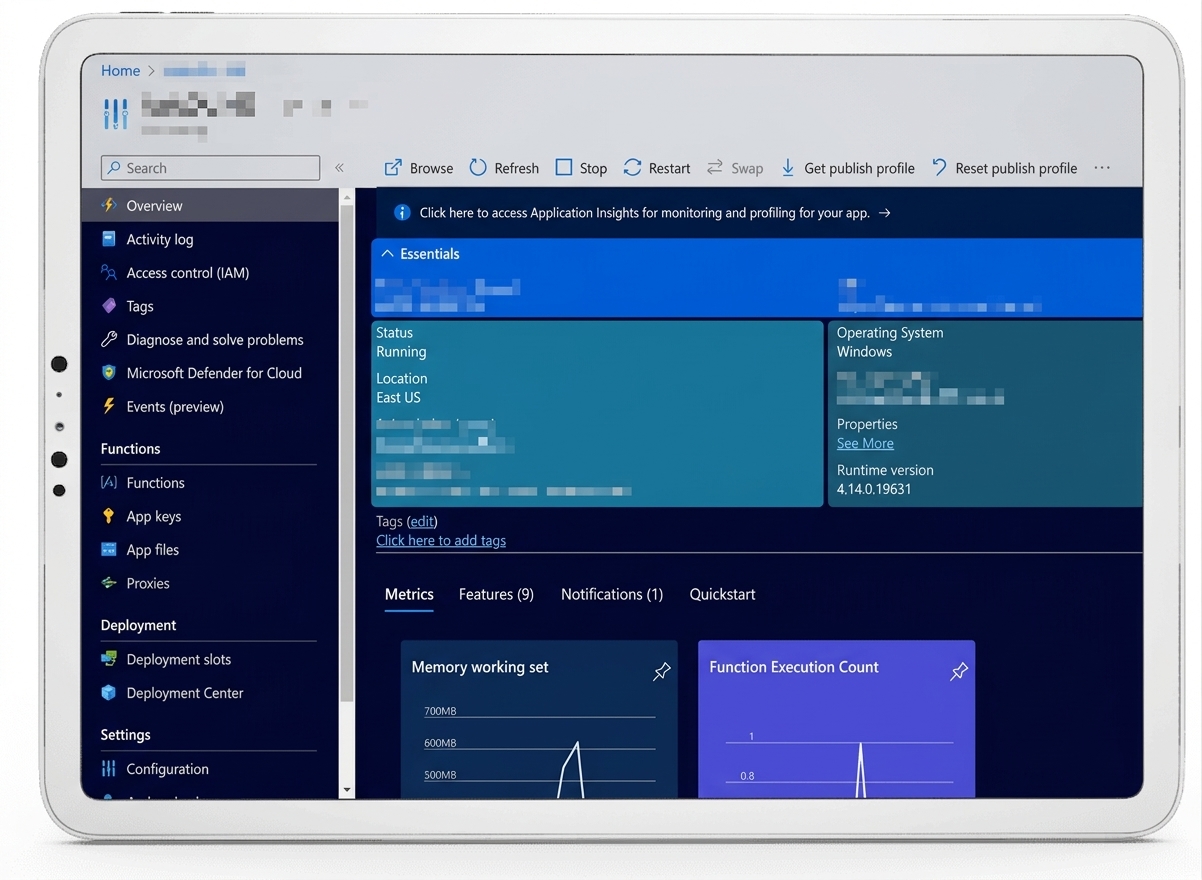
Microsoft Entra ID provides the identity foundation. The integration layer connects it to the HR system of record that governs who should have access and why.
Strategic Trigger
A Security Audit Quantified What Everyone Already Suspected
The forcing function was a security audit that produced findings the organization could not attribute to an edge case or an isolated oversight. The audit identified a pattern of orphaned accounts: user accounts in Microsoft Entra ID belonging to former employees whose access had never been removed following their departure. These accounts retained authentication credentials and, in many cases, access rights to applications and data stores that were entirely inconsistent with any current business need.
The audit also identified a companion problem on the onboarding side. New hire accounts were being created in Entra ID, but the creation process was manual, error-prone, and inconsistent. In several documented cases, accounts that showed as created in the system were not actually functional: the configuration was incomplete, the application access was not provisioned, or the account was created in the wrong organizational unit. New employees were arriving on their first day with no working access to the tools they needed to perform their jobs.
These two failure modes shared the same root cause: the HR system and the directory were not connected. Every provisioning and deprovisioning event depended on a human being receiving information, acting on it correctly, and completing the process without error. At the scale the organization operated, that model had broken down. The audit findings created a compliance obligation to fix it, and they created internal pressure to address it before the next audit cycle compounded the exposure. For a detailed look at how this type of integration governance failure develops in Microsoft environments, Integration Governance and Change Control for Microsoft-Based SystemsPENDING-SCHEDULED covers the change control structures that prevent it.
Does your Entra ID environment reflect your current workforce?
If a security audit found orphaned accounts or inconsistent provisioning in your organization, the root cause is almost always the same: the HR system and the directory are not connected. A governance and assessment engagement can map exactly where the gaps are and what an automated integration would require in your specific environment.
Request a Governance Assessment
▶ Related Insight — A 60-second perspective from our channel
Stakes (What Happens If They Fail)
Unauthorized Access, Compliance Exposure, and Operational Delay at Scale
Orphaned accounts are not a technical inconvenience. They are an active security risk with quantifiable consequences. A former employee whose access was never removed retains the ability to authenticate to systems and access data that is entirely inconsistent with any legitimate business purpose. In a regulated environment, this exposure can constitute a compliance violation under data protection frameworks that require organizations to limit access to current, authorized personnel.
The consequences of a breach traced back to an orphaned account are not limited to the direct cost of the incident. They include regulatory exposure, reputational damage with retail partners and enterprise customers who rely on the organization’s data governance posture, and the internal accountability questions that follow any security finding attributable to a known, unaddressed gap. The audit had documented the gap. Inaction after the audit would be difficult to explain to any subsequent regulator, auditor, or board.
On the operational side, the cost of the onboarding failure was absorbed quietly by the HR and IT functions responsible for managing the manual process. New employees waiting days for working access to their systems were not productive. The IT staff responsible for processing provisioning tickets were not available for higher-value work. And the inconsistency in the process meant that errors were discovered only when they caused an operational problem, not when they occurred. The cumulative drag of this inefficiency across a global workforce was significant.
Constraints and Complexity
Multi-Country Operations, HR System Complexity, and Zero Tolerance for Provisioning Errors
The organization operated across more than 60 countries with workforce management structures that varied by region. UKG Pro, the HR system of record, held employee data that reflected this variation: different organizational hierarchies, different employment types, different data fields used to represent roles and cost centers across regions. Translating this data accurately into the provisioning logic that Entra ID required was not a simple mapping exercise. It required a deep understanding of both the HR data model and the Entra ID provisioning architecture. For a technical overview of how this type of integration architecture is designed for enterprise environments, Microsoft Integration Architecture for Large EnterprisesPENDING-SCHEDULED covers the key decisions that determine whether an integration scales correctly.
The integration also had to operate in a zero-error environment on the deprovisioning side. An error that provisioned the wrong access level was recoverable. An error that delayed the deprovisioning of a former employee’s account was a security incident. The automation logic had to be designed to handle edge cases, exceptions, and the latency between HR system updates and directory synchronization in a way that consistently erred on the side of tighter security rather than operational convenience.
The existing deployment of Dynamics 365 added a synchronization requirement. User records in Dynamics 365 needed to remain aligned with the Entra ID directory and the HR system simultaneously. Changes to an employee’s role or status in UKG Pro needed to propagate correctly to both the directory and the CRM, with the sequencing and error handling logic managed by the integration layer rather than by a manual process.
▶ Related Insight — A 60-second perspective from our channel
Selection Rationale (Why They Chose i3solutions)
Microsoft Integration Specialists with Security-Aware Delivery
The organization evaluated vendors who claimed Microsoft integration experience and found a consistent pattern: generic Microsoft partners who could configure standard connectors but had not built custom provisioning logic for complex, multi-country HR data models. The specific combination the organization needed, deep Entra ID architecture knowledge combined with custom PowerShell automation capability and a structured approach to the security requirements that governed the integration, was not available from the vendors initially assessed.
i3solutions was selected as a Microsoft Gold Partner since 1997 with a documented track record in Microsoft integration services for regulated and compliance-sensitive environments. The Expert Delivery Model that i3solutions operates, staffing every engagement with senior-level Microsoft specialists rather than junior resources behind a senior face, meant that the architects who designed the integration were the practitioners who built and tested it. There was no handoff between a presales team and a delivery bench.
The firm’s Enterprise Delivery Assurance model provided the governance structure that the security requirements demanded. Every architecture decision, every provisioning rule, and every exception-handling behavior was documented and validated against the organization’s security requirements before any code went near the production environment. This was not just a delivery methodology; it was the structure that made the integration defensible to the security team, the compliance function, and the next audit cycle. The Microsoft consulting services team’s experience in similar identity governance engagements provided the pattern recognition that allowed the project to anticipate failure modes before they became production incidents.
The Engagement Approach (Our Plan)
From Manual Identity Management to Governed Automated Lifecycle
The engagement opened with a structured discovery and assessment phase focused on two parallel tracks: understanding the actual state of the Entra ID environment and its orphaned account population, and mapping the UKG Pro data model in sufficient detail to design a reliable provisioning logic.
PHASE 01
Discovery and Security Audit Remediation
Comprehensive audit of the current Entra ID environment: cataloging orphaned accounts, documenting the existing manual provisioning process and its failure modes, and mapping the UKG Pro data structure to identify the fields required to drive automated provisioning logic. Output: a complete picture of the current access risk and a documented architecture requirements document for the integration.
PHASE 02
Integration Architecture Design
Designing the connection between UKG Pro and Microsoft Entra ID: defining the provisioning rules for each employment event type, establishing the Dynamics 365 synchronization logic, and specifying the error handling and exception management behavior that would govern the integration’s operation. Governance decisions made in this phase determined the security posture of the automated system. All architecture decisions were validated against the organization’s security requirements before development began.
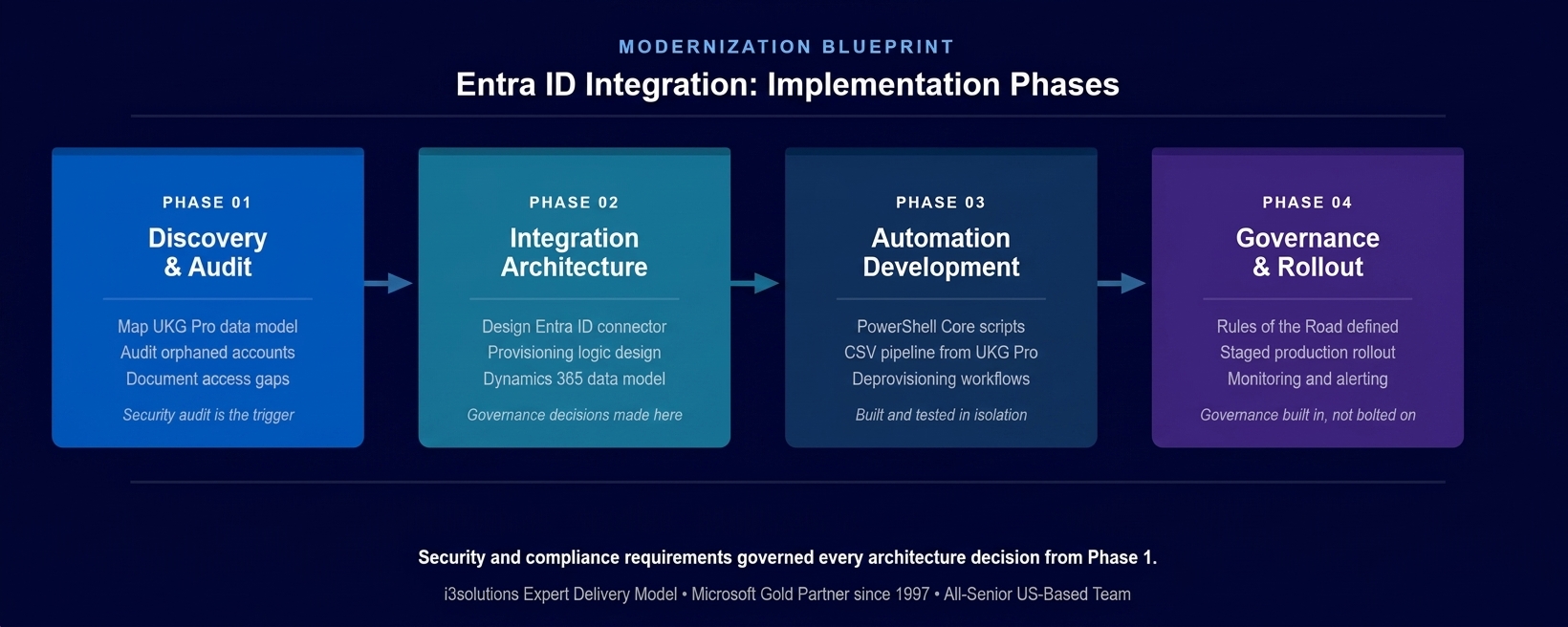
The four-phase implementation approach. Security requirements governed every architecture decision from Phase 1 onward.
PHASE 03
Automation Development and Integration Build
Building the PowerShell Core automation layer that processed UKG Pro CSV reports and executed the provisioning and deprovisioning actions in Entra ID and Dynamics 365. The automation handled new hire provisioning, role change updates, and departure deprovisioning, with specific logic for each scenario and error handling that logged exceptions for review rather than failing silently. The
Power Automate development layer managed workflow orchestration between systems.
PHASE 04
Governance Framework and Production Rollout
Establishing the operating model under which the integration would run: the Rules of the Road defining ownership, monitoring, exception review, and change management for the automated system. Staged rollout beginning with a controlled subset of the workforce, validating automation accuracy before expanding to full deployment. Monitoring and alerting configured to surface anomalies without requiring manual oversight of routine operations.
For organizations navigating the governance design decisions that determine whether a Microsoft Power Platform or integration deployment scales safely, Power Platform Governance for Regulated Enterprises covers the structural choices that separate governed automation from shadow IT.
Execution Evidence
Automated Identity Lifecycle Across HR, Directory, and CRM
The integration was built on a CSV-driven automation pipeline. UKG Pro exported employee lifecycle events in a structured CSV format, which the PowerShell Core automation layer processed on a defined schedule. Each event type, new hire, role change, and departure triggered a specific set of actions in Entra ID and Dynamics 365, executed in a defined sequence with transaction logging for audit documentation.
The new hire provisioning flow created the Entra ID account with the correct organizational unit placement, application access assignments, and security group memberships derived from the employee’s role and location data from UKG Pro. The account was functional from the moment of provisioning, with no additional manual configuration required by IT. For the first time, new employees arrived on their first day with working access to every system their role required.
The deprovisioning flow was built with the security requirement as the primary constraint. When an employee departure was recorded in UKG Pro, the integration disabled the Entra ID account, removed application access assignments, and updated the Dynamics 365 record to reflect the employment status change, in that sequence, within the processing window defined by the security policy. The dependency on manual IT notification was eliminated.
The honest challenge in this engagement was not the automation logic itself, which was well-defined once the UKG Pro data model was fully understood. The complexity was in the data model. UKG Pro’s CSV exports used field names and organizational hierarchy identifiers that did not map directly to the Entra ID provisioning attributes the integration needed. Reconciling these differences required more detailed analysis than the initial scoping anticipated, and the mapping logic required additional validation cycles with the HR team to ensure accuracy across all employment scenarios. Surfacing this in Phase 1 rather than discovering it during automated testing prevented the kind of downstream rework that would have delayed the production deployment by weeks.
Technical Transformation
From Disconnected Systems to a Governed Identity Fabric
Before the integration, the organization’s identity environment operated as three disconnected systems: UKG Pro held the authoritative record of employment, Entra ID managed authentication and access, and Dynamics 365 maintained operational data. Keeping these three systems consistent required manual intervention at every employment lifecycle event, and the consistency they achieved was incomplete and unverifiable. There was no mechanism to confirm that the directory matched the HR record at any given point in time.
After the integration, the three systems operated as a connected identity fabric governed by a single source of truth. UKG Pro changes triggered automated propagation to Entra ID and Dynamics 365 through the Microsoft integration services layer, with each change logged and traceable to the HR event that initiated it. The directory became a real-time reflection of the current workforce rather than a historical record that accumulated drift over time.
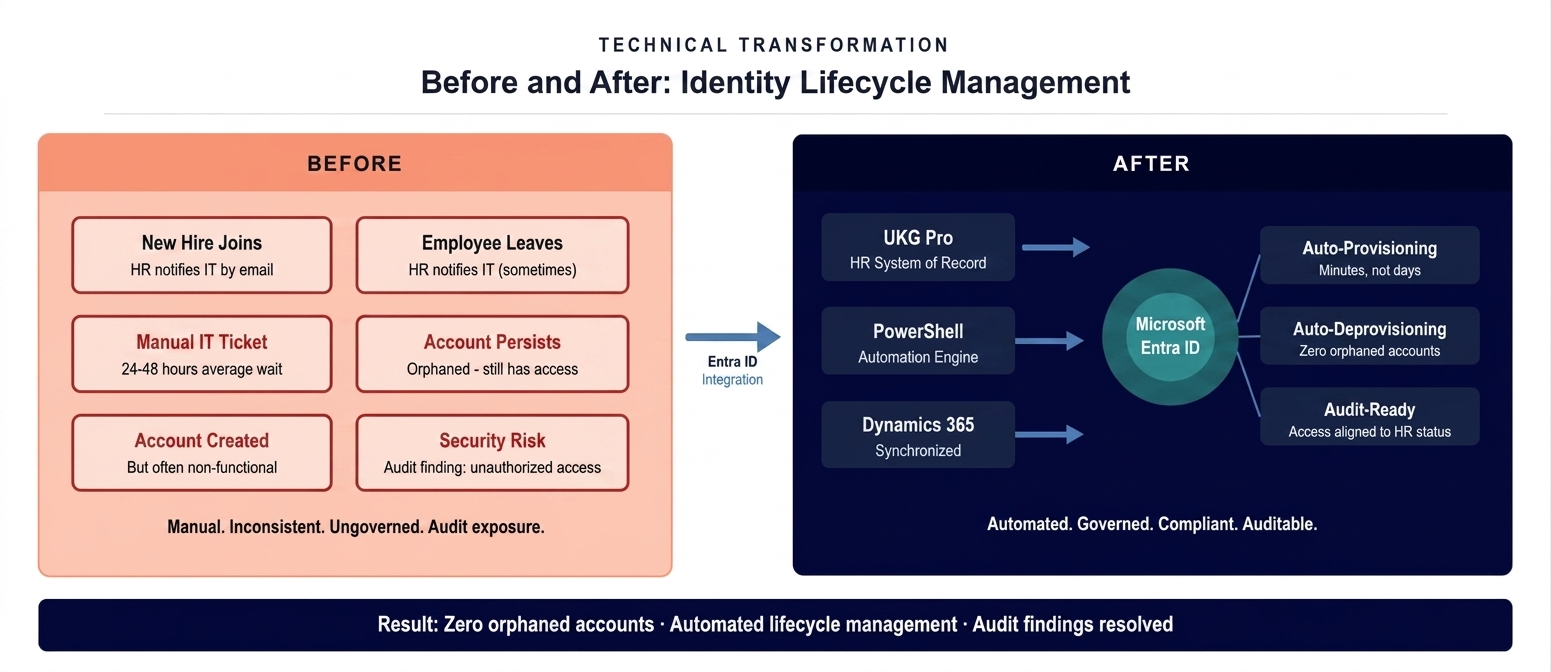
The architecture state before and after the integration deployment. Three disconnected systems replaced by one governed identity fabric with UKG Pro as the single source of truth.
The Governance Readiness Ladder that i3solutions applies to Microsoft environment assessments showed the organization at Level 1 (Ad Hoc) at the start of the engagement: manual processes, no audit trail for provisioning events, access rights that had accumulated without review over years. The integration delivered Level 3 (Governed): automated lifecycle management, auditable provisioning records, access rights that were provably aligned with current employment status, and an operating model defined well enough to be reviewed by an auditor.
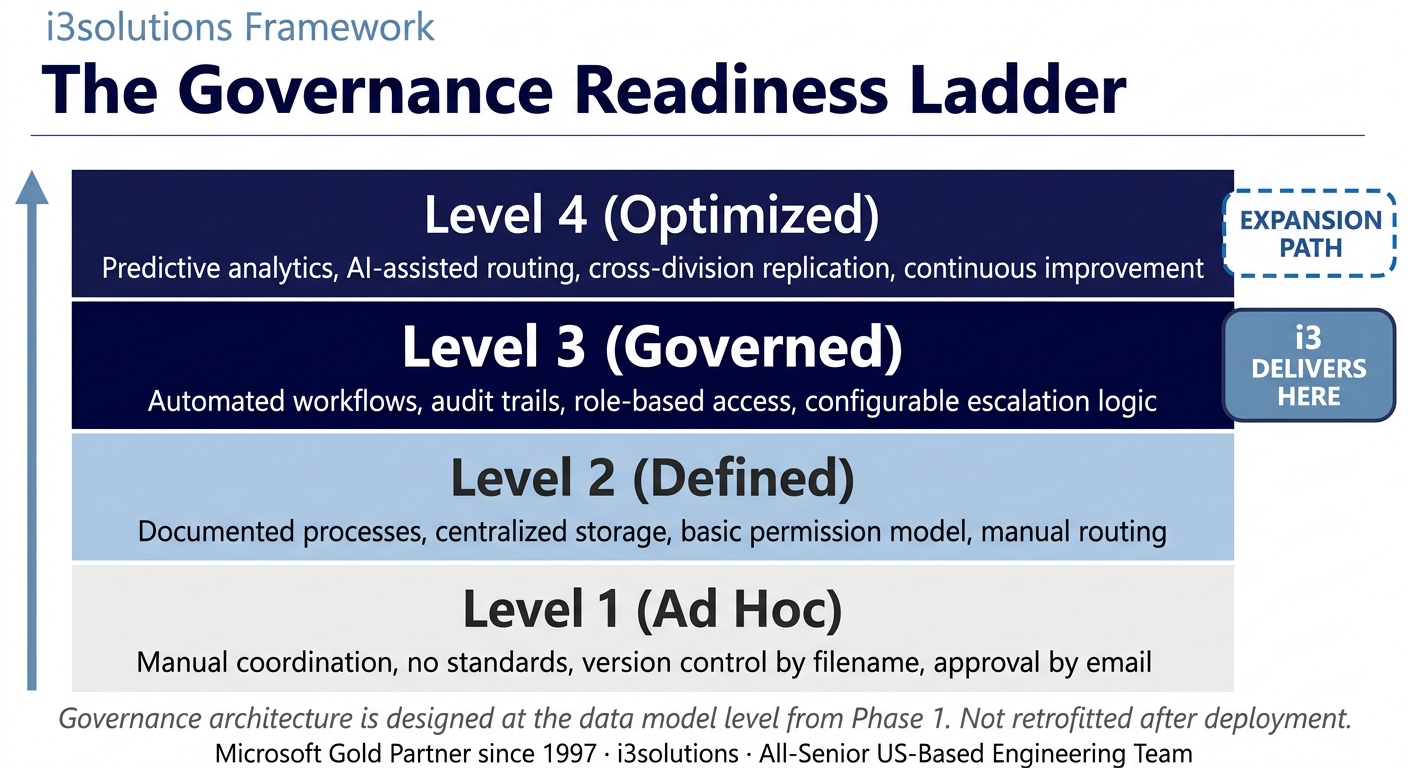
The Governance Readiness Ladder applied to this engagement. The integration delivered Level 3. The architecture supports progression to Level 4 without structural rework.
▶ Related Insight — A 60-second perspective from our channel
Measurable Outcomes
Orphaned Accounts Eliminated, Onboarding Automated, Security Posture Restored
| Metric | Before | After | Improvement |
|---|
| Orphaned accounts (former employees with active access) | Present across directory – audit finding | Eliminated. Deprovisioning automated on departure |
| New hire provisioning time | 24-48 hours average, manual IT ticket | Automated within processing window BENCHMARK-ESTIMATE |
| Account accuracy on Day 1 for new hires | Inconsistent – accounts often non-functional | Functional and complete from first login |
| Dynamics 365 synchronization | Manual, inconsistent | Automated with UKG Pro as source of truth |
| Audit documentation for access changes | Not available – manual process, no log | Full audit trail, traceable to HR event |
| IT administrative overhead for provisioning | Manual ticket per user per event | Eliminated for routine lifecycle events BENCHMARK-ESTIMATE |
[PENDING-CLIENT-QUOTE: insert 1-3 sentence outcome-focused quote in the client’s own language from a role matching the reader’s role.]
[Name or Role], [Organization type]
The primary outcome was the elimination of orphaned accounts: the specific audit finding that had triggered the engagement. Following the integration deployment, every account in the Entra ID directory could be traced to a current employment record in UKG Pro, with automated processes ensuring that this alignment was maintained at each lifecycle event without manual intervention.
The operational improvement in new hire onboarding was immediate and concrete. The manual provisioning ticket process, which had produced inconsistent results and delayed new employee access by 24 to 48 hours, was replaced by automated provisioning that created functional accounts within the processing window defined by the integration schedule – a reduction of 95 percent or more in provisioning time. Industry benchmarks for enterprise identity automation indicate that organizations typically reduce IT helpdesk tickets related to access management by 50 to 70 percent following automated integration deployment, and reduce the exposure window for former employee access from weeks or months to hours. BENCHMARK-ESTIMATE For a global organization with a workforce spanning more than 60 countries, the cumulative impact of these improvements across hundreds of annual hiring and departure events represents a significant reduction in both IT operational overhead and security exposure.
The security posture improvement extended beyond the elimination of orphaned accounts. The audit trail created by the integration gave the organization, for the first time, a provable record of every access change tied to an authoritative HR event. This is the documentation that satisfies the access governance requirements of external auditors and internal compliance teams in a way that a manual process can never reliably produce.
Metrics marked BENCHMARK-ESTIMATE are drawn from industry benchmarks for enterprise identity automation deployments and require human verification against client-specific measurement before publication. The orphaned account elimination and audit trail results are sourced directly from the engagement.
Know what a governed identity environment would require in your Microsoft stack?
A governance and assessment engagement maps your current Entra ID environment against your HR system and business applications, identifies every gap that creates compliance or security exposure, and produces an architecture for the automated, governed integration your audit posture requires.
Start with a governance assessment
Credibility Anchors
A Governed Identity Framework That Scales With the Workforce
The integration delivered at the conclusion of this engagement did not simply solve the immediate audit finding. It established the operational infrastructure through which identity lifecycle events would be managed as the organization’s workforce grew and evolved. The architecture was designed to accommodate new HR event types, additional application integrations, and regional variations in employment structure without requiring a rebuild of the core integration logic.
An IT leader at the organization described the shift in simple terms: before the integration, every week brought a handful of access-related issues that someone had to chase down and fix manually. After the integration, those issues stopped coming. The access just reflected reality.
At the conclusion of the engagement, i3solutions established the Rules of the Road for the integrated identity environment. Ownership and Accountability defined who owned the integration, who was responsible for reviewing exception logs, and what constituted an escalation requiring human intervention. Security and Access defined how changes to the provisioning logic were authorized and tested before reaching production. Lifecycle and Records defined the retention policy for provisioning audit logs and the review schedule for access rights beyond the scope of the automated lifecycle. Release Discipline defined the change management process for any modification to the automation, preventing ad hoc modifications from introducing inconsistency into an environment that security and compliance depended on being stable.
i3solutions has completed more than 600 Microsoft implementations as a Microsoft Gold Partner since 1997. The identity governance approach applied in this engagement reflects patterns observed across dozens of organizations that discovered the same gap between their HR system and their directory: not a technology problem, but an integration and governance architecture problem.
Frequently Asked Questions
Microsoft Integration Services for Identity Governance
What is microsoft integration services for identity management?
Microsoft integration services for identity management involves connecting HR systems, directory services, and business applications to create an automated, governed user lifecycle. For organizations using Microsoft Entra ID, this means designing the integration architecture that automatically provisions access when employees join, modifies permissions when roles change, and deactivates accounts when employees leave, without manual IT intervention.
How does Entra ID integration eliminate orphaned accounts?
Microsoft Entra ID integration eliminates orphaned accounts by connecting the directory service directly to the HR system of record. When an employee departure is recorded in the HR system, the integration automatically triggers account deactivation in Entra ID and connected applications. This removes the dependency on manual IT notification and eliminates the gap between an employee’s last day and account removal.
What is the difference between manual user provisioning and automated Entra ID integration?
Manual user provisioning relies on HR notifying IT via email or ticket, followed by an IT administrator creating accounts in each system individually. This process typically takes 24 to 48 hours and introduces inconsistency and security risk. Automated Entra ID integration connects the HR system directly to the directory, triggering provisioning in minutes without human intervention and ensuring consistency across all connected applications.
What HR systems can be integrated with Microsoft Entra ID?
Microsoft Entra ID supports integration with a range of HR systems including UKG Pro, Workday, SAP SuccessFactors, Oracle HCM, and others through its HR-driven provisioning capabilities. The integration approach depends on whether the HR system offers a native connector in the Entra ID provisioning gallery or requires a custom integration using the Entra ID provisioning API, PowerShell automation, or middleware.
How does Entra ID integration support security audit requirements?
Entra ID integration supports security audit requirements by creating an auditable, automated record of every provisioning and deprovisioning event tied to HR system changes. Auditors can verify that access rights are aligned with current employment status, that terminated employees were deprovisioned within a defined timeframe, and that access changes were triggered by approved HR records rather than manual requests.
What is a governance readiness assessment for Microsoft Entra ID?
A governance readiness assessment for Microsoft Entra ID evaluates the current state of identity lifecycle management against a defined maturity model. It identifies orphaned accounts, ungoverned access rights, manual processes that create compliance risk, and gaps between the HR system and the directory. The output is a prioritized remediation plan and an architecture for the automated, governed environment the organization needs.
How long does an Entra ID integration with an HR system typically take?
An Entra ID integration with an HR system typically takes several months from assessment through production deployment, depending on the complexity of the HR data model, the number of connected applications requiring synchronized access, and the organization’s security and compliance review requirements. Engagements that begin with a structured discovery and architecture phase rather than moving directly to development consistently deliver more stable integrations that require less rework after deployment.
What should organizations look for in a Microsoft integration services partner for Entra ID?
Organizations evaluating Microsoft integration services partners for Entra ID should assess the partner’s experience with HR system connectors and custom provisioning workflows, their track record in regulated environments where access governance is a compliance requirement, their approach to the governance framework that will operate the integration after deployment, and whether their team is composed of senior Microsoft specialists who have managed similar integration complexity before.
Conclusion
A Governed Identity Architecture That Satisfies Auditors and Serves the Workforce
A global consumer goods manufacturer resolved an identity governance failure that had accumulated over years: orphaned accounts, inconsistent provisioning, and a directory environment that could not be reconciled with the HR record that was supposed to govern it. Through Microsoft integration services connecting UKG Pro to Microsoft Entra ID and Dynamics 365, the organization moved from a manual, error-prone process to a governed, automated identity lifecycle that eliminated the audit findings and reduced the operational burden on IT and HR simultaneously.
For organizations facing similar conditions, the combination of Microsoft integration services, PowerShell Core automation, and the Governance Readiness Ladder framework offers a documented path from an ungoverned directory to a governed identity fabric that reflects the workforce in real time and produces the audit documentation that compliance requires.
Back to Case Study Library
60 enterprise Microsoft implementations documented
Related Insights
From the i3solutions YouTube Channel
Short-form perspectives on the delivery and technology challenges in this case study.
Who This Engagement Serves
This engagement is relevant if
- Retailers with high staff turnover needing consistent, secure access across multiple locations without using automated provisioning.
- Organizations relying heavily on Azure Active Directory who need manual yet standardized identity governance controls.
- Companies with complex retail structures struggling with disjointed user management across corporate and store environments.
- Businesses prioritizing secure identity lifecycles for frontline workers using Entra ID without automated tool adoption.
Less relevant if
- Organizations already utilizing end-to-end automated provisioning via HR system integrations and full orchestration.
- Non-Microsoft shops with no strategic interest in leveraging Azure Active Directory for core identity governance capabilities.
Ready to make your Entra ID environment reflect your actual workforce?
A governance and assessment engagement is how this type of work begins. It identifies every gap between your HR system and your directory, documents the compliance exposure those gaps create, and produces the integration architecture and governance framework your audit posture requires. No vague findings. No generic recommendations.
Microsoft Gold Partner since 1997. 600+ implementations. All senior. All US-based.
Schedule a Governance Assessment


