Case Study • Education Nonprofit • Digital Workplace
Legacy Systems, 3 Million Members, Zero Margin for Security Gaps: How the national education association Modernized Its Digital Workplace
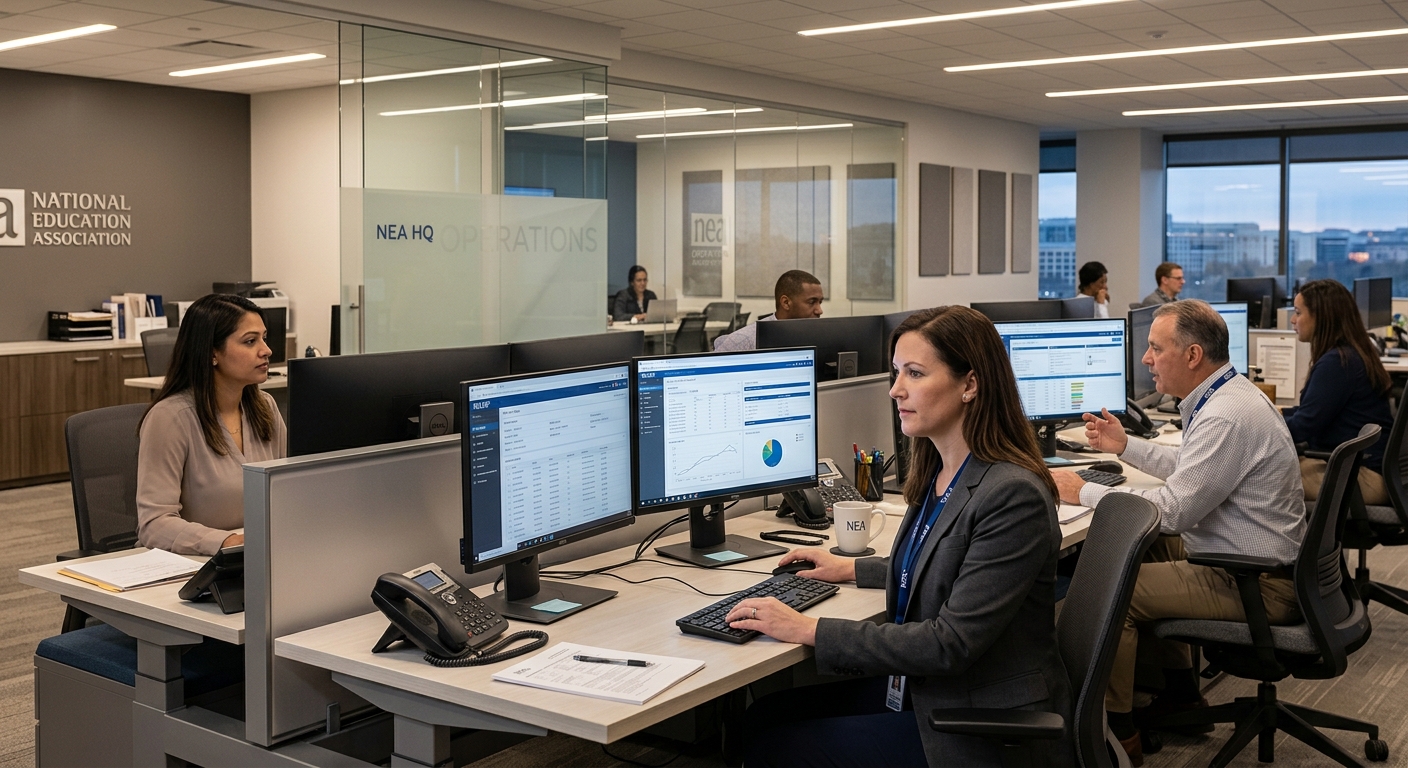
The Enterprise Challenge
The the national education association, the largest labor union in the United States representing public school teachers and other educational professionals across the country, faced a technology infrastructure problem with high stakes. Its legacy systems were failing to meet the security, compliance, and collaboration requirements of an organization that advocated for the professional interests of millions of members. Data security gaps, regulatory compliance shortfalls, and limited tools for real-time collaboration across the organization were all symptoms of a single root cause: a technology foundation that had not kept pace with what the the national education association needed it to do.
i3solutions modernized the the national education association digital workplace by deploying Microsoft 365 – Teams, SharePoint, the full M365 suite – and automating the business processes that legacy manual workflows had been handling inefficiently. The result was a secure, compliant, modern digital platform that delivered more than 50% productivity improvement through workflow automation alone, providing the the national education association with the technology infrastructure its advocacy mission required.
Strategic Trigger
The compliance requirement was the non-negotiable driver. An organization that represents educational professionals and handles the membership data of millions of people has a legal and reputational obligation to meet applicable data security and privacy standards. Operating on legacy systems with known security gaps was not a technology problem the the national education association could defer – it was a liability that required resolution on a defined timeline.
Is your organization facing a similar challenge?
A 15-Business-Day Microsoft Assessment maps the specific architecture that would address your situation.
Request the Assessment
Stakes
Operational inefficiencies risking critical educational support funding
From a strategic perspective, continued technological stagnation posed a significant reputational risk. The the national education association risks being perceived as out of touch with the modern digital landscape, potentially alienating both current and prospective members, especially in a sector increasingly driven by digital communication. A failure to modernize could undermine the organization’s influence and ability to advocate effectively for educators. Furthermore, this internal inefficiency directly impacted the speed and quality of support provided to affiliates, threatening to weaken the overall cohesion and effectiveness of the association.
Constraints and Complexity
Complex data migration from decades of legacy systems
The primary challenge lay in migrating vast amounts of critical data and institutional knowledge accumulated over decades within the aging legacy intranet. This system was not only outdated but also lacked proper documentation, making the extraction and structuring of content exceptionally difficult. Ensuring data integrity, preserving security permissions, and minimizing operational downtime during the transition to Microsoft 365 were crucial constraints. The new solution had to integrate seamlessly with existing workflows while adhering to strict security and compliance standards inherent in a major national organization.
Beyond technical hurdles, the sheer scale of the organization presented a significant adoption complexity. With diverse user groups and well-established workflows tied to the old system, overcoming resistance to change and ensuring widespread adoption was critical for success. The migration needed to go beyond mere data transfer; it required rethinking information architecture and designing a user experience that would be intuitive and immediately beneficial to all employees, encouraging shift in organizational culture toward modern collaboration tools.
Selection Rationale
Senior Microsoft Specialists with Proven Delivery Depth
The the national education association evaluated multiple options, including attempting an in-house migration or engaging with generic IT consultancies. However, these alternatives lacked the deep, specialized expertise required to navigate the complexities of their legacy environment and the specific demands of a large-scale Microsoft 365 implementation. General contractors often utilize junior resources or offshore teams, which would have introduced unacceptable risks in terms of communication, security, and project timelines. The the national education association needed a partner with a proven track record in complex digital transformations within large non-profit organizations.
i3solutions emerged as the ideal partner due to their unparalleled Microsoft expertise, evidenced by their status as a Microsoft Gold Partner since 1997 and a history of over 600 successful implementations. Crucially, their model of employing only all-senior, all-US-based specialists provided the the national education association with the confidence that experienced consultants would directly manage every aspect of the project. This depth of experience ensured that complex challenges, from data migration strategies to custom SharePoint development and adoption planning, would be handled with precision and strategic foresight.
The Engagement Approach
PHASE 01
Legacy Assessment and Planning
Complete audit of legacy systems identifying security gaps, compliance shortfalls, and collaboration limitations. M365 readiness assessment. Compliance requirements mapping against applicable data security and regulatory standards. Migration sequencing plan designed to address the highest-risk gaps first.
PHASE 02
M365 Architecture
Microsoft 365 tenant architecture designed for the the national education association’s organizational structure. Collaboration framework establishing Teams and SharePoint as the unified communication and document management platform. Security policy design meeting applicable cybersecurity standards. Workflow automation framework identifying the manual processes where automation would deliver the highest productivity impact.
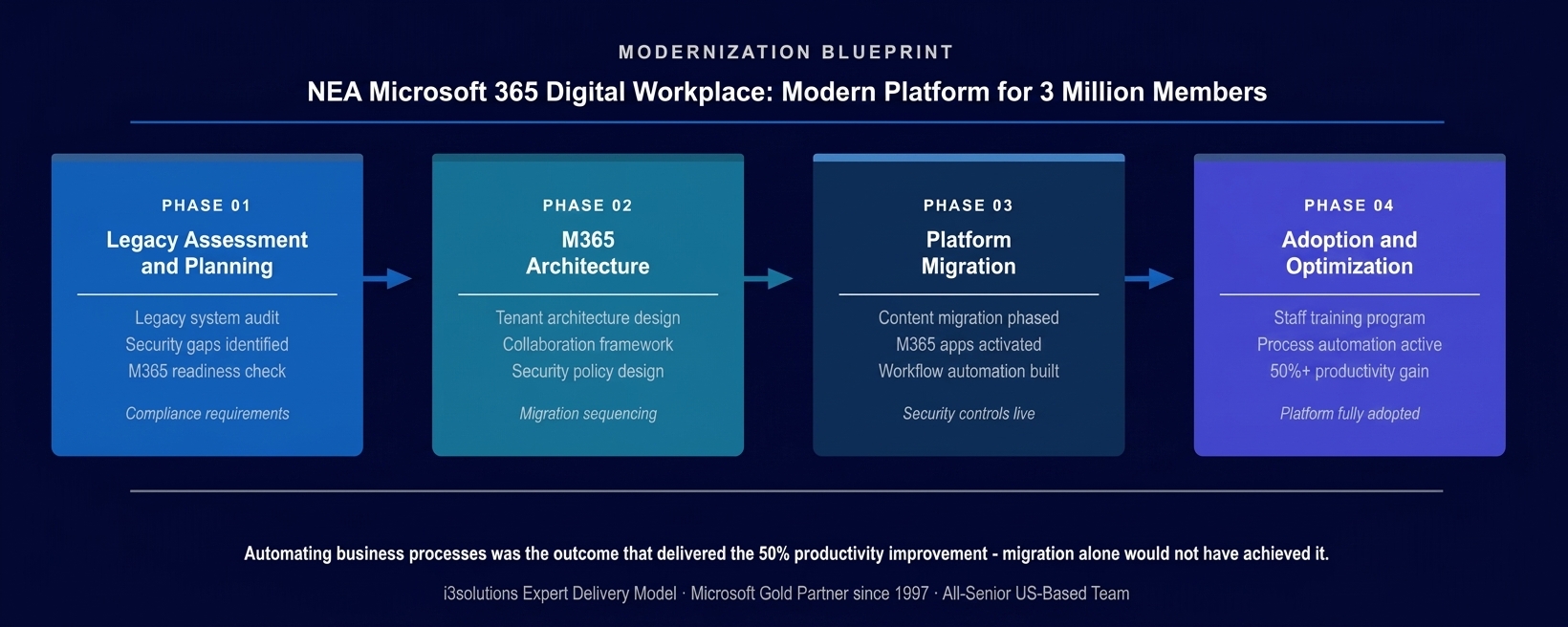
The workflow automation phase was the productivity multiplier – migration delivers the platform; automation delivers the 50% productivity improvement.
PHASE 03
Platform Migration and Automation
Phased content migration from legacy systems to M365 SharePoint Online with data integrity validation. M365 applications activated: Teams for real-time collaboration, SharePoint for document management and intranet, the full suite of M365 productivity tools. Workflow automation built for the manual approval, routing, and communication processes that had consumed staff capacity.
PHASE 04
Adoption and Optimization
Staff training program ensuring the the national education association workforce could use the new platform effectively. Process automation verified delivering the productivity improvement. Security controls confirmed meeting compliance standards. Platform fully operational as the the national education association’s unified digital workplace.
Technical Transformation
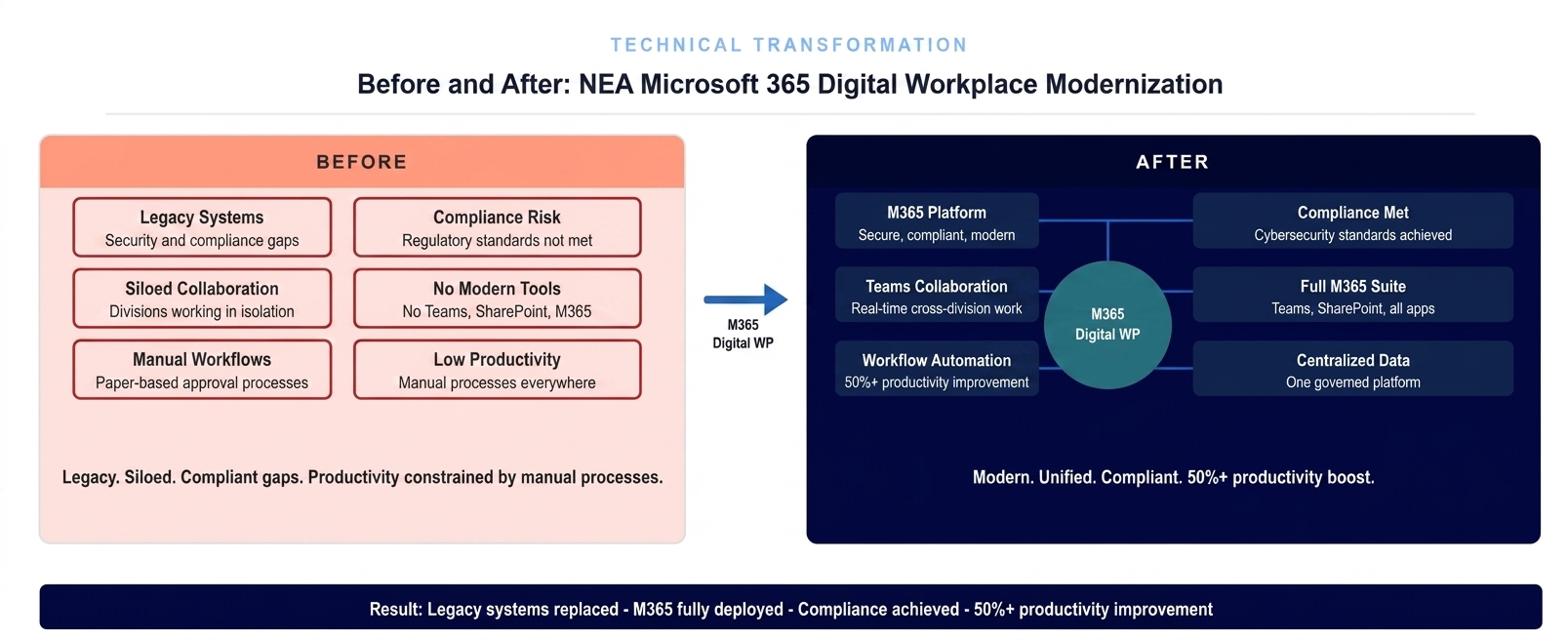
Legacy systems replaced by M365. Manual workflows replaced by automation. Security and compliance gaps closed. 50%+ productivity improvement measured.
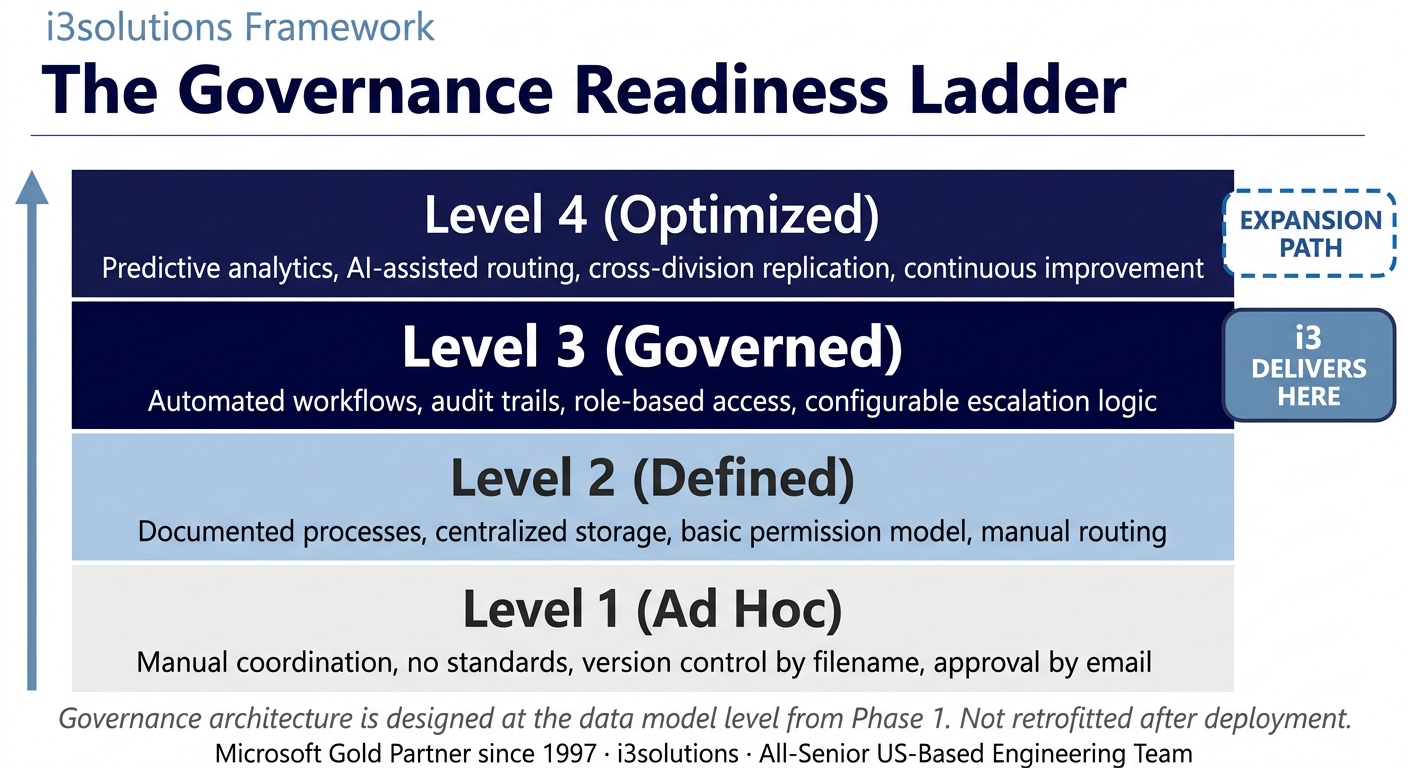
The Governance Readiness Ladder applied. M365 digital workplace delivered Level 3 governance. The platform supports Level 4 as Power Platform automation and advanced analytics expand on the M365 foundation.
Measurable Outcomes
| Metric | Before | After | Improvement |
|---|
| Digital workplace security | Legacy systems with data security and compliance gaps | M365 platform meeting cybersecurity standards | Security gaps closed |
| Collaboration tools | No real-time collaboration across the organization | Teams and SharePoint enabling cross-organizational real-time work | Modern collaboration active |
| Productivity | Manual workflows consuming staff capacity | Workflow automation delivering 50%+ productivity improvement | 50%+ productivity gain |
| Compliance status | Regulatory compliance requirements not met | Compliance standards achieved on modern platform | Compliance achieved |
| Platform currency | Legacy systems approaching end of useful life | Microsoft 365 suite, continuously updated by Microsoft | Modern governed platform |
[PENDING-CLIENT-QUOTE: insert 1-3 sentence outcome-focused quote in the client’s own language from a role matching the reader’s role.]
[Name or Role], [Organization type]
Frequently Asked Questions
Digital Workplace Modernization for Nonprofits and Member Organizations
What is digital workplace modernization and when does a nonprofit need it?
Digital workplace modernization is the process of replacing a legacy technology infrastructure, outdated collaboration tools, on-premises systems with security gaps, manual approval workflows, with a modern, cloud-based platform like Microsoft 365 that meets current security and compliance standards and provides the collaboration and automation capabilities that modern knowledge work requires. A nonprofit needs it when legacy systems are creating compliance risk, when staff spend significant time on manual processes that could be automated, when remote or distributed collaboration is impeded by tool limitations, or when the organization’s technology capability is limiting its mission delivery.
How does i3solutions approach a Microsoft 365 migration for a large nonprofit?
i3solutions begins every M365 migration for a nonprofit with a legacy assessment that goes beyond inventory, it identifies the specific security gaps, compliance shortfalls, and collaboration limitations that are driving the modernization need, and sequences the migration to address the highest-risk gaps first. For the national education association, that meant addressing data security and regulatory compliance requirements before activating the full collaboration suite, so that the platform the organization migrated to was secure from day one rather than compliant in theory but vulnerable in practice. Workflow automation is designed in parallel with the migration so that productivity improvements are delivered as part of the platform launch, not as a separate phase months later.
Why does workflow automation matter as much as the platform migration itself?
Workflow automation matters as much as the platform migration because migration delivers infrastructure while automation delivers the productivity improvement that justifies the investment. A Microsoft 365 tenant with Teams, SharePoint, and Exchange running on modern infrastructure is a better version of what the organization already had. Adding workflow automation that replaces manual approval routing, document distribution, notification, and status tracking converts the platform from infrastructure to a productivity multiplier. the national education association’s 50%+ productivity improvement came from automation, not from migration, the migration was the prerequisite, and automation was the outcome that made the investment return measurable.
How does i3solutions address cybersecurity and regulatory compliance requirements during an M365 migration?
i3solutions maps the applicable cybersecurity and regulatory compliance requirements to specific Microsoft 365 configuration decisions at the architecture phase, before migration begins. This means security policies, data loss prevention, conditional access, identity protection, encryption standards, are designed into the platform rather than applied after deployment. For organizations like the national education association with obligations around member data security and applicable regulatory standards, compliance is a migration success criterion, not a post-migration remediation task. i3solutions confirms compliance posture is met before the legacy systems are retired.
What ongoing support does i3solutions provide after a Microsoft 365 migration is complete?
i3solutions provides post-migration support that extends beyond the technical go-live to confirm that the organization is actually realizing the productivity and compliance outcomes the migration was designed to deliver. This includes adoption support, ensuring staff are using the new platform effectively rather than reverting to legacy habits, performance monitoring to identify any configuration gaps that emerge under real operational conditions, and help desk support during the transition period when staff are adjusting to new workflows. For nonprofits that lack large internal IT teams, this post-migration support period is critical to ensuring the technology investment translates into organizational impact rather than just a completed project.
The the national education association replaced a legacy technology infrastructure carrying security and compliance risk with a Microsoft 365 digital workplace that met applicable cybersecurity standards, delivered real-time collaboration tools to the the national education association workforce, and automated the manual business processes that had constrained staff productivity – achieving more than 50% productivity improvement through workflow automation on a platform purpose-built for the the national education association’s mission.
Back to Case Study Library
60 enterprise Microsoft implementations documented
Related Insights
From the i3solutions YouTube Channel
Short-form perspectives on the delivery and technology challenges in this case study.
Who This Engagement Serves
This engagement is relevant if
- An organization seeking to modernize a dated, legacy intranet system using modern cloud capabilities.
- A company struggling with fragmented employee communication channels and siloed information across different digital platforms.
- Businesses looking to leverage existing Microsoft 365 investments for a more unified digital workplace solution.
Less relevant if
- Organizations requiring a highly customized, non-Microsoft solution for their digital workplace or intranet needs.
- Companies with deeply embedded, proprietary legacy systems that cannot migrate to modern cloud platforms.
Ready to modernize your organization’s digital workplace to meet current security and compliance standards?
The 15-Business-Day Microsoft Assessment maps the legacy system gaps, M365 migration approach, and workflow automation opportunities that would deliver a secure, compliant, productive digital platform for your organization and the members or stakeholders it serves.
Microsoft Gold Partner since 1997. 600+ implementations. All senior. All US-based.
Schedule the Assessment


